
MCP server for versioned document retrieval, metadata access, and diff capabilities
Verified details
These details have been verified by PyPIProject links
GitHub Statistics
Maintainers

Project description
Folios







A lightweight Model Context Protocol (MCP) server for querying your local library of documents.
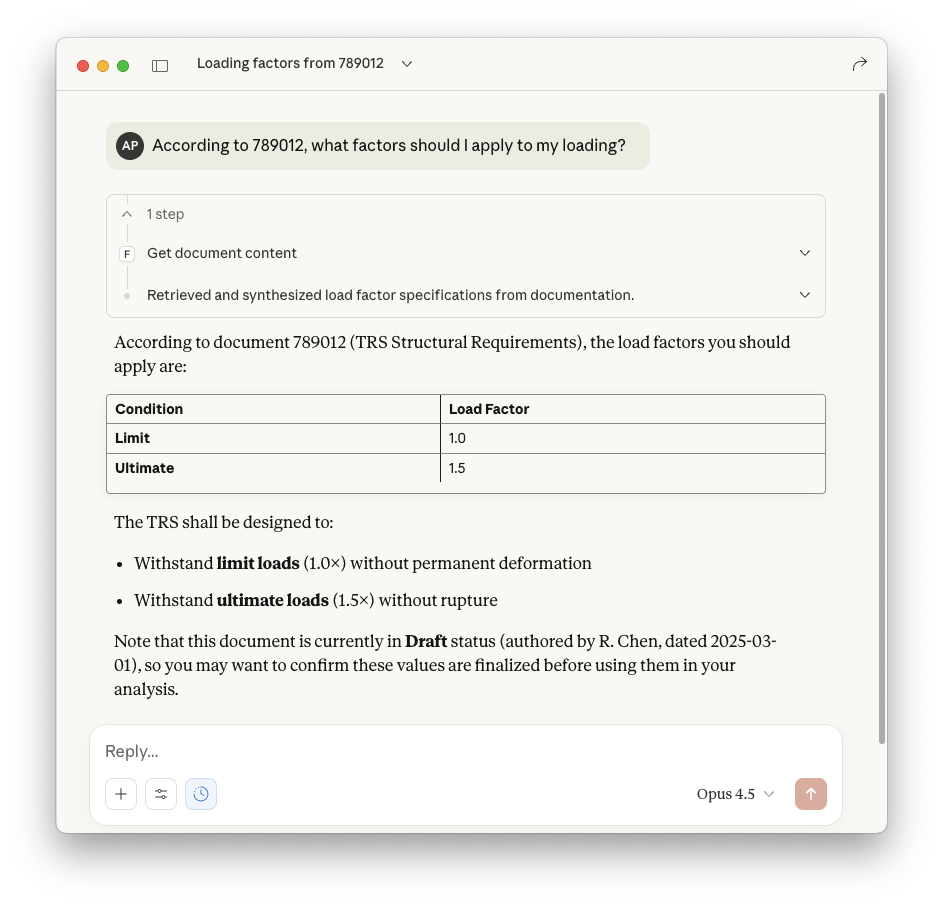
What problem does Folios solve?
AI agents working on engineering tasks often need access to internal documents—design practices, guidelines, specifications—typically stored in document management systems (PLM, QMS...). While RAG (Retrieval Augmented Generation) can provide this functionality, it's complex to set up and maintain.
Why not access the documents directly? LLM context windows are big enough to handle these documents, or at least whole sections. Also, the master information lives in these documents anyway, AIs or RAGs won't replace the quality processes companies already use to manage knowledge. Giving agents read-only access to the source library is a more straightforward approach. However, enterprise document repositories often have restricted APIs or require privileged access that's difficult to obtain.
Folios solves this by providing a simple MCP server that points to a folder of Markdown files. If you're developing agentic workflows and need to mock or prototype document access before integrating with complex enterprise systems, Folios lets AI assistants query documents with minimal setup.
No RAG pipelines, no finetuning, no extra steps. From source to context window.
Features
- Zero Config - Just point to a folder of Markdown files and go
- Local First - Your documents stay on your machine or network, no cloud dependencies
- Flexible Metadata - Use any YAML metadata fields your workflow needs
- Versioned Documents - Store multiple versions with simple
{id}_v{version}.mdnaming - Chapter Extraction - Retrieve specific sections without loading entire documents
- Version Diffing - Compare changes between document versions, grouped by chapter
- MCP Resources - Browse documents as native MCP resources
One-liner to install, run and configure
uvx folios --path /path/to/your/documents
Quick guide to get started
1. Create your documents folder
Any normal local folder will do. Documents follow the naming convention {id}_v{version}.md:
documents/
├── 123456_v1.md      # Design Practice (v1)
├── 123456_v2.md      # Design Practice (v2)
├── 200001_v1.md      # Material Specification
├── 200002_v1.md      # Procedure
└── 789012_v1.md      # Technical Requirements
2. Add YAML metadata to each document
Metadata is flexible - include any fields your workflow requires:
---
author: "J. Smith"
date: "2025-01-15"
document_type: "Design Practice"
status: "Approved"
reviewer: "A. Johnson"
---

# Stress Analysis Design Practice

Lorem ipsum dolor sit amet, consectetur adipiscing elit.

## Background

More text here...
Only an H1 title and the {id}_v{version}.md filename pattern are required. Metadata is optional—missing fields show "NA" in responses.
3. Run the server
You can run folios directly with one terminal command:
uvx folios --path /path/to/your/documents
alternatively, you can add it to your LLM Client MCP configuration:
{
  "mcpServers": {
    "folios": {
      "command": "uvx",
      "args": ["folios", "--path", "/path/to/your/documents"]
    }
  }
}
We have tested it with Claude Desktop and the GitHub Copilot Extension for VS Code, but it should work with any MCP-compatible client.
MCP Tools
| Tool | Parameters | Description |
|---|---|---|
get_document_content |
document_id, version? |
Retrieve document content (latest if version omitted) |
get_document_metadata |
document_id, version? |
Get metadata including auto-parsed chapters |
get_chapter_content |
document_id, chapter_title, version? |
Retrieve content of a specific chapter (H2 section) |
diff_document_versions |
document_id, from_version, to_version |
Diff between two versions, grouped by chapter |
browse_catalog |
status?, document_type?, author? |
List documents with optional filters |
list_revisions |
document_id |
List all versions of a document |
Document Schema
Core Metadata Fields
These fields are always present in metadata responses:
| Field | Type | Description |
|---|---|---|
id |
int | Unique document identifier (from filename) |
version |
int | Version number (from filename) |
title |
str | Document title (from H1 heading) |
author |
str | Document author ("NA" if not in metadata) |
date |
str | Publication date ("NA" if not in metadata) |
chapters |
list | Auto-parsed from H2 headings |
Dynamic Fields
Any additional YAML fields are included in metadata responses. Common examples:
document_type- Document type (Design Practice, Guideline, etc.)status- Document status (Draft, Approved, etc.)reviewer,approver- Approval workflow fields- Custom fields for your specific workflow
Configuration
Documents Path
Provide the documents folder path via CLI flag or environment variable:
| Option | Description |
|---|---|
--path |
Path to documents folder (CLI flag) |
FOLIOS_PATH |
Path to documents folder (environment variable) |
Limitations
Folios is intentionally minimal. It does not provide:
- Full-text search - Use
browse_catalogfilters or let your LLM search within retrieved content - Write operations - Documents are read-only; edit them with your normal tools
- Authentication - No access control; secure your documents folder via filesystem permissions
- Real-time updates - Schema discovery happens at startup; restart to pick up new documents
- Non-Markdown formats - Only
.mdfiles are supported
Development
git clone https://github.com/alex-pradas/folios
cd folios
uv sync

# Run locally
FOLIOS_PATH=./examples/documents uv run folios

# Run tests
uv run pytest
License
This project is licensed under the terms of the MIT license.
Project details
Verified details
These details have been verified by PyPIProject links
GitHub Statistics
Maintainers
Release history Release notifications | RSS feed


Download files
Download the file for your platform. If you're not sure which to choose, learn more about installing packages.
Source Distribution
Built Distribution
Filter files by name, interpreter, ABI, and platform.
If you're not sure about the file name format, learn more about wheel file names.
Copy a direct link to the current filters
File details
Details for the file folios-0.8.0.tar.gz.
File metadata
- Download URL: folios-0.8.0.tar.gz
- Upload date:
- Size: 362.2 kB
- Tags: Source
- Uploaded using Trusted Publishing? Yes
- Uploaded via: twine/6.1.0 CPython/3.13.7
File hashes
| Algorithm | Hash digest | |
|---|---|---|
| SHA256 |
bdef5b41d66a2b931b17b4ff75db32073056b4d6459632ab13e7f449e997c542
|
|
| MD5 |
c00d2baf3e771a73d4ebd956ccb565eb
|
|
| BLAKE2b-256 |
56bf3053f5897b19f1ce1bef4b9da75934cf1302effb33cc6e398a8f6513ad0f
|
Provenance
The following attestation bundles were made for folios-0.8.0.tar.gz:
Publisher:
publish.yml on alex-pradas/folios
-
Statement:
-
Statement type:
https://in-toto.io/Statement/v1 -
Predicate type:
https://docs.pypi.org/attestations/publish/v1 -
Subject name:
folios-0.8.0.tar.gz -
Subject digest:
bdef5b41d66a2b931b17b4ff75db32073056b4d6459632ab13e7f449e997c542 - Sigstore transparency entry: 1134279421
- Sigstore integration time:
-
Permalink:
alex-pradas/folios@e020fe83c8ab59084f4976f33e5b128893c1db83 -
Branch / Tag:
refs/tags/v0.8.0 - Owner: https://github.com/alex-pradas
-
Access:
public
-
Token Issuer:
https://token.actions.githubusercontent.com -
Runner Environment:
github-hosted -
Publication workflow:
publish.yml@e020fe83c8ab59084f4976f33e5b128893c1db83 -
Trigger Event:
release
-
Statement type:
File details
Details for the file folios-0.8.0-py3-none-any.whl.
File metadata
- Download URL: folios-0.8.0-py3-none-any.whl
- Upload date:
- Size: 14.3 kB
- Tags: Python 3
- Uploaded using Trusted Publishing? Yes
- Uploaded via: twine/6.1.0 CPython/3.13.7
File hashes
| Algorithm | Hash digest | |
|---|---|---|
| SHA256 |
9da6beba6ebf5b5b12b1800c9d87db5009627a69dca540fbb6f0f6e437914bdb
|
|
| MD5 |
ab3db2e73f41da0923fa9f5076027660
|
|
| BLAKE2b-256 |
510637e11468503c9dfacdce65a4aef118914ea2d5f7ffce6e688026abaf3097
|
Provenance
The following attestation bundles were made for folios-0.8.0-py3-none-any.whl:
Publisher:
publish.yml on alex-pradas/folios
-
Statement:
-
Statement type:
https://in-toto.io/Statement/v1 -
Predicate type:
https://docs.pypi.org/attestations/publish/v1 -
Subject name:
folios-0.8.0-py3-none-any.whl -
Subject digest:
9da6beba6ebf5b5b12b1800c9d87db5009627a69dca540fbb6f0f6e437914bdb - Sigstore transparency entry: 1134279505
- Sigstore integration time:
-
Permalink:
alex-pradas/folios@e020fe83c8ab59084f4976f33e5b128893c1db83 -
Branch / Tag:
refs/tags/v0.8.0 - Owner: https://github.com/alex-pradas
-
Access:
public
-
Token Issuer:
https://token.actions.githubusercontent.com -
Runner Environment:
github-hosted -
Publication workflow:
publish.yml@e020fe83c8ab59084f4976f33e5b128893c1db83 -
Trigger Event:
release
-
Statement type:






