
fpl-cli
Fantasy Premier League analysis from the terminal. Classic and Draft formats. Six data sources, one interface.


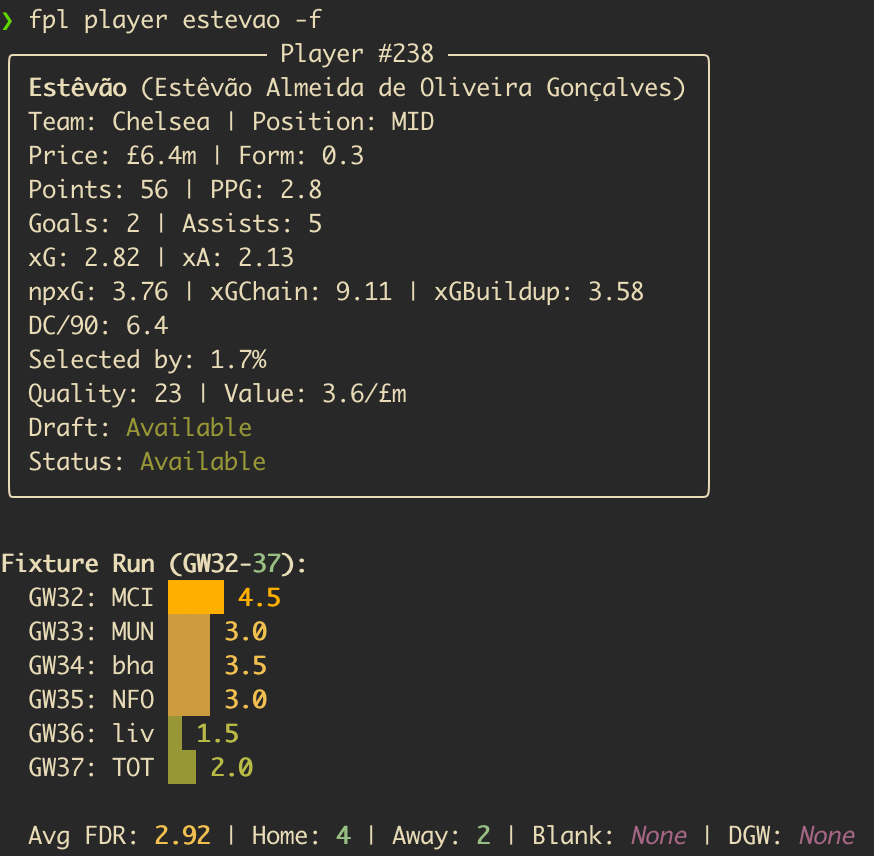
Example output from fpl player — real-time player analysis with form, xGI and availability flags.
Features
- Multi-source data - FPL API, Draft API, Understat (npxG/xGChain), historical data (a four-season window: the newest two seasons from Core-Insights, the two before from vaastav), and football-data.org in one place.
- Player scouting - Filter by any stat, track xG trends, spot underperformers, check fixture runs.
- Fixture intelligence - Bayesian difficulty ratings from actual match results, blank/double GW detection, squad exposure analysis.
- Custom analysis - Captain picks, transfer targets, differentials, waivers, and ILP-optimal squad allocation. Opt-in, off by default.
- Gameweek reports - Post-GW reviews and league recaps with optional LLM narrative.
- Draft parity - Most commands work for both Classic and Draft. Waivers cover the free-agent wire.
- Agent-friendly -
--format jsonwith a consistent envelope on key commands. Ready-made agent skills in.agents/skills/.
Quickstart
$ pipx install fplkit
$ fpl init
$ fpl status
$ fpl stats -p MID -s form --available-only
fpl init configures your FPL IDs and optional features. With just an entry ID you get the full data toolkit.
Installation
Requires Python 3.11+.
$ pipx install fplkit
Alternatives: uv pip install fplkit or pip install fplkit.
Usage
After the Gameweek
$ fpl status                       # GW result, deadline, rank movement, flagged players
$ fpl review --save --summarise    # Full review with LLM narrative
$ fpl league                       # Live league standings
$ fpl league-recap                 # Awards, standout players, standings movement, and streaks
$ fpl league-recap --summarise     # Add the LLM editorial for the group chat
$ fpl league-fines                 # Who owes what this season, and which weeks were ruled
review --summarise writes its "Next Week" section against next gameweek's fixtures —
your own players' opponents and positional FDR — so it can't tell you to bench a defender
who is at home to the league's weakest side just because he scored 5 last week. When there
is no next gameweek to see, it drops the selection calls and says to run fpl gw-prep.
An LLM summary that stops short is caught rather than saved as if it were whole:
review --summarise checks the analysis against the sections its own prompt asked
for, retries once if a heading is missing or the text ends mid-sentence, and if the
second try is no better it says what is missing on stderr and repeats it as a warning
in the saved report. league-recap --summarise reports the same for its editorial.
The summary is an add-on, and a missing key costs only the half it belongs to. The
review itself — squad, transfers, standings, fixtures, results — needs no key at all,
so review --summarise with a key for one provider prints that half, says on stderr
why the other was skipped, and still exits 0; a saved report names each skipped half
in its own warning callout. league-recap --summarise does the same for its editorial.
FPL marks a gameweek finished before it has refreshed the league tables, and the refresh
can trail by hours. fpl status says where it has got to beside "Finished" ("bonus
confirmed, league tables updated", or "still updating"), and a league-recap run inside
that window says on stderr that positions and totals may be stale and to re-run before the
next deadline, with the same caveat at the top of a saved report. It records the gameweek
anyway, and the later run replaces it.
A saved recap opens with a fixed title — # Gameweek 4 Recap: <league name>, the league's name
as configured — whether or not it has an editorial. The editorial's own headline sits beneath it
as a ## subheading, never as the title, so the first line you paste into the group chat reads
the same every week and the name on it is the league's rather than one the model restyled.
Fines are ruled per gameweek by league-recap and recorded against it, so fpl league-fines reads them straight back off disk — no network, and any season still
on disk (--season 2025-26). Every gameweek that could not be ruled is named
beneath the table, because a zero there means "not known", not "not fined". A tie for
last is shared: everyone level on the lowest score of the gameweek pays, rather than
whichever of them the standings listed first. The ledger is append-only, so gameweeks
recorded before that was true are repaired by the next recap rather than re-ruled.
For a draft league the recap also records the waiver claims each manager lost to a rival,
kept apart from the moves that landed, so being outbid is never written into the ledger
as sitting the week out. Gameweeks recorded before that existed are named on stderr;
fpl league-recap --draft --backfill-detail re-records them while the draft API still
serves the season's transactions. Those lost claims also make the waiver wire's races
visible to the editorial — every player more than one manager claimed, who won him, who
was beaten to him and at what priority — and a week where three or more managers claimed
the same player gets a Most Contested award beside Waiver Genius and Waiver Disaster, so
a pickup four managers fought over no longer reads as an unremarkable move.
In draft the Standout Players lines also say how each player came to the manager they name: "Haaland scored 17 points for Alice, who drafted him in the first round", "...who picked him up on waivers in GW4", "...who acquired him from Cam in a GW7 trade". It is the latest way he joined that squad as of the gameweek, worked out by replaying the league's draft, waivers and trades and checking the result against FPL's own record of who owns whom; if that does not agree, or a log cannot be read, the lines read without it and a warning says why. If the draft's picks are gone (a redraft was scheduled before they were first kept) it still says who drafted whom, rebuilt from the squads, but not in which round, and a notice says so.
A draft recap also keeps each held draft's picks, who picked whom in which round, in the ledger beside the gameweeks. The draft API serves only a league's latest draft, so the moment a redraft is scheduled the previous draft's picks are gone from it for good. The recap saves them the first time it sees them and never rewrites them, says so on stderr if the API ever serves different picks for the same draft, and names, once, any draft that was held before anything saved it.
The recap prints the season table only at GW19 and at the finale, so the set-piece
stays a set-piece — though with --summarise its editorial knows the running totals
every week and may work one into a sentence. fpl league-fines answers the season
question any week you want it.
Streaks come with season totals: the recap counts every time a condition has occurred this season — gameweek wins, last places, weeks on top, captain blanks — across resets, so a report or editorial can say "their sixth gameweek win of the season", not just "two in a row". Each count has its own rule for when it is worth mentioning, tuned to how often it happens: wins and last places on every third, captain blanks and waiver hauls on every fifth, bottom-half gameweeks only in the second half of the season and only on every tenth, and a green-arrow drought only while unbroken at five or ten gameweeks, never counting the weeks a manager spent top of the table with nowhere to climb. Some bring along others who added to the same count that week. The full list prints twice a season, at GW19 and the finale, alongside the fines table. Unjudged gameweeks are always stated beside the number — see Season counts for the per-count rules.
On the league's first gameweek the recap also looks up each manager's FPL record from
previous seasons — how many they have played, how they finished last season, their best
season — and puts it in the saved report and, with --summarise, in front of the
editorial as a locked section, since "finished in the top 4% last year" is the one
piece of history a fresh season has. The record is FPL-wide, never "Nth season in
this league": entry and league IDs are reissued every season, so the API cannot say
when anyone joined. A manager with no previous seasons is named as new to FPL rather
than left out.
Checking Your Setup
$ fpl doctor                       # Verify configured IDs and data files - essential after a season rollover
$ fpl doctor --providers           # Probe the external data sources for shape and volume drift
Every ID in settings.yaml is resolved against the live API and the team/league name reported back, so a dead or recycled ID (which otherwise fails silently) is visible. Per-team data files are checked against the current season's clubs, and the scoring scale against the newest completed season. Exits non-zero when something needs fixing.
--providers checks the other side of the bargain: that each external data source (FPL and Draft APIs, the historical datasets, Understat, football-data.org) still serves data of the expected shape and size, that every club resolves across sources and its players still join to them by name, that a player's per-gameweek history still carries the fields the scoring signals read, and that the per-gameweek match files actually parse into records through the same code the scoring commands run — the upstream drift that otherwise surfaces as plausible but wrong output, especially at a season rollover.
Scouting Players
$ fpl stats -p FWD -s form -a             # Forwards by form, excluding unavailable
$ fpl player Rice -f -u                   # Deep dive: fixtures + Understat analysis
$ fpl xg                                  # xG/xA analysis, over/underperformers
$ fpl history                             # Career arc across 3 seasons
$ fpl price-history -n 4 -s price_slope   # Bandwagon detection
$ fpl returnees                           # Injured and suspended players due back soon
$ fpl returnees --enrich                  # Add searched return timing where FPL says nothing
fpl xg scales its minutes floor to the gameweeks played, so an early-season run analyses the football that has actually happened rather than filtering everyone out against a bar the calendar has not allowed yet; it names the window and floor it used, and says which of the two caused an empty result. See Underlying Stats.
fpl returnees reads the availability news attached to each player, works out who is due back inside the next few gameweeks, and keeps the list short by filtering on past performance — the players worth claiming in draft before they are fit again, and worth planning around in classic. FPL states a return date for only a small minority of flagged players, so --enrich searches the web for fresher timing on the ones it is quiet or stale about and shows what it finds alongside the FPL news rather than in place of it. Each run remembers what it showed, so the next one can say whose outlook moved.
Before the Deadline
$ fpl squad                        # Squad health: form, injuries, recommendations
$ fpl squad --classic              # Pin the format when a script must not guess
$ fpl squad grid -n 8 -w Mbeumo    # 8-GW fixture difficulty grid with a watchlist player
$ fpl fdr --my-squad               # Your squad's blank/double GW exposure
$ fpl preview --save --scout       # Full analysis + BUY/SELL research via LLM
Strategic Planning
$ fpl fdr --blanks                 # Confirmed + predicted blank/double GWs
$ fpl chips timing                 # Rule-based Free Hit / Bench Boost / Triple Captain signals
$ fpl fixtures                     # Next GW fixtures, same FDR as `fpl fdr`
$ fpl fixtures -m opponent         # ...on the opponent's rating alone (custom analysis)
Season Preview Intel
Optional. Notes you write up per team before the season — projected XIs, long-term injuries, new signings with no Premier League record — from whatever source you read. Nothing ships with the tool; the previews are yours.
$ fpl intel schema                 # The file format, every field explained
$ fpl intel init                   # Scaffold one empty file per team
$ fpl intel resolve ARS --write    # Match player names to FPL codes, save them
$ fpl intel                        # Coverage across the league, and what it permits
$ fpl intel show ARS               # One team's intel, aged to the current gameweek
Intel expires on a schedule (fpl intel --show-decay prints it): each section is aged
out at the point where real data supersedes it — API news for injuries, actual minutes
for projected XIs. There is no in-season upkeep, and squad-builder and gw-prep read it
automatically when present.
Custom Analysis
Off by default. Enable via fpl init or custom_analysis: true in settings.yaml.
$ fpl captain                      # Ranked captain picks (0-100 matchup scoring)
$ fpl captain --global             # ...across the game rather than your squad
$ fpl targets --min-own 30         # Transfer targets, template tier
$ fpl differentials -t 3           # Ultra-differentials (<3% owned)
$ fpl waivers                      # Free-agent waiver picks with drop suggestions (draft)
$ fpl transfer-eval --out Palmer --in "Salah,Mbeumo"  # Side-by-side comparison
$ fpl allocate --horizon 1         # Free Hit: optimal squad for a single GW
$ fpl ratings                      # Bayesian team strength ratings from match results
Enabling custom analysis also enriches other commands: fpl stats gains --value columns, fpl xg adds Value Picks, fpl fdr upgrades to Bayesian FDR with ATK/DEF split.
JSON Output
Commands with --format json emit a consistent envelope:
{
  "command": "stats",
  "metadata": {"gameweek": null, "format": "classic", "custom_analysis": true},
  "data": [...]
}
$ fpl stats --format json -p MID -s expected_goal_involvements
$ fpl status --format json
$ fpl fdr --blanks --format json
$ fpl league-recap --format json
$ fpl league-fines --format json
Failures come back on the same stream: {"command", "error"} on stdout with exit code 1.
Parse stdout either way, and read the message from error rather than from stderr — see
JSON Output. Where a payload names a club by its
code (team_code in each season of fpl history and fpl player --history; the older team
key there carries the same number and is deprecated), it is the FPL club code that stays fixed
across seasons, not a season's 1-20 team id. Where it names a player, id is
the element id of the game the command serves (the draft game for draft commands such as
fpl waivers, the main game otherwise) and code the identifier both games share — join two
commands' player rows on code, since a mid-season addition holds a different id in each game
(see Player identifiers).
Without --format json it is the other way round: the table is on stdout, and the reason a
command exited nonzero is on stderr — the same for every command, so 2>/dev/null quietens
them all alike.
Configuration
Run fpl init to configure interactively. Settings stored in your platform's config directory (override with FPL_CLI_CONFIG_DIR, and also home to the optional previews/ intel files); generated data such as team ratings, chip plans and the league history ledger league-recap builds up is stored in your platform's data directory (override with FPL_CLI_DATA_DIR). In ephemeral environments (e.g. Claude Code on the web), point both at a persistent workspace. Both overrides must be absolute paths — see Directories. Saved reports (--save, --output) are written to a season subdirectory — <output_dir>/2026-27/gw21-review.md — so a new season never overwrites the last one's files; see Report layout.
Required: FPL classic entry ID or draft league + entry IDs.
| Feature | What it enables |
|---|---|
| Custom Analysis | Captain, targets, differentials, waivers, allocate, ratings, value scores, Bayesian FDR |
| League ID | Standings, fines, league recaps |
| LLM providers | --summarise and --scout flags (Perplexity, Anthropic, OpenAI, or any compatible API) |
| FPL credentials | fpl squad sell-prices (browser scraping) |
FOOTBALL_DATA_API_KEY |
League table in fpl review; Championship form for promoted teams in pre-season ratings (set it later and the next command re-rates them — nothing to delete) |
# LLM providers (for --summarise and --scout)
export PERPLEXITY_API_KEY="your-key"    # Research role
export ANTHROPIC_API_KEY="your-key"     # Synthesis role
See Command Reference for the full settings.yaml schema and LLM provider setup.
Development
$ git clone https://github.com/rossgroomio/fpl-cli.git
$ cd fpl-cli
$ python3 -m venv .venv && source .venv/bin/activate
$ pip install -e ".[dev]"
$ fpl init
$ ruff check fpl_cli/    # Lint
$ pyright fpl_cli/       # Type check
$ pytest tests/          # Tests
Command Reference | Custom Analysis Guide | Architecture | Agent Tools & Skills | Contributing
1 maintainer

Metadata
1 maintainer
Release files for fplkit 2.9.0
For a detailed explanation of source distributions (sdists) and built distributions (wheels), please see the package formats documentation.
Source distribution (sdist)
| File | Size | Uploaded | Provenance | Actions |
|---|---|---|---|---|
| fplkit-2.9.0.tar.gz | 2.2 MB | With provenance | Details for fplkit-2.9.0.tar.gz |
Built distribution (wheel)
| File | Interpreter | ABI | Platform | Actions Reset |
|---|---|---|---|---|
| fplkit-2.9.0-py3-none-any.whl | Python 3 | none | any | Details for fplkit-2.9.0-py3-none-any.whl |
Total release size: 3.1 MB
Release files / fplkit-2.9.0.tar.gz
| Download URL | fplkit-2.9.0.tar.gz |
|---|---|
| Size | 2.2 MB |
| Tags | Source |
|
SHA-256 checksum How to use checksums |
f64bc9fb2878d877b6d7c1de907495f46477d54a0a2db5efb0000c4fa16b483b
|
|
BLAKE2b-256 checksum How to use checksums |
415689f1f97c8c19196d19cff08c42ff54209c80a1b988f95620a7bd61971b9e
|
| Upload date | |
|
Uploaded using Trusted Publishing? What is trusted publishing? |
Yes |
| Uploaded via |
twine/7.0.0 CPython/3.13.14
|
Provenance
Provenance describes where a file came from. On PyPI, provenance is shared via attestations, which provide a verifiable record of the build or publishing details. View details, limitations and caveats.


PyPI Publish Attestation
PyPI verified that this artifact, at this checksum, originated from the publisher listed below.
Signed by GitHub Actions, verified by PyPI on Oct 18, 2026.
Transparency logRelease files / fplkit-2.9.0-py3-none-any.whl
| Download URL | fplkit-2.9.0-py3-none-any.whl |
|---|---|
| Size | 886.0 kB |
| Tags | Python 3 |
|
SHA-256 checksum How to use checksums |
0209e0159d772be9064937ee41a3d52f6cc448f232936bd4abe5dc428c2d1485
|
|
BLAKE2b-256 checksum How to use checksums |
11ecf2688fad5685d44b4dc7d7253e2d0d37360cb342c96e24bd1572f0c57595
|
| Upload date | |
|
Uploaded using Trusted Publishing? What is trusted publishing? |
Yes |
| Uploaded via |
twine/7.0.0 CPython/3.13.14
|
Provenance
Provenance describes where a file came from. On PyPI, provenance is shared via attestations, which provide a verifiable record of the build or publishing details. View details, limitations and caveats.
PyPI Publish Attestation
PyPI verified that this artifact, at this checksum, originated from the publisher listed below.
Signed by GitHub Actions, verified by PyPI on Oct 18, 2026.
Transparency logSecurity for fplkit 2.9.0
Provenance
Provenance describes where a file came from. On PyPI, provenance is shared via attestations, which provide a verifiable record of the build or publishing details. View details, limitations and caveats.
Full provenance
All 2 files in this release have been uploaded with provenance metadata.
Attestation for fplkit-2.9.0.tar.gz
PyPI Publish Attestation
PyPI verified that this artifact, at this checksum, originated from the publisher listed below.
Signed by GitHub Actions, verified by PyPI on Oct 18, 2026.
Transparency logA note on package security
PyPI is a repository for distributing packages, not a service for auditing them. While third-party security researchers and our staff do their best to detect and remove malicious packages, PyPI cannot guarantee the quality, security or suitability of any given package.
To learn more about protecting yourself from malicious actors, visit our package security documentation.














