
Fracture Network Analysis

Project description



fractopo is a Python module that contains tools for validating and analysing lineament and fracture trace maps (fracture networks).
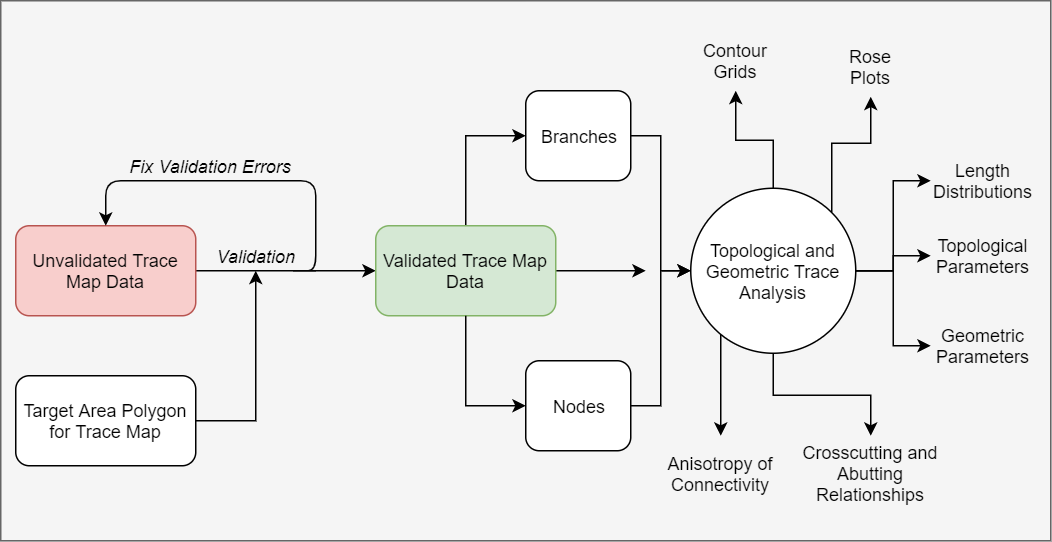
Overview of fractopo
Full documentation
Documentation is hosted on Read the Docs:
Installation
Currently installation is supported only for linux-based operating systems and MacOS. There’s a known problem with installing any gdal-based Python package onto a Windows machine. (Could be circumvented at some point by using conda.)
Omit --dev or [dev] for regular installation. Keep if you want to test/develop or otherwise install all development python dependencies.
Pip
The module is on PyPI.
# Non-development installation
pip install fractopo
Or locally for development:
git clone https://github.com/nialov/fractopo
cd fractopo
# Omit [dev] from end if you do not want installation for development
pip install --editable .[dev]
poetry
For usage:
poetry add fractopoFor development:
git clone https://github.com/nialov/fractopo --depth 1
cd fractopo
poetry install
Usage
See Full documentation for usage guidance and examples.
Input data
Reading and writing spatial filetypes is done in geopandas and you should see geopandas documentation for more advanced read-write use cases:
Simple example with trace and area data in GeoPackages:
import geopandas as gpd

# Trace data is in a file `traces.gpkg` in current working directory
# Area data is in a file `areas.gpkg` in current working directory
trace_data = gpd.read_file("traces.gpkg")
area_data = gpd.read_file("areas.gpkg")
Trace validation
Trace and target area data can be validated for further analysis with a Validation object.
from fractopo import Validation

validation = Validation(
    trace_data,
    area_data,
    name="mytraces",
    allow_fix=True,
)

# Validation is done explicitly with `run_validation` method
validated_trace_data = validation.run_validation()
Trace validation is also accessible as a command-line script, tracevalidate which is more straightforward to use than through Python calls.
tracevalidate always requires the target area that delineates trace data.
# Get full up-to-date script help

tracevalidate --help

# Basic usage:
# --fix is recommended due to automatic fixing being very minor in effect
# currently
# --output can be omitted. By default the same spatial filetype
# as the input is used and the output is saved as e.g.
# /path/to/validated/trace_data_validated.shp
# i.e. a new folder is created (or used) for validated data
# --summary can be given to print out summary data of validation
# i.e. error types and error counts

tracevalidate /path/to/trace_data.shp /path/to/target_area.shp --fix --output /path/to/output_data.shp

# Or with automatic saving to validated/ directory

tracevalidate /path/to/trace_data.shp /path/to/target_area.shp --fix --summary
Geometric and topological trace network analysis
Trace and target area data (GeoDataFrames) are passed into a Network object which has properties and functions for returning and visualizing different parameters and attributes of trace data.
from fractopo import Network

# Initialize Network object and determine the topological branches and nodes
network = Network(
    trace_data,
    area_data,
    # Give the Network a name!
    name="mynetwork",
    # Specify whether to determine topological branches and nodes
    # (Required for almost all analysis)
    determine_branches_nodes=True,
    # Specify the snapping distance threshold to define when traces are
    # snapped to each other
    snap_threshold=0.001,
    # If the target area used in digitization is a circle, the knowledge can
    # be used in some analysis
    circular_target_area=True,
    # Analysis on traces can be done for the full inputted dataset or the
    # traces can be cropped to the target area before analysis (cropping
    # recommended)
    truncate_traces=True,
)

# Properties are easily accessible
# e.g.
network.branch_counts
network.node_counts

# Plotting is done by plot_ -prefixed methods
network.plot_trace_lengths()
Development status
Breaking changes are possible and expected.
Critical issues:
Installation on Windows is currently not supported due to problems with installation of gdal-based packages like geopandas.
Trace validation should be refactored at some point.
Though keeping in mind that the current implementation works well.
snap_traces in branch and node determination is not perfect. Some edge cases cause artifacts which only sometimes are recognized as error branches. However these cases are very rare.
Reinforces that some amount of responsibility is always in the hands of the digitizer.
Issue mostly avoided when using a snap_threshold of 0.001
Release history Release notifications | RSS feed


Download files
Download the file for your platform. If you're not sure which to choose, learn more about installing packages.
Source Distribution
Built Distribution
Filter files by name, interpreter, ABI, and platform.
If you're not sure about the file name format, learn more about wheel file names.
Copy a direct link to the current filters
File details
Details for the file fractopo-0.1.0.tar.gz.
File metadata
- Download URL: fractopo-0.1.0.tar.gz
- Upload date:
- Size: 75.6 kB
- Tags: Source
- Uploaded using Trusted Publishing? No
- Uploaded via: twine/3.4.2 importlib_metadata/4.6.1 pkginfo/1.7.1 requests/2.26.0 requests-toolbelt/0.9.1 tqdm/4.61.2 CPython/3.9.6
File hashes
| Algorithm | Hash digest | |
|---|---|---|
| SHA256 |
c4094cae680efe77c8d441cf361aa92fb85d29738d271fc77925a352ce2c0e7c
|
|
| MD5 |
752a95ea4e87d15c8cbda3418564d902
|
|
| BLAKE2b-256 |
3e1a09c5bafeb6cbd1fed507b1b729cc0fe1a9834a905d82991ae7e62073c302
|
File details
Details for the file fractopo-0.1.0-py3-none-any.whl.
File metadata
- Download URL: fractopo-0.1.0-py3-none-any.whl
- Upload date:
- Size: 82.2 kB
- Tags: Python 3
- Uploaded using Trusted Publishing? No
- Uploaded via: twine/3.4.2 importlib_metadata/4.6.1 pkginfo/1.7.1 requests/2.26.0 requests-toolbelt/0.9.1 tqdm/4.61.2 CPython/3.9.6
File hashes
| Algorithm | Hash digest | |
|---|---|---|
| SHA256 |
c317a4cfe3efef236ff73f991d401967270246041a177526b5cdbfbdb3d08b92
|
|
| MD5 |
1eb4211d0afa395cef71003dae1f7443
|
|
| BLAKE2b-256 |
ca7bbfe9922b7218a3adba485918a3638c1fba151ef9f64b57f7d92b937acb61
|






