
freerdp-tk
Remote desktops, low cost and high performance: FreeRDP 3 on Linux, Windows and macOS, in one command.
uvx freerdp-tk
- Low cost: free and open source (Apache-2.0), no account, no subscription. The wheel brings the FreeRDP client, Python with Tkinter and the keyring package, so there is nothing else to install.
- High performance: FreeRDP 3's SDL client, with AV1 and AV2 (H.264 through the system on macOS and Windows). Tick Show live stats and the session shows its codec, frames per second, bandwidth and round trip.
- Made for everyday use: saved connections, passwords in the system keyring, SSH tunnels built in, several sessions at once.
- Or in a browser: FreeRDP Web runs the same FreeRDP, compiled to WebAssembly, with nothing to install.
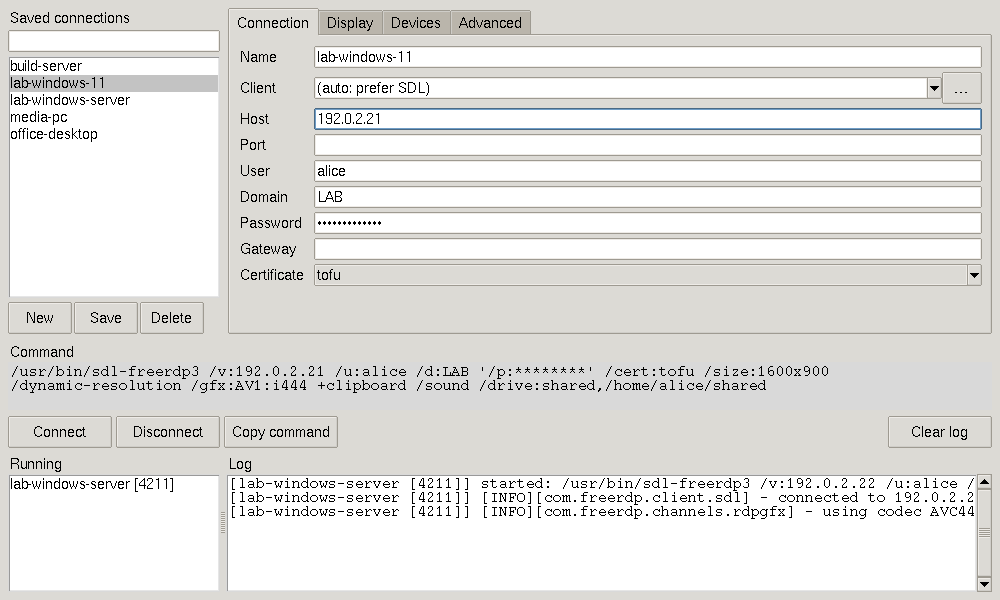
- Saved connections: a list you can filter. Double-click one to connect, or select several and connect them all at once.
- Changes stay visible: what you changed lights up, on its label, on its tab and in the list, until you save it. Reset goes back to what is saved, and moving on to another connection, or closing the window, asks whether to save or discard. New starts an empty connection or a copy of this one.
- Finds the client for you: "(auto)" takes the client that came with freerdp-tk, then the first FreeRDP 3 SDL client on your
PATH(sdl-freerdp,sdl-freerdp3,sdl3-freerdp), then one in a local build tree, passing over any that is not FreeRDP 3 or does not start. OnPATH, its order decides, whatever the names: a release that puts its ownbin/first gets its own client, not the system's. The SDL client is the one FreeRDP actively develops, and the same on Linux, Windows and macOS. You can still pick another FreeRDP 3 program with …. - Form instead of flags: display, monitors (List… asks the client which ones it sees, then you tick them; the remote desktop gets them as separate screens, or as one big screen with
/span), graphics codec (including AV1 and AV2), clipboard, sound, microphone, drive sharing, log level, plus a box for extra arguments. - Live command preview: shows the exact command line, with the password hidden, and copies it for you.
- Session log: runs several sessions at once and shows each client's output.
- Four languages: English, 中文 (Chinese), 日本語 (Japanese) and Français (French). The window starts in the system's language; the button beside Clear log picks another one, from the next start, and
FREERDP_TK_LANG=frsets one for a single run. The log stays in English, so it can be searched and pasted into a bug report.
The codecs, as they are
| Codec | 4:4:4 | 4:2:0 | Linux | Windows | macOS |
|---|---|---|---|---|---|
| AV1 | yes | yes | yes | yes | yes |
| AV2 | yes | yes | yes | yes | yes |
| H.264 (AVC444, AVC420) | yes | yes | no: the bundled client carries no H.264 decoder | yes, through Media Foundation | yes, through VideoToolbox |
| H.265 | — | — | not yet: no bundled client decodes it | not yet | not yet |
Pick one under Display → Graphics codec and the client offers only that one; (default) lets the server choose. Show live stats shows which codec runs.
The other side
rdp-release-kit is the all-in-one: the same FreeRDP as a shadow server for Linux, Windows and macOS hosts, xrdp packages, this client and the browser one. How to install the shadow server on Linux, Windows and macOS.
Built on FreeRDP
freerdp-tk runs FreeRDP, the FreeRDP project's work. The bundled client comes from our fork: upstream master plus our commits on their way upstream. About shows the exact upstream commit it is based on and how many commits are ours.
Install
uvx freerdp-tk               # run it once, without installing
uv tool install freerdp-tk   # or install it: then just freerdp-tk (pipx install freerdp-tk works too)
That is all: the wheel for your platform carries the FreeRDP SDL client, one program of about 25 MB.
| Platform | Client in the wheel |
|---|---|
| Linux x86_64, aarch64 | yes, with glibc 2.34 or newer (RHEL 9, Debian 12, Ubuntu 22.04, Fedora 35 and newer) and PulseAudio's libpulse.so.0, which every desktop has (else sudo apt install libpulse0) |
| macOS 12 and newer, Apple Silicon and Intel | yes |
| Windows 10 and 11, x86_64 and ARM64 | yes |
| Anything else (musl, an older glibc, a BSD) | no: the same freerdp-tk without a client, see below |
Auto takes the wheel's client first: it is the one this release was tested with, and a distribution's client is often older (no AV1). A client you installed yourself is one pick away under Connection → Client, and auto falls back to it when the wheel has no client, or its client is not FreeRDP 3 or does not start. To install one, or where no wheel has a client:
| Platform | Client |
|---|---|
| Debian / Ubuntu | sudo apt install freerdp3-sdl |
| Fedora | sudo dnf install freerdp |
| macOS | brew install freerdp |
| Windows | a FreeRDP 3 build containing sdl-freerdp.exe, on your PATH |
About that client: it is a portable build from rdp-release-kit, unofficial and a preview: FreeRDP's master plus open pull requests, with AV1, AV2 and Opus. client.lock pins the release and its SHA-256. It decodes H.264 through the system on macOS (VideoToolbox) and Windows (Media Foundation). On Linux it has no H.264, since it carries neither OpenH264 nor FFmpeg: leave the codec on its default, pick AV1, AV2 or progressive, or use a client of your own. AV1 and AV2 need a client built with them, such as this one; a distribution's FreeRDP refuses them ("Command line parsing failed at 'gfx'"). freerdp_tk/client/ in the installed package holds its MANIFEST (what it was built from) and licenses/, one folder per component.
Tk: the window needs a Python with Tk. The Pythons that uv installs include it; a Linux system Python often does not (sudo apt install python3-tk, sudo dnf install python3-tkinter). uv takes the system Python when there is one, so:
- started by
uvx, freerdp-tk notices a Python without Tk and starts again with uv's own Python (it downloads one the first time);uvx --managed-python freerdp-tkgoes there directly; - installed with
uv tool install, useuv tool install --managed-python freerdp-tkon such a system; - anywhere else, it says what to install and exits.
On Linux, the Tk in uv's Pythons draws with the X core fonts (it is built without Xft), which often lack … and •: freerdp-tk then shows ... and * instead.
Passwords
- Saved in the system keyring, never in a file. With Remember it in the system keyring ticked (the default), the password goes to the system's own store: Credential Manager on Windows, the Keychain on macOS, the Secret Service (GNOME Keyring, KeePassXC) or KWallet on Linux. From then on a double-click connects without asking. The connections file only keeps whether the box is ticked.
- The password dialog has the same box: untick it, and the password stays in memory only, until the window closes. Forget removes a saved password. Deleting a connection removes its password too, unless another saved connection logs in to the same account.
- A rejected password is asked for again. When the client exits because the server turned the password down (exit codes 132, 134, 154 and 159 of the SDL client), freerdp-tk asks for another one and connects again; with the box ticked, the new password replaces the saved one. A locked, expired or disabled account is not asked again, since another password would not help.
- An entry is named after the account it logs in to,
freerdp-tk/<domain\user>@<host>:<port>, not after the connection. Renaming a connection keeps its password, and two connections to one account share it. - No usable keyring (on Linux: no Secret Service or KWallet, or no D-Bus session, as over plain SSH): the box is greyed out with the reason, and passwords are asked for and kept in memory only. freerdp-tk never falls back to a file. A locked keyring is unlocked through the system's own prompt; if that fails or is cancelled, freerdp-tk asks for the password instead. The keyring is used from a thread of its own, so a slow one (an unlock prompt, a Secret Service that D-Bus takes two minutes to give up on) never freezes the window.
- What the keyring protects: the password on disk, and from the other users of the computer. A program that runs as you can usually read it: Credential Manager and an unlocked Secret Service hand it to any process of your session, while the Keychain asks you first unless the program is on the entry's access list.
- All arguments are passed to the client through standard input (
/args-from:stdin), so the password never appears in the process list (ps, Task Manager). FreeRDP 2 has no such option, so freerdp-tk refuses to start a FreeRDP 2 client rather than put the password on its command line.
Before and after commands (SSH tunnels and more)
The Before / after tab runs your own commands around a session:
- Before connecting: runs to the end before the client starts; if it fails, the client does not start. Tick Keep it running during the session for a command that stays up beside the session, such as a tunnel.
- Then wait until: holds the client back until whatever the command started is ready, whether the command ran to its end or keeps running:
- a port answers, for
host:port, such as127.0.0.1:%L. - the output shows, for a regular expression matched against each line of the before command's output, such as
listening on .*%L. A placeholder here stands for its literal value. Lines only arrive once the program writes them, and many programs hold back their output when it goes to a pipe. - seconds have passed, for a fixed pause, when nothing can be checked.
- a port answers, for
- Give up after: the seconds the whole before step may take, from the start of the command; then the client does not start, and a command that was to run to its end is stopped. Left empty, a port or output wait gives up after 30 seconds and the command itself has no limit. A fixed pause always lasts as long as asked.
- Stop it when the session ends: ends the before command and everything it started, also if freerdp-tk itself crashes or is killed:
- Linux: a small supervisor runs the command as a child subreaper, so even daemons that fork twice and leave the process group stay under it. Each is sent SIGTERM, then SIGKILL after 3 seconds.
- Windows: the command runs in a job object that the system closes, and with it everything inside, when freerdp-tk lets go of it.
- macOS: the same supervisor, but macOS has no subreaper: a daemon that forks twice and leaves the process group survives.
- After disconnecting: runs once the session is over, however it ended.
- Client proxy: passed to the client as
/proxy:.
Placeholders work in all of these and in the extra arguments: %h host, %p port, %u user, %L a free local port picked for this session, %% a percent sign.
Fill in: SSH tunnel… sets it all up for the common case. It asks for a jump host and fills in:
before:      ssh -N -D 127.0.0.1:%L -o ExitOnForwardFailure=yes -o BatchMode=yes me@bastion
wait until:  127.0.0.1:%L
proxy:       socks5://127.0.0.1:%L
The RDP server then only has to be reachable from the jump host, and the client still connects by its real name, so the certificate check is unchanged. ssh runs without a terminal, so it must log in with a key or an agent, and it must already know the jump host's key (connect once with ssh in a terminal).
Hotkeys
The SDL client takes a few keys for itself: a modifier plus Enter (fullscreen), R (resizable), G (grab the keyboard), M (minimize), I (show or hide the stats overlay: codec, frames per second, bandwidth, round trip) and D (disconnect). Its own default modifier is Right Shift, so a capital D typed with the right Shift key would end the session.
So when freerdp-tk starts and the client's settings file does not exist yet, it writes one that moves the modifier to Right Alt + Right Shift (Right Option + Right Shift on a Mac):
{ "SDL_KeyModMask": ["KMOD_RALT", "KMOD_RSHIFT"] }
The file is sdl-freerdp.json in ~/.config/freerdp/ (Linux, macOS; $XDG_CONFIG_HOME if set) or %APPDATA%\freerdp\ (Windows). It belongs to the client, so it holds for every session of an SDL client on that account, also without freerdp-tk. An existing file is never changed, so a file without SDL_KeyModMask keeps Right Shift. To change the keys, edit the file; deleting it only brings this one back. A user file also takes precedence over a system-wide SDL_KeyModMask.
Where things are kept
| What | Where |
|---|---|
| Saved connections | ~/.config/freerdp-tk/profiles.json (Linux), ~/Library/Application Support/freerdp-tk/ (macOS), %APPDATA%\freerdp-tk\ (Windows) |
| Extra FreeRDP source trees to search for built clients | FREERDP_TK_TREES, separated like PATH. ~/projects/FreeRDP is always searched. |
Limitation
The client runs without a terminal, so it cannot ask questions while connecting, such as whether to trust a new certificate. Pick a certificate policy (tofu, ignore or deny) on the Connection tab instead. The default, tofu, trusts a server's certificate the first time you connect.
Development
uv run --with-editable . python -m freerdp_tk   # run from the checkout
uv build                                         # build the sdist and wheel into dist/
The screenshot above is rendered from demo data in a virtual X server, so no real hosts end up in it. Regenerate it after changing the UI:
xvfb-run -s "-screen 0 1400x1000x24" \
    uv run --with pillow --with-editable . python scripts/screenshot.py docs/screenshot.png
Releasing to PyPI
Releases are published by GitHub Actions through trusted publishing, so no API token is needed. The version is taken from the git tag.
One-time setup:
- On PyPI, open Your projects → Publishing → Add a new pending publisher and enter: project
freerdp-tk, ownercongzhangzh, repositoryfreerdp-tk, workflowrelease.yml, environmentpypi. - On GitHub, create an environment named
pypi(Settings → Environments).
Each release after that:
- In
src/freerdp_tk/RELEASE_NOTES.md, rename the section "Unreleased" to the release's version, commit and push tomain, and wait until its tests pass. - Tag that commit and push the tag:
git tag 20261107.1          # yyyymmdd.index, the index counting that day's releases from 1
git push origin 20261107.1
Only a tag of this form starts the release; the tests run on every push to main. The release waits for the tests of its commit and stops, before anything is published, when they failed or when the notes have no section for its version. A tag whose release failed stays as it is: fix it and tag the next index.
The workflow builds the package, adds the client to one wheel per platform (scripts/bundle_client.py), checks on a runner of each platform that the wheel installs and its client starts, and then uploads them all to PyPI, with the plain wheel and the sdist. Then it makes the GitHub release, with that version's notes and the same files. The window shows the version in its title, and the notes under About.
A new client by itself. When an rdp-release-kit release has passed all its checks, demos included, the kit sends a kit-release event, and client-bump.yml takes it from there: it pins that release in client.lock (scripts/bundle_client.py --pin), adds an "Under the hood" line under Unreleased, runs the tests, the real-client test with the new client too, and pushes to main, where test.yml runs on every platform. When nothing but such bumps has come since the last release, it goes on: it dates the notes, tests that commit too, tags the next yyyymmdd.index and starts the release. Anything else waiting since the last release (a change to the window, say) keeps the tag for a person. It can be started by hand too (Actions → client-bump → Run workflow, with the kit release and its FreeRDP version).
To move to a newer client, pin a release of rdp-release-kit and commit client.lock:
python scripts/bundle_client.py --pin 20261106.3
License
Apache-2.0, the same license as FreeRDP.
1 maintainer

Metadata
1 maintainer
Release files for freerdp-tk 20261118.1
For a detailed explanation of source distributions (sdists) and built distributions (wheels), please see the package formats documentation.
Source distribution (sdist)
| File | Size | Uploaded | Provenance | Actions |
|---|---|---|---|---|
| freerdp_tk-20261118.1.tar.gz | 189.2 kB | With provenance | Details for freerdp_tk-20261118.1.tar.gz |
Built distributions (wheels)
Total release size: 62.9 MB
Release files / freerdp_tk-20261118.1.tar.gz
| Download URL | freerdp_tk-20261118.1.tar.gz |
|---|---|
| Size | 189.2 kB |
| Tags | Source |
|
SHA-256 checksum How to use checksums |
11b4e897a110edffa6f0806c9564a304136ac1e769bedf74d4444e1071a8944c
|
|
BLAKE2b-256 checksum How to use checksums |
7a065f29c9c1f8ec6747de87cbae1376a4bdec997720043ae639029841b85849
|
| Upload date | |
|
Uploaded using Trusted Publishing? What is trusted publishing? |
Yes |
| Uploaded via |
twine/7.0.0 CPython/3.13.16
|
Provenance
Provenance describes where a file came from. On PyPI, provenance is shared via attestations, which provide a verifiable record of the build or publishing details. View details, limitations and caveats.


PyPI Publish Attestation
PyPI verified that this artifact, at this checksum, originated from the publisher listed below.
Signed by GitHub Actions, verified by PyPI on Nov 18, 2026.
Transparency logRelease files / freerdp_tk-20261118.1-py3-none-win_arm64.whl
| Download URL | freerdp_tk-20261118.1-py3-none-win_arm64.whl |
|---|---|
| Size | 8.7 MB |
| Tags | Python 3 Windows ARM64 |
|
SHA-256 checksum How to use checksums |
2e7cd87c08b8549099f5552b21027edbd7704b3ddd6933cffd92e998573fd896
|
|
BLAKE2b-256 checksum How to use checksums |
50b0c60154db949b6cbcfa9741dd81c3bce47ddb7357495fa0602162dd31256f
|
| Upload date | |
|
Uploaded using Trusted Publishing? What is trusted publishing? |
Yes |
| Uploaded via |
twine/7.0.0 CPython/3.13.16
|
Provenance
Provenance describes where a file came from. On PyPI, provenance is shared via attestations, which provide a verifiable record of the build or publishing details. View details, limitations and caveats.
PyPI Publish Attestation
PyPI verified that this artifact, at this checksum, originated from the publisher listed below.
Signed by GitHub Actions, verified by PyPI on Nov 18, 2026.
Transparency logRelease files / freerdp_tk-20261118.1-py3-none-win_amd64.whl
| Download URL | freerdp_tk-20261118.1-py3-none-win_amd64.whl |
|---|---|
| Size | 10.2 MB |
| Tags | Python 3 Windows x86-64 |
|
SHA-256 checksum How to use checksums |
e2bb3ca564f0d94e08f91a659b111b8cbf9972341dae3825db6853b7b987f0a0
|
|
BLAKE2b-256 checksum How to use checksums |
ddba9f3c3f2f3c0131abc0b05844b3f70d958cbd7afd6b6d4c05fdef24f7389d
|
| Upload date | |
|
Uploaded using Trusted Publishing? What is trusted publishing? |
Yes |
| Uploaded via |
twine/7.0.0 CPython/3.13.16
|
Provenance
Provenance describes where a file came from. On PyPI, provenance is shared via attestations, which provide a verifiable record of the build or publishing details. View details, limitations and caveats.
PyPI Publish Attestation
PyPI verified that this artifact, at this checksum, originated from the publisher listed below.
Signed by GitHub Actions, verified by PyPI on Nov 18, 2026.
Transparency logRelease files / freerdp_tk-20261118.1-py3-none-manylinux_2_34_x86_64.whl
| Download URL | freerdp_tk-20261118.1-py3-none-manylinux_2_34_x86_64.whl |
|---|---|
| Size | 12.6 MB |
| Tags | Linux glibc 2.34+ x86-64 Python 3 |
|
SHA-256 checksum How to use checksums |
ce855eca1247223f73d28237b1674e36ed702cac06ae51bea262be39533d1ec1
|
|
BLAKE2b-256 checksum How to use checksums |
4ae05900e24c8bfcae8cbbdc9394125ecf9eacb3a69662e67f5996f398421436
|
| Upload date | |
|
Uploaded using Trusted Publishing? What is trusted publishing? |
Yes |
| Uploaded via |
twine/7.0.0 CPython/3.13.16
|
Provenance
Provenance describes where a file came from. On PyPI, provenance is shared via attestations, which provide a verifiable record of the build or publishing details. View details, limitations and caveats.
PyPI Publish Attestation
PyPI verified that this artifact, at this checksum, originated from the publisher listed below.
Signed by GitHub Actions, verified by PyPI on Nov 18, 2026.
Transparency logRelease files / freerdp_tk-20261118.1-py3-none-manylinux_2_34_aarch64.whl
| Download URL | freerdp_tk-20261118.1-py3-none-manylinux_2_34_aarch64.whl |
|---|---|
| Size | 12.1 MB |
| Tags | Linux glibc 2.34+ ARM64 Python 3 |
|
SHA-256 checksum How to use checksums |
040746072e16db1a6c4a083ca4871514669aff38095d86d7432be005b03bb34c
|
|
BLAKE2b-256 checksum How to use checksums |
219489a09aab89e5a37853f18c29055fd36beda43b6df209aa466f37d2316367
|
| Upload date | |
|
Uploaded using Trusted Publishing? What is trusted publishing? |
Yes |
| Uploaded via |
twine/7.0.0 CPython/3.13.16
|
Provenance
Provenance describes where a file came from. On PyPI, provenance is shared via attestations, which provide a verifiable record of the build or publishing details. View details, limitations and caveats.
PyPI Publish Attestation
PyPI verified that this artifact, at this checksum, originated from the publisher listed below.
Signed by GitHub Actions, verified by PyPI on Nov 18, 2026.
Transparency logRelease files / freerdp_tk-20261118.1-py3-none-macosx_12_0_x86_64.whl
| Download URL | freerdp_tk-20261118.1-py3-none-macosx_12_0_x86_64.whl |
|---|---|
| Size | 10.2 MB |
| Tags | Python 3 macOS 12.0+ x86-64 |
|
SHA-256 checksum How to use checksums |
68fa18662e5f8423dd5fba19e8a5cd651a3ed4a77aeba2b00eba904553dc5012
|
|
BLAKE2b-256 checksum How to use checksums |
9c49c4e2386541f4ed72cbe21d5fc4ffcbdbcbaceea1504b239ad887c8764a03
|
| Upload date | |
|
Uploaded using Trusted Publishing? What is trusted publishing? |
Yes |
| Uploaded via |
twine/7.0.0 CPython/3.13.16
|
Provenance
Provenance describes where a file came from. On PyPI, provenance is shared via attestations, which provide a verifiable record of the build or publishing details. View details, limitations and caveats.
PyPI Publish Attestation
PyPI verified that this artifact, at this checksum, originated from the publisher listed below.
Signed by GitHub Actions, verified by PyPI on Nov 18, 2026.
Transparency logRelease files / freerdp_tk-20261118.1-py3-none-macosx_12_0_arm64.whl
| Download URL | freerdp_tk-20261118.1-py3-none-macosx_12_0_arm64.whl |
|---|---|
| Size | 8.9 MB |
| Tags | Python 3 macOS 12.0+ ARM64 |
|
SHA-256 checksum How to use checksums |
a1debf0279903d49e05a6d04145c2742a8a3a0e52fc56e03d51c37e2a927e867
|
|
BLAKE2b-256 checksum How to use checksums |
de8ed0e9bbfcfd85982ff27a672d28eb812f1bdbb091987ae00191f69e6aa800
|
| Upload date | |
|
Uploaded using Trusted Publishing? What is trusted publishing? |
Yes |
| Uploaded via |
twine/7.0.0 CPython/3.13.16
|
Provenance
Provenance describes where a file came from. On PyPI, provenance is shared via attestations, which provide a verifiable record of the build or publishing details. View details, limitations and caveats.
PyPI Publish Attestation
PyPI verified that this artifact, at this checksum, originated from the publisher listed below.
Signed by GitHub Actions, verified by PyPI on Nov 18, 2026.
Transparency logRelease files / freerdp_tk-20261118.1-py3-none-any.whl
| Download URL | freerdp_tk-20261118.1-py3-none-any.whl |
|---|---|
| Size | 66.3 kB |
| Tags | Python 3 |
|
SHA-256 checksum How to use checksums |
9def505abfd0f91e321aea52ab05633dc4c2d78d1bad3d42b251c01d7c4d42a3
|
|
BLAKE2b-256 checksum How to use checksums |
aac524b34bd3b31b3ae671cec979684302d91d1e2843e9cfdff8ac52b26a6d37
|
| Upload date | |
|
Uploaded using Trusted Publishing? What is trusted publishing? |
Yes |
| Uploaded via |
twine/7.0.0 CPython/3.13.16
|
Provenance
Provenance describes where a file came from. On PyPI, provenance is shared via attestations, which provide a verifiable record of the build or publishing details. View details, limitations and caveats.
PyPI Publish Attestation
PyPI verified that this artifact, at this checksum, originated from the publisher listed below.
Signed by GitHub Actions, verified by PyPI on Nov 18, 2026.
Transparency logSecurity for freerdp-tk 20261118.1
Provenance
Provenance describes where a file came from. On PyPI, provenance is shared via attestations, which provide a verifiable record of the build or publishing details. View details, limitations and caveats.
Full provenance
All 8 files in this release have been uploaded with provenance metadata.
Attestation for freerdp_tk-20261118.1.tar.gz
PyPI Publish Attestation
PyPI verified that this artifact, at this checksum, originated from the publisher listed below.
Signed by GitHub Actions, verified by PyPI on Nov 18, 2026.
Transparency logA note on package security
PyPI is a repository for distributing packages, not a service for auditing them. While third-party security researchers and our staff do their best to detect and remove malicious packages, PyPI cannot guarantee the quality, security or suitability of any given package.
To learn more about protecting yourself from malicious actors, visit our package security documentation.














