
ft-Explore allows to control motors and to check inputs by GUI and user-provided Python code

Project description
ft-Explore
ft-Explore allows to control motors and to check inputs by GUI and user-provided Python code.
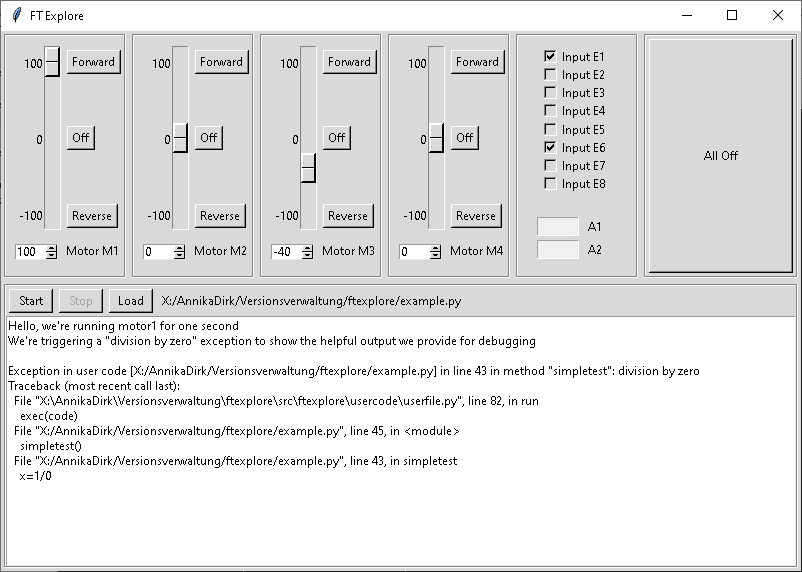
ft-Explore was implemented to interface with hardware of technical models for educational purposes. It is open-source and contains interface modules for widely available hardware (RaspberryPi with Adafruit Motor HAT).
Installation
ft-Explore can be installed easily. See the sections below depending on your platform.
Windows
- Download msi installer file (can be found "dist" folder)
- Install using the msi installer
- Afterwards the application can be started via shortcut "ft-Explore" in start menu
Alternatively, you can download the source code and run it after installing Python (e.g. via https://www.anaconda.com/distribution/). See the Linux section below for required Python packages.
Linux
- Make sure that you use Python version 3.5 or newer
- Install Python libraries as needed:
in case the application shall not just be used locally and shall use the network
$ pip install cffi pynng
in case you are running on a RaspberryPi and want to access the GPIOs as inputs
$ pip install RPi.GPIO
in case you are running on a RaspberryPi with an Adafruit Motor HAT
$ pip install adafruit_motorkit
- Install ft-Explore:
$ pip install ftexplore
- Run ft-Explore
run and show help page
$ python -m ftexplore --help
Clone (for developers only)
- Clone this repo to your local machine using
https://www.hosting-srv.de/gitea/HNET/ftexplore.git
Features
- Graphical user interface for controlling four motors/lights and showing the state of eight digital inputs
- Platform independent, tested on Windows and Linux (Debian and Raspbian)
- No dependencies except hardware drivers when operating locally
- Controlling motors/lights and getting the state of the inputs can be done by user-provided Python scripts
- The user-provided Python scripts can be executed and interrupted in the GUI. Script output and exceptions are shown there
- Manual control via GUI and script-based control is possible simultaneously
- GUI and hardware can be distributed to multiple machines, e.g. hardware on a headless RaspberryPi can be controlled via GUI on a Windows notebook
Usage
- Demo usage
Show GUI and use no real hardware for demo purposes (the default):
$ python -m ftexplore
This is equivalent to
$ python -m ftexplore --loglevel info --hardware demo
In this mode, there is just emulated hardware. When you control the motors, depending on the direction of the motors the inputs are set.
- Show GUI and use the locally available default hardware (Adafruit Motor HAT and eight RaspberryPi GPIOs as inputs)
$ python -m ftexplore --hardware default
Use this mode if you're working locally on a RaspberryPi with an Adafruit Motor HAT shield.0
- Distributed operation with local GUI and remote hardware')
Listening side with the hardware (adapt port as needed)
$ python -m ftexplore --hardware default --listen 2201
Client side with the GUI (adapt IP address and port as needed)
$ python -m ftexplore --hardware 192.168.1.1:2201
- Show help page for details on command line arguments
$ python -m ftexplore --help
Documentation
- src/ftexplore/eventprocessor
This folder contains code for event processing and event distribution to the applications submodules. The application works by broadcasting events between the different application modules.
- src/ftexplore/gui
This folder contains the code for the graphical user interface. That interface is based on Tk.
- src/ftexplore/hardware
This folder contains modules to communicate with different types of hardware. A special hardware is "remote" hardware that resides on another machine and is accessed via network. Adapt the demo hardware to quickly implement support for your special hardware.
- src/ftexplore/listener
This folder contains the module that provides access to the local hardware via the network. One or more clients can be connected.
- src/ftexplore/usercode
This folder contains the code controlling the execution of user-provided code.
License

- GPL3 license
- Copyright 2019 © Dirk Henrici.


Download files
Download the file for your platform. If you're not sure which to choose, learn more about installing packages.
Source Distribution
Built Distribution
Filter files by name, interpreter, ABI, and platform.
If you're not sure about the file name format, learn more about wheel file names.
Copy a direct link to the current filters
File details
Details for the file ftexplore-2.1.0.tar.gz.
File metadata
- Download URL: ftexplore-2.1.0.tar.gz
- Upload date:
- Size: 39.2 kB
- Tags: Source
- Uploaded using Trusted Publishing? No
- Uploaded via: twine/3.4.2 importlib_metadata/4.8.1 pkginfo/1.7.1 requests/2.28.1 requests-toolbelt/0.9.1 tqdm/4.62.3 CPython/3.9.5
File hashes
| Algorithm | Hash digest | |
|---|---|---|
| SHA256 |
8f82fb447459a4cefc7a0c3196135074625636d3f9cba5973b9b1b5d328cf746
|
|
| MD5 |
7e924ed9e3a2ae377db0813fef4547ad
|
|
| BLAKE2b-256 |
fda7248f670c5b7f8395de1f4fcbf7949fad3235d7fa204815462c9ff9640cfd
|
File details
Details for the file ftexplore-2.1.0-py3-none-any.whl.
File metadata
- Download URL: ftexplore-2.1.0-py3-none-any.whl
- Upload date:
- Size: 45.8 kB
- Tags: Python 3
- Uploaded using Trusted Publishing? No
- Uploaded via: twine/3.4.2 importlib_metadata/4.8.1 pkginfo/1.7.1 requests/2.28.1 requests-toolbelt/0.9.1 tqdm/4.62.3 CPython/3.9.5
File hashes
| Algorithm | Hash digest | |
|---|---|---|
| SHA256 |
6b429ae40191278e6c552d7261f1de7045ff977b36064df1f57d0aaa895c83bd
|
|
| MD5 |
3cf63c06f5b9e65fa10ad5128ed78d51
|
|
| BLAKE2b-256 |
4e5bb23a655b9fce02bcb2a1cd381610eab6f96b07b148bf35c7e671a3bec5f1
|






