
Purge old builds from Gentoo Build Publisher

Project description
gbp-purge
A Gentoo Build Publisher plugin to purge old builds.
Description
This is a plugin to purge old builds of one's Gentoo Build Publisher instance. It was spun off from core some of the core functionality in Gentoo Build Publisher. The main reason for spinning out from GBP is that the strategy for determining which builds to purge are specific and subjective, the purge process was optional to begin with and, well, the satisfaction of writing another plugin.
Usage
Simply install it into the same environment as your Gentoo Build Publisher, restart the services and that's it. So if you've installed GBP via the Install Guide it would look like this:
cd /home/gbp
sudo -u gbp -H ./bin/pip install git+https://github.com/enku/gbp-purge.git
systemctl restart gentoo-build-publisher-wsgi gentoo-build-publisher-worker
How it works?
The system starts off by listening for "pull" events from Gentoo Build Publisher. Whenever a build is pulled, a worker task is created to purge builds belonging to the same machine as the build that was pulled.
In my (rq) logs it looks something like this (summarized):
09:05:19 gbp: gentoo_build_publisher.worker.tasks.pull_build('web.2815', note=None, tags=None) (fba40994-bbfb-4aef-be8f-5adbc1dd3d5e)
09:05:35 Successfully completed gentoo_build_publisher.worker.tasks.pull_build('web.2815', note=None, tags=None) job in 0:00:16.334798s on worker bb259ab3c5d14539940c50b35ffb624e
09:05:35 gbp: gbp_purge.worker.tasks.purge_machine('web') (69b9f4e6-d4bb-4c26-af24-95a366ede59a)
09:05:35 Successfully completed gbp_purge.worker.tasks.purge_machine('web') job in 0:00:00.012854s on worker bb259ab3c5d14539940c50b35ffb624e
09:05:36 gbp: gbp_fl.worker.tasks.index_build('web', '2815') (16978e09-fb3d-40e6-bc20-70735744b546)
09:05:51 Successfully completed gbp_fl.worker.tasks.index_build('web', '2815') job in 0:00:14.332937s on worker bb259ab3c5d14539940c50b35ffb624e
09:05:51 gbp: gentoo_build_publisher.worker.tasks.delete_build('web.2795') (fb01267d-ed5a-4ca9-a483-917f980bd2f5)
09:05:53 Successfully completed gentoo_build_publisher.worker.tasks.delete_build('web.2795') job in 0:00:02.805851s on worker bb259ab3c5d14539940c50b35ffb624e
09:05:53 gbp: gentoo_build_publisher.worker.tasks.delete_build('web.2811') (a81e42ca-9914-446d-a6f0-1be0dae25234)
09:05:57 Successfully completed gentoo_build_publisher.worker.tasks.delete_build('web.2811') job in 0:00:03.305191s on worker bb259ab3c5d14539940c50b35ffb624e
09:05:57 gbp: gbp_fl.worker.tasks.deindex_build('web', '2795') (62c9f6ff-ce70-476e-a582-310b0bfbdfcf)
09:05:57 Successfully completed gbp_fl.worker.tasks.deindex_build('web', '2795') job in 0:00:00.059129s on worker bb259ab3c5d14539940c50b35ffb624e
09:05:57 gbp: gbp_fl.worker.tasks.deindex_build('web', '2811') (0303373e-8e17-49a6-a3b7-38b076b89cbb)
09:05:57 Successfully completed gbp_fl.worker.tasks.deindex_build('web', '2811') job in 0:00:00.144880s on worker bb259ab3c5d14539940c50b35ffb624e
Purge strategy
gbp-purge will get the list of builds for the machine, look at the time they were submitted (pulled) by GBP and keep:
- All from yesterday or later
- One for each day of the past week
- One for each week of the past month
- One for each month of the past year
- One per year
- The published build, if there is one
- All tagged builds
- All builds with the "keep" flag.
All other builds for that machine will be deleted. In all of the "one for each" scenarios if there are more than one then it prefers the most recent. For example in the "one for each day of the past week" scenario, if there is a Thursday build and a Friday build it will keep the Friday build.
This is the same method I use for my backup script.
Depending how many machines you have, how often they are build and how often builds build new packages this will resemble something like a long tail over time. For example, presently on my GBP instance the number of builds kept over time looks like this
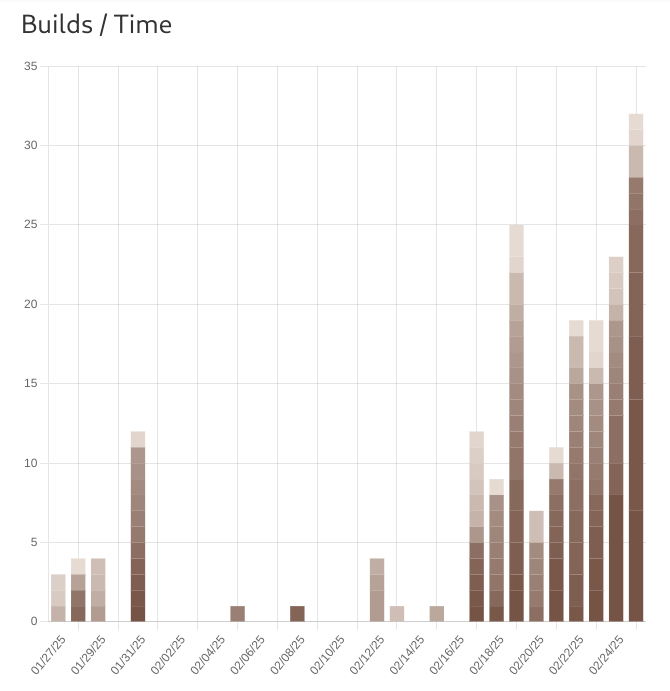
Perhaps in the future I will add the capability of choosing different purge strategies and add configuration to decide which strategy to use.


Download files
Download the file for your platform. If you're not sure which to choose, learn more about installing packages.
Source Distribution
Built Distribution
Filter files by name, interpreter, ABI, and platform.
If you're not sure about the file name format, learn more about wheel file names.
Copy a direct link to the current filters
File details
Details for the file gbp_purge-1.0.2.tar.gz.
File metadata
- Download URL: gbp_purge-1.0.2.tar.gz
- Upload date:
- Size: 11.0 kB
- Tags: Source
- Uploaded using Trusted Publishing? No
- Uploaded via: twine/6.1.0 CPython/3.13.5
File hashes
| Algorithm | Hash digest | |
|---|---|---|
| SHA256 |
b2c9e2bf778f627c85e888e184bf7835774df044dbc23d89ebf2e13662d838ed
|
|
| MD5 |
707b8d8060498f0e221dd5695ffbcdb2
|
|
| BLAKE2b-256 |
b57a3ae8ae076e36cc7431d5d1e6d8bc57be3fb007798255750760fe2596385f
|
File details
Details for the file gbp_purge-1.0.2-py3-none-any.whl.
File metadata
- Download URL: gbp_purge-1.0.2-py3-none-any.whl
- Upload date:
- Size: 8.6 kB
- Tags: Python 3
- Uploaded using Trusted Publishing? No
- Uploaded via: twine/6.1.0 CPython/3.13.5
File hashes
| Algorithm | Hash digest | |
|---|---|---|
| SHA256 |
09270093af94a47f7372c995f7ab36a3b215af3b6b7ff70afc13a4c6ead1053e
|
|
| MD5 |
ba066125b1d228a2d2485be603ba1654
|
|
| BLAKE2b-256 |
02d6c85fcb62244ae1a6388ea0b91d0d1685d3a9ea17c0a0840b62da4654e806
|






