
Appearance enhancement for camera-captured document images (GCDRNet, IEEE TAI 2023)

Project description
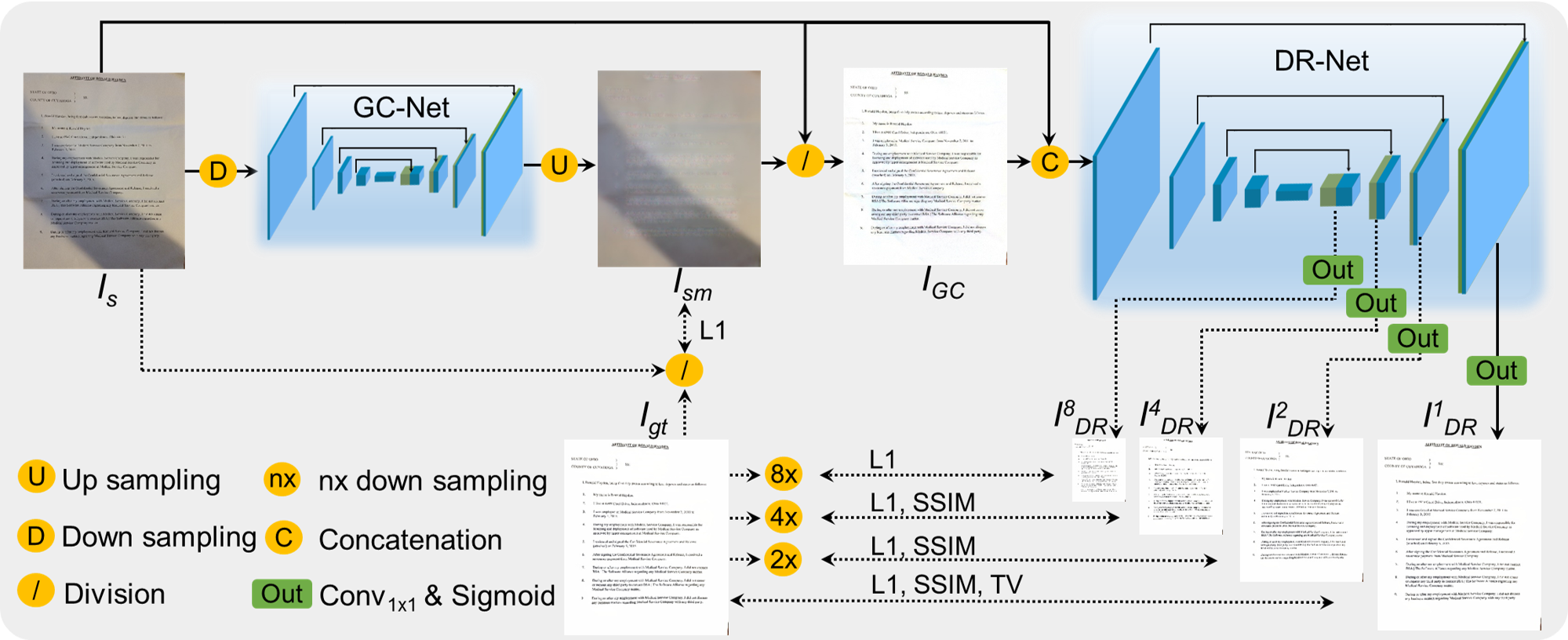
GCDRNet
Inference code and a pip-installable library for our paper Appearance Enhancement for Camera-captured Document Images in the Wild, accepted for IEEE Transactions on Artificial Intelligence.
GCDRNet enhances the appearance of camera-captured document images by chaining two networks: GCNet predicts a shadow/illumination map and DRNet restores the shadow-corrected image.
Install
pip install gcdrnet
For GPU support, install a CUDA build of PyTorch from the PyTorch index first (the plain PyPI install gives you the CPU wheels on most platforms):
pip install torch torchvision --index-url https://download.pytorch.org/whl/cu128
pip install gcdrnet
From a clone (development install):
pip install -e ".[dev]"
Tested on Python 3.13 with PyTorch 2.11 + CUDA 12.8; requires Python ≥ 3.10 and PyTorch ≥ 2.6.
Model weights
The weights (~110 MB total) are not bundled in the package. They are resolved lazily the first time you load a model, in this order:
- an explicit path you pass,
$GCDRNET_CHECKPOINTS_DIRor./checkpoints/<name>/checkpoint.pkl(the repo layout),- the on-disk cache (
$GCDRNET_CACHEor~/.cache/gcdrnet), - a download from
$GCDRNET_GCNET_URL/$GCDRNET_DRNET_URL(default: the GitHub release).
You can always download the weights manually from the paper's link and place them as:
checkpoints/gcnet/checkpoint.pkl
checkpoints/drnet/checkpoint.pkl
or point the library at your own host:
export GCDRNET_GCNET_URL=https://example.com/gcnet.pkl
export GCDRNET_DRNET_URL=https://example.com/drnet.pkl
Library usage
import cv2
from gcdrnet import GCDRNet

# Loads weights (explicit path, ./checkpoints/, cache, or download — in that order)
model = GCDRNet.from_pretrained(device="cuda")

# BGR ndarray in, BGR ndarray out (OpenCV convention)
enhanced = model.enhance(cv2.imread("doc.jpg"))
cv2.imwrite("doc_enhanced.png", enhanced)

# Convenience helpers
model.enhance_file("doc.jpg", "doc_enhanced.png")   # file in, file out
model.enhance_folder("distorted", "enhanced")        # batch a folder
Explicit checkpoint paths:
model = GCDRNet.from_checkpoints(
    gcnet="checkpoints/gcnet/checkpoint.pkl",
    drnet="checkpoints/drnet/checkpoint.pkl",
    device="cpu",
)
One-off call with a lazily-loaded, cached default model:
from gcdrnet import enhance_image
enhanced = enhance_image("doc.jpg")   # ndarray or path in, ndarray out
Inference runs at the image's native resolution, so GPU memory scales with image
size (~0.6 GiB per megapixel). Images that do not fit are retried automatically on
the CPU (disable with model.enhance(img, cpu_fallback=False)).
Command line
The package installs a gcdrnet console command (equivalent to python -m gcdrnet):
gcdrnet --input ./distorted --output ./enhanced
gcdrnet --input ./distorted --output ./enhanced --device cpu
gcdrnet --gcnet path/to/gcnet.pkl --drnet path/to/drnet.pkl
From a clone without installing, the historical entry point still works:
python infer.py --input ./distorted --output ./enhanced
Runs on the GPU when one is available and falls back to the CPU otherwise.
RealDAE
RealDAE (Real-world Document Image Appearance Enhancement) is a real-world dataset designed explicitly for camera-captured document images in the wild. It contains 600 pairs of degraded camera-captured document images and corresponding manually enhanced ground-truths (aligned at the pixel level). It can be downloaded here. Some examples are illustrated below.

Citation
If you are using our code and data, please cite our paper.
@article{zhang2023appearance,
title={Appearance Enhancement for Camera-captured Document Images in the Wild},
author={Zhang, Jiaxin and Liang, Lingyu and Ding, Kai and Guo, Fengjun and Jin, Lianwen},
journal={IEEE Transactions on Artificial Intelligence},
year={2023}}
Release history Release notifications | RSS feed

Download files
Download the file for your platform. If you're not sure which to choose, learn more about installing packages.
Source Distribution
Built Distribution
Filter files by name, interpreter, ABI, and platform.
If you're not sure about the file name format, learn more about wheel file names.
Copy a direct link to the current filters
File details
Details for the file gcdrnet-0.1.0.tar.gz.
File metadata
- Download URL: gcdrnet-0.1.0.tar.gz
- Upload date:
- Size: 16.4 kB
- Tags: Source
- Uploaded using Trusted Publishing? No
- Uploaded via: twine/6.2.0 CPython/3.13.14
File hashes
| Algorithm | Hash digest | |
|---|---|---|
| SHA256 |
7c4fcc398826fbb0b2847a249f4dca348052e70b460c48997d8f0b1d1b533a1a
|
|
| MD5 |
acdbf05699784af9c165f1aa42e342fa
|
|
| BLAKE2b-256 |
165ba1e50bc218f9982a2c7cf75b85af671e969c630dc8788e40805e35e83b5f
|
File details
Details for the file gcdrnet-0.1.0-py3-none-any.whl.
File metadata
- Download URL: gcdrnet-0.1.0-py3-none-any.whl
- Upload date:
- Size: 18.0 kB
- Tags: Python 3
- Uploaded using Trusted Publishing? No
- Uploaded via: twine/6.2.0 CPython/3.13.14
File hashes
| Algorithm | Hash digest | |
|---|---|---|
| SHA256 |
77ab659d32614d1afa5f7b866b8c9a27dc70c1076c8e18cbff150b05ee2d44e0
|
|
| MD5 |
c21c5dae443da98299685d4bf65a07af
|
|
| BLAKE2b-256 |
703bd96ba5907b621cdf8e466757b0940d0ff75a967c4c185ce21ff5e5d264d1
|






