
GEB simulates the environment (e.g., hydrology, floods), the individual people, households and orginizations as well as their interactions at both small and large scale.


Project description
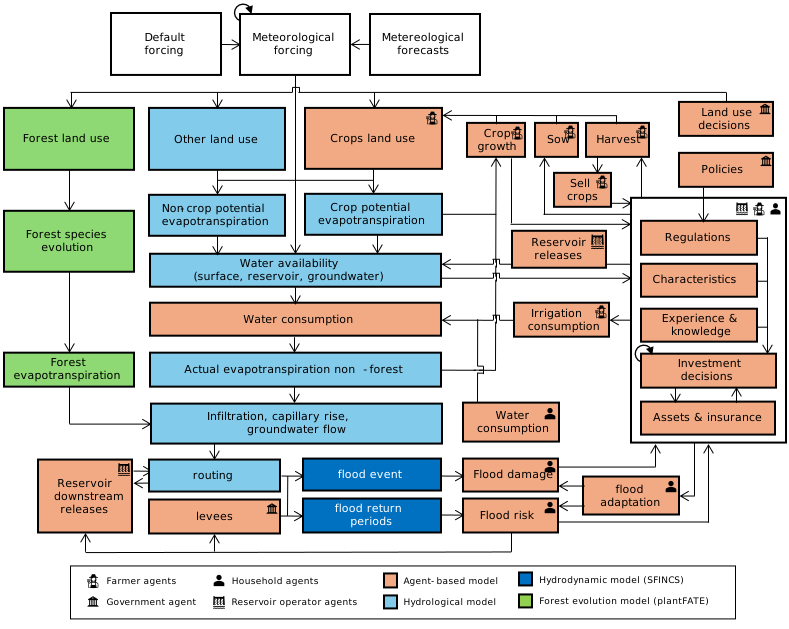
GEB (Geographical Environmental and Behavioural model) simulates the environment (e.g., hydrology, floods), the individual people, households and orginizations as well as their interactions at both small and large scale. The model does so through a "deep" coupling of an agent-based model a hydrological model, a vegetation model and a hydrodynamic model. You can find full documentation here.
The figure below shows a schematic overview of GEB.
Installation (not for development)
GEB can be installed with pip, including all dependencies on Windows, Linux and Mac OS X.
pip install geb
or with uv, which first needs to be installed by running:
on Linux and Mac OS X:
curl -LsSf https://astral.sh/uv/install.sh | sh
on Windows:
powershell -ExecutionPolicy ByPass -c "irm https://astral.sh/uv/install.ps1 | iex"
After, GEB can be installed with:
uv pip install geb --prerelease=allow
To run SFINCS (the hydrodynamic model), you also need to install Docker (on Windows) or Singularity (on Linux and Mac OS X). To install Docker you need to obtain and install Docker from their website (https://www.docker.com/get-started) and make sure Docker or Singularity is running.
Development installation and setup
To contribute to GEB, we recommend first cloning the repository from this repo using git clone, and then use uv to install the dependencies. Therefore, first install git and uv (see above)
Also create a folder where you would like to store the code and model, we call this the working directory. Note that this folder should NOT be placed into a cloud synchonized folder (e.g., OneDrive). In this working directory, create a folder called model, and place the model input files in this folder. The directory structure should look like this:
working directory
|   model
|   |   model.yml
|   |   build.yml│
|   |   input
|   |   (potential other files and folders)
Then, in the working directory, open a new terminal and run the following command to clone (download) all the code from the repository:
git clone git@github.com:GEB-model/GEB.git
Now the directory structure should look like this:
working directory
|   model
|   |   model.yml
|   |   build.yml
|   |   input
|   |   (potential other files and folders)
|   GEB
|   |   README.md
|   |   (all files and folders from the repository)
Then proceed with the following commands:
cd GEB  # switch the terminal to GEB code folder
git switch main  # switch to the main development branch by default, but may be changed to another branch
uv sync --dev  # install all dependencies using uv
You will now have a virtual environment (.venv) in the GEB folder with the right Python installation and all packages you need.
Now open Visual Studio Code in the GEB folder (or use the "File -> Open Folder" dialog in Visual Studio Code).
code .
Visual Studio code should now prompts you to install the recommended extensions, which we recommend you do. After installing the Python extension VS Code should also automatically use the environment you created earlier. To test this, open a terminal in Visusal Studio Code (Terminal -> New Terminal) and run:
geb --help
We have also prepared a configuration for the debugger in .vscode/launch.json.sample and a settings file in .vscode/settings.json.sample with some useful default settings. To activate these files, copy (i.e., not remove or rename) the files to .vscode/launch.json and .vscode/settings.json respectively.
The debugger assumes that you have the data files for the model located in ../model (i.e., your model.yml is in ..model/). You may need to adjust the paths in .vscode/launch.json to match your setup.
Happy gebbing! Let us know when you run into issues, and any contributions to GEB are more than welcome. You can find a list of active and past contributors at the bottom of this file.
Cite as
Model framework
de Bruijn, J. A., Smilovic, M., Burek, P., Guillaumot, L., Wada, Y., and Aerts, J. C. J. H.: GEB v0.1: a large-scale agent-based socio-hydrological model – simulating 10 million individual farming households in a fully distributed hydrological model, Geosci. Model Dev., 16, 2437–2454, https://doi.org/10.5194/gmd-16-2437-2023, 2023.
Applications
Kalthof, M. W. M. L., de Bruijn, J., de Moel, H., Kreibich, H., and Aerts, J. C. J. H.: Adaptive behavior of farmers under consecutive droughts results in more vulnerable farmers: a large-scale agent-based modeling analysis in the Bhima basin, India, NHESS, https://doi.org/10.5194/nhess-25-1013-2025, 2025.
Building on the shoulders of giants
GEB builds on, couples and extends several models, depicted in the figure below.
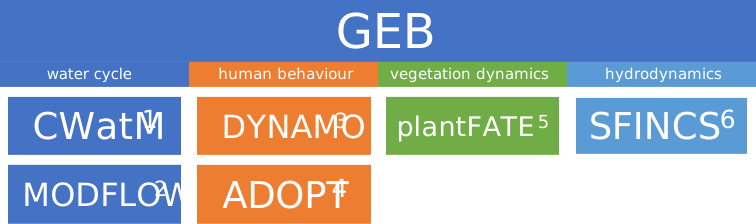
- Burek, Peter, et al. "Development of the Community Water Model (CWatM v1.04) A high-resolution hydrological model for global and regional assessment of integrated water resources management." (2019).
- Langevin, Christian D., et al. Documentation for the MODFLOW 6 groundwater flow model. No. 6-A55. US Geological Survey, 2017.
- Tierolf, Lars, et al. "A coupled agent-based model for France for simulating adaptation and migration decisions under future coastal flood risk." Scientific Reports 13.1 (2023): 4176.
- Streefkerk, Ileen N., et al. "A coupled agent-based model to analyse human-drought feedbacks for agropastoralists in dryland regions." Frontiers in Water 4 (2023): 1037971.
- Joshi, Jaideep, et al. "Plant-FATE-Predicting the adaptive responses of biodiverse plant communities using functional-trait evolution." EGU General Assembly Conference Abstracts. 2022.
- Leijnse, Tim, et al. "Modeling compound flooding in coastal systems using a computationally efficient reduced-physics solver: Including fluvial, pluvial, tidal, wind-and wave-driven processes." Coastal Engineering 163 (2021): 103796.
Developers (ordered by full-time equivalent working time on model)
Current or past contributors (in order of first to last contribution)
- Mikhail Smilovic
- Luca Guillaumot
- Romijn Servaas
- Thomas van Eldik
Release history Release notifications | RSS feed


Download files
Download the file for your platform. If you're not sure which to choose, learn more about installing packages.
Source Distribution
Built Distribution
Filter files by name, interpreter, ABI, and platform.
If you're not sure about the file name format, learn more about wheel file names.
Copy a direct link to the current filters
File details
Details for the file geb-1.0.0b6.tar.gz.
File metadata
- Download URL: geb-1.0.0b6.tar.gz
- Upload date:
- Size: 335.7 kB
- Tags: Source
- Uploaded using Trusted Publishing? Yes
- Uploaded via: uv/0.7.20
File hashes
| Algorithm | Hash digest | |
|---|---|---|
| SHA256 |
040f4c5894a7d979cb9d510f8384a047a3c9ed099e9dd4462be6e1a6c6de86c8
|
|
| MD5 |
a8a2b972d15b605b1ceedd622cba00a5
|
|
| BLAKE2b-256 |
40094ea13b46dde947a05e5e52a8222ea5594b126282e549cf0e60d46da63dae
|
File details
Details for the file geb-1.0.0b6-py3-none-any.whl.
File metadata
- Download URL: geb-1.0.0b6-py3-none-any.whl
- Upload date:
- Size: 377.2 kB
- Tags: Python 3
- Uploaded using Trusted Publishing? Yes
- Uploaded via: uv/0.7.20
File hashes
| Algorithm | Hash digest | |
|---|---|---|
| SHA256 |
bce5f7156fba062bda358bc706b7ee815c94811d3bafc3e0e97e7d88f5884f45
|
|
| MD5 |
2249289d8c56633f6e249be10e2a7135
|
|
| BLAKE2b-256 |
e21801a8f753757163ffabdd4877bb6d735627b553c1f348de7db8aace31ac67
|






