
This release is a pre-release and may not be stable for production use.
Gemini Research MCP Server


MCP server for AI-powered research using Gemini. Fast grounded search, URL extraction, comprehensive Deep Research, and session management.
Built on FastMCP 4.0.0b5 (beta, exact-pinned) with the modern sessionless
MCP protocol, Gemini 3.7 Flash, MCP Tasks (SEP-1732), the guard-pattern
elicitation flow, a BM25-compacted tool catalog, and pluggable Disk/Redis
storage for multi-worker deployments.
Architecture
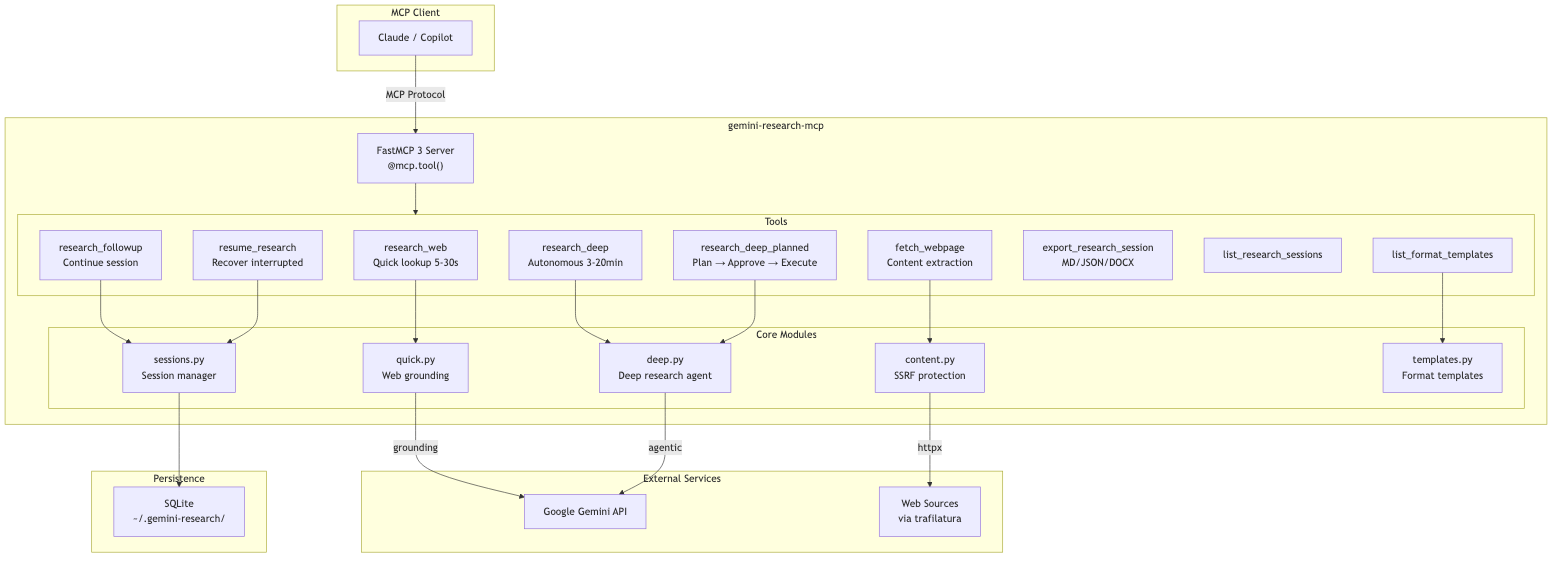
Mermaid source
flowchart TB
    subgraph Client["MCP Client"]
        Claude["Claude / Copilot"]
    end

    subgraph Server["gemini-research-mcp"]
        direction TB
        FastMCP["FastMCP 4 Server<br/>@mcp.tool()<br/>BM25SearchTransform"]

        subgraph Tools["Tools"]
            RW["research_web<br/>Quick lookup 5-30s"]
            RD["research_deep<br/>Autonomous 3-20min"]
            RF["research_followup<br/>Continue session"]
            RR["resume_research<br/>Recover interrupted"]
            FW["fetch_webpage<br/>Content extraction"]
            EX["export_research_session<br/>MD/JSON/DOCX"]
            LS["list_research_sessions"]
            LT["list_format_templates"]
        end

        subgraph Modules["Core Modules"]
            Quick["quick.py<br/>Web grounding"]
            Deep["deep.py<br/>Deep research agent"]
            Content["content.py<br/>SSRF protection"]
            StorageMod["storage.py<br/>Session + artifact store"]
            Templates["templates.py<br/>Format templates"]
        end
    end

    subgraph External["External Services"]
        Gemini["Google Gemini API"]
        Web["Web Sources<br/>via trafilatura"]
    end

    subgraph Storage["Persistence"]
        Disk["DiskStore<br/>XDG data directory"]
        Redis["Redis/Valkey<br/>shared multi-worker storage"]
    end

    Claude -->|"MCP Protocol"| FastMCP
    FastMCP --> Tools

    RW --> Quick
    RD --> Deep
    RF --> StorageMod
    RR --> StorageMod
    FW --> Content
    LT --> Templates

    Quick -->|"grounding"| Gemini
    Deep -->|"agentic"| Gemini
    Content -->|"httpx"| Web
    StorageMod --> Disk
    StorageMod -.-> Redis
Tools
The server exposes a BM25-compacted catalog: only the 5 tools below plus
the synthetic search_tools/call_tool pair are listed by default
(fastmcp.server.transforms.search.BM25SearchTransform). Utility tools
(fetch_webpage, research_followup, list_research_sessions,
list_format_templates, refine_research_plan,
inspect_mcp_server_for_gemini) are hidden from the default
listing to keep the catalog small for LLM tool-selection, but remain fully
callable directly by name or via the call_tool proxy, and are discoverable
by relevance through search_tools.
| Tool | Description | Latency | Visible by default |
|---|---|---|---|
research_web |
Fast web search with citations | 5-30 sec | ✅ |
research_deep |
Multi-step autonomous research (MCP Tasks) | 3-20 min | ✅ |
research_deep_max |
Maximum-comprehensiveness Deep Research for exhaustive/high-stakes work | longer-running | ✅ |
resume_research |
Resume interrupted/in-progress sessions | instant | ✅ |
export_research_session |
Disk-first export to persistent Markdown, JSON, or DOCX artifacts | instant | ✅ |
search_tools |
Discover hidden utility tools by relevance (BM25) | instant | ✅ |
call_tool |
Proxy to invoke any hidden tool by name | varies | ✅ |
research_followup |
Continue conversation after research | 5-30 sec | discoverable |
list_research_sessions |
List saved research sessions | instant | discoverable |
list_format_templates |
Browse report format templates | instant | discoverable |
refine_research_plan |
Iterate on or approve a collaborative_planning=True plan |
instant-3min | discoverable |
fetch_webpage |
Extract article content from a specific URL (SSRF-protected, chunkable) | 0.5-2 sec | discoverable |
inspect_mcp_server_for_gemini |
Diagnose remote MCP schemas and allowed tool names | varies | discoverable |
research_deep / research_deep_max Deep Research parameters
| Parameter | Type | Default | Description |
|---|---|---|---|
visualization |
"off" | "auto" |
"off" |
Let the agent produce and persist supporting images/charts. Images are persisted as MCP resource artifacts (research://exports/{id}), never inlined as text. |
collaborative_planning |
boolean | false |
Return the drafted research plan and an interaction ID instead of running the full report. Approve or iterate on the plan with `refine_research_plan(previous_interaction_id=..., decision="approve" |
fetch_webpage Parameters
fetch_webpage is discoverable through search_tools in the default server listing.
The fetch_webpage tool supports chunked reading for large pages and optional proxy routing:
| Parameter | Type | Default | Description |
|---|---|---|---|
url |
string | required | HTTP/HTTPS URL to fetch |
max_length |
integer | null | null |
Maximum characters to return (chunk size) |
start_index |
integer | 0 |
Character offset for pagination |
proxy_url |
string | null | null |
Optional HTTP(S) proxy URL for the request |
Notes:
- SSRF protection is always applied (private/internal hosts are blocked).
robots.txtis checked before fetch whenprotegois installed.- When output is truncated, the response includes a continuation hint with next
start_index. - If
proxy_urlis omitted, the server falls back toFETCH_PROXY_URLwhen set. proxy_urlmust be a public HTTP(S) host (private/internal proxy hosts are blocked).
Install the web extra for the highest-quality fetch_webpage experience:
pip install 'gemini-research-mcp[web]'
# or
uv add 'gemini-research-mcp[web]'
Without [web], fetch_webpage still works using the built-in HTML fallback, but trafilatura
extraction and protego-based robots.txt checks are unavailable.
Power User Workflow

Key insight: Gemini Deep Research runs asynchronously on Google's servers. Even if VS Code disconnects, your research continues. The
resume_researchtool retrieves completed work.
Features
- Auto-Clarification:
research_deepasks clarifying questions for vague queries. On the modern sessionless MCP protocol this uses a stateless guard pattern (InputRequiredResult, two independent tool calls, no server-held connection); legacy handshake clients still use MCP Elicitation (ctx.elicit()) - Deep Research Max:
research_deep_maxexposes Google's Max agent for exhaustive, high-stakes, and offline research workflows - Collaborative Planning:
research_deep(..., collaborative_planning=True)returns the drafted plan for approval before running the full report; refine or approve it withrefine_research_plan - Visualization:
visualization="auto"lets Deep Research produce supporting images, persisted as downloadable MCP resource artifacts - MCP Tasks: Real-time progress with streaming updates
- Session Persistence: Research sessions are automatically saved and can be resumed later; shareable across instances with Redis (see Storage backends)
- Persistent, Disk-First Exports: Export to Markdown, JSON, or professional DOCX with Table of Contents; artifacts survive restarts and can be shared through Redis while files are still written to disk by default
- File Search: Search your own data alongside web using
file_search_store_names - Remote MCP sources:
research_deep_maxcan call remote MCP servers usingmcp_servers - Format Instructions: Control report structure (sections, tables, tone)
- LangChain-ready: verified consumable via
langchain.mcp.MCPAdapter(LangChain1.4.0a2) over both stdio and streamable-http - seescripts/langchain_interop_smoke.py. LangChain is never a dependency of this package.
Installation
PyPI (recommended)
pip install gemini-research-mcp
# or
uv add gemini-research-mcp
Claude Desktop (MCPB Bundle)
Download the .mcpb bundle from GitHub Releases and open it in Claude Desktop for single-click installation.
The bundle uses UV runtime - dependencies are installed automatically, no Python required.
Configuration
| Variable | Required | Default | Description |
|---|---|---|---|
GEMINI_API_KEY |
Yes | — | Google AI Studio API key |
GEMINI_MODEL |
No | gemini-3.7-flash |
Model for research_web |
GEMINI_SUMMARY_MODEL |
No | gemini-3.7-flash |
Model for session summaries, titles, and clarification (thinking level low) |
DEEP_RESEARCH_AGENT |
No | deep-research-preview-04-2026 |
Default agent for research_deep; accepts fast, standard, deep-research, max, deep-research-max, or exact agent IDs |
FETCH_PROXY_URL |
No | — | Default HTTP(S) proxy for fetch_webpage |
GEMINI_RESEARCH_STORAGE_URL |
No | — | redis://... URL to share sessions/exports across multiple server instances/workers. Falls back to a local DiskStore when unset (see Storage backends) |
GEMINI_RESEARCH_STORAGE_PATH |
No | XDG data dir | Custom directory for the local DiskStore |
GEMINI_RESEARCH_TTL_SECONDS |
No | backend default | Override session/export TTL |
GEMINI_RESEARCH_EXPORT_DIR |
No | ~/.gemini-research/exports/ |
Disk-first destination when export_research_session has no output_path |
GEMINI_RESEARCH_TRANSPORT |
No | stdio |
stdio (default, historical) or streamable-http (opt-in, see Transports) |
GEMINI_RESEARCH_HTTP_HOST |
No | 127.0.0.1 |
Bind host for streamable-http. Non-loopback requires GEMINI_RESEARCH_HTTP_BEARER_TOKEN |
GEMINI_RESEARCH_HTTP_PORT |
No | 8000 |
Bind port for streamable-http |
GEMINI_RESEARCH_HTTP_PATH |
No | /mcp |
URL path for streamable-http |
GEMINI_RESEARCH_HTTP_BEARER_TOKEN |
No | — | Static bearer token required to call streamable-http. Never reuse GEMINI_API_KEY for this |
cp .env.example .env
# Edit .env with your API key
Transports
The server defaults to stdio, matching every existing VS Code/Claude Desktop configuration - no changes required for local, single-client use.
Streamable HTTP is opt-in, for remote or multi-client/multi-worker deployments, and is sessionless (no sticky session required across calls):
# Local-only (no auth required, loopback binding):
uv run gemini-research-mcp --transport streamable-http

# Remote-accessible (bearer token required - refuses to start otherwise):
GEMINI_RESEARCH_HTTP_BEARER_TOKEN=$(openssl rand -hex 32) \
  uv run gemini-research-mcp --transport streamable-http --host 0.0.0.0 --port 8000
Binding to any non-loopback host (0.0.0.0, ::, a LAN/public IP, etc.)
without GEMINI_RESEARCH_HTTP_BEARER_TOKEN set causes the server to refuse to
start - this prevents accidentally exposing your Gemini API quota to the
public internet. 127.0.0.1/localhost/::1 never require a token.
--transport, --host, --port, and --path CLI flags mirror the
GEMINI_RESEARCH_TRANSPORT/GEMINI_RESEARCH_HTTP_HOST/GEMINI_RESEARCH_HTTP_PORT/GEMINI_RESEARCH_HTTP_PATH
environment variables (CLI flags take precedence).
Storage backends
Research sessions and export artifacts are stored through a single backend-agnostic layer:
- Local (default): a
DiskStoreunder the XDG data directory (GEMINI_RESEARCH_STORAGE_PATHto override) - zero configuration, single process/single machine. - Distributed (Redis/Valkey): set
GEMINI_RESEARCH_STORAGE_URL=redis://host:6379/0to share sessions and exports across multiple server instances or workers - a session created (or an export produced) on one instance is immediately readable from another. Requires thedistributedextra:
uv add 'gemini-research-mcp[distributed]'
Deep Research vs Deep Research Max
Google exposes Deep Research variants through the Gemini Interactions API agent
field, not the regular Gemini model field:
research_deepusesdeep-research-preview-04-2026by default. Use it for interactive research, comparisons, investigations, and latency/cost-sensitive synthesis.research_deep_maxusesdeep-research-max-preview-04-2026. Use it when the user explicitly asks for Max, exhaustive/comprehensive due diligence, market maps, literature reviews, board-ready reports, offline/nightly research, or maximum completeness over speed.
For Copilot and other LLM clients, the two tools are intentionally separate so
Max can be selected from the tool name and description. There is no public
model parameter for Deep Research, because follow-up and quick research use
Gemini models while Deep Research uses Interactions agents.
Remote MCP servers for Deep Research
Google Deep Research exposes remote MCP server wiring through the Interactions
API. In this package, pass mcp_servers to research_deep_max when the agent
needs a specialized/private data source.
Experimental: remote MCP is gated to
deep-research-max-preview-04-2026. The standarddeep-research-preview-04-2026agent has reproduced provider-side finalization/retrieval500 api_errorfailures after successful MCP tool calls; useresearch_deep_maxor setDEEP_RESEARCH_AGENT=deep-research-max-preview-04-2026. See https://github.com/googleapis/python-genai/issues/2126.Known limitation (live-verified): even on
research_deep_max, the provider-side agent may call the remote MCP tool successfully (confirmed via server-side access logs) yet fail to ground its final report in the returned data — paraphrasing a marker token instead of quoting it verbatim, or omitting specific evidence IDs/facts from a retrieved evidence ledger. This is preview-API agent behavior, not a bug in this package. Treatresearch_deep_maxMCP evidence as best-effort: always verify citations against your own audit/quarantine path before trusting a report for decisions.
Example research_deep_max mcp_servers argument:
{
  "query": "Use the Market Researcher MCP evidence ledger to analyze the approved market gate.",
  "mcp_servers": [
    {
      "name": "Market Researcher MCP",
      "url": "https://example.com/mcp",
      "headers": {
        "Authorization": "Bearer ${TOKEN}"
      },
      "allowed_tools": [
        "market_get_mission",
        "market_get_runtime_policy",
        "market_get_task_status",
        "market_generate_report"
      ]
    }
  ]
}
Use allowed_tools aggressively. For evidence-led workflows, expose read-only
ledger/report/status tools to Deep Research Max and import the resulting report back
through your own audit/quarantine path. The MCP server tool accepts the
user-friendly string list shown above and normalizes it to the Gemini
Interactions API allowed_tools object shape before sending the request.
If Gemini returns a generic 400 invalid_request before the research task
starts, use inspect_mcp_server_for_gemini first. It lists the remote MCP
server tools and flags common compatibility problems such as missing tool
descriptions, empty input schemas, unsupported JSON Schema keywords, or
allowed_tools names that do not exist on the server. Public quick-tunnel hosts
may still be rejected before Gemini contacts the server; prefer a stable HTTPS
deployment for production E2E tests.
Live E2E validation is intentionally skipped by default because it is paid, slow, and depends on preview APIs. There are two useful levels:
- Minimal marker smoke test: proves remote MCP result inclusion with a stable
HTTPS MCP fixture that returns
MCP_E2E_FIXTURE_7B9F2Afromget_guardrail_summary.
GEMINI_API_KEY=... \
GEMINI_MCP_E2E_URL=https://fresh-stable-fixture.example/mcp \
uv run pytest -m e2e tests/test_deep_research_max_mcp_e2e.py -q
- Realistic evidence-inclusion test: proves Deep Research Max can start a new
research task and integrate substantive MCP-only evidence into the final
report. The fixture should expose read-only tools such as
market_get_mission,market_get_evidence_ledger,market_get_runtime_policy, andmarket_generate_report.
GEMINI_API_KEY=... \
GEMINI_MCP_REALISTIC_E2E_URL=https://fresh-realistic-fixture.example/mcp \
GEMINI_MCP_E2E_ARTIFACT_DIR=/tmp/gemini-realistic-e2e \
uv run pytest -m e2e tests/test_deep_research_max_mcp_e2e.py \
  -q -s -k realistic_evidence_inclusion
The realistic test checks for multiple MCP-only evidence IDs, distinctive metrics, platform constraints, a derived gate recommendation, and absence of the hidden/disallowed tool canary.
Usage
VS Code MCP
Add to .vscode/mcp.json:
{
  "servers": {
    "gemini-research": {
      "command": "uvx",
      "args": ["gemini-research-mcp"],
      "env": {
        "GEMINI_API_KEY": "your-api-key"
      }
    }
  }
}
Or run from source:
{
  "servers": {
    "gemini-research": {
      "command": "uv",
      "args": ["run", "--directory", "path/to/gemini-research-mcp", "gemini-research-mcp"],
      "envFile": "${workspaceFolder}/path/to/gemini-research-mcp/.env"
    }
  }
}
Command Line
uv run gemini-research-mcp
# or
uvx gemini-research-mcp
DOCX Export
Export research sessions to professional Word documents with:
- Cover page with title, date, and research metadata
- Clickable Table of Contents with navigation to sections
- Professional typography: Calibri fonts, 1-inch margins, 1.5x line spacing
- Executive summary with elegant formatting
- Full research report with proper heading hierarchy
- Sources section with full clickable URLs
- Metadata table with session details
VS Code Setup
To enable DOCX export, install with the [docx] extra:
{
  "servers": {
    "gemini-research": {
      "command": "uvx",
      "args": ["--from", "gemini-research-mcp[docx]", "gemini-research-mcp"],
      "env": {
        "GEMINI_API_KEY": "your-api-key"
      }
    }
  }
}
Downloading Files
export_research_session is disk-first: the file is always written
to disk and the absolute path is returned on the first line of the
response text (e.g. ✅ **Saved to:** /…/report.docx). This means any
MCP client — GUI or headless — gets a usable file path back.
By default exports are written to GEMINI_RESEARCH_EXPORT_DIR
(defaults to ~/.gemini-research/exports/; falls back to the system
temp dir if that location isn't writable). Override per-call with the
output_path argument:
{
  "name": "export_research_session",
  "arguments": {
    "interaction_id": "v1_...",
    "format": "docx",
    "output_path": "/absolute/or/relative/path/report.docx"
  }
}
When output_path is supplied, the parent directory must already
exist (no silent mkdir). GUI hosts (e.g. VS Code Copilot Chat) also
receive an EmbeddedResource attachment backed by the persistent
research://exports/{id} resource store for native "Save As" — clients that can't render it can safely ignore it.
Client compatibility
research_deep requires MCP Tasks support
(SEP-1732) on the client. Clients that do not advertise the tasks
capability will receive a -32600 error.
Known client status:
- VS Code Copilot Chat / MCP Inspector / Claude Desktop — supported.
- GitHub Copilot CLI — tracked upstream at
github/copilot-cli#2538;
until that lands, use
research_webfrom the CLI.
Installation (pip/uv)
# Install with DOCX support
pip install 'gemini-research-mcp[docx]'
# or
uv add 'gemini-research-mcp[docx]'
Features
| Feature | Description |
|---|---|
| Cover Page | Title, date, duration, tokens, AI agent |
| Clickable TOC | Internal hyperlinks navigate to sections |
| Syntax Highlighting | Pygments-powered code blocks with GitHub colors |
| Professional Styling | Calibri fonts, proper heading hierarchy (H1-H4) |
| Page Margins | Standard 1-inch (2.54cm) margins |
| Heading Spacing | keep_with_next prevents orphan headings |
| Sources | Full URLs as clickable hyperlinks |
| Pure Python | No external binaries (Pandoc not required) |
Resources
MCP Resources provide read-only data that clients can access:
| Resource | Description |
|---|---|
research://models |
Available models and their capabilities |
research://exports |
List cached exports ready for download |
research://exports/{id} |
Download an exported file (Markdown, JSON, or DOCX) |
File Downloads
The export_research_session tool creates exports and returns a resource URI. Clients (like VS Code) can then fetch the resource to download the file with proper MIME type handling.
Development
uv sync --extra dev
uv run pytest
uv run mypy src/
uv run ruff check src/
Tests
uv run pytest                    # Unit tests
uv run pytest -m e2e             # E2E tests (requires GEMINI_API_KEY)
uv run pytest --cov=src/gemini_research_mcp  # With coverage
Pricing
| Tool | Typical Cost |
|---|---|
research_web |
~$0.01-0.05 per query |
research_deep |
~$2-5 per task |
Deep Research uses ~80-160 searches and ~250k-900k tokens per task.
License
MIT
1 maintainer

Download files
Download the file for your platform. If you're not sure which to choose, learn more about installing packages.
Source Distribution
Built Distribution
Filter files by name, interpreter, ABI, and platform.
If you're not sure about the file name format, learn more about wheel file names.
Copy a direct link to the current filters
File details
Details for the file gemini_research_mcp-0.16.0b1.tar.gz.
File metadata
- Download URL: gemini_research_mcp-0.16.0b1.tar.gz
- Upload date:
- Size: 461.3 kB
- Tags: Source
- Uploaded using Trusted Publishing? Yes
- Uploaded via:
twine/7.0.0 CPython/3.13.14
File hashes
| Algorithm | Hash digest | |
|---|---|---|
| SHA256 |
10a2e871617a13080da512f873133f85bf907525c0dd36d4ebfd694ac516554c
|
|
| MD5 |
f1b3424781a9c9007e2012e97dd5289b
|
|
| BLAKE2b-256 |
9682b89406f9facd2eeaf31932b6c5fa021b7207a18157bbe0657b654bc29695
|
Provenance
The following attestation bundles were made for gemini_research_mcp-0.16.0b1.tar.gz:
Publisher:
publish.yml on machinemates-ai/gemini-research-mcp
-
Statement:
-
Statement type:
https://in-toto.io/Statement/v1 -
Predicate type:
https://docs.pypi.org/attestations/publish/v1 -
Subject name:
gemini_research_mcp-0.16.0b1.tar.gz -
Subject digest:
10a2e871617a13080da512f873133f85bf907525c0dd36d4ebfd694ac516554c - Sigstore transparency entry: 2656214642
- Sigstore integration time:
-
Permalink:
machinemates-ai/gemini-research-mcp@6b5e9426a606e7d9966468f9a84a6f49402e7743 -
Branch / Tag:
refs/tags/v0.16.0b1 - Owner: https://github.com/machinemates-ai
-
Access:
public
-
Token Issuer:
https://token.actions.githubusercontent.com -
Runner Environment:
github-hosted -
Publication workflow:
publish.yml@6b5e9426a606e7d9966468f9a84a6f49402e7743 -
Trigger Event:
release
-
Statement type:
File details
Details for the file gemini_research_mcp-0.16.0b1-py3-none-any.whl.
File metadata
- Download URL: gemini_research_mcp-0.16.0b1-py3-none-any.whl
- Upload date:
- Size: 96.7 kB
- Tags: Python 3
- Uploaded using Trusted Publishing? Yes
- Uploaded via:
twine/7.0.0 CPython/3.13.14
File hashes
| Algorithm | Hash digest | |
|---|---|---|
| SHA256 |
d6a7b1ac1a03e53a3b156de94d1bcb78f0d75d93763cbabb98f422b8322168f7
|
|
| MD5 |
f2db4e6530b50f0319fb9878080ba2e8
|
|
| BLAKE2b-256 |
8fb3057d3c82c94f2d2f0573f60a6853ee90fdc228b2acc0fd34b5cce383cfcf
|
Provenance
The following attestation bundles were made for gemini_research_mcp-0.16.0b1-py3-none-any.whl:
Publisher:
publish.yml on machinemates-ai/gemini-research-mcp
-
Statement:
-
Statement type:
https://in-toto.io/Statement/v1 -
Predicate type:
https://docs.pypi.org/attestations/publish/v1 -
Subject name:
gemini_research_mcp-0.16.0b1-py3-none-any.whl -
Subject digest:
d6a7b1ac1a03e53a3b156de94d1bcb78f0d75d93763cbabb98f422b8322168f7 - Sigstore transparency entry: 2656214758
- Sigstore integration time:
-
Permalink:
machinemates-ai/gemini-research-mcp@6b5e9426a606e7d9966468f9a84a6f49402e7743 -
Branch / Tag:
refs/tags/v0.16.0b1 - Owner: https://github.com/machinemates-ai
-
Access:
public
-
Token Issuer:
https://token.actions.githubusercontent.com -
Runner Environment:
github-hosted -
Publication workflow:
publish.yml@6b5e9426a606e7d9966468f9a84a6f49402e7743 -
Trigger Event:
release
-
Statement type:














