
genmodelfit
English · 日本語
genmodelfit tells you which image, video, music, sound-effect, speech (TTS) and 3D generation models run well on your PC.



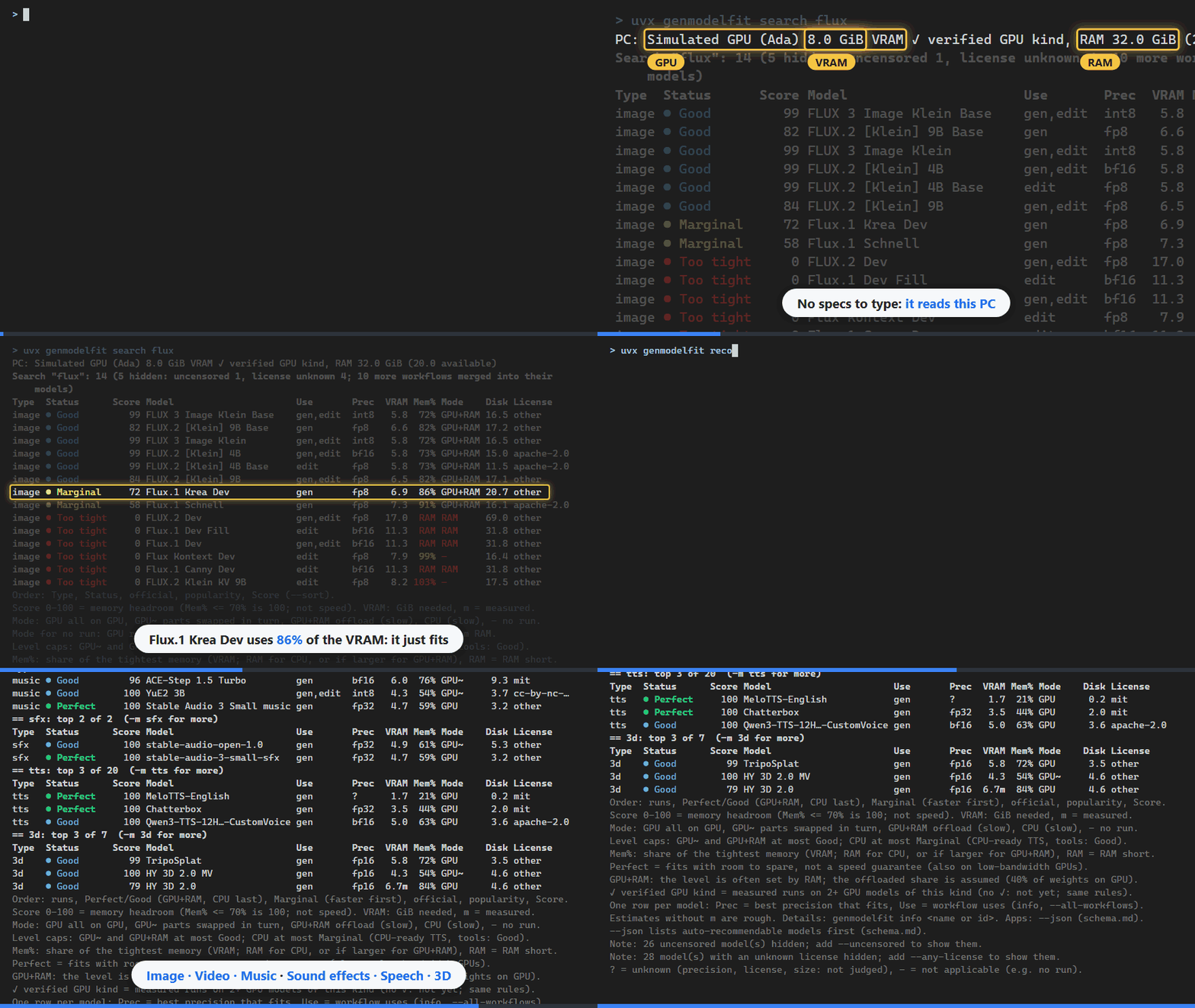
uvx genmodelfit search flux and uvx genmodelfit recommend with genmodelfit 0.13.1. The list is updated weekly, so
the models and counts change. In this GIF the GPU is a simulated Ada-generation one (8 GiB VRAM), not a real PC.
It is inspired by llmfit, which does this for LLMs. Status: alpha (CHANGELOG.md).
Quick start
Try it without installing. With uv, one command is enough. uv runs genmodelfit in its own temporary environment and fetches Python if needed; nothing is added to your Python or PATH.
uvx genmodelfit recommend         # the best models for this PC, per type
uvx genmodelfit system            # what was detected on this PC
Every command in this README works this way: write uvx genmodelfit instead of genmodelfit.
uvx may keep using the version it fetched before; uvx genmodelfit@latest … checks for a newer one first.
Install
pipx install genmodelfit        # once: pipx ensurepath, then open a new terminal
uv tool install genmodelfit     # once: uv tool update-shell, then open a new terminal
pip install genmodelfit
Command not found after pip install: run python -m genmodelfit … with the same Python you installed it into
(not for pipx or uv tool). More, including pip's "not on PATH" warning:
docs/commands.md.
To help with measurements: genmodelfit share (Help by measuring).
What it does
- Judges whether each model in its list runs on this PC, and how comfortably (from VRAM, RAM and GPU generation).
- Recommends the best models per type: image, video, music, sfx (sound effects), tts (speech), 3d.
- Downloads the files of a model, after showing the licenses and asking you.
- It does not generate anything. To run a model, use ComfyUI (or the runtime the model names). genmodelfit holds model information only, never weights.
Why not llmfit: it covers LLMs only (llmfit#41). For generation models the memory changes several times over with precision, resolution, frames and offloading.
Requirements
- Windows, Linux or macOS, Python 3.10 or newer (with
uvx, uv provides Python). - GPU: NVIDIA (CUDA). Without a usable NVIDIA GPU: AMD (ROCm), Intel (XPU) and Apple silicon (MPS), judged with the vendors' support tables. Integrated GPUs use shared memory; other PCs are judged as CPU-only. Which GPUs and OS versions count: docs/hardware.md.
Usage
genmodelfit system                                # 1. check your PC
genmodelfit recommend                             # 2. the best models per type
genmodelfit recommend -m image --task edit        #    only one type and one use
genmodelfit fit                                   # 3. everything that runs, in one table
genmodelfit info "Z-Image-Turbo"                  # 4. one model in detail
genmodelfit download "Z-Image-Turbo" --list       # 5. the files, without downloading
genmodelfit download "Z-Image-Turbo"              #    download into your ComfyUI
genmodelfit update --from-release                 # 6. fetch the latest signed list
system: the GPU, VRAM, RAM, page file, free disk, and whether the model list is still fresh.recommend: the top models of each type that run here, best first.-mpicks a type,--taska use inside it (genmodelfit typeslists them).fit: all models that run here (Perfect / Good / Marginal).--alladds tools and models that do not run,--sort scoreranks across types,--fit goodkeeps one level.info: files, licenses, memory in each mode, limits, and why it is or is not Verified.download: asks first, puts the files into your ComfyUI folders and checks every sha256. Without--comfyui-dirit looks for your ComfyUI and shows where it found it.update --from-release: the list is rebuilt weekly. A model whose link check is older than 30 days stops being Verified until you fetch a newer list.
Judge another PC
--vram and --ram (GiB) replace the detected sizes, e.g. genmodelfit recommend --vram 12 --ram 32. Only the
amount changes: with a usable NVIDIA GPU its generation is kept (reasons say "the generation"); otherwise --vram judges an NVIDIA GPU of unknown
generation. From the RTX 30 series on (30, 40, 50) the generation does not change the estimate, so this also checks a
GPU before you buy it. --width, --height, --frames, --length and --precision judge a specific setting.
Language
Output is in English by default. For Japanese, add --lang ja to any command, or save it once with
genmodelfit config set lang ja. Column names, level names and run-mode marks stay in English in both languages.
Details (the environment variable, Python, line wrapping): docs/commands.md.
Results
Example
genmodelfit recommend on a PC with 8 GiB VRAM and 32 GiB RAM, the top model per type (COLUMNS=100, the
simulated GPU of the GIF). tools/screenshots.py --readme
rebuilds this block:
$ genmodelfit recommend --vram 8 --ram 32 -n 1
PC: assumed 8.0 GiB VRAM (--vram), RAM 32.0 GiB (--ram)
Recommended: 6 of 83 (221 hidden: uncensored 26, tools 34, license unknown 28, too tight 133; 25
    more workflows merged into their models)
== image: top 1 of 32  (-m image for more)
Type  Status      Score Model                      Use       Prec  VRAM Mem% Mode    Disk License
image ● Good        100 Anima Base 1.0             gen,edit  bf16   5.7  71% GPU~     5.4 other
== video: top 1 of 12  (-m video for more)
Type  Status      Score Model                      Use       Prec  VRAM Mem% Mode    Disk License
video ● Good         96 Wan 2.2 5B TI2V            gen       fp16   6.1  76% GPU+RAM 16.9 apache-2.0
== music: top 1 of 10  (-m music for more)
Type  Status      Score Model                      Use       Prec  VRAM Mem% Mode    Disk License
music ● Good         96 ACE-Step 1.5 Turbo         gen       bf16   6.0  76% GPU~     9.3 mit
…
The first lines show the PC and how many models were hidden and why; a footer after the tables explains the marks. fit prints
the same columns in one table.
Fit levels
The level comes from how much of the memory the mode uses (VRAM on the GPU, RAM on the CPU), as in llmfit. Some modes cap it:
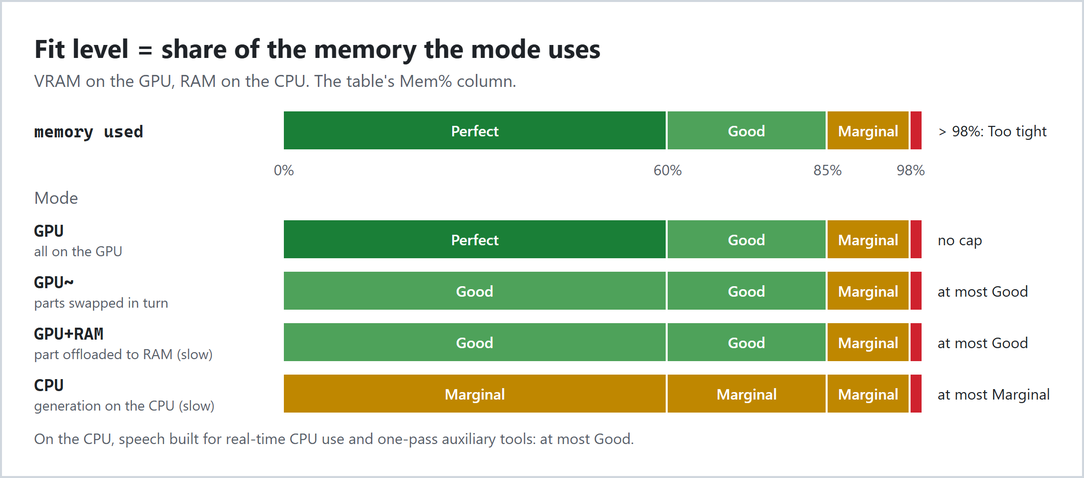
| level | use of memory | cap by mode |
|---|---|---|
| Perfect | ≤ 60% | only all on the GPU (GPU); room to spare, not a speed guarantee |
| Good | ≤ 85% | highest for GPU~ and GPU+RAM, and on the CPU for real-time speech and one-pass auxiliary tools |
| Marginal | ≤ 98% | highest for generation on the CPU or slightly short RAM |
| Too tight | > 98% | does not run |
| ? | — | not judged: the download size is unknown |
recommend lists models that run first, then Perfect / Good (GPU+RAM and CPU after the others), then Marginal.
The PC line shows "✓ verified GPU kind" when that kind of GPU has runs on two or more GPU models. Rules, including
when measurements set the level: docs/scoring.md.
Columns
| column | meaning |
|---|---|
| Score | 0–100: memory headroom (100 up to 70% Mem%); not speed, quality or popularity |
| Use | gen, edit, i2v, … (genmodelfit types) |
| Prec | the best precision that fits (fp16, bf16, fp8, int8, …) |
| VRAM | GiB needed in that mode; m = measured |
| Mem% | share of the tightest memory used (VRAM, or RAM on the CPU); RAM = system RAM is short |
| Mode | GPU all on GPU, GPU~ parts swapped in turn, GPU+RAM offload (slow), CPU (slow), - does not run |
Type, Status, Model, Disk (download GiB) and License (other = read it yourself) are what they say. On a
narrow terminal Disk and then Mem% are dropped first. Every column in detail:
docs/commands.md.
Unknown-license and uncensored models are hidden by default
Models whose license is unknown and uncensored models are not listed by default. Used without options, genmodelfit keeps you from picking such a model without knowing it. The number hidden is shown as a "Note" at the end of the results. To show them, add these options:
--any-license: also show models whose license is unknown--uncensored: also show uncensored models (with theCensoredcolumn;--content uncensoredshows only them)
uncensored marks models with safety filtering removed or made for adult output. They are never Verified by default.
Models aimed at sexual content involving minors are excluded entirely
(docs/sources.md).
Accuracy
As of 0.13.1, the estimates are calibrated on a few runs on one NVIDIA GPU and cross-checked against runs on another.
Treat values without m as rough. ComfyUI uses more VRAM when more is free, so a peak measured on a large GPU is not
the minimum. Counts and error figures: docs/accuracy.md.
Help by measuring
Measured runs on more GPUs make the estimates better. One command, no git needed (NVIDIA, AMD, Intel or Apple GPU; a GitHub account):
genmodelfit share
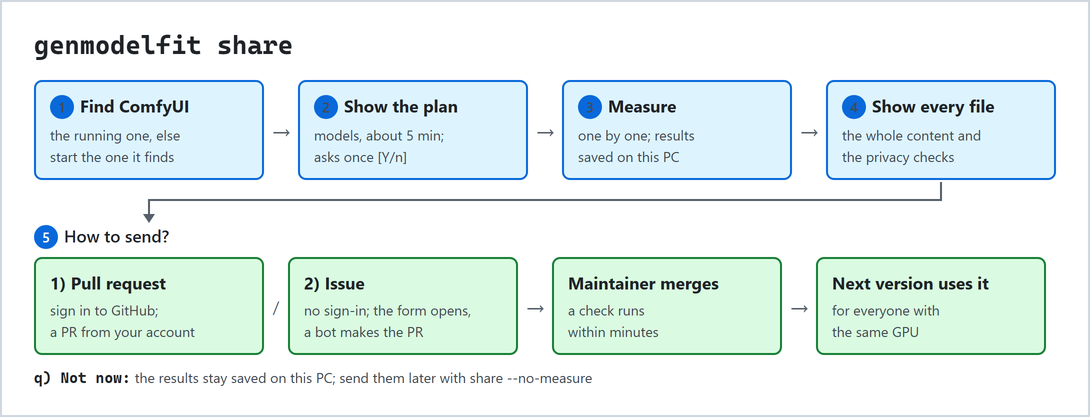
- It finds your ComfyUI (the running one, else the installed one it finds, started and stopped for you).
- It picks installed models worth measuring, about 5 minutes in total, shows the plan and asks once.
- It measures them one by one and saves the results on this PC.
- It shows every file to send, then asks: 1) a pull request (sign in to GitHub), 2) issues (no sign-in; a
bot makes the pull request), or q) not now (
share --no-measuresends them later). - A maintainer merges it, and the next version uses it for everyone with the same GPU.
genmodelfit measure measures one model you choose and sends nothing. It suggests only models with a known license
(share --any-license also takes unknown-license ones).
How the results are used: runs on NVIDIA with ComfyUI's dynamic VRAM (the default today) only cross-check the estimates. Runs without it (AMD, Intel, Apple, or NVIDIA with dynamic VRAM turned off) adjust the estimate for that GPU, and set the level when two people's runs agree. The ✓ needs runs on two or more GPU models of that kind.
Every step, keys, --dry-run, measuring at other settings, and bench for git users:
CONTRIBUTING.md.
Privacy
Network. Judging commands and the Python API make no network access (tested with every socket blocked; in
Python only update_from_release and download connect). Only these commands connect:
update: public data (GitHub, Hugging Face API, HEAD on model URLs);--from-releaseonlydb.jsonand its signature.download: the model files.download,measure,share: a ComfyUI running on this PC (127.0.0.1 ports 8188 and 8000), and only that one.measure/sharemay also fetch official templates and input images from GitHub; a ComfyUI they start listens on 127.0.0.1 only.benchtalks only to your--url.share: before measuring, only a check of a GitHub token you already have (api.github.com). After you agree, it signs in and opens the pull request (github.com, api.github.com).share --issueonly opens the form in your browser. The sign-in token is saved readable only by you.
No ~/.netrc credentials, no telemetry. Nothing is sent on its own.
What share sends (all of it is shown before you send):
- the GPU name, VRAM, vendor and backend, generation and compute capability (NVIDIA), driver version, and for AMD /
Intel GPUs the PCI model ID (a model number such as
1002:744c, the same on every card of that model; not the slot) - the OS family, RAM rounded to GiB, the ComfyUI and genmodelfit versions, the list version, the date (no time)
- the model, settings, result, peak VRAM / RAM, time and its breakdown (queue, load, sampling, decode), how the model
was loaded (
offload), how it was measured, a fingerprint of the model files, and a mark when the peak VRAM went over the GPU total into shared memory - the estimate genmodelfit made for that run (without your measurements of that model on that GPU)
- one failure record file per run: the model, the kind of failure, missing node names, the error's type name and the failing node type
Never sent: host or user names, paths, GPU UUID, PCI slot, serial numbers, IP addresses, the CPU name, the exact time, prompts, your inputs, generated images or sounds, error message text, runs you interrupted or that other programs disturbed, and models whose files are missing on this PC.
Per command: docs/schema.md; the file format: docs/schema.md.
For apps (Python / JSON)
The commands take --json (docs/schema.md).
The same in Python:
import genmodelfit as gmf

for f in gmf.recommend(modality="image", task="edit", limit=5):
    print(f.model.id, f.estimate.fit, f.to_dict()["memory_required_gb"])

if gmf.data_status().expired:  # is the list fresh enough for Verified (auto) models?
    db = gmf.update_from_release()  # the signed list (network: only this and gmf.download)

fit = gmf.judge_model("image_sdxl_simple", gpu_name="NVIDIA GeForce RTX 3060", vram_gb=12, driver="560.94")
print(fit.to_dict()["fit_level"])
Only names in gmf.__all__ are stable API. More (system_from for AMD / Intel, load_db, sessions):
docs/schema.md.
Reference
Commands
| command | what it does |
|---|---|
system [--all-gpus] |
this PC and the freshness of the list |
recommend [-m TYPE] [--task USE] [-n N] [--auto-only] |
best models per type |
fit [-m TYPE] [--fit LEVEL] [--sort KEY] [--all] |
every model that runs, in one table |
search <text> |
models whose id or name contains the text, judged for this PC |
types |
the six types, their uses (--task names) and counts |
info <name or id> |
files, licenses, estimate, limits, Verified checks |
download <name or id> [--list] [--comfyui-dir DIR] |
download the files (Download) |
update [--from-release] |
rebuild the list from upstream, or fetch the signed list |
gate |
how many models are Verified, and why the rest are held |
diff [OLD] [NEW] [--all] |
what changed between two lists (Maintenance) |
config [show | set KEY VALUE | unset KEY | path] |
settings: the ComfyUI folder for download and the display language (docs/download.md) |
measure [name or id] |
measure one model on ComfyUI and save the result (nothing is sent) |
share [file] |
measure for a few minutes and send the results as a GitHub pull request (--issue: the issue form) |
For maintainers: review, bench and contrib. Every command and option, the environment variables and exit codes:
docs/commands.md (the same text as --help).
Verified (auto-recommendation)
info shows verified (auto-recommend): yes (JSON auto) only when all checks pass: licenses on a
commercial-use allowlist, nothing gated, an official ComfyUI workflow, every URL checked within 30 days, sha256 known,
content sfw, and no review pending. The tables do not show it. Details: docs/gate.md.
Download
Only https URLs from the list, sha256-checked, resumable after Ctrl+C, never outside the destination, gated files never; uncensored and unknown-license files only with your consent (docs/download.md).
Data sources
The ComfyUI workflow templates (MIT), the Hugging Face Hub API (10,000+ downloads, as in llmfit) and a few hand-added models; not Civitai (docs/sources.md).
Maintenance
The list is rebuilt weekly; new or changed models stay pending (not Verified) until a person approves them
(genmodelfit review), and only reviewed data is signed (docs/release.md).
genmodelfit diff shows what changed (docs/commands.md).
The README images: tools/screenshots.py, tools/diagrams.py, tools/demo_gif.py.
Documentation
Every page, with who each one is for: docs/README.md.
License
Mozilla Public License 2.0 (MPL-2.0), including the bundled
data. You may use genmodelfit unmodified in closed-source apps. If you distribute modified genmodelfit files, publish
those files under MPL-2.0. When you bundle genmodelfit in your app (e.g. a PyInstaller exe), keep its license notices
and tell users where its source is (https://github.com/laxshmate/genmodelfit, MPL-2.0 §3.2); the same applies to
certifi (MPL-2.0). Third-party data: THIRD_PARTY_NOTICES.
Model licenses are reported, not granted.
1 maintainer

Metadata
1 maintainer
Release files for genmodelfit 0.14.1
For a detailed explanation of source distributions (sdists) and built distributions (wheels), please see the package formats documentation.
Source distribution (sdist)
| File | Size | Uploaded | Provenance | Actions |
|---|---|---|---|---|
| genmodelfit-0.14.1.tar.gz | 2.1 MB | With provenance | Details for genmodelfit-0.14.1.tar.gz |
Built distribution (wheel)
| File | Interpreter | ABI | Platform | Actions Reset |
|---|---|---|---|---|
| genmodelfit-0.14.1-py3-none-any.whl | Python 3 | none | any | Details for genmodelfit-0.14.1-py3-none-any.whl |
Total release size: 3.0 MB
Release files / genmodelfit-0.14.1.tar.gz
| Download URL | genmodelfit-0.14.1.tar.gz |
|---|---|
| Size | 2.1 MB |
| Tags | Source |
|
SHA-256 checksum How to use checksums |
df30af01ad76b564d0ff530e2d4aefccf655bd05efa3c15114fb3847d4e7c8ca
|
|
BLAKE2b-256 checksum How to use checksums |
0a66f5129cb45676c36b126c4d2b893bc4e62f2e05f60724dc335c9c18e30b15
|
| Upload date | |
|
Uploaded using Trusted Publishing? What is trusted publishing? |
Yes |
| Uploaded via |
twine/7.0.0 CPython/3.13.16
|
Provenance
Provenance describes where a file came from. On PyPI, provenance is shared via attestations, which provide a verifiable record of the build or publishing details. View details, limitations and caveats.


PyPI Publish Attestation
PyPI verified that this artifact, at this checksum, originated from the publisher listed below.
Signed by GitHub Actions, verified by PyPI on Oct 31, 2026.
Transparency logRelease files / genmodelfit-0.14.1-py3-none-any.whl
| Download URL | genmodelfit-0.14.1-py3-none-any.whl |
|---|---|
| Size | 864.7 kB |
| Tags | Python 3 |
|
SHA-256 checksum How to use checksums |
d3adc8f3b11782a7e1f7ce3ab60d7708dcb9089ba383cfba8385b49f5a326ab9
|
|
BLAKE2b-256 checksum How to use checksums |
19f39c6ce3c075bfe5fb1d21854c0a41ebd0ae79c36a9ebb435e0961815a6d9a
|
| Upload date | |
|
Uploaded using Trusted Publishing? What is trusted publishing? |
Yes |
| Uploaded via |
twine/7.0.0 CPython/3.13.16
|
Provenance
Provenance describes where a file came from. On PyPI, provenance is shared via attestations, which provide a verifiable record of the build or publishing details. View details, limitations and caveats.
PyPI Publish Attestation
PyPI verified that this artifact, at this checksum, originated from the publisher listed below.
Signed by GitHub Actions, verified by PyPI on Oct 31, 2026.
Transparency logSecurity for genmodelfit 0.14.1
Provenance
Provenance describes where a file came from. On PyPI, provenance is shared via attestations, which provide a verifiable record of the build or publishing details. View details, limitations and caveats.
Full provenance
All 2 files in this release have been uploaded with provenance metadata.
Attestation for genmodelfit-0.14.1.tar.gz
PyPI Publish Attestation
PyPI verified that this artifact, at this checksum, originated from the publisher listed below.
Signed by GitHub Actions, verified by PyPI on Oct 31, 2026.
Transparency logA note on package security
PyPI is a repository for distributing packages, not a service for auditing them. While third-party security researchers and our staff do their best to detect and remove malicious packages, PyPI cannot guarantee the quality, security or suitability of any given package.
To learn more about protecting yourself from malicious actors, visit our package security documentation.














