
Archived
This project has been archived by its maintainers, and is no longer receiving any updates.
getjump




- Retrieve and save images from manga distribution sites using GigaViewer
- If you read retrieved comics as combined PDF, use: eggplants/mkbook
Note: Redistribution of downloaded image data is prohibited. Please keep it to private use.
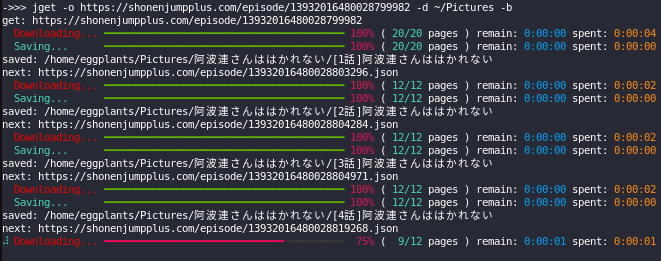
Screenshot
Valid URL Formats
<host>/(episode|magazine|volume)/<number><host>/series/<number>/first_episode<host>/rss/series/<number>(all episodes in the feed are downloaded)
Available Hosts
- https://comic-action.com
- https://comic-days.com
- https://comic-earthstar.com
- https://comic-gardo.com
- https://comic-ogyaaa.com
- https://comic-seasons.com
- https://comic-trail.com
- https://comic-y-ours.com
- https://comic-zenon.com
- https://comicborder.com
- https://feelweb.jp
- https://ichicomi.com
- https://kuragebunch.com
- https://magcomi.com
- https://mangatime-square.com
- https://ourfeel.jp
- https://shonenjumpplus.com
- https://tonarinoyj.jp
- https://www.sunday-webry.com
Deleted
- https://comicbushi-web.com
- Moved to: https://comic-growl.com
- https://www.corocoro.jp
- Replaced with original viewer
- https://comic-growl.com
- Replaced with Comici+
- https://pocket.shonenmagazine.com
- Replaced with original viewer
- https://viewer.heros-web.com
- Replaced with Comici+
Install
pip install getjump
CLI
Usage
$ jget -b https://kuragebunch.com/episode/10834108156628843815
get: https://kuragebunch.com/episode/10834108156628843815
  Downloading... ━━━━━━━━━━━━━━━━━━━━━━━━━━━━━━━━━━━━━━━━ 100% ( 18/18 pages ) remain: 0:00:00 spent: 0:00:02
  Saving...      ━━━━━━━━━━━━━━━━━━━━━━━━━━━━━━━━━━━━━━━━ 100% ( 18/18 pages ) remain: 0:00:00 spent: 0:00:00
saved: 少女終末旅行/01 星空
next: https://kuragebunch.com/episode/10834108156628843819
...
saved: 少女終末旅行/42 終末
done.
Help
$ jget -h
usage: jget [-h] [-b] [-d DIR] [-f] [-o] [-m] [-u ID] [-p PW] [-q] [-V] url

Get images from jump web viewer

positional arguments:
  url                    target url

options:
  -h, --help             show this help message and exit
  -b, --bulk             download series in bulk (default: False)
  -d DIR, --savedir DIR  directory to save downloaded images (default: .)
  -f, --first            download only first page (default: False)
  -o, --overwrite        overwrite (default: False)
  -m, --metadata         save metadata as json (default: False)
  -u ID, --username ID   username if you want to login (default: None)
  -p PW, --password PW   password if you want to login (default: None)
  -q, --quiet            disable console print (default: False)
  -V, --version          show program's version number and exit

available urls:
  - https://comic-action.com
  - https://comic-days.com
  - https://comic-earthstar.com
  - https://comic-gardo.com
  - https://comic-ogyaaa.com
  - https://comic-seasons.com
  - https://comic-trail.com
  - https://comic-y-ours.com
  - https://comic-zenon.com
  - https://comicborder.com
  - https://feelweb.jp
  - https://ichicomi.com
  - https://kuragebunch.com
  - https://magcomi.com
  - https://mangatime-square.com
  - https://ourfeel.jp
  - https://shonenjumpplus.com
  - https://www.sunday-webry.com
  - https://tonarinoyj.jp
Library
Overview
from getjump import GetJump
g = GetJump()  # create session

g.get(
    url: str,
    save_path: str = ".",
    overwrite: bool = True,
    only_first: bool = False,
    username: str | None = None,
    password: str | None = None,
)
# >>> (next_uri: str | None, prev_title: str, saved: bool)

g.login(
    url: str,
    username: str | None = None,
    password: str | None = None,
    overwrite: bool = False,
)
# >>> logined_response: requests.Response | None

g.is_valid_uri(url: str)
# >>> is_valid_uri: bool
Download all series
To download all series at once:
from getjump import GetJump as g

G = g()
next_uri = "https://shonenjumpplus.com/episode/13932016480028799982.json"
while next_uri:
    next_uri, prev_title, saved = G.get(next_uri, overwrite=False)
    if saved:
        print("saved:", prev_title)
    print("next:", next_uri)
Login
To get purchased or login-required works:
from getjump import GetJump as g

G = g()
G.login("https://shonenjumpplus.com", username="***", password="***")
G.login("https://comic-days.com", username="***", password="***")
...
G.get(...)
License
MIT
Reference
- fa0311/jump-downloader
- 少年ジャンププラスの漫画をダウンロードするライブラリ - yuki0311.com
- はてな開発の新マンガビューワを「少年ジャンプ+」が採用。集英社と共同でサイト成長、マネタイズの両面を加速 - プレスリリース - 株式会社はてな
- はてな、集英社「少年ジャンプ+」ブラウザ版への機能提供を拡張。ブラウザ版への電子版「週刊少年ジャンプ」定期購読が可能に|株式会社はてなのプレスリリース
- GigaViewer の検索結果 - プレスリリース - 株式会社はてな
- GigaViewer(ギガビューワー)を作るにあたって - daily thinking running
1 maintainer

Metadata
1 maintainer
Release files for getjump 3.0.2
For a detailed explanation of source distributions (sdists) and built distributions (wheels), please see the package formats documentation.
Source distribution (sdist)
| File | Size | Uploaded | |
|---|---|---|---|
| getjump-3.0.2.tar.gz | 11.0 kB | Details |
Built distribution (wheel)
| File | Interpreter | ABI | Platform | Reset |
|---|---|---|---|---|
| getjump-3.0.2-py3-none-any.whl | Python 3 | none | any | Details |
Total release size: 22.2 kB
Release files / getjump-3.0.2.tar.gz
| Download URL | getjump-3.0.2.tar.gz |
|---|---|
| Size | 11.0 kB |
| Tags | Source |
|
SHA-256 checksum How to use checksums |
95040ab131abac83f50e9b3030f5c57b0d66355d005ede699039ce7952ee69f5
|
|
BLAKE2b-256 checksum How to use checksums |
73c355507f815648a1f1b709a135034390b3c34ae52498c288cddbf557dff33d
|
| Upload date | |
|
Uploaded using Trusted Publishing? What is trusted publishing? |
Yes |
| Uploaded via |
uv/0.12.7 {"installer":{"name":"uv","version":"0.12.7","subcommand":["publish"]},"python":null,"implementation":{"name":null,"version":null},"distro":{"name":"Ubuntu","version":"24.04","id":"noble","libc":null},"system":{"name":null,"release":null},"cpu":null,"openssl_version":null,"setuptools_version":null,"rustc_version":null,"ci":true}
|
Release files / getjump-3.0.2-py3-none-any.whl
| Download URL | getjump-3.0.2-py3-none-any.whl |
|---|---|
| Size | 11.2 kB |
| Tags | Python 3 |
|
SHA-256 checksum How to use checksums |
19cff528c0c4d28836007a7f61a749b9179b304189192e37b7359cdb7eb05d0d
|
|
BLAKE2b-256 checksum How to use checksums |
1c8a0a5a7058598dee2b29f66809e0329b403e04665e570eb9ba028f98a7e27b
|
| Upload date | |
|
Uploaded using Trusted Publishing? What is trusted publishing? |
Yes |
| Uploaded via |
uv/0.12.7 {"installer":{"name":"uv","version":"0.12.7","subcommand":["publish"]},"python":null,"implementation":{"name":null,"version":null},"distro":{"name":"Ubuntu","version":"24.04","id":"noble","libc":null},"system":{"name":null,"release":null},"cpu":null,"openssl_version":null,"setuptools_version":null,"rustc_version":null,"ci":true}
|














