
Get and save images from jump web viewer
Verified details
These details have been verified by PyPIProject links
GitHub Statistics
Maintainers

Project description
getjump




- Retrieve and save images from manga distribution sites using GigaViewer
- If you read retrieved comics as combined PDF, use: eggplants/mkbook
Note: Redistribution of downloaded image data is prohibited. Please keep it to private use.
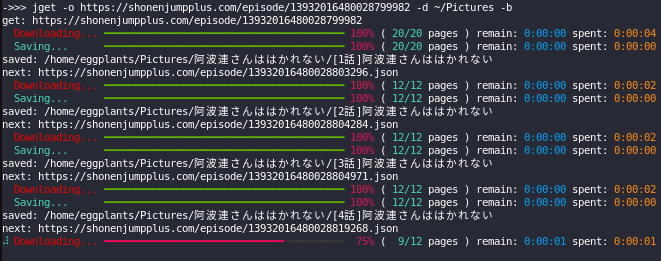
Screenshot
Valid URL Formats
<host>/(episode|magazine|volume)/<number>
Available Hosts
https://comic-action.comhttps://comic-days.comhttps://comic-earthstar.comhttps://comic-gardo.comhttps://comic-ogyaaa.comhttps://comic-seasons.comhttps://comic-trail.comhttps://comic-y-ours.comhttps://comic-zenon.comhttps://comicborder.comhttps://feelweb.jphttps://ichicomi.comhttps://kuragebunch.comhttps://magcomi.comhttps://ourfeel.jphttps://shonenjumpplus.comhttps://tonarinoyj.jphttps://viewer.heros-web.comhttps://www.sunday-webry.com
Install
pip install getjump
CLI
Usage
$ jget -b https://kuragebunch.com/episode/10834108156628843815
get: https://kuragebunch.com/episode/10834108156628843815
  Downloading... ━━━━━━━━━━━━━━━━━━━━━━━━━━━━━━━━━━━━━━━━ 100% ( 18/18 pages ) remain: 0:00:00 spent: 0:00:02
  Saving...      ━━━━━━━━━━━━━━━━━━━━━━━━━━━━━━━━━━━━━━━━ 100% ( 18/18 pages ) remain: 0:00:00 spent: 0:00:00
saved: 少女終末旅行/01 星空
next: https://kuragebunch.com/episode/10834108156628843819
...
saved: 少女終末旅行/42 終末
done.
Help
$ jget -h
usage: jget [-h] [-b] [-d DIR] [-f] [-o] [-m] [-u ID] [-p PW] [-q] [-V] url

Get images from jump web viewer

positional arguments:
  url                    target url

options:
  -h, --help             show this help message and exit
  -b, --bulk             download series in bulk (default: False)
  -d DIR, --savedir DIR  directory to save downloaded images (default: .)
  -f, --first            download only first page (default: False)
  -o, --overwrite        overwrite (default: False)
  -m, --metadata         save metadata as json (default: False)
  -u ID, --username ID   username if you want to login (default: None)
  -p PW, --password PW   password if you want to login (default: None)
  -q, --quiet            disable console print (default: False)
  -V, --version          show program's version number and exit

available urls:
  - https://comic-action.com
  - https://comic-days.com
  - https://comic-earthstar.com
  - https://comic-gardo.com
  - https://comic-ogyaaa.com
  - https://comic-seasons.com
  - https://comic-trail.com
  - https://comic-y-ours.com
  - https://comic-zenon.com
  - https://comicborder.com
  - https://feelweb.jp
  - https://ichicomi.com
  - https://kuragebunch.com
  - https://magcomi.com
  - https://ourfeel.jp
  - https://shonenjumpplus.com
  - https://www.sunday-webry.com
  - https://tonarinoyj.jp
  - https://viewer.heros-web.com
Library
Overview
from getjump import GetJump
g = GetJump()  # create session

g.get(
    url: str,
    save_path: str = ".",
    overwrite: bool = True,
    only_first: bool = False,
    username: str | None = None,
    password: str | None = None,
)
# >>> (next_uri: str | None, prev_title: str, saved: bool)

g.login(
    url: str,
    username: str | None = None,
    password: str | None = None,
    overwrite: bool = False,
)
# >>> logined_response: requests.Response | None

g.is_valid_uri(url: str)
# >>> is_valid_uri: bool
Download all series
To download all series at once:
from getjump import GetJump as g

G = g()
next_uri = "https://shonenjumpplus.com/episode/13932016480028799982.json"
while next_uri:
    next_uri, prev_title, saved = G.get(next_uri, overwrite=False)
    if saved:
        print("saved:", prev_title)
    print("next:", next_uri)
Login
To get purchased or login-required works:
from getjump import GetJump as g

G = g()
G.login("https://shonenjumpplus.com", username="***", password="***")
G.login("https://comic-days.com", username="***", password="***")
...
G.get(...)
License
MIT
Reference
- fa0311/jump-downloader
- 少年ジャンププラスの漫画をダウンロードするライブラリ - yuki0311.com
- はてな開発の新マンガビューワを「少年ジャンプ+」が採用。集英社と共同でサイト成長、マネタイズの両面を加速 - プレスリリース - 株式会社はてな
- はてな、集英社「少年ジャンプ+」ブラウザ版への機能提供を拡張。ブラウザ版への電子版「週刊少年ジャンプ」定期購読が可能に|株式会社はてなのプレスリリース
- GigaViewer の検索結果 - プレスリリース - 株式会社はてな
- GigaViewer(ギガビューワー)を作るにあたって - daily thinking running
Project details
Verified details
These details have been verified by PyPIProject links
GitHub Statistics
Maintainers
Release history Release notifications | RSS feed


Download files
Download the file for your platform. If you're not sure which to choose, learn more about installing packages.
Source Distribution
getjump-2.10.1.tar.gz
(9.7 kB
view details)
Built Distribution
Filter files by name, interpreter, ABI, and platform.
If you're not sure about the file name format, learn more about wheel file names.
Copy a direct link to the current filters
File details
Details for the file getjump-2.10.1.tar.gz.
File metadata
- Download URL: getjump-2.10.1.tar.gz
- Upload date:
- Size: 9.7 kB
- Tags: Source
- Uploaded using Trusted Publishing? Yes
- Uploaded via: uv/0.11.7 {"installer":{"name":"uv","version":"0.11.7","subcommand":["publish"]},"python":null,"implementation":{"name":null,"version":null},"distro":{"name":"Ubuntu","version":"24.04","id":"noble","libc":null},"system":{"name":null,"release":null},"cpu":null,"openssl_version":null,"setuptools_version":null,"rustc_version":null,"ci":true}
File hashes
| Algorithm | Hash digest | |
|---|---|---|
| SHA256 |
225271527cbaea6ccd596c9ce75648afa5f1f1e9b9f8dce811d13f004e134a06
|
|
| MD5 |
4a4bff33951e3f8961557bc9c3051c24
|
|
| BLAKE2b-256 |
9443263966144e7b27178938df180535afe05fa698ae4d492e07717d015ebfbb
|
File details
Details for the file getjump-2.10.1-py3-none-any.whl.
File metadata
- Download URL: getjump-2.10.1-py3-none-any.whl
- Upload date:
- Size: 9.9 kB
- Tags: Python 3
- Uploaded using Trusted Publishing? Yes
- Uploaded via: uv/0.11.7 {"installer":{"name":"uv","version":"0.11.7","subcommand":["publish"]},"python":null,"implementation":{"name":null,"version":null},"distro":{"name":"Ubuntu","version":"24.04","id":"noble","libc":null},"system":{"name":null,"release":null},"cpu":null,"openssl_version":null,"setuptools_version":null,"rustc_version":null,"ci":true}
File hashes
| Algorithm | Hash digest | |
|---|---|---|
| SHA256 |
0bd633e481d4dbf641acaaa14341d00976dfbf9054c5efa011a24271273139a6
|
|
| MD5 |
a04cb60ac25afbdaa7cd2bcb2c47c787
|
|
| BLAKE2b-256 |
eea386af4498956d5caf2b1bdd1bc21e3f33539f73cd73583adf2d7bb0e05657
|






