
gguf node for comfyui

Project description
gguf node for comfyui 

install it via pip/pip3
pip install gguf-node
for all/general user(s)
enter the user menu by:
py -m gguf_node
opt 1 to download the compressed comfy pack (7z), decompress it, and run the .bat file striaght
for technical user/developer(s)
opt 2 to clone the gguf repo to the current directory (navigate to ./ComfyUI/custom_nodes first)
Please select:
- download the full pack
- clone the node only
Enter your choice (1 to 2): _
alternatively, you could execute the git clone command to perform that task (see below):
navigate to ./ComfyUI/custom_nodes, clone the gguf repo to that folder
git clone https://github.com/calcuis/gguf
check the dropdown menu for gguf
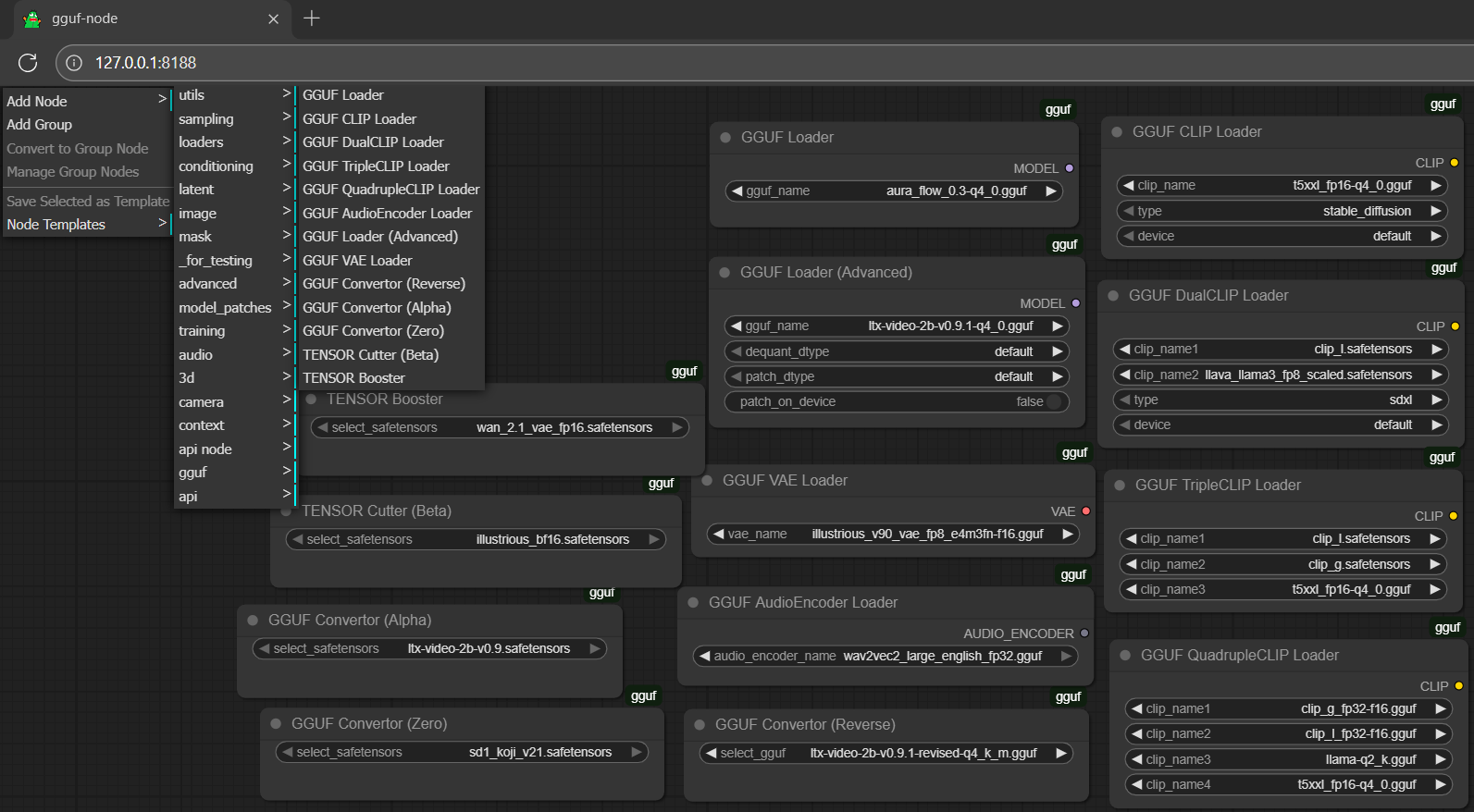
if you opt to clone the repo to custom_nodes (method 2); you need gguf-connector as well
setup (in general)
- drag gguf file(s) to diffusion_models folder (./ComfyUI/models/diffusion_models)
- drag clip or encoder(s) to text_encoders folder (./ComfyUI/models/text_encoders)
- drag controlnet adapter(s), if any, to controlnet folder (./ComfyUI/models/controlnet)
- drag lora adapter(s), if any, to loras folder (./ComfyUI/models/loras)
- drag vae decoder(s) to vae folder (./ComfyUI/models/vae)
workflow
- drag the workflow json file to the activated browser; or
- drag any generated output file (i.e., picture, video, etc.; which contains the workflow metadata) to the activated browser
simulator
- design your own prompt; or
- generate a random prompt/descriptor by the simulator (though it might not be applicable for all)
reference
Release history Release notifications | RSS feed


Download files
Download the file for your platform. If you're not sure which to choose, learn more about installing packages.
Source Distribution
Built Distribution
Filter files by name, interpreter, ABI, and platform.
If you're not sure about the file name format, learn more about wheel file names.
Copy a direct link to the current filters
File details
Details for the file gguf_node-0.0.4.tar.gz.
File metadata
- Download URL: gguf_node-0.0.4.tar.gz
- Upload date:
- Size: 3.6 kB
- Tags: Source
- Uploaded using Trusted Publishing? No
- Uploaded via: twine/4.0.2 CPython/3.11.4
File hashes
| Algorithm | Hash digest | |
|---|---|---|
| SHA256 |
940202a71c0538da00f7cf4f15efb7407325deb56c4c1d1f6d3c92cdeaef3866
|
|
| MD5 |
31b1e941210c1672d6f49e70f312ef67
|
|
| BLAKE2b-256 |
812f8b462b5363992975160d7016d5a1104902843596b017d152ce156525170a
|
File details
Details for the file gguf_node-0.0.4-py2.py3-none-any.whl.
File metadata
- Download URL: gguf_node-0.0.4-py2.py3-none-any.whl
- Upload date:
- Size: 4.1 kB
- Tags: Python 2, Python 3
- Uploaded using Trusted Publishing? No
- Uploaded via: twine/4.0.2 CPython/3.11.4
File hashes
| Algorithm | Hash digest | |
|---|---|---|
| SHA256 |
7396d533142915d377c18141fc1405fb18deb0092c89a9993686f5d335242d25
|
|
| MD5 |
7f32e67442d55e1a73230e3bbd7707c2
|
|
| BLAKE2b-256 |
cf25d2b77a2a195a149dcd80c3fc2e34c89984916342475fb139e178be40a2b0
|






