
Gingugu
Long-term memory for AI coding agents.
Gingugu is an open-source MCP server. One SQLite file on your machine. It keeps what your agent learned — decisions, bugs, gotchas, the why behind the code — and brings it back at the moment it matters, across sessions, repos, and projects. No cloud, no API keys, no telemetry.
🌐 gingugu.com — the tour, with live demos of spreading activation and the Codebase X-ray.




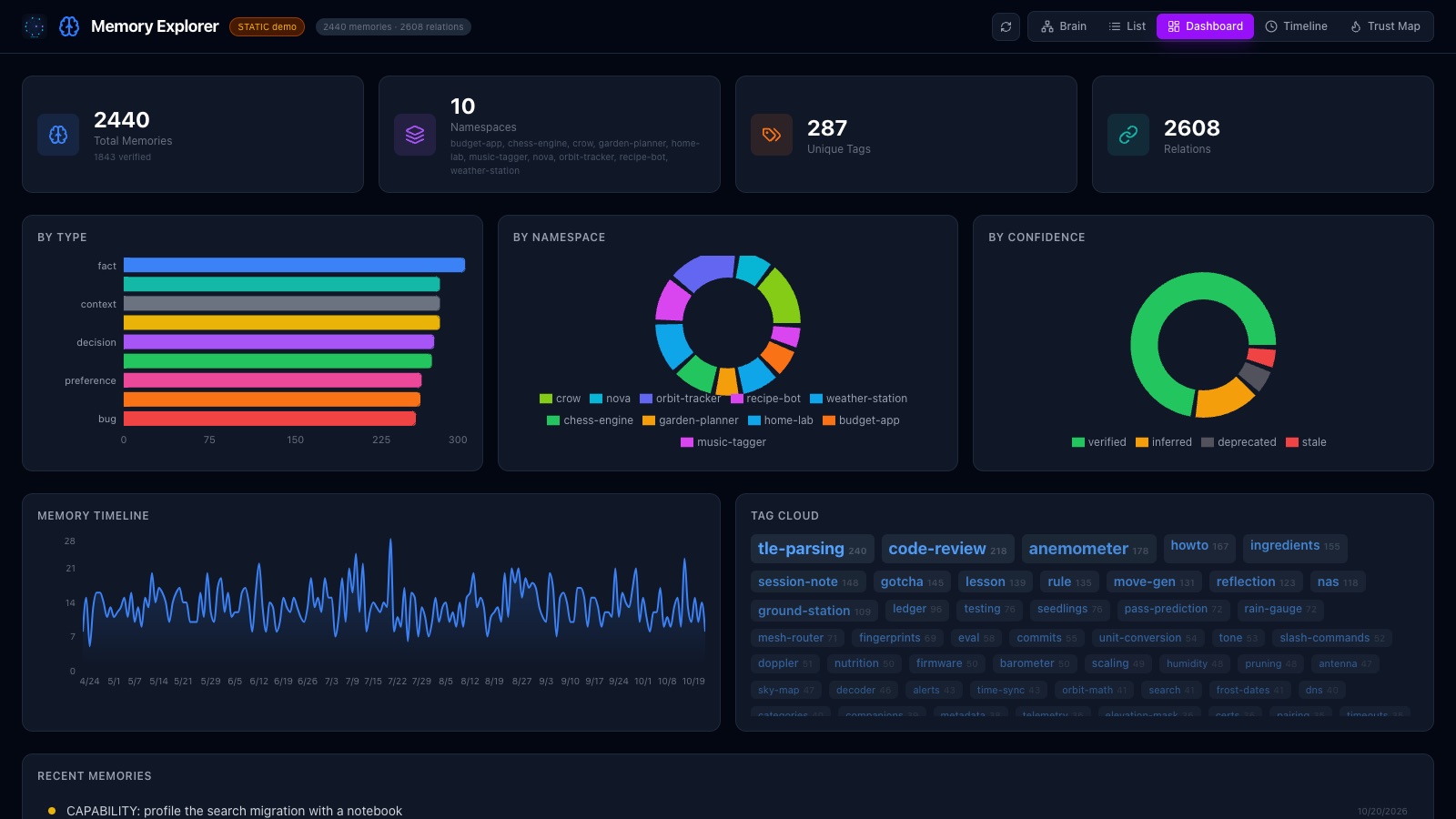
The Memory Explorer on demo data. Try the live demo.
📋 Table of Contents
- Why Gingugu
- FAQ
- Features
- Architecture
- Setup
- Memory Explorer UI
- Configuration
- Usage
- Development
- Troubleshooting
Why Gingugu
Every session with an AI assistant starts from zero. The decisions you made yesterday, the bug you fixed last week, the reason the auth code is shaped the way it is — gone. You explain it again, or the agent guesses.
Gingugu is a structured long-term brain the agent talks to over MCP:
- Remembers across sessions, repos, and projects
- Organizes knowledge as typed memories in namespaces, linked by typed relations
- Ranks memories by relevance, freshness, access, and confidence
- Surfaces what matters at session start, on a prompt, or before a tool call
- Consolidates duplicate and related knowledge on demand
Memory comes in three layers, loaded in this order: crow, shared across every project (your rules, preferences, lessons); an optional persona, one agent's own reflections; and a project namespace per repo (decisions, bug history, deploy quirks).
How it is built
The design calls behind it, each a property of the code:
- One file, your machine. Memories, the full-text index and the embeddings
live in one SQLite file. Embeddings run locally (fastembed, or your own
Ollama). A shared brain is optional:
gingugu servebehind your own scoped tokens. - No AI decides what is true. Ranking is arithmetic you can read, with a per-hit score breakdown on request. The dream pass is PageRank and label propagation, and it only proposes — you accept or reject.
- Dormant, never deleted. Untouched memories rest; recall wakes them. Only an explicit forget removes anything, and a hard delete asks you first.
- Memory comes to the agent. Hooks do the remembering: a session-start contract, involuntary recall, tripwires, and a stop hook that checks real work got written down.
- It knows when it might be stale. State claims ("PR #10 open") are tracked apart from the prose, point-in-time notes get review hints, and a newer memory that resolves a claim names the ones it made wrong.
- Works where you work. Any MCP client;
gingugu initwires Claude Code, Windsurf, Cursor, and Cline. Subagents get a fenced, pre-loaded slice of the brain. - Secrets stay out of the context. The vault is your OS keychain, and
credential_getcan write a secret into a 0600 file and hand the agent only the path.
The protocol ships with it
Storage is the easy half. A memory server that an agent never writes to is an empty database, and an agent left to its own judgement will save almost nothing worth keeping — the failure mode isn't retrieval, it's discipline.
So Gingugu ships the discipline too. gingugu init wires a repo in one
command and installs a SessionStart hook that injects the memory protocol
at the top of every session: load these namespaces, check memory before asking
a question already answered, save at the moment of observation rather than
batching to the end, build a relation only when it records something search
cannot infer. There is no rules file to paste and nothing to remember to do —
the harness runs it whether or not the agent feels like it. A stop hook
then checks that a session with real work in it actually wrote something down.
Three more hooks bring memory to you: involuntary recall surfaces what your
prompt woke, tripwires stop a tool call that a memory says must not be
missed, before it runs, and warm minions hand a subagent a fenced,
pre-loaded brain of its own. Agents sharing a brain can also leave each other
posts on the agent board (board), which is not memory: addressed, read
once, never ranked. gingugu board watch wakes an idle agent when one arrives.
Codebase X-ray (code_xray) maps a repository's import graph - Python,
TypeScript/JavaScript and Go: before an edit, an agent asks what the change
reaches and which tests to run, and which files the rest of the code leans on. It reads your checkout on your machine, even when the
brain is remote, and rebuilds itself whenever the code changes. The tool hook also
tells the agent on its first edit of an imported file what depends on it.
That is the part that makes the memory worth having, and it is in the box.
Retrieval quality
Hybrid retrieval (BM25 over FTS5 + local embeddings, fused with Reciprocal
Rank Fusion) measured with the in-repo bench/
toolset — MRR 0.828, recall@1 0.611, recall@5 0.983.
Measured over 30 labeled questions against a real working brain (~1,100
memories), not a public benchmark suite, so read it as a regression baseline
for this workload rather than a cross-product comparison. The runner is
deterministic and committed, so you can point it at your own store and get
your own numbers: python -m bench --help.
The benchmark can also build its own labeled question set from your store
(python -m bench --db <store> --generate-probes <out>), by picking questions
whose answer is provable rather than hand-judged: a phrase that occurs in
exactly one memory has exactly one correct answer. That gives you a golden set
sized to your own brain without labeling anything by hand, and it stays local.
Where this goes long-term — federated, org-wide agent memory — lives in docs/enterprise-vision.md.
FAQ
Why not just use Claude Projects / Cursor @memories / Windsurf Memories?
Those are great if you live in one tool. The moment you switch between Claude Code in the morning and Cursor in the afternoon, the memory is gone. Gingugu's memory follows you across every MCP client, lives on your machine, and is programmable (23 tools, structured types, relationships, confidence levels). The built-ins are convenience features. Gingugu is infrastructure.
Why SQLite + FTS5 instead of a vector database?
Both, actually. We do hybrid retrieval out of the box: BM25 over FTS5 + local semantic embeddings, fused with Reciprocal Rank Fusion. No vector DB server required.
Why this stack:
- No deployment. One SQLite file holds memories, FTS5 index, and embeddings. No Postgres, no Pinecone, no Chroma server.
- Two embedding backends — pick one:
- fastembed (default) — ONNX-based, no PyTorch, ~80MB model download
to
~/.cache/fastembed. Works fully offline after first use. - Ollama — delegates to your already-running Ollama process via its
HTTP API. Zero extra memory footprint. Set
MEMORY_EMBEDDINGS_BACKEND=ollama.
- fastembed (default) — ONNX-based, no PyTorch, ~80MB model download
to
- It composes. Hybrid relevance feeds the composite (relevance × freshness × access × confidence) — every signal in one engine.
You can disable semantic search via MEMORY_EMBEDDINGS_ENABLED=false and
fall back to BM25-only.
Is this ready to use?
Usable today for local personal workflows. 2,500+ tests passing covering storage, search, migrations, concurrency, credentials, hooks, the board, and the X-ray. Hardened against adversarial input and write contention. WAL mode for concurrency. CI matrix across Python 3.11–3.13 on Linux/macOS/Windows. Dogfooded daily in this repo (the memories you see referenced in commits are Gingugu memories).
It's still early — broader real-world validation across MCP clients,
databases at large scale, and long upgrade horizons is the work ahead.
Treat it as an early cognitive-runtime framework, not a finished product.
See SECURITY.md for the threat model, and
docs/future-architecture.md for where
this is headed.
What happens when my memory store gets big?
SQLite FTS5 comfortably handles millions of rows. Gingugu adds composite
re-ranking on top, but only over a small candidate pool (4× limit). For
typical personal/team use it should hold up well — though we haven't
yet benchmarked at the 100k+ memory scale. Use memory_consolidate to
merge duplicates or summarize clusters when things sprawl.
Why Python instead of TypeScript / Rust?
It's a local CLI/server tool. Python's SQLite + keyring + asyncio story is
mature, the install footprint via uv is small, and there's no JS bundling
or Rust toolchain required to use it. The MCP SDK is first-class in Python.
Features
| Feature | Description |
|---|---|
| 🏷️ Namespace Scoping | Memories auto-scoped to repos/projects with cross-repo pattern sharing |
| 🔍 Hybrid Search | SQLite FTS5 (BM25) + semantic embeddings fused with Reciprocal Rank Fusion. Two backends: fastembed (ONNX, offline) or Ollama (zero extra footprint, uses your existing Ollama process) |
| ⏰ Temporal Intelligence | Trust-led scoring, dormancy tracking (never forgets), "last confirmed" tracking, spreading activation |
| 🔔 Review Hints | Point-in-time memories ("PR #947 open, waiting on…", passed expiry dates) get advisory staleness flags on every read - you reconcile, the server never mutates |
| 🔗 Relationships | A typed graph over what similarity can't see: supersedes, contradicts, caused_by, parent_of/child_of (related_to as a fallback) |
| 🎯 Confidence Levels | verified → inferred → stale → deprecated lifecycle |
| 🧹 Consolidation Tools | Find near-duplicate clusters (read-only suggest scan), then merge, summarize, or deduplicate on demand |
| 🚀 Auto-Context | Surfaces relevant memories on session start - one call loads many namespaces deduped, with an optional compact mode for lighter payloads |
| 📊 Health Metrics | Memory stats, dormancy reports, review sweep, namespace overviews |
| 🔐 Credential Vault | Secure service-bundle storage for API keys/tokens via OS Keychain |
| 📌 Pinned Tier | The handful of rules that must never be missed load first at every session start, exempt from ranking |
| 🪝 Hooks | Session-start contract, involuntary recall on a prompt, tripwires that stop a tool call a memory forbids, warm minions for subagents, and a save-discipline stop hook — wired by gingugu init |
| 🌙 Dream Pass | Deterministic consolidation over the relation graph (PageRank, label propagation, orphan reconnection), staged to a proposal queue you accept or reject - safe on a cron |
| 📬 Agent Board | Agents sharing a brain leave each other addressed posts and claimable tasks; gingugu board watch wakes an idle agent, and a reply goes back to the session that asked |
| 🩻 Codebase X-ray | code_xray maps a repo's import graph (Python, TypeScript/JavaScript, Go; parsed, never run): blast radius before an edit (dependents by hop, candidate tests) and the files the code leans on, ranked by directed PageRank. The tool hook says it on the first edit of an imported file |
| 🌐 Memory Explorer UI | 3D brain (one lobe per namespace), list, dashboard, timeline, and trust map — a read-only observer (live demo) |
| 📡 Central Brain (optional) | gingugu serve runs the same server over HTTP behind Bearer tokens, each client scoped to its own namespaces; gingugu promote harvests a local brain's durable knowledge up to it with provenance stamps |
Architecture
graph TD
    A[AI Assistant<br/>any MCP client] -->|MCP Protocol| B[Gingugu Server]
    HK[Harness Hooks<br/>session start · prompt recall<br/>tripwires · warm minions · stop] -->|reads| D
    HK -.->|injects context| A
    B --> C[Search Engine<br/>FTS5 BM25 + embeddings, RRF]
    B --> D[Storage Layer<br/>SQLite + WAL]
    B --> E[Decay Engine<br/>Scoring + Dormancy]
    B --> F[Context Engine<br/>Pinned tier + spreading activation]
    B --> H[Consolidation Engine<br/>Merge + Dedupe]
    B --> L[Dream Pass<br/>PageRank · clusters → proposals]
    B --> M[Agent Board<br/>posts · tasks · replies]
    B --> X[Codebase X-ray<br/>import graph · blast radius]
    B --> K[Credential Vault]
    C --> D
    E --> D
    F --> D
    H --> D
    L --> D
    M --> D
    X --> D
    K --> D
    K --> J[OS Keychain<br/>via keyring]
    D --> G[(~/.local/share/gingugu/memories.db)]
See docs/architecture.md for full technical details.
Setup
Prerequisites
- Python 3.11+
uv(recommended) orpip- macOS, Linux, or Windows — the credential vault uses your OS-native secret
store via
keyring(macOS Keychain, Windows Credential Locker, Linux Secret Service/KWallet). On headless Linux without a Secret Service backend, everything works except storing secrets.
Install
# Recommended: uv (fast, manages Python for you)
uv tool install gingugu

# Or with pip
pip install gingugu
That's it. The gingugu command is now on your PATH.
From source (for contributors)
git clone https://github.com/gingugu/gingugu.git && cd gingugu
uv sync
uv run gingugu  # or pip install -e .
Usable today. 23 MCP tools live. 2300+ tests passing. Dogfooded daily in Claude Code and Windsurf — this repo's own memories live in a Gingugu database. Early and seeking broader real-world validation.
Upgrading
1. Upgrade the package.
uv tool upgrade gingugu     # if installed with uv
pip install --upgrade gingugu   # if installed with pip
2. Restart your MCP client. The client spawns the server, so a running
client keeps the old code until it restarts. Schema migrations apply
automatically on the next start, and a one-shot backup of your database
(memories.db.bak-before-vN) is taken before any migration runs. Your
memories are never rewritten by an upgrade.
3. Re-run gingugu init in each repo to pick up improvements to the
hooks and the session protocol:
cd ~/code/my-repo && gingugu init --force
--force is what refreshes managed files that already exist; without it,
init leaves them alone and you stay on the old hooks. Run --dry-run first
if you want to see the changes before they land. Your .claude/settings.json
is merged, not overwritten.
If you have edited a managed file yourself, --force saves your version
alongside it as <name>.bak before writing the new one, and says so in the
output. A file it would not change is left untouched and gets no .bak.
If an upgrade doesn't seem to take effect
gingugu can be reachable through more than one install at once, and they
version independently. The usual surprise is a repo virtualenv shadowing the
tool install, so a fresh shell resolves to a different binary than the one you
just upgraded:
which -a gingugu # note the -a: a bare `which` shows only the winner
Check your MCP client config too. If it points at a source checkout (e.g.
uv --directory ~/code/gingugu run gingugu), the client runs that tree and
a package upgrade changes nothing for it — restart the client instead. And
because it runs whatever is checked out, a source-backed client also follows
you onto a feature branch.
Version strings can't settle this on their own: an unreleased local checkout and the last published release report the same number until someone bumps it. When it matters, confirm with behaviour — run a command whose output you know changed in the new version.
Finish embedding after an upgrade (optional)
The server backfills embeddings in small batches at startup, on purpose - a
cold model download must never block the process an editor is waiting on.
That is the right default and the wrong tool right after an upgrade that
changes what gets embedded: at one batch per startup, catching up a large
existing brain could take dozens of restarts. gingugu embed runs the same
backfill to completion in a single run instead:
gingugu embed [--batch-size N]
It's safe to interrupt and re-run - every batch commits, and a memory that already has a current vector is never re-selected. Takes about five minutes on an existing brain of a few thousand memories. Run it once after upgrading so every memory already in your brain is caught up immediately, rather than trickling in one batch per server restart.
Run as a remote server (optional)
By default gingugu runs over stdio (the client spawns it). To reach one
shared instance over the network instead — a hosted/central brain — run:
gingugu serve # streamable HTTP on http://127.0.0.1:8765/mcp
Every request needs a Bearer token. Set MEMORY_SERVE_TOKEN to pin one, or let
the server generate and persist it to <db-dir>/serve_token (0600, reused
after; the log shows the path, never the token). Set MEMORY_SERVE_HOST=0.0.0.0 to accept remote
connections. On a loopback bind the server also rejects any Host header
other than localhost (DNS-rebinding protection); on a LAN bind the Bearer token
is the gate.
Beside /mcp and /healthz, the server exposes POST /token/derive, the
owner-only POST /hook/* routes used by remote-mode hooks, and the owner-only
GET /ui/api/* routes that let gingugu ui on another machine show this brain
(read-only; a scoped token gets 403).
TLS is on by default for any non-loopback bind, with nothing to set up. On
first start the server generates a self-signed certificate for this machine's
name (<host>, <host>.local, loopback) and keeps it in <db-dir>/tls/ (key
0600), reused after; the log shows its SHA-256 fingerprint. A loopback bind
stays plain http, and local (stdio) mode never touches a certificate.
gingugu remote login (below) pins that certificate for you over SSH. A client
pointed at the URL directly will not trust a self-signed cert: give the server
one it does trust (MEMORY_SERVE_TLS_CERT + MEMORY_SERVE_TLS_KEY, PEM), or
opt out with MEMORY_SERVE_TLS=off on a network you trust. Extra names for the
generated cert go in MEMORY_SERVE_TLS_SAN. With a cert the client trusts
(or plain http), point a client at it directly with:
{ "mcpServers": { "gingugu": {
  "url": "https://<host>:8765/mcp",
  "headers": { "Authorization": "Bearer <token>" }
} } }
That token is the owner's and has full access. Give every other client - a second laptop, another assistant, a subagent - its own scoped token instead, limited to the namespaces it needs, each read-only or read-write:
gingugu token add laptop-2 --ns my-project=write,crow=read   # printed once
gingugu token add reviewer --ns '*=read,scratch=write'       # * = any namespace
gingugu token list
gingugu token revoke laptop-2                                # live on the next request
The server enforces the grant, not the client: anything outside it reads as
not found, an omitted namespace means the token's namespaces, and the
whole-brain tools (memory_export, memory_import, memory_dream, the
credential vault, and namespace admin) are closed to scoped tokens. Only a
SHA-256 of each token is stored, in <db-dir>/serve_tokens.json (0600).
This is one owner sharing a brain with their own clients, not a multi-tenant service.
Your own machines each get a full-access token of their own, named and
revocable on its own: gingugu token add my-laptop --owner. To skip handling
it at all, let the machine mint it over SSH with a key that can do nothing else.
Give each machine its own key, and on the server authorize it with a forced
command pinned to that machine's name (one line per machine, in the
authorized_keys of the account the server runs as):
restrict,from="192.168.1.0/24",command="env MEMORY_DB_PATH=/srv/gingugu/memories.db /srv/gingugu/bin/gingugu token ssh-mint --name my-laptop" ssh-ed25519 AAAA... my-laptop
Use full paths (a forced command gets no login PATH) and the server's own
MEMORY_DB_PATH, or the token lands in a file the server never reads. --name
means the key can only ever rotate its own machine's token. To cut a machine
off, delete its line and gingugu token revoke my-laptop. Without --name, any
holder of the key could mint itself a new token after a revoke. Then, on the
machine:
gingugu remote login http://brain.local:8765 --ssh me@brain.local   # token -> OS keychain
gingugu remote on https://brain.local:8765   # this machine now uses that brain
gingugu remote status
gingugu remote off                           # back to the local brain
login uses ~/.ssh/gingugu_mint by default (--key to change it) and ignores
~/.ssh/config, so a default identity can never stand in for the restricted
key. Before it mints, login asks the same forced command for the brain's
generated certificate (cert), pins it in <user-data-dir>/remote-tls/, and
files the token under the https URL - the SSH channel you already trust is
what vouches for the certificate. Before anything is rotated it also checks the
live brain over https with that pin, so a certificate that is stale or does
not name the host you dial stops the login with the fix spelled out, and the
old token keeps working. From then on every remote client verifies the
brain against that pin alone, and plain http to it is refused rather than
sent. A machine already on that brain over http is moved to https. A brain
with a certificate you brought is not pinned: give login its https URL
(if a generated cert is still in <db-dir>/tls/ from before, delete it on the
brain). If the brain's certificate is regenerated, run login again.
Local is the default: with no setting, nothing is remote. A single client
can choose for itself with MEMORY_REMOTE_URL in its own environment (off
forces local). A URL carrying a username or password is refused.
Remote mode: a bare gingugu relays
With a remote brain on (gingugu remote on, or MEMORY_REMOTE_URL), a bare
gingugu never opens the local database. It relays MCP over stdio to
gingugu serve, so every client config stays command: gingugu. It never falls
back to the local DB for memory: it refuses to start (exit 2) when
MEMORY_GRANTis malformed, blank or*=write;MEMORY_GRANTis set andMEMORY_CREDENTIALS_ENABLEDis notfalse- a scoped client never gets the vault;- the keychain holds no token (run
gingugu remote login); - the brain is unreachable - after retrying for up to 15 seconds, so a brain slow to answer after a quiet spell does not cost the session.
The credential vault stays on the machine: secrets are in its keychain and a
remote brain cannot serve them. With credentials on (the default, and only
without MEMORY_GRANT), the proxy serves the credential_* tools itself from
the local database's vault tables, so they keep working - into included - and
a credential call never reaches the brain, even while it is down. reveal is
refused there: every other tool is relayed, so an inline secret could be carried
off the machine, while into keeps it in a local 0600 file. Set
MEMORY_CREDENTIALS_ENABLED=false and they are hidden and refused. A
credential_delete still asks you to confirm: the proxy's local vault shows the
dialog through your client, just as the brain does for its own destructive tools.
Some clients cannot show that dialog. Claude Code's VS Code extension declares
MCP elicitation but answers every request "decline" without asking you, so under
it (it names itself in CLAUDE_CODE_ENTRYPOINT=claude-vscode) a destructive call
is refused as "this client cannot ask" rather than blamed on you - the proxy
tells the brain the same. Use the terminal claude for those, or delete a
credential by hand:
gingugu credential list                        # names and fields, never a secret value
gingugu credential delete my-api               # type the name back to confirm
gingugu credential delete my-api --field token # one field only
delete needs a real terminal: input cannot be piped, and there is no --yes.
Plain http to a non-loopback host starts with a warning. The proxy sends the
machine token only to POST /token/derive (owner tokens only; scoped tokens get
403), which trades it for a session token held in memory on the server (stamped with
the owner token's name as its origin, the machine; the caller cannot claim one): valid
at most an hour, SHA-256 only, at most 256 live, gone when the server restarts.
The session token carries the client's MEMORY_GRANT (full if unset) and its
MEMORY_NAMESPACE as its home, so a call that names no namespace lands in
the client's own namespace rather than the server's. The proxy refreshes the
token at half its life and, when the connection drops, reconnects with backoff
(0.25s doubling to 5s) and re-initializes the session itself. A call a restarted
brain refused before running it is sent again, once; a call whose fate is
unknown fails and is never replayed. New calls wait up to 5 seconds for the
connection to come back, then fail.
{ "mcpServers": { "gingugu": {
    "command": "gingugu",
    "env": {
      "MEMORY_CREDENTIALS_ENABLED": "false",
      "MEMORY_PERSONA": "research",
      "MEMORY_NAMESPACE": "research",
      "MEMORY_GRANT": "research=write,crow=read"
    }
} } }
The Claude Code hooks follow the same switch. With a remote brain on,
involuntary prompt recall, tripwires and minion warm-up ask the brain over
POST /hook/recall, /hook/tripwires, /hook/trip, /hook/warmup and
/hook/inbox (board mail) with the
machine token (these routes refuse every other token). The brain embeds and
ranks the prompt; tripwire rules come back to be matched on this machine, cached
for a minute, with the last copy kept while the brain is unreachable. Which
memories a session has already been shown stays on this machine and travels
with each request. If the brain cannot answer, recall and warm-up stay quiet
and tripwires keep their last rules; no hook ever reads a local database
instead. A client fenced by MEMORY_GRANT has its hooks fenced the same way:
the grant is applied on this machine before anything is sent (the routes trust
the list they get). Setting MEMORY_GRANT in the MCP server's env block is
enough: each gingugu server publishes the grant it runs under, and the hooks
apply what their client's servers published. If the hooks' own environment
sets it too, the two must agree, or the hooks stay quiet. A folder name the routes would refuse
(say My Repo) is left out of the request. Every hook call carries the machine
token and goes through the same pin as the proxy; on a brain served with
MEMORY_SERVE_TLS=off it crosses the network unencrypted on every prompt.
Personas
MEMORY_PERSONA names an agent's own namespace. Involuntary prompt recall,
tripwires and the SessionStart contract load crow (shared by every persona),
then the persona, then the repo. A malformed value is ignored. With
MEMORY_GRANT set, recall and tripwires drop any of those the grant cannot
read, and an unusable grant keeps them quiet. To fence a
persona to its own namespace, pair it with MEMORY_GRANT and MEMORY_NAMESPACE
as above: it writes to research, reads crow, and anything else reads as not
found.
Promote memories to a central brain (optional)
Once a central instance exists, gingugu promote harvests a local brain's
durable knowledge up to it - the tribal-knowledge loop:
GINGUGU_SOURCE_TOKEN=<local-token> GINGUGU_TARGET_TOKEN=<central-token> \
  gingugu promote --source-url http://127.0.0.1:8765/mcp --source-ns my-project \
                  --target-url https://central:8765/mcp --target-ns org \
                  --contributor brian --dry-run   # drop --dry-run to actually write
The promoter is an MCP client (the server stays a pure store); a brain this
machine has pinned with gingugu remote login is verified against that pin. It is
read-only on the source, idempotent on re-runs, and applies an exclusion
filter: only verified memories move, minus episodic session noise, minus
personal-context tags, and it refuses to promote anything that looks like a
live secret - a shared brain must never become a credential leak. Each
promoted memory carries a provenance stamp (source instance, namespace,
contributor, timestamp).
Schedule the dream pass (optional)
The consolidation pass computes structure over the relation graph - PageRank, communities, orphan reconnection - and stages what it finds for you to accept or reject. It never writes to memories, so it is safe to run unattended.
There is no daemon to install. Your OS already knows how to run something
every fifteen minutes; what it cannot do is tell whether you are mid-session.
So --if-idle puts that judgment in the command:
# cron
*/15 * * * * gingugu dream --if-idle

# or a launchd StartInterval agent / Windows Task Scheduler trigger
# running exactly the same command
Each tick opens the database, reads one row, and exits in well under a second
unless the brain has actually gone quiet - by default 20 minutes untouched
(MEMORY_DREAM_IDLE_MINUTES, or --if-idle=45 for a one-off). A skip exits 0,
so your scheduler stays silent instead of mailing you every quarter hour.
"Untouched" means nobody used the brain, not no process is running - your editor keeps the MCP server alive all day whether or not you store anything, and that is exactly when the pass should get its turn. Come back to the keyboard mid-run and it stops between passes, keeping whatever it finished; the next run picks up the rest.
Review the queue with memory_dream(action="list"), and accept or reject each
finding. A run takes roughly 24 seconds on a 1,900-memory brain.
Cluster findings come ranked by the tags their members already carry, weighted
so that a rare tag counts for more than one spread across the whole store, and
a group whose strongest tag is already on every member is not staged at all -
accepting it could apply nothing. Each proposal shows the tag_score,
tag_cohesion and tag_gap behind its position, so the ordering can be
checked rather than taken on faith.
Edge findings pair an orphan with its closest neighbour, and the pass has no
way to know which end an arrow starts at. When the pair is right but the
direction is backwards, accept it with reverse=True rather than rejecting it.
Wake an agent when a post arrives (optional)
A reader is a persona plus a machine. The machine is the name of the owner token
its session was derived from, so one persona on two machines (each with its own
owner token) can post to itself across them; your own persona's posts are mail
only when both machines are known and differ. Every session of one persona, on any
machine, reads a new post addressed to it, but a reply goes to the session that
asked: it shows only to that session until it has sat unread for an hour, then to
every session of the persona. The session is Claude Code's CLAUDE_CODE_SESSION_ID,
stored only as a hash.
MCP has no standard way to wake an idle agent, so gingugu board watch is a
plain command instead: it prints one JSON line (id, parent_id, from, origin,
to, kind, namespace, body, text) for every new post in your persona's board inbox,
posts already waiting first.
gingugu board watch [--persona NAME] [--once] [--all] [--exec CMD] [--interval SECONDS]
The persona is --persona or MEMORY_PERSONA; without one it exits 2. Against
a remote brain it is pushed (a subscriptions/listen on your inbox and on
broadcasts, reconnecting with backoff); locally it polls the database
read-only every --interval seconds (default 2). It never marks anything
read - opening a post is the agent's act. A small cursor file in the data
directory remembers the newest post delivered, so a re-armed watcher does not
repeat itself (--all ignores it). --once exits after the first batch, as a
"board wait". --exec CMD runs a shell command per post with the post JSON on
stdin and GINGUGU_POST_{ID,PARENT_ID,FROM,ORIGIN,TO,KIND,NAMESPACE,BODY,TEXT} in the
environment (PARENT_ID is empty for a new thread, ORIGIN when the machine is unknown); a failing command is reported on stderr and the watch carries on.
Which harness wakes on what was measured, not assumed:
- Claude Code (terminal and VS Code) wakes an idle session on each stdout
line of a
Monitorwatch, and when a background command exits. ArmMonitorongingugu board watch, and re-arm it at the 30 minute deadline. - Codex CLI and the ChatGPT desktop app wake on a message queued from outside; a background command exiting does not wake Codex. Run the watcher as a sidecar that queues each post into the thread:
gingugu board watch --exec 'codex queue --thread <thread> --message "$GINGUGU_POST_TEXT"'
Configure Your MCP Client
Gingugu speaks standard MCP over stdio — it works with any MCP client. Claude Code, Claude Desktop, Cursor, Cline, and Windsurf are all first-class.
Windsurf
Add to ~/.codeium/windsurf/mcp_config.json — a ready-to-edit template lives
at examples/mcp_config.json:
{
  "mcpServers": {
    "gingugu": {
      "command": "uv",
      "args": ["--directory", "/ABSOLUTE/PATH/TO/gingugu", "run", "gingugu"]
    }
  }
}
⚠️ Windsurf's
mcp_config.jsonis global, not per-workspace, and it only interpolates${env:VAR}/${file:path}— not${workspaceFolder}. So a single server instance serves every repo.
Claude Code
claude mcp add gingugu -- uv --directory /ABSOLUTE/PATH/TO/gingugu run gingugu
Or add the standard mcpServers block (as in the Windsurf example) to
.mcp.json in your project root for a per-repo setup.
Claude Desktop
Add the same mcpServers block to
~/Library/Application Support/Claude/claude_desktop_config.json (macOS) or
%APPDATA%\Claude\claude_desktop_config.json (Windows).
Cursor
Add the same mcpServers block to ~/.cursor/mcp.json (global) or
.cursor/mcp.json in your repo (per-project).
Cline
Cline → MCP Servers → Configure: add the same mcpServers block to
cline_mcp_settings.json.
Anything else
Any client that supports stdio MCP servers works — point it at:
command: uv
args: ["--directory", "/ABSOLUTE/PATH/TO/gingugu", "run", "gingugu"]
Scoping memories per repo: when your client's config is global (it can't
see the active workspace), the assistant passes a namespace argument on each
memory tool call (every tool accepts one). To instead pin a server instance to
a single project, set a static MEMORY_NAMESPACE in the env block. See
docs/architecture.md → Namespace Auto-Detection for the full resolution
order. Reads never dead-end on the wrong namespace: a recall with no namespace
on an unconfigured server searches all of them, and a scoped lookup that finds
nothing widens to every namespace and says so with widened_from.
Configure Your AI Agent
The MCP server gives your assistant the tools, but it won't use them effectively without instructions telling it when and how to call them.
Recommended (Claude Code): gingugu init
One command bootstraps a repo with the strongest setup Claude Code allows:
cd your-repo
gingugu init
It installs:
.claude/hooks/session_start.py— aSessionStarthook that auto-injects the memory startup contract into context every session. This is the key advantage: unlike a rules file (which is not guaranteed to be loaded into context), a hook fires every time, so the protocol is always present. The project namespace is derived from the repo's folder name automatically. A folder name that is not a plain name (letters, digits,.,_,-, starting with a letter or digit, up to 64 chars) is left out of the session-start contract, which then loadscrow(and the persona) only..claude/hooks/stop.py— aStophook that blocks once if a working session never saved anything, guarding the "unsaved session vanishes" trap..claude/hooks/user_prompt_recall.py— aUserPromptSubmithook for involuntary recall: memories that arrive because of what you typed, with no tool call and no decision by the assistant. Every other retrieval path answers "what did you ask for"; this one answers "what should have arrived anyway". Injected context reads as authoritative, so the design is built around refusing: a memory must clear a length floor, a similarity bar, a margin above the median of its own sweep, a keyword match on the same prompt, and not have been surfaced already this session. Pinned memories are skipped (they already load every session) and so are superseded ones. On a 548-prompt sample it fires on about 5% of turns. Every prompt long enough to search on is recorded, with what it surfaced, in thequery_logtable of your memory database - the same file as the memories. With a remote brain on, that database is the brain's, so the prompt text goes there. An agent with aMEMORY_PERSONAalso gets its unread board posts on every prompt, short ones included, in the same injected block; nothing is marked read. SetMEMORY_RECALL_HOOK=offto disable it..claude/hooks/pre_tool_tripwire.py— aPreToolUsehook for tripwires: memories bound, withmemory_tripwire, to a tool call that should not go unchallenged (a tag written into a commit, a merge of a stacked PR). Triggers are plain regexes over the tool name and its input, with no model judging relevance. The first matching call in a session is denied once, with the memory as the reason; re-issue it unchanged and it passes. Your memory tools never trip, so a bad tripwire can always be fixed. (Inside a subagent the minion fence still denies their write tools - that is a separate check, not a tripwire.) Each trip is recorded inquery_log. SetMEMORY_TRIPWIRES=offto disable memory tripwires. The same hook also runs the X-ray edit tripwire: the first edit of a source file (Python, TypeScript/JavaScript, Go) that other files import is denied once per file per session, with the files that import it and the tests worth running; re-issue the edit and it passes. It reads your checkout locally and never asks the brain. SetMEMORY_XRAY_TRIPWIRE=offto disable it..claude/skills/sink-the-ship/SKILL.md— a/sink-the-shipskill to flush everything worth keeping before you close a session. If an older install left a.claude/commands/sink-the-ship.mdbehind,gingugu initretires it and keeps a.bak- but only if it is untouched. Edit that file and it is yours: it stays put, and the output tells you it did..claude/hooks/subagent_warmup.py— aSubagentStarthook (gingugu hook subagent) that warms a minion: a subagent whose agent file declares its own fenced brain (MEMORY_GRANT, see the table below) starts with the memories its task woke, read-only and inside that grant - and inside the spawning client's ownMEMORY_GRANT, when it has one. Inside a subagent,gingugu hook toolalso keeps it off the brain's data directory and theginguguCLI, and denies the write and credential tools of the inherited full-brain server, so a built-in agent like Explore can read the brain but not change it. This prevents accidents; it is not a sandbox against a hostile process running as you. SetMEMORY_MINION_FENCE=offto disable the fence.- All five hooks wired into
.claude/settings.json, merged non-destructively — any existing config is backed up (settings.json.bak) and preserved. mcp__brainadded topermissions.allow, in the repo's.claude/settings.jsonand in your user-level~/.claude/settings.json(backed up, idempotent), so a fenced minion's calls to its ownbrainserver are not denied or prompted in any repo. The server enforces the grant; the allow grants nothing beyond it.- The runtime artifacts the hooks generate (
logs/,.claude/data/,.claude/settings.local.json), and the.bakcopiesinititself saves, appended to your.gitignore— so a session transcript never gets committed, which matters most on a public repo. - The memory protocol in your user-level
~/.claude/CLAUDE.md, inside a marked block. This is what covers sessions started in a directory with no project protocol installed. It is strictly additive: the block goes below whatever you already wrote, only the block's own contents are ever rewritten on a re-run, and if the file already contains a memory protocol thatinitdoesn't manage it writes nothing and tells you how to opt in. - The same, for the repo's own
CLAUDE.md/AGENTS.md— only files that already exist (it never creates one), same append-only / marked-block rules.
It's idempotent (re-run any time — that's how you pick up protocol changes after
upgrading), --dry-run previews without writing, and --force overwrites
existing hook files in the target repo only — it never authorizes appending
to your user-level rules file. Anything --force replaces is copied to
<name>.bak first, including a --client rules file you wrote yourself.
If a rules file already carries its own hand-written protocol, init refuses
to touch it (see above) — pass --adopt to wrap that existing section in
the managed markers and refresh it to the template in one step, backing up the
original first. It finds the section by its heading's own title, so it wraps
the right span even when a neighboring subsection just happens to mention a
tool name in passing.
The first line of output is the resolved target directory. Check it: --path
defaults to the current directory, and some wrappers change that for you. uv run --directory X gingugu init runs in X, so it bootstraps X rather than the
directory you typed the command in. Pass --path explicitly when in doubt.
Run from your home directory, init does the user-level steps only (the
~/.claude/CLAUDE.md block and the mcp__brain permission) and installs no
hooks: ~/.claude/settings.json is loaded in every project, and hooks there
would point at scripts most projects don't have. Run init inside each project.
Then register the server as gingugu and restart your client:
claude mcp add gingugu -- gingugu
The full harness: gingugu harness
init sets a repo up to use the brain. gingugu harness does that and adds a
working kit around it:
cd your-repo
gingugu harness
On top of everything init installs, it adds:
.claude/hooks/pre_tool_use.py- a guard that blocks reading (including throughGrep) or writing secrets (.env, credentials, keys) and dangerousrmcommands. Template files such as.env.examplepass. It is a speed bump, not a sandbox: the assistant can edit it..claude/hooks/log_event.py- one stdlib-only logger wired to every other Claude Code event, appending a JSON line per event tologs/<event>.jsonl. It logs metadata only - the tool, the path it touched, the session - never file contents, command output, prompts or form answers. The guard logs its decisions the same way..claude/hooks/pre_compact.py- copies the session transcript to.claude/data/transcript_backups/(git-ignored, owner-only) before Claude Code compacts it.- Three fenced minions in
.claude/agents/:repo-scout(haiku, search and inventory),security-reviewerandai-docs-auditor(sonnet). Each runs its ownbrainserver that readscrowand this repo's namespace and writes onlyminions. - The
/creating-prskill - opens a PR only after assessing the.ai/knowledge base. - An
.ai/knowledge base -memory.md,plans/status.md,specs/,standards/, created only where missing and never overwritten, even with--force. - A managed block in the repo's
CLAUDE.md(created if missing) saying when to update which.ai/file, and which minion to use for what. ACLAUDE.mdthat already has its own## AI Knowledge Base Enforcementsection keeps it, and gets no second copy. permissions.denyentries for Opus minions (Agent(model:opus)), force pushes,git reset --hardandrm -rf. Existing entries are kept.
None of it calls out to the network or needs an API key. Same --force and
--dry-run semantics as init, and the same refusal to install into your home
directory. The repo's folder name must be a valid namespace.
Moving off an older hook kit: --migrate, then --prune. Plain harness
only ever adds. On a repo that already runs a one-script-per-event logging kit,
that would leave the old loggers wired beside log_event. gingugu harness --migrate instead:
- replaces gingugu's own hook files (copying each old one to
<name>.bak); - unwires the legacy per-event loggers (
post_tool_use.py,user_prompt_submit.pyand the rest of that kit) in favour oflog_event, and resets gingugu's own hook commands to their current flags; - moves the legacy scripts and the kit's own
utils/files into.claude/hooks/retired/, recording a hash of each in a manifest, and leaves a stub at each old path that exits 0 - a running Claude Code session keeps calling the hooks it started with, and a missing script would block your next prompt.
A script counts as the old kit's only if its name matches and it carries
the kit's fingerprint (it writes its own logs/<name>.json): a
notification.py you wrote yourself is left wired and untouched. So are your
own agents, skills, any other files in utils/, and any hook it doesn't
recognise. Symlinks are never written through.
After restarting Claude Code, gingugu harness --prune deletes what it can
prove is ours: stubs that are unedited and that no settings file
(settings.json, settings.local.json or your user-level one) still wires, and
files in retired/ that the manifest lists and whose bytes still match. A file
you changed, a stub that is still wired (and the original behind it), and a
retired/ that --migrate didn't create are all kept.
Other tools (Windsurf / Cursor / Cline)
These have no hook system, so there's no auto-injection to install — the setup
is a static rules file. Let gingugu init write it for you:
gingugu init --client windsurf # or cursor, cline
…or paste the memory protocol below into the rules file yourself.
Which file? Depends on your IDE / tool:
| IDE / Tool | Rules File | Scope |
|---|---|---|
| Windsurf | .windsurfrules (repo root) |
Per-workspace |
| Cursor | .cursorrules (repo root) |
Per-workspace |
| Cline | .clinerules (repo root) |
Per-workspace |
| Codex / OpenAI | AGENTS.md (repo root) |
Per-repo |
| Any (global) | Your IDE's global rules/system prompt | All workspaces |
Paste this into your rules file (adjust the project namespace and tool prefix to match your MCP config name):
## Memory Protocol

Gingugu is your long-term brain. Memory is split into **three layers**:

1. **`crow`** — the shared namespace every agent serving you loads: your
   rules, preferences and feedback, plus cross-project lessons, patterns and
   techniques. Loaded FIRST every session. (Crow's nest — sees across all
   horizons.)
2. **Persona namespace** (named by `MEMORY_PERSONA`, when set) — this agent's
   own self: reflections, its own failure modes, opinions. Loaded after crow,
   and only by that persona.
3. **Project namespace** (e.g. `<your-project-name>`) — schema decisions,
   bug history, deploy quirks, specific commits. Loaded last.

**What goes where:**
- References a specific repo, file, commit, or project decision → project
- A rule or preference from you, or a lesson another agent serving you
  would want → `crow`
- About this agent itself (a reflection, its own slip, its opinion) → persona
- When in doubt, project-scope it.

### Session start
1. `memory_context(namespace="crow[,<persona>],<project>[,<project2>…]", task_hint=…)` - one call loads
   the shared layer, your persona, and every repo in the workspace (multi-repo workspaces are common),
   de-duplicated across namespaces; load all of them speculatively rather than asking the user
   which one to focus on. Add `compact=true` for a lighter payload and pull full bodies with
   `memory_recall` as needed.
2. `memory_stats(namespace="crow[,<persona>],<project>[,<project2>…]")` - the same namespace list as
   step 1, in one call: global health once (dormancy is a resting signal, never
   auto-forgotten) plus each namespace's own breakdown

### During the session
**Default: save. Immediately.** Gingugu has trust-led scoring,
consolidation, and dormancy tracking (never forgetting) — volume is its problem, not yours.

Save with `memory_store` (project namespace) whenever you:
- Make or observe a decision, trade-off, or architectural choice
- Hit an error or fix a bug (update the memory when resolved)
- Notice a pattern, convention, or constraint worth remembering
- See a config value, version, path, or credential name that matters
- Complete a task (what you did, why, and the outcome)

Save with `memory_store` (`crow` namespace) whenever you:
- Learn a rule or preference of the user's, or how they work or make decisions
- Reach a conclusion that applies beyond this one project
- Develop a debugging instinct or workflow you'd reuse anywhere

Save with `memory_store` (your persona namespace, when `MEMORY_PERSONA` is set;
without one these stay in `crow`) whenever you:
- Form an opinion about a tool, language, or approach
- Have a reflection on a milestone, win, or hard-won lesson

**This memory is yours. Use it like one.** Don't censor opinions or
instincts — they're what make the brain *yours* across sessions.

**Before asking the user any question** — about a process, a decision, a
config value, a path, a preference, or anything else — run `memory_recall`
or `memory_search` first. If the answer is in memory, use it. Don't ask.
The whole point is you never have to ask the same question twice.

Use `memory_recall` before non-trivial work to check what's already known.
Use `memory_update` when something changes — don't leave stale records.
Use `memory_relate` where an edge records something search cannot infer — what a
memory `supersedes`, `contradicts`, was `caused_by`, or is `parent_of`/`child_of`.
Recall already ranks by text + semantic similarity, so `related_to` is a fallback
for a real connection none of those describe, not shorthand for "same topic".

Set `confidence="verified"` when proven by a test or explicit confirmation.
Use `confidence="inferred"` for conclusions you drew.

### Memory types
- `fact` — concrete state (versions, paths, config values)
- `decision` — trade-offs made, rejected alternatives
- `architecture` — structural choices, module boundaries
- `bug` — issues found and how they were fixed
- `pattern` — recurring approaches worth reusing
- `workflow` — process steps, sequences
- `context` — background, reflections, milestones, the *why*
- `preference` — your opinions, working style, tool choices
- `capability` — a script or tool that exists, with how to run it (`metadata.capability = {run, path}`)
Tip: A ready-to-use example lives at
.windsurfrulesin this repo. Copy the## Memory Protocolsection and adapt the project namespace name.
Memory Explorer UI
A React-based visualization dashboard for exploring your memory data interactively. The built UI ships inside the package, so one command runs it:
gingugu ui
That serves the Explorer and a live read of your database from a single process
on http://127.0.0.1:5174 and opens your browser. No Node.js required. Flags:
--port, --host, --no-browser.
Views: Brain (a 3D map of your memories grouped into namespace lobes; size is
recall count, glow is trust; click a node to open it), List (sortable,
filterable table), Dashboard, Timeline and Trust Map. The detail
drawer renders a memory's markdown with clickable [[Title]] links, its
relations, claims, tripwires and recall history. A header badge shows whether
you are looking at your LOCAL brain, a REMOTE one, or the bundled STATIC demo,
and the view updates itself as the brain changes.
The Explorer is a read-only observer: it opens the database read-only and does
not count as a recall, so looking at your brain never changes it. --host must
be a loopback address (anything else is refused), and the server only answers
requests addressed to a loopback host name. Nothing on the page authenticates,
so anything that can reach the port can read the brain, which makes this a
single-user-machine tool.
With a remote brain on (gingugu remote on, or MEMORY_REMOTE_URL), gingugu ui
shows that brain automatically: the page's requests are forwarded to the brain's
owner-only /ui/api/* routes with this machine's keychain token, which never
reaches the browser.
Working on the UI itself? Use dev mode for Vite hot reload (needs a repo checkout + Node.js 22 and npm):
cd ui && npm install   # first time only
gingugu ui --dev       # runs the API backend + Vite (:5173) together
In dev mode the same views apply: the Brain, List, Dashboard,
Timeline and Trust Map tabs above, a refresh button for a manual pull,
and a bundled fictional demo when no API is reachable. Run the UI tests with
cd ui && npm test.
Configuration
Environment variables (all optional):
| Variable | Default | Description |
|---|---|---|
MEMORY_DB_PATH |
~/.local/share/gingugu/memories.db (macOS/Linux) · %LOCALAPPDATA%\gingugu\memories.db (Windows) |
Database location |
MEMORY_NAMESPACE |
(unset) | Default namespace for this workspace (recommended per-MCP-entry) |
MEMORY_NAMESPACE_PATH |
(unset) | Alternative: filesystem path; namespace derived from basename |
MEMORY_AUTO_CONTEXT_LIMIT |
10 |
Max memories to surface on auto-context |
MEMORY_DECAY_LAMBDA |
0.01 |
Freshness decay rate in days⁻¹ (gentle; freshness is floored, so memories never fully fade) |
MEMORY_EMBEDDINGS_ENABLED |
true |
Toggle semantic search. false falls back to rank-based BM25-only retrieval |
MEMORY_EMBEDDINGS_BACKEND |
fastembed |
Embedding backend: fastembed (ONNX, offline) or ollama (delegates to local Ollama process) |
MEMORY_EMBEDDINGS_MODEL |
BAAI/bge-small-en-v1.5 |
fastembed model. First use downloads ~80MB to ~/.cache/fastembed |
MEMORY_EMBEDDINGS_OLLAMA_MODEL |
nomic-embed-text |
Ollama model to use when MEMORY_EMBEDDINGS_BACKEND=ollama |
MEMORY_EMBEDDINGS_OLLAMA_HOST |
http://localhost:11434 |
Ollama host when MEMORY_EMBEDDINGS_BACKEND=ollama |
MEMORY_W_RELEVANCE |
0.45 |
Composite-score weight for FTS5 relevance |
MEMORY_W_FRESHNESS |
0.10 |
Composite-score weight for freshness (a soft recency tiebreaker) |
MEMORY_W_ACCESS |
0.10 |
Composite-score weight for access frequency |
MEMORY_W_CONFIDENCE |
0.35 |
Composite-score weight for confidence (trust — the dominant standalone signal) |
MEMORY_CREDENTIALS_ENABLED |
true |
Expose the credential_* vault tools. Set false to run an instance without a secret vault (e.g. a shared/central server) |
MEMORY_CONFIRM_DESTRUCTIVE |
(unset: confirmations on) | Destructive tools (hard memory_forget, cascading namespace delete, memory_consolidate with keep_originals=false, overwriting memory_import, credential_delete) ask you to confirm through the client (a client that cannot show the dialog is refused - see gingugu credential delete for the vault). off (also false, 0, no) skips the dialog, for automation. Applies to the server that executes the tool: with a remote brain, set it on the brain for memory tools and on the local proxy for the credential vault |
MEMORY_GRANT |
(unset) | Fence a stdio server like a scoped token: ns=read|write,... (e.g. my-project=read,minions=write). Unset is full access. A bad spec, an empty value, or *=write refuses to start. Used by a subagent's own brain server in its agent file. The client's hooks follow it too, whether it is set in the MCP server's env block (the server publishes it) or in the hooks' own environment: recall, tripwires and minion warm-up stay inside it, and an unusable value or a disagreement keeps them quiet |
MEMORY_PERSONA |
(unset) | This agent's own namespace (e.g. research). Recall, tripwires and the SessionStart contract load crow, then the persona, then the repo (recall and tripwires narrowed by MEMORY_GRANT when set). A malformed value is ignored |
MEMORY_REMOTE_URL |
(unset) | Use this remote brain for this client only (off forces local). A bare gingugu then relays to it; the credential vault stays local |
MEMORY_XRAY_TRIPWIRE |
on |
Set off to disable the X-ray edit tripwire in gingugu hook tool (the first edit of an imported Python, TypeScript/JavaScript or Go file per session is denied with its dependents) |
MEMORY_MINION_FENCE |
on |
Set off to disable the subagent fence in gingugu hook tool (data-dir file/shell access and inherited-server writes) |
MEMORY_SERVE_HOST |
127.0.0.1 |
Bind host for gingugu serve (set 0.0.0.0 to accept remote connections) |
MEMORY_SERVE_PORT |
8765 |
Bind port for gingugu serve |
MEMORY_SERVE_TOKEN |
(unset) | The owner's Bearer token for gingugu serve (full access). If unset, a token is read from <db-dir>/serve_token, or generated and saved 0600 (its path is logged, never the token). Other clients get scoped tokens from gingugu token add |
MEMORY_SERVE_TLS |
auto |
TLS for gingugu serve. auto: https on any non-loopback bind with a self-signed cert generated in <db-dir>/tls/, plain http on loopback. on: https on loopback too. off: plain http everywhere. Anything else refuses to start |
MEMORY_SERVE_TLS_CERT / MEMORY_SERVE_TLS_KEY |
(unset) | Your own PEM cert and key instead of the generated one (both or neither); turns TLS on. Never pinned by gingugu remote login |
MEMORY_SERVE_TLS_SAN |
(unset) | Extra comma-separated names (DNS or IP) for the generated cert. Delete <db-dir>/tls/ to regenerate it, then gingugu remote login again on each machine |
MEMORY_DREAM_IDLE_MINUTES |
20 |
How long the brain must go untouched before gingugu dream --if-idle will run. Also the threshold that cancels a run in progress when you come back |
MEMORY_LOG_LEVEL |
INFO |
Logging verbosity (logs go to stderr — stdout is the MCP transport) |
MEMORY_DEBUG |
false |
Convenience switch for DEBUG logging (MEMORY_LOG_LEVEL wins if also set) |
The four MEMORY_W_* weights are normalized at load (w_i / Σw), so they
need not sum to 1.0 — only their ratios matter. Setting all four to 0 falls
back to the defaults with a logged warning.
See docs/architecture.md → Scoring & Memory Lifecycle for how the weights combine.
Concurrency
The DB runs in WAL mode, which supports multiple concurrent processes:
any number of readers plus a single writer at a time. Running your IDE or
agent across several workspaces — each spawning its own gingugu process
against the shared DB — is fully supported. Writers serialize via SQLite's write lock and a
busy_timeout; transient DB locked errors under write contention are retried
automatically.
Usage
Once configured, the MCP server exposes these tools to your AI assistant:
| Tool | Purpose |
|---|---|
memory_store |
Save a new memory; provenance declares how you came to believe it (user-asserted / measured / file-derived / self-concluded), about what it is for in the user's words (searchable) |
memory_recall |
Search + retrieve (ranked by relevance × freshness; one or many namespaces; optional compact mode; explain for a per-hit score breakdown) |
memory_context |
Auto-surface relevant memories (one or many namespaces, deduped; optional compact mode; explain for a per-hit score breakdown) |
memory_update |
Update content, type, confidence, metadata, provenance or about; resolve_claims reconciles a stale PR/MR claim without editing the prose |
memory_relate |
Create relationships between memories; one at a time or a batch (edges), all-or-nothing, idempotent |
memory_edges |
List edges with both endpoints' titles, namespaces, and degree; filter by namespace, type, or memory |
memory_unrelate |
Retype an edge in place, reverse a backwards one, or remove it; one at a time or a batch, with dry_run |
memory_consolidate |
Merge/summarize/deduplicate; call without ids for a read-only near-dupe scan. keep_originals=false deletes the originals, so you confirm it |
memory_dream |
Run the deterministic consolidation pass, read its proposal queue, and accept or reject a finding. PageRank, community detection and orphan reconnection over the relation graph - staged for you to decide, never written |
memory_tripwire |
Bind a memory to a tool call so it stops that call once, before it runs: add (a tool-name regex + an input regex), list, remove, and test (a dry run that never denies) |
board |
Leave posts for other agents sharing this brain and read the ones left for you: post (to a persona or *, as a message or a task), inbox, read (a thread), reply (with no to, it goes to the post's author, or to whoever spoke last in the thread when that is you), claim (one agent wins), done. Posts are not memories, and you post as yourself - the author is never an argument. Your inbox is also the subscribable resource gingugu://board/inbox/<you>; gingugu board watch turns it into a command that prints a line per new post, to wake an idle agent; a post or reply to a persona returns a delivery receipt |
code_xray |
Codebase X-ray for a Python, TypeScript/JavaScript or Go repo: blast (what a change to these files reaches, and the tests worth running), overview (the files the code leans on most, and files nothing reaches), refresh, ingest. Rebuilt automatically when the checkout changes; read on your machine even with a remote brain |
memory_forget |
Deprecate or remove a memory (a hard delete asks you to confirm) |
memory_namespaces |
List/create/update/delete namespaces; default_repo sets what a bare "PR #12" means there ("" = not a repo). Deleting a non-empty namespace asks you to confirm |
memory_export |
Export memories + tags + relations to portable JSON |
memory_import |
Restore a JSON export (skip or replace on conflict; a replace that overwrites memories asks you to confirm) |
memory_stats |
Health overview (dormancy, counts, coverage, review sweep, the claims backlog, a relation-graph block whose orphan_sample names the memories no edge reaches - review_limit raises every sample's cap, a size block reporting the character cost of the store and of the always-loaded pinned tier, and query_log_rows, the count of recorded queries); a comma-separated namespace list returns the global block once plus each namespace's own stats |
memory_search |
Advanced filtered search (type, tags, confidence, dates; one or many namespaces; optional compact mode; fetch by exact ids; claims to work the reconciliation backlog or read refs the prose never resolved, orphans to work the graph backlog, pinned to enumerate the always-present tier; explain for a per-hit score breakdown) |
memory_excerpt |
Read inside ONE memory: find literal matches with their character offsets, line numbers and surrounding context, and/or slice an exact character range |
credential_store |
Store/update a service credential bundle |
credential_get |
Retrieve a credential bundle - secrets redacted; into writes one to a 0600 file, reveal shows it inline |
credential_list |
List services + expiry status (no secrets shown) |
credential_delete |
Remove a service or specific credential field (asks you to confirm) |
Development
# Run tests
uv run pytest

# Run with verbose logging
MEMORY_LOG_LEVEL=DEBUG uv run gingugu

# Run specific test suite
uv run pytest tests/test_search.py -v
Troubleshooting
| Issue | Solution |
|---|---|
| DB locked | Expected under heavy concurrent writes — WAL mode supports multiple processes (many readers + one writer). The server retries with a busy_timeout; if it persists, a stuck process holds the write lock. See Concurrency above. |
| Slow search | Run memory_stats to check DB size; consolidate if bloated |
| Stale results | Use memory_update to confirm or deprecate old memories |
| Missing context | Check namespace — memories might be scoped to a different repo |
License
MIT — see LICENSE.
See CHANGELOG.md for release history.
A pirate never forgets where the treasure's buried. 🏴☠️
1 maintainer

Metadata
1 maintainer
Release files for gingugu 0.31.0
For a detailed explanation of source distributions (sdists) and built distributions (wheels), please see the package formats documentation.
Source distribution (sdist)
| File | Size | Uploaded | Provenance | Actions |
|---|---|---|---|---|
| gingugu-0.31.0.tar.gz | 3.1 MB | With provenance | Details for gingugu-0.31.0.tar.gz |
Built distribution (wheel)
| File | Interpreter | ABI | Platform | Actions Reset |
|---|---|---|---|---|
| gingugu-0.31.0-py3-none-any.whl | Python 3 | none | any | Details for gingugu-0.31.0-py3-none-any.whl |
Total release size: 5.1 MB
Release files / gingugu-0.31.0.tar.gz
| Download URL | gingugu-0.31.0.tar.gz |
|---|---|
| Size | 3.1 MB |
| Tags | Source |
|
SHA-256 checksum How to use checksums |
661d280a52aa39567f8f1ae9f106731ac9bdf6cec2fa6995ff738f603e05148f
|
|
BLAKE2b-256 checksum How to use checksums |
8c9c1d378747e533d74837a828d541d6056d332e2a0e14db06bd45d3aaebec57
|
| Upload date | |
|
Uploaded using Trusted Publishing? What is trusted publishing? |
Yes |
| Uploaded via |
twine/7.0.0 CPython/3.13.16
|
Provenance
Provenance describes where a file came from. On PyPI, provenance is shared via attestations, which provide a verifiable record of the build or publishing details. View details, limitations and caveats.


PyPI Publish Attestation
PyPI verified that this artifact, at this checksum, originated from the publisher listed below.
Signed by GitHub Actions, verified by PyPI on Oct 28, 2026.
Transparency logRelease files / gingugu-0.31.0-py3-none-any.whl
| Download URL | gingugu-0.31.0-py3-none-any.whl |
|---|---|
| Size | 2.0 MB |
| Tags | Python 3 |
|
SHA-256 checksum How to use checksums |
14698e8ee0a1a6c176918b47560355e75368a8b80608e876fbf86f3f3329fcb6
|
|
BLAKE2b-256 checksum How to use checksums |
5d845475cbacc53fce22656b6e1568862649268673940ed3224a8c1a976077e4
|
| Upload date | |
|
Uploaded using Trusted Publishing? What is trusted publishing? |
Yes |
| Uploaded via |
twine/7.0.0 CPython/3.13.16
|
Provenance
Provenance describes where a file came from. On PyPI, provenance is shared via attestations, which provide a verifiable record of the build or publishing details. View details, limitations and caveats.
PyPI Publish Attestation
PyPI verified that this artifact, at this checksum, originated from the publisher listed below.
Signed by GitHub Actions, verified by PyPI on Oct 28, 2026.
Transparency logSecurity for gingugu 0.31.0
Provenance
Provenance describes where a file came from. On PyPI, provenance is shared via attestations, which provide a verifiable record of the build or publishing details. View details, limitations and caveats.
Full provenance
All 2 files in this release have been uploaded with provenance metadata.
Attestation for gingugu-0.31.0.tar.gz
PyPI Publish Attestation
PyPI verified that this artifact, at this checksum, originated from the publisher listed below.
Signed by GitHub Actions, verified by PyPI on Oct 28, 2026.
Transparency logA note on package security
PyPI is a repository for distributing packages, not a service for auditing them. While third-party security researchers and our staff do their best to detect and remove malicious packages, PyPI cannot guarantee the quality, security or suitability of any given package.
To learn more about protecting yourself from malicious actors, visit our package security documentation.














