
Git Commit Lines Graph




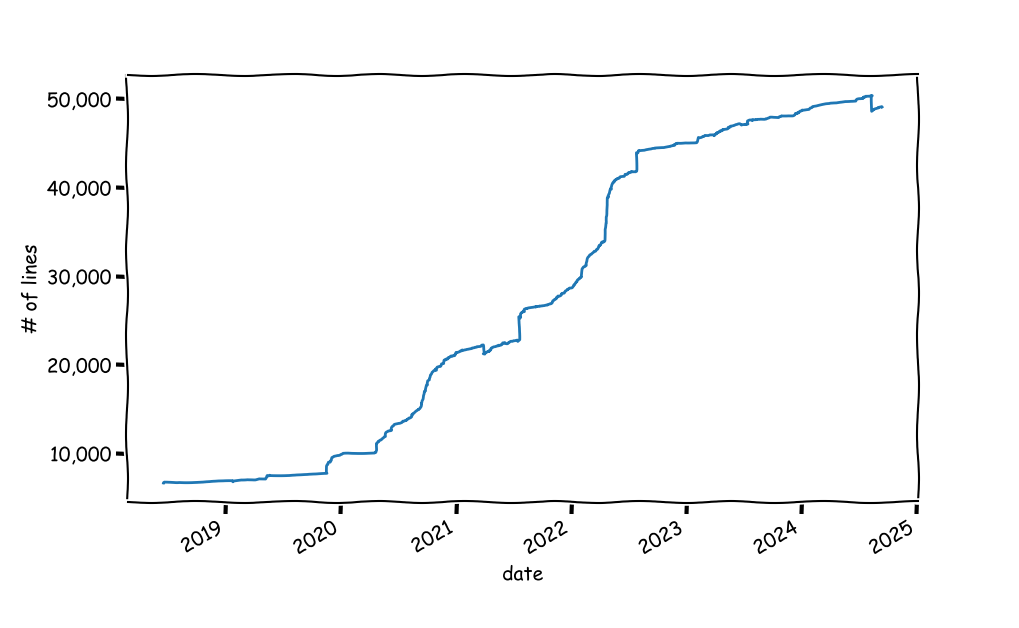
A small python script to visualize the number of lines in a project, as a function of time.
Install
uv tool install git-lines-graph
# OR
python3 -m pip install git-lines-graph
Usage
Run: git-lines-graph [-b BRANCH] [GIT-DIR]
Call with an optional git project directory. You can also specify a branch to scan; other wise the branch currently checked in is used.
Dependencies
GitPythonto interact withgit.matplotlibfor plotting.pandasfor data manipulation.
How Does It Work
The code goes over all commits messages and looks for the number of lines added/removed and keeps an updated count. Caveat: the lines reported in git commit messages are only a proxy for the true number of lines of code. It could be way off in projects in which there are data artifacts such as big data files. One solution is to loop over all commits, checkout the commit and do a wc over all files that are considered to be code files. But that's slower and could be dangerous in dirty projects.
1 maintainer

Metadata
1 maintainer
Release files for git-lines-graph 2.3.7
For a detailed explanation of source distributions (sdists) and built distributions (wheels), please see the package formats documentation.
Source distribution (sdist)
| File | Size | Uploaded | |
|---|---|---|---|
| git_lines_graph-2.3.7.tar.gz | 144.5 kB | Details |
Built distribution (wheel)
| File | Interpreter | ABI | Platform | Reset |
|---|---|---|---|---|
| git_lines_graph-2.3.7-py3-none-any.whl | Python 3 | none | any | Details |
Total release size: 160.0 kB
Release files / git_lines_graph-2.3.7.tar.gz
| Download URL | git_lines_graph-2.3.7.tar.gz |
|---|---|
| Size | 144.5 kB |
| Tags | Source |
|
SHA-256 checksum How to use checksums |
b46bd2b3662f741b331b057a267102fe853e8f42834aba3e35c80e1b2eb87419
|
|
BLAKE2b-256 checksum How to use checksums |
69004d3edec2e8fff001efbe4fc65069253921365cbb026b98137faf600c3a04
|
| Upload date | |
|
Uploaded using Trusted Publishing? What is trusted publishing? |
No |
| Uploaded via |
uv/0.12.5 {"installer":{"name":"uv","version":"0.12.5","subcommand":["publish"]},"python":null,"implementation":{"name":null,"version":null},"distro":{"name":"macOS","version":null,"id":null,"libc":null},"system":{"name":null,"release":null},"cpu":null,"openssl_version":null,"setuptools_version":null,"rustc_version":null,"ci":null}
|
Release files / git_lines_graph-2.3.7-py3-none-any.whl
| Download URL | git_lines_graph-2.3.7-py3-none-any.whl |
|---|---|
| Size | 15.5 kB |
| Tags | Python 3 |
|
SHA-256 checksum How to use checksums |
cabe5b348c302d315bfe1b81fa46ec686c42e9892c7ef8b5018c53cf8e2369ef
|
|
BLAKE2b-256 checksum How to use checksums |
f72db2bc750fcf1cc2ea0bfc3d12d643849cd7a2c3e191e29c89a4282591fd65
|
| Upload date | |
|
Uploaded using Trusted Publishing? What is trusted publishing? |
No |
| Uploaded via |
uv/0.12.5 {"installer":{"name":"uv","version":"0.12.5","subcommand":["publish"]},"python":null,"implementation":{"name":null,"version":null},"distro":{"name":"macOS","version":null,"id":null,"libc":null},"system":{"name":null,"release":null},"cpu":null,"openssl_version":null,"setuptools_version":null,"rustc_version":null,"ci":null}
|














