
Git commit lines graph

Project description
Git Commit Lines Graph




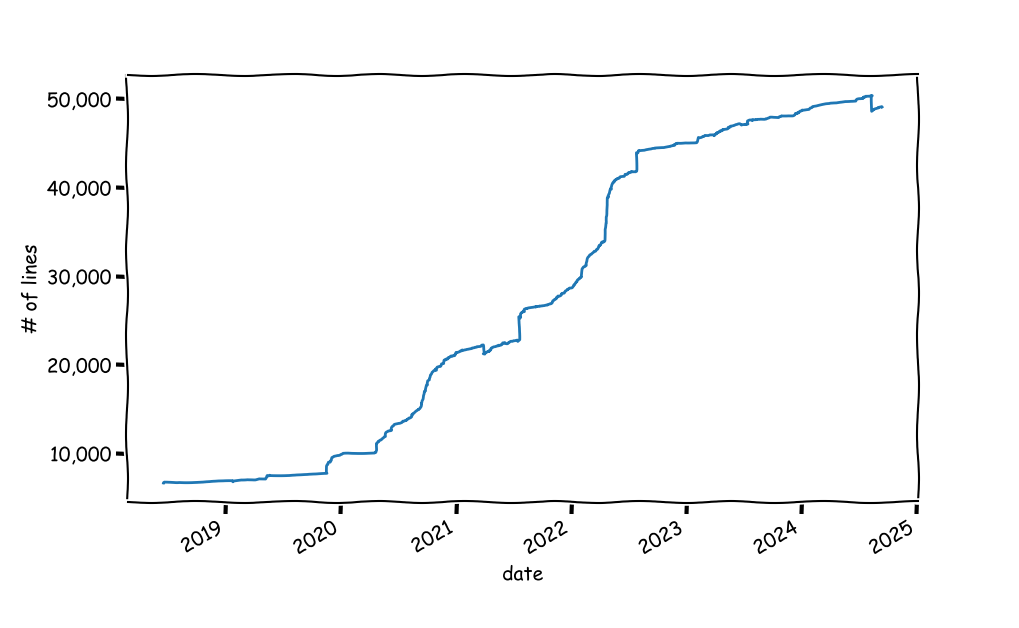
A small python script to visualize the number of lines in a project, as a function of time.
Install
uv tool install git-lines-graph
# OR
python3 -m pip install git-lines-graph
Usage
Run: git-lines-graph [-b BRANCH] [GIT-DIR]
Call with an optional git project directory. You can also specify a branch to scan; other wise the branch currently checked in is used.
Dependencies
GitPythonto interact withgit.matplotlibfor plotting.pandasfor data manipulation.
How Does It Work
The code goes over all commits messages and looks for the number of lines added/removed and keeps an updated count. Caveat: the lines reported in git commit messages are only a proxy for the true number of lines of code. It could be way off in projects in which there are data artifacts such as big data files. One solution is to loop over all commits, checkout the commit and do a wc over all files that are considered to be code files. But that's slower and could be dangerous in dirty projects.
Release history Release notifications | RSS feed


Download files
Download the file for your platform. If you're not sure which to choose, learn more about installing packages.
Source Distribution
Built Distribution
Filter files by name, interpreter, ABI, and platform.
If you're not sure about the file name format, learn more about wheel file names.
Copy a direct link to the current filters
File details
Details for the file git_lines_graph-2.3.3.tar.gz.
File metadata
- Download URL: git_lines_graph-2.3.3.tar.gz
- Upload date:
- Size: 133.3 kB
- Tags: Source
- Uploaded using Trusted Publishing? No
- Uploaded via: uv/0.11.11 {"installer":{"name":"uv","version":"0.11.11","subcommand":["publish"]},"python":null,"implementation":{"name":null,"version":null},"distro":{"name":"macOS","version":null,"id":null,"libc":null},"system":{"name":null,"release":null},"cpu":null,"openssl_version":null,"setuptools_version":null,"rustc_version":null,"ci":null}
File hashes
| Algorithm | Hash digest | |
|---|---|---|
| SHA256 |
dfbca36aaa3d59a0582fd91ad9e7f5df56b73280bcc8e2b0a2d14323ca0ec28b
|
|
| MD5 |
0c1e25765011227efa154a0dc0dfdc47
|
|
| BLAKE2b-256 |
794924328ef720e093b3959df2175d2e54f18ed57f130fe28b85142d90df0fb5
|
File details
Details for the file git_lines_graph-2.3.3-py3-none-any.whl.
File metadata
- Download URL: git_lines_graph-2.3.3-py3-none-any.whl
- Upload date:
- Size: 15.5 kB
- Tags: Python 3
- Uploaded using Trusted Publishing? No
- Uploaded via: uv/0.11.11 {"installer":{"name":"uv","version":"0.11.11","subcommand":["publish"]},"python":null,"implementation":{"name":null,"version":null},"distro":{"name":"macOS","version":null,"id":null,"libc":null},"system":{"name":null,"release":null},"cpu":null,"openssl_version":null,"setuptools_version":null,"rustc_version":null,"ci":null}
File hashes
| Algorithm | Hash digest | |
|---|---|---|
| SHA256 |
e5e74cc2367f82a04697caee9f020d4ed69736d923a9318cbc3c0d013c158189
|
|
| MD5 |
b2d9a3571d7cebac2da24130e5f459bd
|
|
| BLAKE2b-256 |
3fec320f15063cf1d513872b28e46c1a71da90ef4ff81863885b11b03723903a
|






