
git-punchcard
Simple git punchcard utility, inspired by git-punchcard-plot but rewritten for python3 with matplotlib.
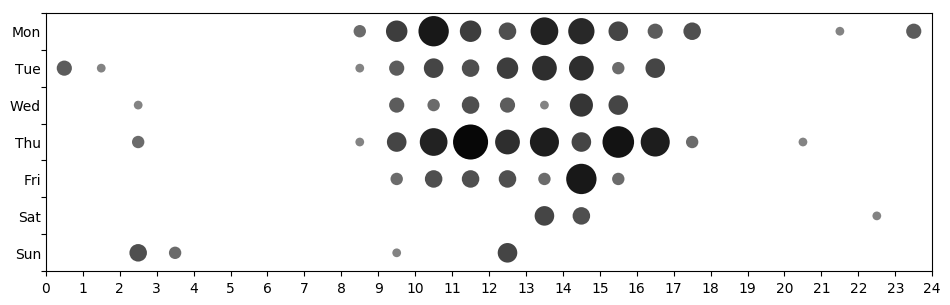
Installation
Install or upgrade from PyPI as follows:
pip install --user --upgrade git-punchcard[gui]Also, make sure that $HOME/.local/bin is in $PATH.
To avoid conflicts with other packages, I recommend installing into an isolated environment, e.g. using pipx:
pipx install git-punchcard[gui]Usage
Basic usage:
git punchcardAdditional arguments can be specified as follows:
git punchcard [<input path>...] [<options>]
              [--] [<log options>] [<revision range>] [-- <path>...]
For more help on available options, type:
git punchcard -h            # [options]
git help log                # [log options]
git help gitrevisions       # [revision]
Options
The most common builtin options are:
# use a fixed timezone for all commits:
git punchcard --timezone CET
git punchcard --timezone Europe/Berlin
git punchcard --timezone UTC+02:30

# show punchcard with specified y/x axes:
git punchcard -p year/month
git punchcard -p wday/month

# histogram with specified x axis:
git punchcard -p /wday

# set the directory of the git repository (multiple allowed):
git punchcard /path/to/repo

# analyze all repositories in ~/dev:
git punchcard ~/dev/*/.git

# read commit dates from stdin:
git punchcard -

# show a github-like punchcard plot with grid:
git punchcard --grid
By default, each commit’s local timezone is used for the plot. If setting a fixed timezone, it should be specified in terms of the timezone name (e.g. CET or Europe/Berlin), but can also given by ISO 3166 country code or country name (if the timezone is ambiguous we will pick the first entry).
git log options
Additionally, you can pass any options understood by git log to e.g. restrict the range of commits and limit to commits performed by a certain author:
# include only commits by specific author:
git punchcard --author=myself

# consider only only the 20 commits:
git punchcard master~20..master

# commits within a certain time frame:
git punchcard --since="1 year ago" --until=now

# show at which times a certain file/folder is usually edited:
git punchcard --follow -- README.rst docs

# show at which times, people like to merge:
git punchcard --merges
Advanced example
Track evolution of commit activity over the years:
for year in {2016..2019}; do
    git punchcard -o $year.png --title $year \
        --since 1.1.$year --until 31.12.$year
done
Changes
2.0.4
Date: 28.10.2021
add pyqt as optional gui dependency, e.g.: pip install git-punchcard[gui]
migrate from Travis CI to GitHub Actions
2.0.3
Date: 31.10.2019
include license file in source distribution
2.0.2
Date: 31.10.2019
automatic deployments
changes in setup and testing
2.0.1
Date: 26.03.2019
fix: default to current directory if no input pathes were passed by the user
2.0.0
Date: 26.03.2019
turn -C into positional argument, remove -C option
allow multiple input files
allow passing - and files with git log output as input files
remove obsolete dependency on docopt
allow passing country codes and names instead of timezone (using first available timezone in case of ambiguity)
match timezones case-insensitively
show git command and number of commits
show error message without traceback for common errors
1.4.0
Date: 26.03.2019
learn --period Y/X parameter to specify Y/X axes
can plot histograms by leaving one of the axes empty
understand -v as alias for --version
1.3.0
Date: 21.03.2019
log options are now passed directly without -- same as the other options
drop dependency on docopt
1.2.0
Date: 21.03.2019
fix setup.py exception if called without runtime dependencies
import pytz only if needed
learn a -C DIR parameter to pass the path to the git repository
learn a --version parameter to show the script version
fix error when passing options and git options at the same time
turn into a module and use setuptools entry_points to generate script
1.1.0
Date: 11.03.2019
add --title parameter
1 maintainer

Metadata
1 maintainer
Release files for git-punchcard 2.0.4
For a detailed explanation of source distributions (sdists) and built distributions (wheels), please see the package formats documentation.
Source distribution (sdist)
| File | Size | Uploaded | |
|---|---|---|---|
| git-punchcard-2.0.4.tar.gz | 8.2 kB | Details |
Built distribution (wheel)
| File | Interpreter | ABI | Platform | Reset |
|---|---|---|---|---|
| git_punchcard-2.0.4-py3-none-any.whl | Python 3 | none | any | Details |
Total release size: 15.7 kB
Release files / git-punchcard-2.0.4.tar.gz
| Download URL | git-punchcard-2.0.4.tar.gz |
|---|---|
| Size | 8.2 kB |
| Tags | Source |
|
SHA-256 checksum How to use checksums |
c24855cf53140396e723883e95f5e9b9732f93fbbd38cd64e8bb2dc102d3da76
|
|
BLAKE2b-256 checksum How to use checksums |
f89df2c051e4956f84c45a344642760815c9b3abdcd7afcebff8fc58b74581c4
|
| Upload date | |
|
Uploaded using Trusted Publishing? What is trusted publishing? |
No |
| Uploaded via |
twine/3.4.2 importlib_metadata/4.8.1 pkginfo/1.7.1 requests/2.26.0 requests-toolbelt/0.9.1 tqdm/4.62.3 CPython/3.9.7
|
Release files / git_punchcard-2.0.4-py3-none-any.whl
| Download URL | git_punchcard-2.0.4-py3-none-any.whl |
|---|---|
| Size | 7.6 kB |
| Tags | Python 3 |
|
SHA-256 checksum How to use checksums |
b5e1518427395b5016fd08d5487ee30e8424cb7ea5afbb9e0f58aa188b823134
|
|
BLAKE2b-256 checksum How to use checksums |
102041bb21acf316bb301e0b9c38b51e514349ed20539032e7bfc9fc5b37b832
|
| Upload date | |
|
Uploaded using Trusted Publishing? What is trusted publishing? |
No |
| Uploaded via |
twine/3.4.2 importlib_metadata/4.8.1 pkginfo/1.7.1 requests/2.26.0 requests-toolbelt/0.9.1 tqdm/4.62.3 CPython/3.9.7
|














