
Convert Git repository contents to Markdown format
Verified details
These details have been verified by PyPIProject links
GitHub Statistics
Maintainers

Project description
🔄 git2md





🚀 A powerful command-line tool for converting Git repository contents into Markdown format. This tool is perfect for developers and documentation specialists who need to create structured Markdown files based on repository contents, including directory trees and file contents.
Read README in Russian here
✨ Features
- 🌳 Repository Directory Tree Generation: outputs repository structure in
treeblock format. - 📝 File to Markdown Conversion:
- Supports syntax highlighting for code files.
Converts Jupyter Notebook (.ipynb) and PDF (.pdf) to Markdown.
- 🎯 Support for
.gitignore,.globalignoreand.mdignorefor local projects:- Automatically excludes files/directories specified in
.gitignore,.globalignoreor.mdignore.
- Automatically excludes files/directories specified in
- 🔍 Custom Exclusion Patterns: use regular expressions to exclude specific files or directories.
- 🗑️ Skip Empty Files: ignores files without content.
- 📋 Copy Results to Clipboard: simplifies using generated Markdown.
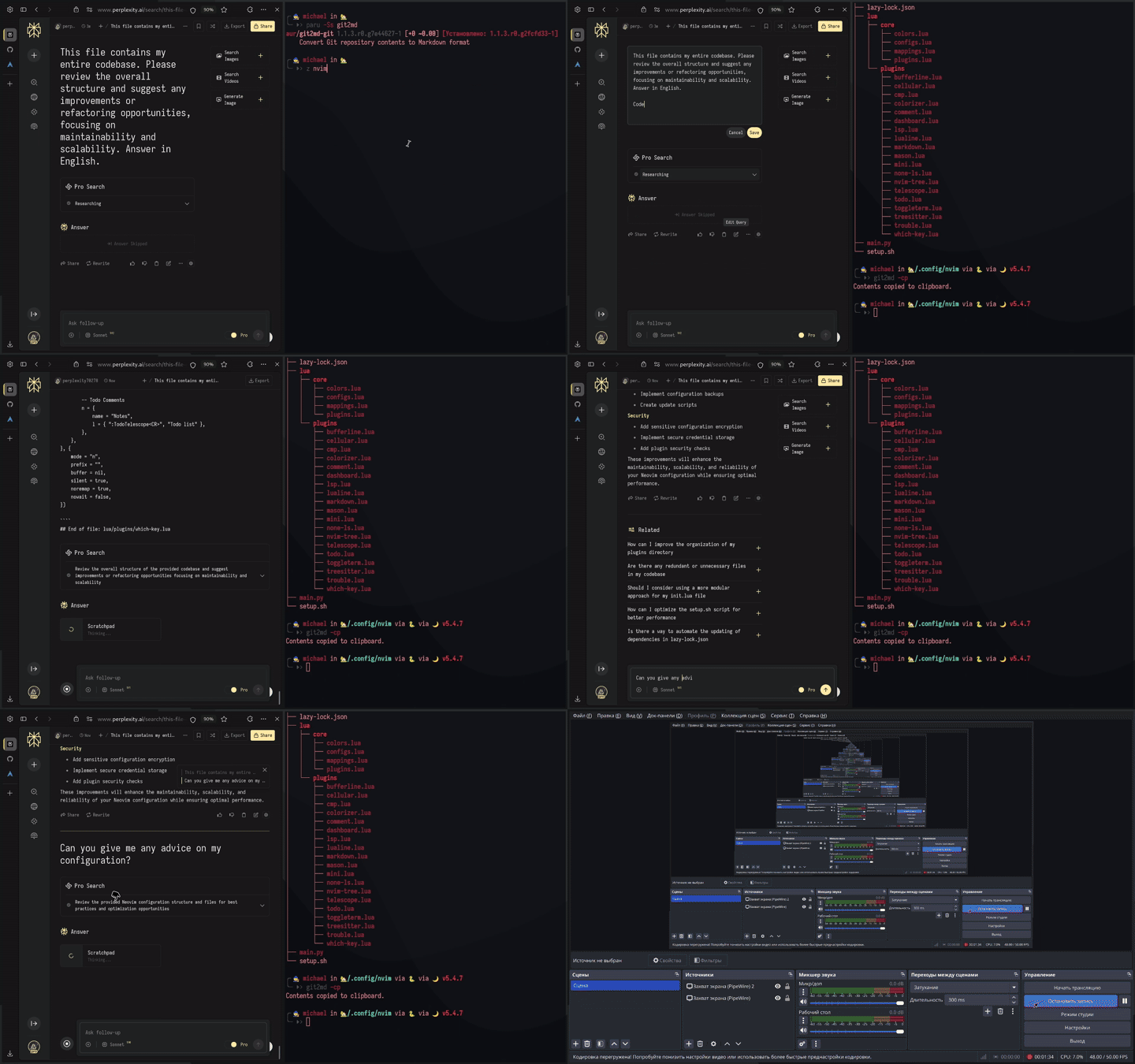
🎬 Demonstration
Below is a demonstration of how git2md works:
📋 Requirements
- 🐍 Python 3.9 or newer
- 🐧
Linux Operating SystemNow supports Windows, MacOS, Linux (X11 and Wayland) - 📦 Dependencies:
pathspec(for.gitignore,.mdignore,.globalignoresupport)nbconvert(for Jupyter Notebook conversion)PyMuPDF4LLM(for PDF conversion)wl-copy/xsel/xclip(optional, Linux-only for clipboard functionality)
📥 Installation
📦 Install via PyPI
You can install git2md directly through PyPI using pip:
pip install git2md
🏗️ Install via AUR (Arch Linux)
For Arch Linux users, the package is available in AUR as python-git2md. It can be installed using AUR helpers like paru or yay:
paru -S python-git2md
🔨 Install from Source
-
Clone the repository:
git clone https://github.com/xpos587/git2md.git
cd git2md
-
Build and install:
python setup.py build
pip install .
🚀 Usage
💻 Basic Command
git2md [path] [options]
If path is not specified, the current directory will be used.
⚙️ Options
| Option | Description |
|---|---|
path |
Path to project directory or Git file (default: current folder) |
-o, --output |
Path to save generated Markdown |
-c, --copy |
Copy result to clipboard |
--ignore |
List of patterns to exclude files or directories |
📝 Examples
📂 Generate Markdown for Entire Repository
git2md /path/to/repo -o output.md
🔍 Exclude Specific Files Using Patterns
git2md --ignore "./assets/style-*.css" "*.log" "*.tmp" -o output.md
🗑️ Copy Result to Clipboard
git2md --copy
📄 Output Format
🌳 Directory Tree
The directory tree is included as a code block with language identifier tree. For example:
src/
├── main.py
├── utils/
│   ├── helper.py
│   └── __init__.py
└── README.md
📑 File Contents
Each file is included with its relative path in the header, followed by its contents in a code block.
🐍 Example for Python File (main.py)
# File: src/main.py

```
print("Hello, world!")
```

# End of file: src/main.py
📓 Example for Jupyter Notebook (notebook.ipynb)
Content is converted from .ipynb to Markdown and included directly:
# File: notebook.ipynb

# Converted content from Jupyter Notebook...

# End of file: notebook.ipynb
📄 Example for PDF (document.pdf)
Text is extracted in Markdown format:
# File: document.pdf

# Extracted content from PDF...

# End of file: document.pdf
🔧 Global Exclusion Patterns
You can create a .mdignore file in the same directory as the script to specify patterns that should be excluded for all repositories. The format is identical to .gitignore.
📝 Example .mdignore
__pycache__/
*.pyc
.mypy_cache/
.env
*.log
👨💻 Development
To set up the development environment:
-
Create a virtual environment:
micromamba create -p ./.micromamba/ -f environment.yml
micromamba activate -p ./.micromamba/
-
Install the project in development mode:
pip install -e .
📄 License
This project is licensed under the MIT License. See the LICENSE file for details.
🤝 Contributing
- Fork the repository.
- Create a feature branch (
git checkout -b feature/amazing-feature). - Commit your changes (
git commit -m 'Add some amazing feature'). - Push to the branch (
git push origin feature/amazing-feature). - Create a Pull Request.
👥 Authors
Michael (x30827pos@gmail.com)
🙏 Acknowledgments
Thanks to the developers of repomix and git2txt.
The idea emerged from the need for universal and simplified repository documentation for LLM-based workflows.
Project details
Verified details
These details have been verified by PyPIProject links
GitHub Statistics
Maintainers
Release history Release notifications | RSS feed


Download files
Download the file for your platform. If you're not sure which to choose, learn more about installing packages.
Source Distribution
Built Distribution
Filter files by name, interpreter, ABI, and platform.
If you're not sure about the file name format, learn more about wheel file names.
Copy a direct link to the current filters
File details
Details for the file git2md-1.1.6.tar.gz.
File metadata
- Download URL: git2md-1.1.6.tar.gz
- Upload date:
- Size: 13.3 kB
- Tags: Source
- Uploaded using Trusted Publishing? Yes
- Uploaded via: twine/6.1.0 CPython/3.12.8
File hashes
| Algorithm | Hash digest | |
|---|---|---|
| SHA256 |
540f668b02bdad732a2dbe40171fdef115d28a319a3fc6926bee88ef663598b6
|
|
| MD5 |
3bd2e6ca4958dd1923fba564bb1e15a4
|
|
| BLAKE2b-256 |
954357605e7f9ebea05ad3a9da7610f961a1517d40cead183c36322a75869775
|
Provenance
The following attestation bundles were made for git2md-1.1.6.tar.gz:
Publisher:
release.yaml on Xpos587/git2md
-
Statement:
-
Statement type:
https://in-toto.io/Statement/v1 -
Predicate type:
https://docs.pypi.org/attestations/publish/v1 -
Subject name:
git2md-1.1.6.tar.gz -
Subject digest:
540f668b02bdad732a2dbe40171fdef115d28a319a3fc6926bee88ef663598b6 - Sigstore transparency entry: 170698731
- Sigstore integration time:
-
Permalink:
Xpos587/git2md@868c5c4046857f75a1181702d05fbb871e8f96f8 -
Branch / Tag:
refs/tags/1.1.6 - Owner: https://github.com/Xpos587
-
Access:
public
-
Token Issuer:
https://token.actions.githubusercontent.com -
Runner Environment:
github-hosted -
Publication workflow:
release.yaml@868c5c4046857f75a1181702d05fbb871e8f96f8 -
Trigger Event:
push
-
Statement type:
File details
Details for the file git2md-1.1.6-py3-none-any.whl.
File metadata
- Download URL: git2md-1.1.6-py3-none-any.whl
- Upload date:
- Size: 13.6 kB
- Tags: Python 3
- Uploaded using Trusted Publishing? Yes
- Uploaded via: twine/6.1.0 CPython/3.12.8
File hashes
| Algorithm | Hash digest | |
|---|---|---|
| SHA256 |
c6071435f4b5f72a259ce9d5dd11d394057268acc20a0d01855db88fbad01fbb
|
|
| MD5 |
e54a5d5e4b7cb51f3f1ceacc8595306c
|
|
| BLAKE2b-256 |
dbd9b64a7bab1564ed082b622dc7c39c78e7c34dcd5d99c3ded42915973b192b
|
Provenance
The following attestation bundles were made for git2md-1.1.6-py3-none-any.whl:
Publisher:
release.yaml on Xpos587/git2md
-
Statement:
-
Statement type:
https://in-toto.io/Statement/v1 -
Predicate type:
https://docs.pypi.org/attestations/publish/v1 -
Subject name:
git2md-1.1.6-py3-none-any.whl -
Subject digest:
c6071435f4b5f72a259ce9d5dd11d394057268acc20a0d01855db88fbad01fbb - Sigstore transparency entry: 170698732
- Sigstore integration time:
-
Permalink:
Xpos587/git2md@868c5c4046857f75a1181702d05fbb871e8f96f8 -
Branch / Tag:
refs/tags/1.1.6 - Owner: https://github.com/Xpos587
-
Access:
public
-
Token Issuer:
https://token.actions.githubusercontent.com -
Runner Environment:
github-hosted -
Publication workflow:
release.yaml@868c5c4046857f75a1181702d05fbb871e8f96f8 -
Trigger Event:
push
-
Statement type:






