
GitDirector
A terminal control plane for many git repositories and the AI agents working in them.


See every repo's state in one dashboard. Run coding agents and long-lived commands in parallel tmux sessions, watch which ones need you, and drive the whole thing from scripts.
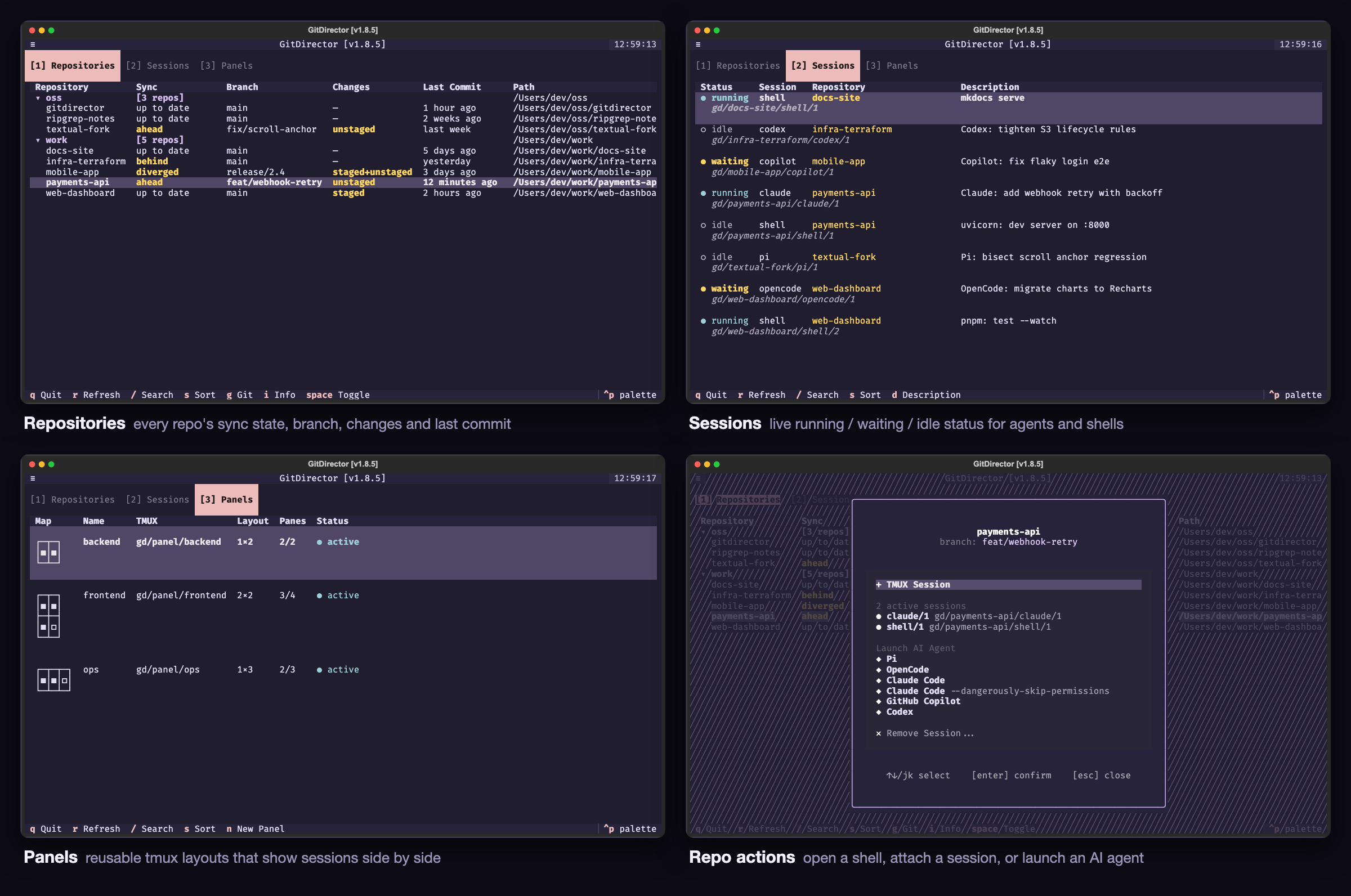
Screenshots use made-up repositories and sessions.
Highlights
- One dashboard for every repo. Sync state, branch, uncommitted changes, and last commit for each tracked repository, grouped by parent directory.
- Agents and servers in tmux sessions. Launch Claude Code, OpenCode, GitHub Copilot, Codex, or Pi in a repo with one keypress, or run a dev server there. Each lives in its own named tmux session.
- Live session status. Every session shows
running,waiting(blocked on you),pending(the agent's background subagents are still working), oridle, so you can leave an agent alone until it needs an answer. - Session sidebar. An open session sits beside a list of every other session and its status; click one to switch.
- Panels. Reusable tmux layouts that show several sessions side by side.
- Git without leaving the console. Status, log, branches, remotes, pull, push, and a two-pane diff viewer that can stage, commit, and push.
- Scriptable CLI. Everything you need from a shell or another agent:
start sessions and agents, read their output, send them input, check their
status, with
--jsonwhere it helps.
Install
pip install gitdirector # or: pipx install gitdirector / uv tool install gitdirector
Runs on macOS and Linux with Python 3.10–3.14 and git; sessions and panels
need tmux ≥ 3.7. gitdirector doctor checks
all of it.
Quick start
gitdirector link ~/work --discover     # track every repo under a directory
gitdirector console                    # open the dashboard
gitdirector list                       # or stay in the shell: every repo at a glance
gitdirector cd my-repo --agent claude  # Claude Code in a new session for my-repo
If GitDirector is useful to you, please star the repo: it needs stars to qualify for Homebrew inclusion.
Console
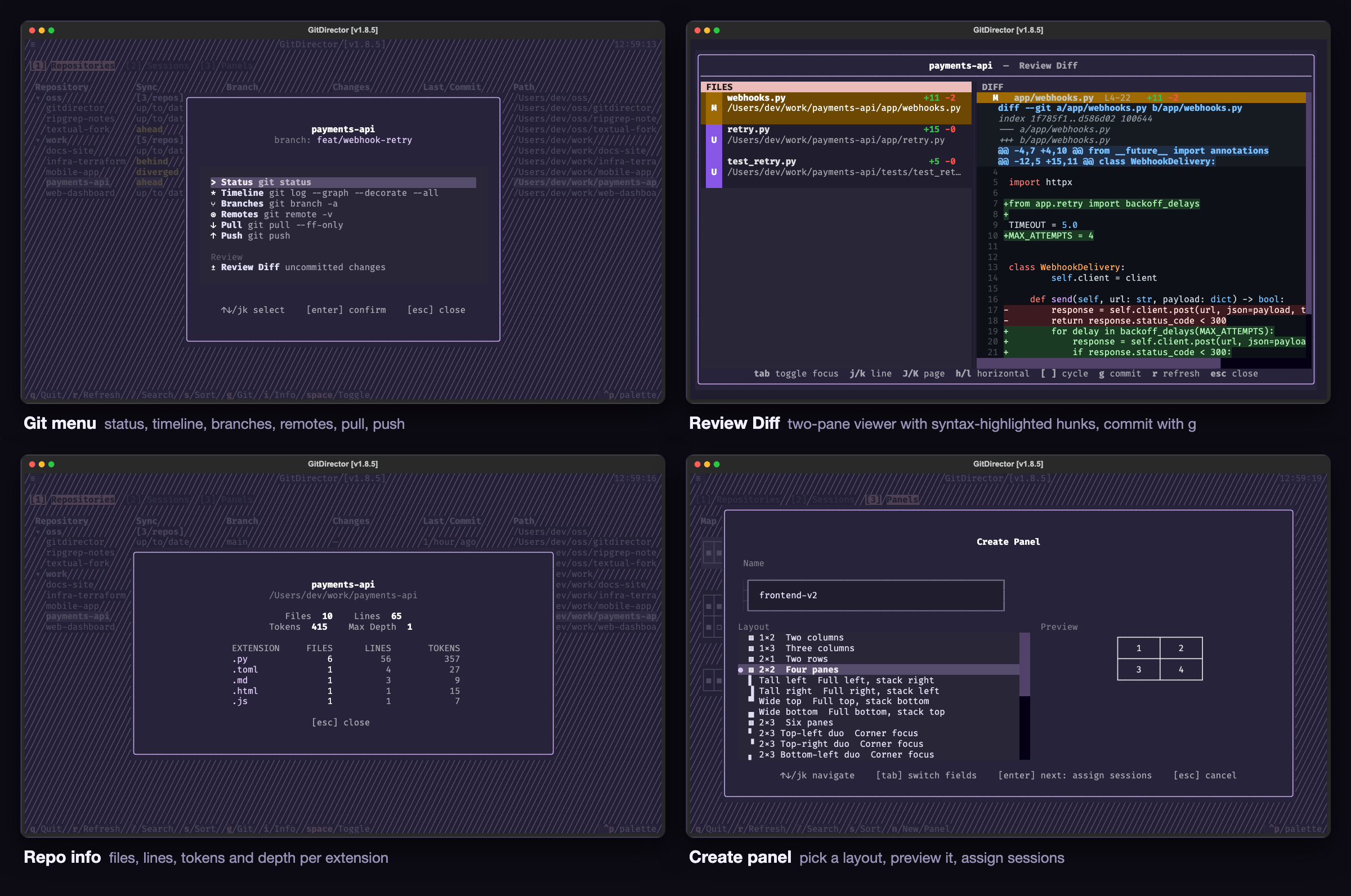
The console has three tabs, switched with 1, 2, and 3.
| Key | Action |
|---|---|
j / k, arrows |
Move between rows (h / l scroll wide tables sideways) |
enter |
Act on the row: action menu (repositories), attach (sessions), panel menu (panels) |
/ |
Filter the table |
s |
Sort (Repositories and Panels tabs) |
r |
Refresh |
g |
Git menu for the highlighted repo |
i |
Repo info: files, lines, tokens, and depth per extension |
space / shift+space |
Collapse or expand one group / every group |
d |
Edit a session's description (Sessions tab) |
n |
Create a panel (Panels tab) |
q |
Quit |
Repositories shows each repo's branch, status (↑1 to push · 2 staged · 5 changed, or nothing when clean and in step with origin), and last commit.
Repos sharing a parent directory collapse into a group. enter opens the
action menu: start a shell or an AI agent, open the repo in your editor
(code unless editor: in the config says otherwise, started as if you had
opened it yourself: nothing of GitDirector reaches it), or attach to or remove
a session. Pick Claude Code's permission mode on its row with Tab
or ←/→: default (your settings), auto (preselected), or bypass
(--dangerously-skip-permissions). g opens the git menu: status, timeline,
branches, remotes, pull, push, and Review Diff, a two-pane diff of
uncommitted changes where g stages everything and commits (and optionally
pushes).
Sessions lists every session under its repo, with its status, purpose,
name, and description. running means the program is working, waiting that
it needs you (a permission prompt, a question, a bell), pending that the
agent is at its prompt while subagents it started keep working, and idle that
nothing is happening. Claude Code and OpenCode report their own status through
hooks passed inline on their launch command (your settings are never
touched); everything else is judged from its pane (DEV.md).
Panels are saved tmux layouts showing several sessions side by side, each
under a header with its slot number; prefix 1–9 jumps to a slot. n
builds one: name it, pick a layout, then fill the panes (enter picks a
session, a fills the empty ones with free sessions, x empties one,
ctrl+o creates it). enter on a panel opens, edits, renames, or deletes it.
Every session carries its own themed header and status line, however it is opened. Sessions never learn which directory gitdirector was started from.
Session sidebar
Opening a session (from the console, the Sessions tab, or gitdirector cd)
shows it beside a sidebar listing every session, grouped by repo, with its
live status. Click a session, or select it and press Enter, to show it on the
right; the session you leave keeps running.
| Key | Action |
|---|---|
prefix Tab |
From the session, focus the sidebar (reopening it if it was closed) |
prefix b |
Collapse the sidebar to a rail of status dots, or expand it |
prefix v |
Open the shown session's repo in your editor (editor: in the config, code by default) |
prefix d |
Detach and go back to the console |
↑/↓, j/k, Enter |
In the sidebar: move, open the session |
Tab, →, l, Esc |
In the sidebar: focus the session |
/ |
In the sidebar: search by repo, agent, or session name (Enter keeps the filter, Esc clears it) |
The « next to the sidebar's title goes back to the console, like prefix d, and ◧
collapses or expands it. The keys are listed on the left of the status line, in a
shorter form on a narrow window.
The usual tmux ways of moving between panes (prefix ←/→, prefix o, a
click) work too. prefix Tab, prefix b and prefix v only mean this inside
the sidebar view; everywhere else they keep whatever they were bound to.
When the shown session ends, the sidebar says so and takes focus so you can
pick another; when no sessions are left you are back in the console. Set
sidebar: false in the config to attach to sessions directly instead.
Commands
| Command | Description |
|---|---|
console |
Interactive dashboard |
link PATH [--discover] |
Track a repo, or every repo under a directory |
unlink PATH|NAME [--discover] |
Stop tracking (nothing on disk is touched) |
list [--no-fetch] [--json] |
Every tracked repo: branch, sync state, changes, last commit, size |
status [--json] |
Only repos with uncommitted changes, file by file |
pull [PATH|NAME...] [--yes] |
git pull --ff-only, concurrently; all repos by default |
info PATH|NAME [--full] [--json] |
File, line, and token counts per extension |
autoclean [--yes] |
Stop tracking repos that no longer exist |
cd PATH|NAME|SESSION [--agent A] |
Open a shell or an agent in a new session, or rejoin a live one |
sessions [--json] |
Live sessions and their status: running, waiting, pending, idle |
panel [NAME] |
Open a saved panel, or list them |
gd-tmux PATH|NAME [CMD] [--agent A] [-d TEXT] |
Start a command or agent in a background session; prints its name |
gd-capture SESSION [-n N|--full] |
Print a live session's recent output |
gd-screenshot SESSION PATH.png |
Save a live session's screen, colours and all, as a PNG |
gd-send SESSION [TEXT] [--enter|--key KEY] |
Type into a live session |
gd-kill SESSION |
End a live session |
doctor |
Check git, tmux, config, shell completion, and agent CLIs |
reset [--yes] |
Kill every session and panel, wipe ~/.gitdirector |
completion {bash|zsh|fish} |
Print the shell completion script |
gitdirector COMMAND -h shows a command's options and examples.
- Repo arguments take a path or a directory name. When two tracked repos share a name, pass the path. Worktrees and submodules work like any other checkout.
- Agents for
--agentareclaude,opencode,codex,copilot, andpi. Claude Code also takes--mode default|auto|bypass;autois the default. - Output goes to stdout: results only. Errors, prompts, and progress go
to stderr. Piped tables are never truncated, and
--jsongives a stable document. Commands exit 1 on failure and 2 on bad arguments.
Background sessions
SESSION=$(gitdirector gd-tmux my-repo "npm run dev" -d "Vite dev server")
gitdirector gd-capture "$SESSION" -n 50           # read its last lines
gitdirector gd-screenshot "$SESSION" /tmp/s.png   # or see its screen as an image
gitdirector gd-send "$SESSION" --key C-c          # stop it
A session ends when its program exits. Sessions started this way appear in the console like any other.
AI coding agents: LLMS.md explains how to drive GitDirector
headlessly, including starting other agents and watching their status. Point
your agent at it.
Configuration
~/.gitdirector/config.yaml:
repositories:
  - /path/to/repo1
max_workers: 10   # optional, 1-32, default 10
theme: rose-pine  # optional
sidebar: true     # optional; false attaches to sessions without the sidebar
editor: code      # optional; the command that opens a repo, e.g. cursor or "zed -n"
The editor command gets the repository path as its last argument and is
started with nothing of GitDirector in its environment. On macOS the default
code opens Visual Studio Code through LaunchServices, as the Dock would.
Themes: textual-dark, textual-light, ansi-dark, ansi-light, nord,
gruvbox, dracula, tokyo-night, monokai, flexoki, solarized-light,
solarized-dark, atom-one-dark, atom-one-light, rose-pine,
rose-pine-moon, rose-pine-dawn, catppuccin-latte, catppuccin-frappe,
catppuccin-macchiato, catppuccin-mocha.
GitHub credentials
GitDirector runs plain git, so if pull and push work in your terminal they
work here. SSH is preferred:
Host github.com
  Hostname ssh.github.com
  Port 443
  User git
  AddKeysToAgent yes
  IdentityFile ~/.ssh/github
Git runs without a terminal, so ssh can't ask to confirm an unknown host;
GitDirector uses StrictHostKeyChecking=accept-new, which records a new host
in ~/.ssh/known_hosts as answering yes would and still refuses a key that
changes. A refused key shows as (offline) in the Sync column. Set
GIT_SSH_COMMAND to take over ssh entirely.
If SSH isn't possible, HTTPS GitHub remotes can fall back to a personal access
token in ~/.gitdirector/secrets.yaml:
github_username: your-username
github_PAT: github_pat_...
It is only used to retry a command that failed authentication, through a temporary credential helper, never on the command line or in the TUI. The file is plaintext, so scope the token narrowly.
Where files go
Everything GitDirector writes lives in ~/.gitdirector: your settings
(config.yaml, panels.yaml, secrets.yaml) at the top, anything it can
rebuild under cache/, and lock files under state/. Set GITDIRECTOR_HOME
to keep it somewhere else. Outside that folder it only runs its own tmux
sessions; your tmux key bindings keep working outside them.
Shell completion
Add the line for your shell to its rc file to complete subcommands, options, repo names, and session names:
eval "$(gitdirector completion bash)"
eval "$(gitdirector completion zsh)"
gitdirector completion fish | source
Contributing
See DEV.md for development, tests, internals, and releases, and AGENTS.md when pointing a coding agent at this repo.
License
1 maintainer

Metadata
1 maintainer
Release files for gitdirector 1.10.0
For a detailed explanation of source distributions (sdists) and built distributions (wheels), please see the package formats documentation.
Source distribution (sdist)
| File | Size | Uploaded | |
|---|---|---|---|
| gitdirector-1.10.0.tar.gz | 210.3 kB | Details |
Built distribution (wheel)
| File | Interpreter | ABI | Platform | Reset |
|---|---|---|---|---|
| gitdirector-1.10.0-py3-none-any.whl | Python 3 | none | any | Details |
Total release size: 458.9 kB
Release files / gitdirector-1.10.0.tar.gz
| Download URL | gitdirector-1.10.0.tar.gz |
|---|---|
| Size | 210.3 kB |
| Tags | Source |
|
SHA-256 checksum How to use checksums |
709746b1fd847a576806c660d089511d7434be180374598b9b4bd267b9f1c4e3
|
|
BLAKE2b-256 checksum How to use checksums |
cffc3b7a232301577e8b06a27347397f37834bb4b690c5222355c9e16ab47002
|
| Upload date | |
|
Uploaded using Trusted Publishing? What is trusted publishing? |
Yes |
| Uploaded via |
twine/7.0.0 CPython/3.13.14
|
Provenance
Provenance describes where a file came from. On PyPI, provenance is shared via attestations, which provide a verifiable record of the build or publishing details. View details, limitations and caveats.


PyPI Publish Attestation
PyPI verified that this artifact, at this checksum, originated from the publisher listed below.
Signed by GitHub Actions, verified by PyPI on Oct 8, 2026.
Transparency logRelease files / gitdirector-1.10.0-py3-none-any.whl
| Download URL | gitdirector-1.10.0-py3-none-any.whl |
|---|---|
| Size | 248.7 kB |
| Tags | Python 3 |
|
SHA-256 checksum How to use checksums |
92518358bcdbfb5ab5eb74f114d0ce38e4b8309ee7eda60c81be77e8eb41636e
|
|
BLAKE2b-256 checksum How to use checksums |
d90fe6d61a0b3c9db2db65bcc3d0adbdf5240110cee259fa8e15571a3244bb1a
|
| Upload date | |
|
Uploaded using Trusted Publishing? What is trusted publishing? |
Yes |
| Uploaded via |
twine/7.0.0 CPython/3.13.14
|
Provenance
Provenance describes where a file came from. On PyPI, provenance is shared via attestations, which provide a verifiable record of the build or publishing details. View details, limitations and caveats.
PyPI Publish Attestation
PyPI verified that this artifact, at this checksum, originated from the publisher listed below.
Signed by GitHub Actions, verified by PyPI on Oct 8, 2026.
Transparency log













