
GitDirector
A terminal control plane for many git repositories and the AI agents working in them.


See every repo's state in one dashboard. Run coding agents and long-lived commands in parallel tmux sessions, watch which ones need you, and drive the whole thing from scripts.
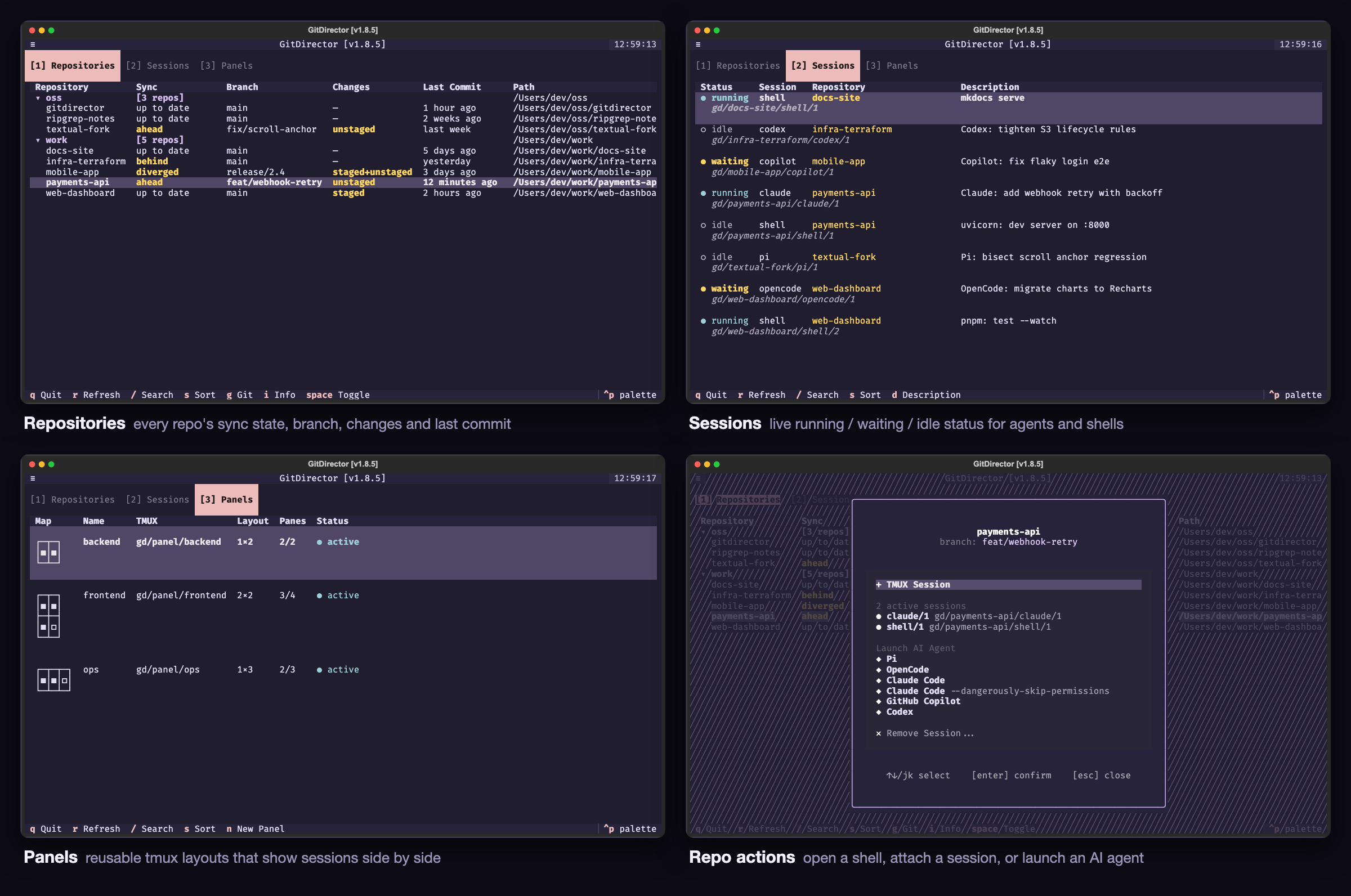
Screenshots use made-up repositories and sessions.
Highlights
- One dashboard for every repo. Sync state, branch, uncommitted changes, and last commit for each tracked repository, grouped by parent directory.
- Agents and servers in tmux sessions. Launch Claude Code, OpenCode, GitHub Copilot, Codex, or Pi in a repo with one keypress, or run a dev server there. Each lives in its own named tmux session.
- Live session status. Every session shows
running,waiting(blocked on you), oridle, so you can leave an agent alone until it needs an answer. - Panels. Reusable tmux layouts that show several sessions side by side.
- Git without leaving the console. Status, log, branches, remotes, pull, push, and a two-pane diff viewer that can stage, commit, and push.
- Headless CLI. Start a session, read its scrollback, and send it input from a script or from another agent.
Install
pip install gitdirector # or: pipx install gitdirector / uv tool install gitdirector
Requires Python 3.10 or newer (the test suite runs on every release from
3.10 through 3.14) and git. Anything session-related needs
tmux ≥ 3.2a. gitdirector doctor checks all
of it.
Quick start
gitdirector link ~/work --discover   # track every repo under a directory
gitdirector console                  # open the dashboard
If GitDirector is useful to you, please star the repo — it needs stars to qualify for Homebrew inclusion.
Console
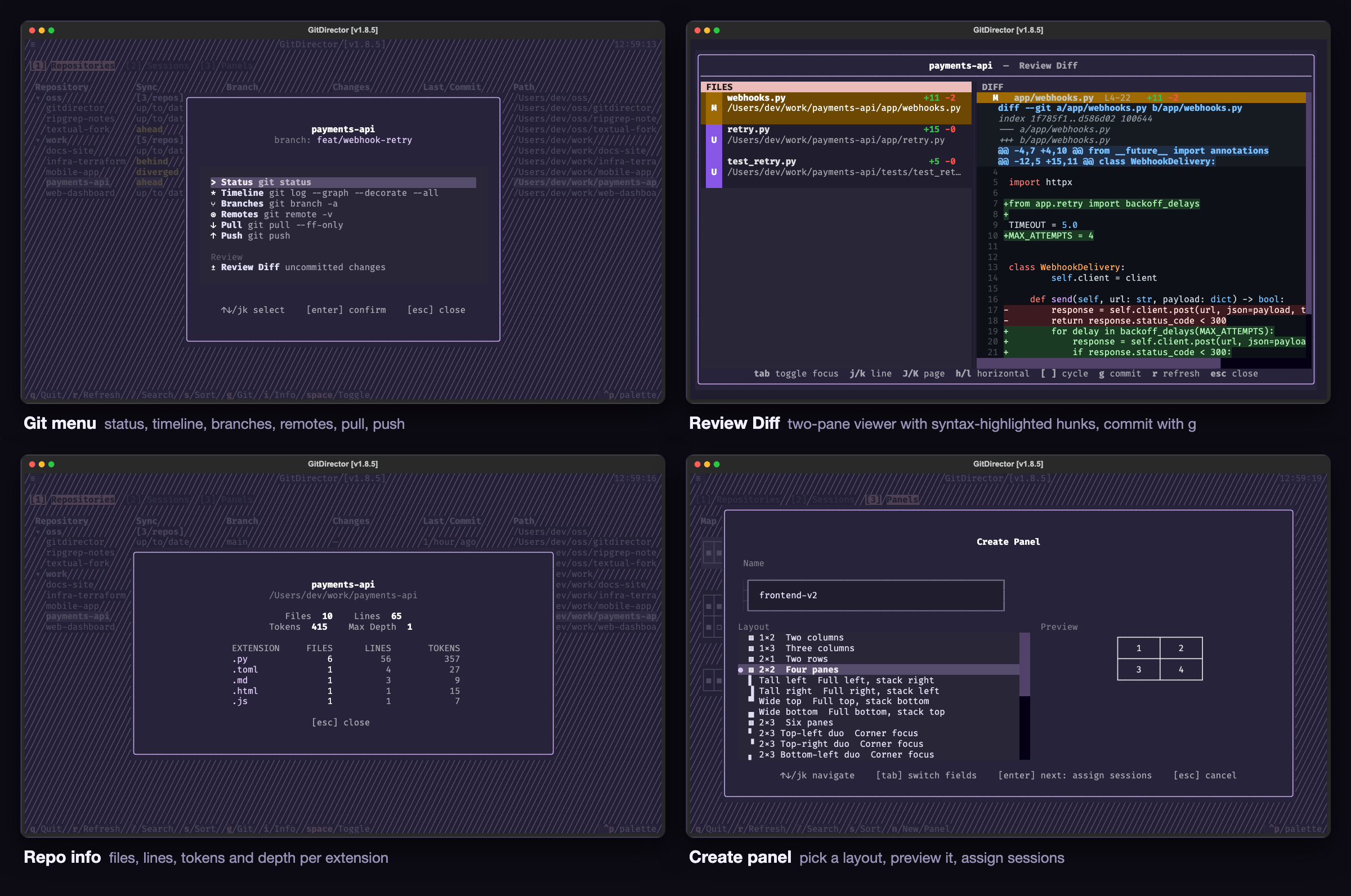
The console has three tabs, switched with 1, 2, and 3.
| Key | Action |
|---|---|
j / k, arrows |
Move between rows (h / l scroll wide tables sideways) |
enter |
Act on the row: action menu (repositories), attach (sessions), open (panels) |
/ |
Filter the table |
s |
Sort |
r |
Refresh |
g |
Git menu for the highlighted repo |
i |
Repo info: files, lines, tokens, and depth per extension |
space / shift+space |
Collapse or expand one group / every group |
d |
Edit a session's description (Sessions tab) |
n |
Create a panel (Panels tab) |
q |
Quit |
Repositories shows sync state (up to date, ahead, behind,
diverged), branch, staged and unstaged changes, and the last commit. Repos
that share a parent directory collapse into a group row. enter opens the
action menu: start a shell session, attach to an existing one, launch an AI
agent, or remove a session. g opens the git menu — status, timeline,
branches, remotes, pull, push, and Review Diff: a two-pane viewer of
uncommitted changes with syntax-highlighted per-file diffs, where g stages
everything and commits (optionally pushing) after you write a message.
Sessions lists every gd/* tmux session with its status, purpose, repo,
and a free-form description. running means the session is working,
waiting means it is blocked on you (a permission question, a prompt for
input), and idle means nothing is happening (a shell prompt, or a finished
agent turn). Claude Code and OpenCode sessions launched from the console
report their status through the agents' own lifecycle hooks; every other
session is classified from what its pane is doing (see DEV.md).
Panels manages reusable tmux layouts. Opening a panel attaches to a tmux
session that shows every assigned session side by side; prefix 1–9 jumps
to a pane and prefix b shows the pane numbers.
Leaving a session (detach with prefix d, or exit its program) returns you
to the console where you left it.
Commands
| Command | Description |
|---|---|
console |
Interactive dashboard |
link PATH [--discover] |
Track a repo, or every repo under a directory |
unlink PATH|NAME [--discover] |
Stop tracking |
list |
All tracked repos with their sync status |
status |
Only repos with uncommitted changes |
pull [--yes] |
Fast-forward pull every tracked repo, concurrently |
cd PATH|NAME |
Open or switch to a tmux session for a repo |
info PATH|NAME [--full] |
File, line, and token statistics |
doctor |
Check tmux, config, shell completion, and agent CLIs |
autoclean [--yes] |
Drop links whose paths no longer exist |
reset [--yes] |
Kill every session and panel, wipe ~/.gitdirector |
gd-tmux PATH|NAME "cmd" [-d TEXT] |
Run a command in a new background session |
gd-capture SESSION [--lines N|--full] |
Print a live session's scrollback |
gd-send SESSION [TEXT] [--enter|--key KEY] |
Send input to a live session |
completion {bash|zsh|fish} |
Print the shell completion script |
help |
Overview of all commands |
Repo arguments accept an absolute path or the directory basename. If two
tracked repos share a basename, GitDirector refuses and lists both so you can
pass the full path. Worktrees and submodules (where .git is a file rather
than a directory) are accepted like any other checkout.
Run gitdirector COMMAND --help (or -h) for a command's options. Errors
and the update notice go to stderr, so command output is safe to capture in
scripts.
Background sessions
gd-tmux runs a command in a detached gd/<repo>/shell/<N> session and
prints the session name, so scripts can capture it:
SESSION=$(gitdirector gd-tmux /path/to/repo "npm run dev" -d "Vite: dev server")
gitdirector gd-capture "$SESSION" --lines 100
gitdirector gd-send "$SESSION" --key C-c
--key accepts C-c, C-d, C-z, C-l, Enter, Escape, Tab, Up,
and Down. The session self-destructs when the command exits, taking its
scrollback with it; to keep output, redirect inside the command:
"make test 2>&1 | tee /tmp/run.log".
AI coding agents: the rules for driving GitDirector headlessly live in
SKILL.md. Point your agent at it before it runs these commands.
Configuration
~/.gitdirector/config.yaml:
repositories:
  - /path/to/repo1
max_workers: 10   # optional, 1-32, default 10
theme: rose-pine  # optional
Themes: textual-dark, textual-light, ansi-dark, ansi-light, nord,
gruvbox, dracula, tokyo-night, monokai, flexoki, solarized-light,
solarized-dark, atom-one-dark, atom-one-light, rose-pine,
rose-pine-moon, rose-pine-dawn, catppuccin-latte, catppuccin-frappe,
catppuccin-macchiato, catppuccin-mocha.
GitHub credentials
GitDirector runs plain git for pull, push, and fetch, so it uses whatever
credentials git already has. The recommended setup is SSH remotes with a
key loaded in your agent — nothing to store in GitDirector, and pull and
push just work from the console and from background sessions.
~/.ssh/config:
Host github.com
  Hostname ssh.github.com
  Port 443
  User git
  AddKeysToAgent yes
  IdentityFile ~/.ssh/github
Hostname ssh.github.com with Port 443 tunnels SSH over the HTTPS port,
which gets through networks that block port 22; drop those two lines if you
do not need that. AddKeysToAgent yes loads the key into ssh-agent on
first use so the passphrase is asked once per login. Then clone (or switch
remotes) with the SSH URL:
git remote set-url origin git@github.com:owner/repo.git
ssh -T git@github.com   # should greet you by username
HTTPS token fallback
If SSH is not an option, GitDirector can retry with a personal access token
on HTTPS GitHub remotes. Credentials live separately in
~/.gitdirector/secrets.yaml:
github_username: your-username
github_PAT: github_pat_...
Git commands still run with your normal credentials first. Only if one fails with an auth error, and both values are set, does GitDirector retry via a temporary credential helper. SSH remotes are never touched. The PAT never appears on the command line or in TUI output, but it is stored in plaintext — scope it narrowly and protect the file.
Shell completion
Completion covers subcommands, options, and tracked repo names.
eval "$(gitdirector completion bash)"
eval "$(gitdirector completion zsh)"
gitdirector completion fish | source
For zsh, writing the script into your $fpath avoids a subprocess on every
TAB:
gitdirector completion zsh > "${fpath[1]}/_gitdirector"
Contributing
See DEV.md for the development workflow, test suite conventions, and the release process, and AGENTS.md if you are pointing a coding agent at this repo.
License
1 maintainer

Metadata
1 maintainer
Release files for gitdirector 1.8.6
For a detailed explanation of source distributions (sdists) and built distributions (wheels), please see the package formats documentation.
Source distribution (sdist)
| File | Size | Uploaded | |
|---|---|---|---|
| gitdirector-1.8.6.tar.gz | 148.0 kB | Details |
Built distribution (wheel)
| File | Interpreter | ABI | Platform | Reset |
|---|---|---|---|---|
| gitdirector-1.8.6-py3-none-any.whl | Python 3 | none | any | Details |
Total release size: 324.3 kB
Release files / gitdirector-1.8.6.tar.gz
| Download URL | gitdirector-1.8.6.tar.gz |
|---|---|
| Size | 148.0 kB |
| Tags | Source |
|
SHA-256 checksum How to use checksums |
3b0fba748e5790adccdd8c4b3d8afe123aba6713db0bcbf84b4e5160666ac8f3
|
|
BLAKE2b-256 checksum How to use checksums |
37710b0439f2de40789d3c7bd92ec1766fe883f6d3a30209b2a5f7335b396b5f
|
| Upload date | |
|
Uploaded using Trusted Publishing? What is trusted publishing? |
Yes |
| Uploaded via |
twine/7.0.0 CPython/3.13.14
|
Provenance
Provenance describes where a file came from. On PyPI, provenance is shared via attestations, which provide a verifiable record of the build or publishing details. View details, limitations and caveats.


PyPI Publish Attestation
PyPI verified that this artifact, at this checksum, originated from the publisher listed below.
Signed by GitHub Actions, verified by PyPI on Sep 5, 2026.
Transparency logRelease files / gitdirector-1.8.6-py3-none-any.whl
| Download URL | gitdirector-1.8.6-py3-none-any.whl |
|---|---|
| Size | 176.3 kB |
| Tags | Python 3 |
|
SHA-256 checksum How to use checksums |
bd56bbab9dcdf29815043cd1b71f5d1507e6b2731823b7f8420e7885c1408865
|
|
BLAKE2b-256 checksum How to use checksums |
2eb3ec81ae4e32a3b99154215a24a1a9f8907f22c022c18f08c2a44616cade59
|
| Upload date | |
|
Uploaded using Trusted Publishing? What is trusted publishing? |
Yes |
| Uploaded via |
twine/7.0.0 CPython/3.13.14
|
Provenance
Provenance describes where a file came from. On PyPI, provenance is shared via attestations, which provide a verifiable record of the build or publishing details. View details, limitations and caveats.
PyPI Publish Attestation
PyPI verified that this artifact, at this checksum, originated from the publisher listed below.
Signed by GitHub Actions, verified by PyPI on Sep 5, 2026.
Transparency log













