
GitHub ssh key manager. Console utility for creating, getting, testing, using public ssh keys for GitHub.

Project description
github-ssh-key v1.0.0
GitHub ssh key manager. Console utility for creating, getting, testing, using public ssh keys for GitHub.







Supported:
- Linux: All.
- Termux (Android).
Images:
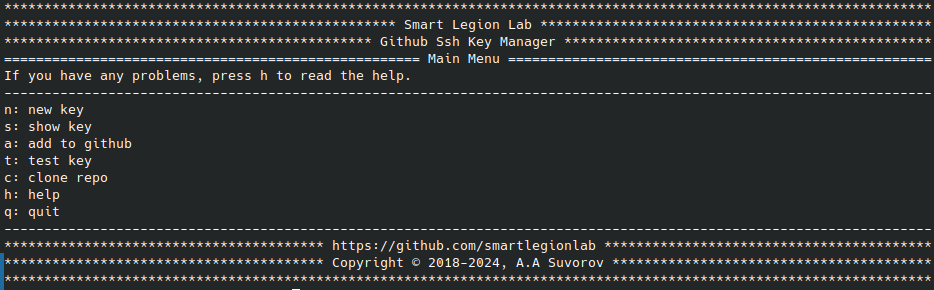
Description:
github-ssh-key - GitHub ssh key manager. Console utility for creating, getting, testing, using public ssh keys for GitHub.
Possibilities:
- Convenient interactive menu.
- Generating ssh keys for GitHub.
- Output ssh key to the console.
- Adding ssh key to GitHub.
- Checking the ssh key, testing the connection.
- Interactive menu for working with the utility.
- Interactive menu for help.
- Launch the default browser with a page for adding ssh key on GitHub.
- Cloning private repositories via ssh.
- Running individual commands.
⚠️ Disclaimer
By using this software, you agree to the full disclaimer terms.
Summary: Software provided "AS IS" without warranty. You assume all risks.
Full legal disclaimer: See DISCLAIMER.md
Help:
Install and use:
Install:
pip install github-ssh-key
github-ssh-key
Use:
To access GitHub over ssh, you should run some sequence of actions.
- Install openssh;
- Generate new ssh keys;
- Copy the public key;
- Add your public key to GitHub;
- Check the connection;
This utility provides you with these capabilities.
Adding a key to your GitHub account involves several steps:
- Generating new ssh key.
- Install openssh, or make sure you have it installed with the ssh command.
- During the generation process, enter your email that you use when working with GitHub.
- Do not change the default file name.
- Don't set a passphrase if you don't want to enter it every time.
- Copying ssh key.
- Highlight and completely copy your ssh key.
- Adding ssh key to your GitHub account.
- Highlight and completely copy your ssh key.
- Add your ssh key to your GitHub account.
- Testing the ssh key (Testing the connection).
- For a successful connection, you had to follow these steps:
- Generate ssh key.
- Highlight and completely copy your ssh key.
- Add ssh key to your GitHub account.
- If you did everything correctly, you will see a personalized greeting.
- For a successful connection, you had to follow these steps:
Also, directly from the interactive menu, you can clone your private repository using ssh.
To get help with commands, use:
github-ssh-key [command] -h
github-ssh-key new -h
github-ssh-key show -h
github-ssh-key add -h
github-ssh-key test -h
github-ssh-key clone -h
github-ssh-key help -h
Commands:
github-ssh-key [command] [args]
- run
github-ssh-key run - new
github-ssh-key new -e [your email] - show
github-ssh-key show - add
github-ssh-key add - test
github-ssh-key test - clone
github-ssh-key clone -l [GitHub login] -n [repo name]
Variant 1:
- Go to the project folder
python setup.py installgithub-ssh-key
Variant 2:
- Install python
- Go to the project folder
pip install -r requirements.txtpython github-ssh-key.py
License
Copyright (©) 2026, Alexander Suvorov


Download files
Download the file for your platform. If you're not sure which to choose, learn more about installing packages.
Source Distribution
Built Distribution
Filter files by name, interpreter, ABI, and platform.
If you're not sure about the file name format, learn more about wheel file names.
Copy a direct link to the current filters
File details
Details for the file github_ssh_key-1.0.0.tar.gz.
File metadata
- Download URL: github_ssh_key-1.0.0.tar.gz
- Upload date:
- Size: 7.6 kB
- Tags: Source
- Uploaded using Trusted Publishing? No
- Uploaded via: twine/6.2.0 CPython/3.14.3
File hashes
| Algorithm | Hash digest | |
|---|---|---|
| SHA256 |
e40f5cf81a280bd1b15b84b691252766520919d0eefa0e94bc6d6e9bfc8c68ce
|
|
| MD5 |
5de1e49884f9655fc49da02cda958380
|
|
| BLAKE2b-256 |
36e42eba4c140bae96f9124b0a41600e5eb8f5b5f35cd72b6476a04e7dcbd918
|
File details
Details for the file github_ssh_key-1.0.0-py3-none-any.whl.
File metadata
- Download URL: github_ssh_key-1.0.0-py3-none-any.whl
- Upload date:
- Size: 8.4 kB
- Tags: Python 3
- Uploaded using Trusted Publishing? No
- Uploaded via: twine/6.2.0 CPython/3.14.3
File hashes
| Algorithm | Hash digest | |
|---|---|---|
| SHA256 |
acd1a0d81bcabfe9684e4be432e0f906be962ddbbb6d7e8302d738c28ac4af5e
|
|
| MD5 |
079ff68526faa2b18fe3be3fb56a7a91
|
|
| BLAKE2b-256 |
dc382fac9945f1eb945e529e127840a0510cbf3da11d78b4bc56e028204ee598
|






