
Monitor and automate your GitHub repository traffic analytics.
Verified details
These details have been verified by PyPIProject links
GitHub Statistics
Maintainers

Project description
📊 Gitlytics
GitHub Traffic Analytics & Automation





Beautiful GitHub traffic analytics for all your repositories — public and private.
Track views, clones, referrers, and popular paths indefinitely.
Please consider giving this project a ⭐ if you find it helpful!
⚠️ NOTE: V0.1.2 ARCHITECTURE UPGRADE!
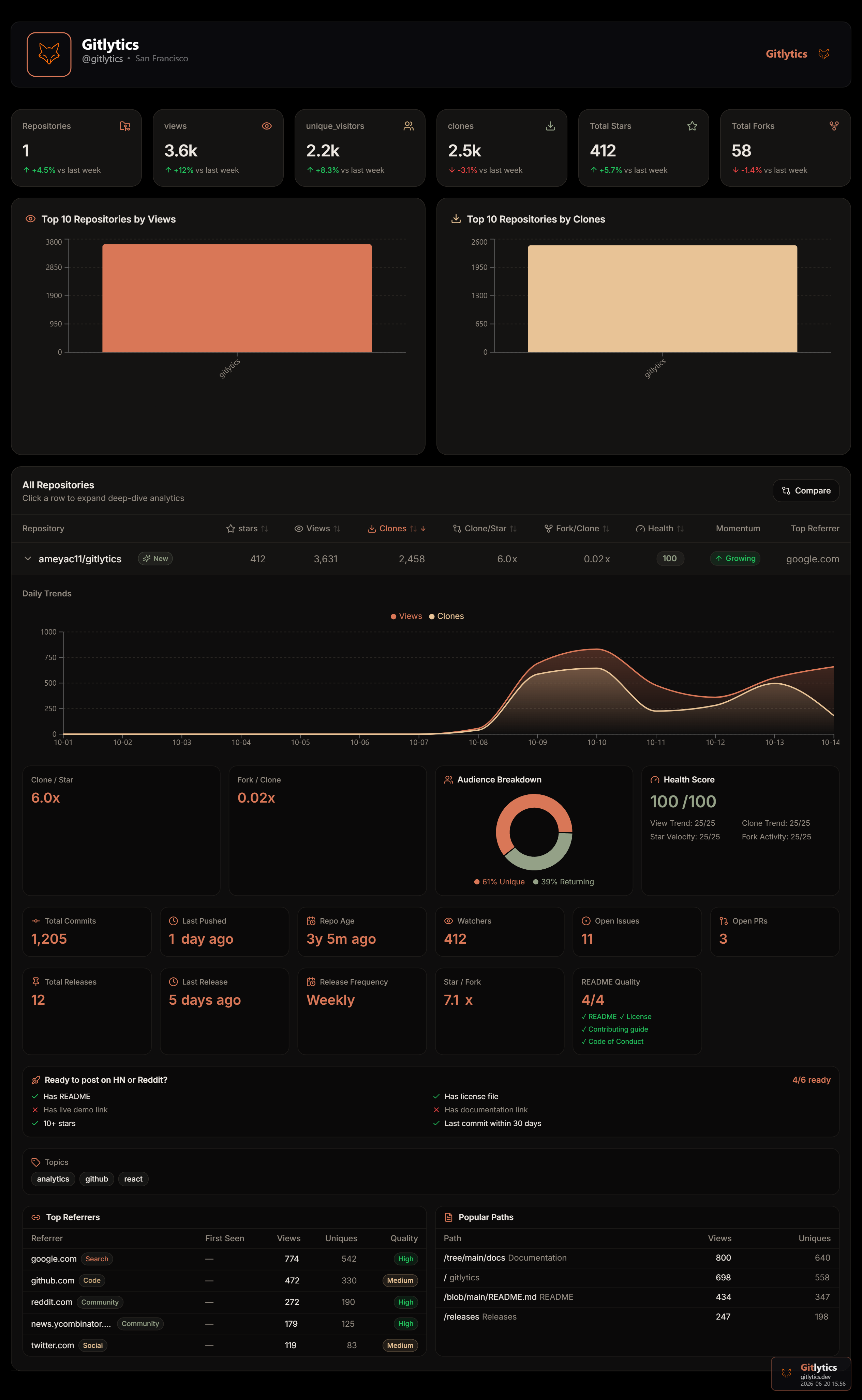
Formerlygithub-traffic-monitor, we have officially rebranded togitlytics! We completely migrated away from Streamlit. The dashboard is now a React + Vite SPA, powered by a FastAPI backend!


📌 Table of Contents
- 🚨 The 14-Day Catch (And How We Fix It)
- 🛠️ Installation
- ⌨️ The 3 Core CLI Commands
- 🐍 Native Python API
- 📊 CSV Output Columns
- 🌟 Show Your Support
- 📄 License
🚨 The 14-Day Catch (And How We Fix It)
⚠️ Did you know? GitHub normally only saves your repository traffic data for 14 days. After two weeks, your valuable views and clones data is permanently deleted.
Don't lose your data! We built a companion automation tool that runs silently in the background every 13 days using GitHub Actions to fetch and save your data permanently.
👉 Set up GitHub Traffic Automation here (It takes literally 2 minutes to set up!)
Once you have your automated CSV data saved from that tool, you can seamlessly plug it right into gitlytics to visualize beautiful, long-term historical charts stretching back months or years!
🛠️ Installation
Install via PyPI:
# Basic CLI and Python Module installation
pip install gitlytics

# Full installation (includes React Dashboard dependencies)
pip install "gitlytics[dashboard]"
🔑 Generating a GitHub Personal Access Token
To use the tools, you'll need a GitHub token.
- Go to GitHub → Settings → Developer settings → Personal access tokens → Tokens (classic)
- Click Generate new token (classic)
- Select the
reposcope (required to read traffic data for private repositories) - Click Generate token and copy it!
⌨️ The 3 Core CLI Commands
Gitlytics is powered by 3 massive command-line tools. You can run them anywhere in your terminal.
1️⃣ gitlytics fetch (Live Terminal Data)
Fetch your live 14-day traffic and print a beautiful ASCII table directly in your console.
gitlytics fetch --token ghp_your_token_here --print-table
2️⃣ gitlytics sync (Background Database Cron)
Tired of losing data? Use sync to permanently append today's traffic to a CSV database. You can even run it as a background cron job (perfect for Raspberry Pi or Linux/Cloud servers)!
# Sync once
gitlytics sync --token ghp_your_token --data-dir ./data

# Run permanently in the background as a cron job (runs at 11:00 PM every day)
gitlytics sync --token ghp_your_token --data-dir ./data --schedule-cron "0 23 * * *"
3️⃣ gitlytics dashboard (React Web UI)
Launch the beautiful React + FastAPI web interface.
gitlytics dashboard
📺 Headless TV Mode: Want to display the dashboard on an office TV monitor? Pass the historical database and token directly so the UI auto-loads without requiring a manual browser login!
gitlytics dashboard --token "ghp_xxx" --data-dir "./data"
🐍 Native Python API
You can import Gitlytics natively into your own Python applications to build custom integrations, run custom cron workflows, or serve the dashboard programmatically on your own cloud servers.
📚 Read the Full API Documentation
1️⃣ gitlytics.fetch_traffic()
Fetches the last 14 days of traffic data (views, clones, referrers, paths) for one or more repositories.
import gitlytics

# Fetch traffic for all repositories accessible by the token
df = gitlytics.fetch_traffic(
    token="ghp_your_token",
    return_format="dataframe"  # Options: "dataframe" (Pandas), "timeseries" (chart-ready dict), or "summary" (per-repo totals dict)
)

# Fetch traffic for a single specific repository and print the table to stdout
gitlytics.fetch_traffic(
    token="ghp_your_token",
    repo_name="username/my-repo",
    print_table=True
)

# Save output directly to a file (CSV or JSON depending on file extension)
gitlytics.fetch_traffic(
    token="ghp_your_token",
    return_format="dataframe",
    save_file="./data/traffic.csv"
)
⚙️ Parameters:
| Parameter | Type | Default | Description |
|---|---|---|---|
token |
str |
Required | GitHub Personal Access Token with repo scope enabled. |
repo_name |
str |
None |
Specific repository name (e.g. "user/repo"). If None, fetches all repositories. |
print_table |
bool |
False |
If True, formats and prints a detailed ASCII traffic table to the console. |
return_format |
str |
"dataframe" |
The format of returned data: "dataframe" (Pandas DataFrame), "timeseries" (chart-ready nested dict), or "summary" (per-repo totals dict). |
save_file |
str |
None |
Optional. File path where the fetched data will be saved (CSV or JSON). |
2️⃣ gitlytics.sync()
Fetches the live traffic data and appends it to a persistent CSV database. Handles merging overlaps and duplicates. Can be scheduled with an internal cron scheduler for cloud deployments.
import gitlytics

# Standard run: Syncs current snapshots to the CSV database and exports UI JSON
gitlytics.sync(
    token="ghp_your_token",
    data_dir="./data",
    export_json="./data/export.json",
    export_public_only=True  # Security Firewall: Exclude private repos from the public-facing export.json
)

# Scheduled Cloud Worker: Run infinitely using standard cron schedule syntax
gitlytics.sync(
    token="ghp_your_token",
    data_dir="./data",
    schedule_cron="0 23 * * *",  # Runs everyday at 11:00 PM UTC
    export_json="./data/export.json"
)
⚙️ Parameters:
| Parameter | Type | Default | Description |
|---|---|---|---|
token |
str |
Required | GitHub Personal Access Token. |
repo_name |
str or list |
None |
Specific repository name(s) to sync. If None, syncs all repositories. |
data_dir |
str |
"./data" |
Directory where CSV files are saved. |
output_mode |
str |
"monthly" |
File grouping frequency: "monthly" (creates traffic_YYYY-MM.csv) or "yearly" (creates traffic_YYYY.csv). |
schedule_cron |
str |
None |
Optional cron expression (e.g., "*/15 * * * *"). If set, runs an infinite scheduler loop. |
export_json |
str |
None |
Optional. Path to compile and export a consolidated history JSON for the frontend. |
export_public_only |
bool |
True |
Security firewall: if True, strips private repository data from the compiled export_json. |
3️⃣ gitlytics.serve_dashboard()
Launches the FastAPI backend and hosts the embedded React SPA dashboard.
import gitlytics

# Host the dashboard programmatically on a custom host/port
gitlytics.serve_dashboard(
    host="0.0.0.0",
    port=8080,
    token="ghp_your_token",     # Pre-authenticates the dashboard session
    data_dir="./data"           # Folder containing the historical databases
)
⚙️ Parameters:
| Parameter | Type | Default | Description |
|---|---|---|---|
host |
str |
"127.0.0.1" |
Host IP to bind the FastAPI server. Use "0.0.0.0" to listen on all interfaces. |
port |
int |
8000 |
Port to run the web server on. |
token |
str |
None |
Optional. Pre-authenticates the dashboard session to bypass the login screen. |
data_dir |
str |
None |
Optional. Path to the folder containing your synced CSV or JSON databases. |
📊 CSV Output Columns
When you sync data, the local CSV databases track 13 detailed metrics:
| Column | Description | Column | Description |
|---|---|---|---|
repository |
Full repo name (user/repo) |
stars |
Current star count |
is_private |
True / False |
forks |
Current fork count |
views |
Page views today | unique_visitors |
Unique visitors today |
clones |
Clone count today | unique_cloners |
Unique cloners today |
top_referrer |
Highest-traffic referral source | top_referrer_views |
Views from top referrer |
top_path |
Most visited path | top_path_views |
Views for top path |
🌟 Show Your Support
If you find this project useful, please consider giving it a ⭐ on GitHub! It helps more people discover the tool.
📄 License
Licensed under the Apache License 2.0.
Project details
Verified details
These details have been verified by PyPIProject links
GitHub Statistics
Maintainers


Download files
Download the file for your platform. If you're not sure which to choose, learn more about installing packages.
Source Distribution
Built Distribution
Filter files by name, interpreter, ABI, and platform.
If you're not sure about the file name format, learn more about wheel file names.
Copy a direct link to the current filters
File details
Details for the file gitlytics-0.1.3.tar.gz.
File metadata
- Download URL: gitlytics-0.1.3.tar.gz
- Upload date:
- Size: 251.2 kB
- Tags: Source
- Uploaded using Trusted Publishing? Yes
- Uploaded via: twine/6.1.0 CPython/3.12.8
File hashes
| Algorithm | Hash digest | |
|---|---|---|
| SHA256 |
2f2813788d5df4f04b417c6bd4c94d2d8edde3838f2bf39156c7394fff3ea22f
|
|
| MD5 |
1a93a0f3b47dfe27ced23b6a50f6d816
|
|
| BLAKE2b-256 |
976e248db09dbdb3e3249738d1c5760649ed6dd94b94641a954c42393f5ea342
|
Provenance
The following attestation bundles were made for gitlytics-0.1.3.tar.gz:
Publisher:
publish.yml on ameyac11/gitlytics
-
Statement:
-
Statement type:
https://in-toto.io/Statement/v1 -
Predicate type:
https://docs.pypi.org/attestations/publish/v1 -
Subject name:
gitlytics-0.1.3.tar.gz -
Subject digest:
2f2813788d5df4f04b417c6bd4c94d2d8edde3838f2bf39156c7394fff3ea22f - Sigstore transparency entry: 1848406401
- Sigstore integration time:
-
Permalink:
ameyac11/gitlytics@8e72b91ac647c7a71e6b4985fc989c37340cee3a -
Branch / Tag:
refs/tags/v0.1.3 - Owner: https://github.com/ameyac11
-
Access:
public
-
Token Issuer:
https://token.actions.githubusercontent.com -
Runner Environment:
github-hosted -
Publication workflow:
publish.yml@8e72b91ac647c7a71e6b4985fc989c37340cee3a -
Trigger Event:
release
-
Statement type:
File details
Details for the file gitlytics-0.1.3-py3-none-any.whl.
File metadata
- Download URL: gitlytics-0.1.3-py3-none-any.whl
- Upload date:
- Size: 240.7 kB
- Tags: Python 3
- Uploaded using Trusted Publishing? Yes
- Uploaded via: twine/6.1.0 CPython/3.12.8
File hashes
| Algorithm | Hash digest | |
|---|---|---|
| SHA256 |
088023d7f382c6738cbdb8d5c707764ec69b3305466a2349b8be655b6a31f369
|
|
| MD5 |
267b494f1c94f3db77878b796b1663d4
|
|
| BLAKE2b-256 |
725173faf4023e92a8e2be00e95d686bdf6d05058eade3b73890fec536127778
|
Provenance
The following attestation bundles were made for gitlytics-0.1.3-py3-none-any.whl:
Publisher:
publish.yml on ameyac11/gitlytics
-
Statement:
-
Statement type:
https://in-toto.io/Statement/v1 -
Predicate type:
https://docs.pypi.org/attestations/publish/v1 -
Subject name:
gitlytics-0.1.3-py3-none-any.whl -
Subject digest:
088023d7f382c6738cbdb8d5c707764ec69b3305466a2349b8be655b6a31f369 - Sigstore transparency entry: 1848406457
- Sigstore integration time:
-
Permalink:
ameyac11/gitlytics@8e72b91ac647c7a71e6b4985fc989c37340cee3a -
Branch / Tag:
refs/tags/v0.1.3 - Owner: https://github.com/ameyac11
-
Access:
public
-
Token Issuer:
https://token.actions.githubusercontent.com -
Runner Environment:
github-hosted -
Publication workflow:
publish.yml@8e72b91ac647c7a71e6b4985fc989c37340cee3a -
Trigger Event:
release
-
Statement type:






