
CLI that renders git tree visualizations as SVG from JSONL input.
Verified details
These details have been verified by PyPIProject links
GitHub Statistics
Maintainers

Project description
gitsvg
CLI that renders git tree visualizations as SVG from JSONL input.




Installation
pip install gitsvg
Or with uv:
uv tool install gitsvg
Quick start
A .gitsvg.jsonl file is a list of operations, one JSON object per line, applied top-to-bottom to build a diagram. Render it with:
gitsvg render diagram.gitsvg.jsonl -o diagram.svg
Validate without rendering:
gitsvg validate diagram.gitsvg.jsonl
Examples
The examples/ folder ships six self-contained input files demonstrating the format. Each subsection below shows the rendered output and the source it came from.
Example 1: Linear history
A single branch with a few commits. The minimum viable diagram.
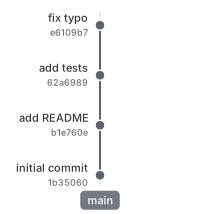
{"op": "branch", "name": "main", "label_side": "left"}
{"op": "commit", "branch": "main", "id": "c1", "msg": "initial commit", "hash": "auto"}
{"op": "commit", "branch": "main", "id": "c2", "msg": "add README", "hash": "auto"}
{"op": "commit", "branch": "main", "id": "c3", "msg": "add tests", "hash": "auto"}
{"op": "commit", "branch": "main", "id": "c4", "msg": "fix typo", "hash": "auto"}
Example 2: Branch and merge
A feature branch forks off main, accumulates a couple of commits, then merges back.
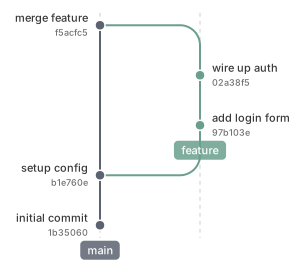
{"op": "branch", "name": "main", "label_side": "left"}
{"op": "commit", "branch": "main", "id": "c1", "msg": "initial commit", "hash": "auto"}
{"op": "commit", "branch": "main", "id": "c2", "msg": "setup config", "hash": "auto"}
{"op": "branch", "name": "feature", "from_branch": "main"}
{"op": "commit", "branch": "feature", "id": "f1", "msg": "add login form", "hash": "auto"}
{"op": "commit", "branch": "feature", "id": "f2", "msg": "wire up auth", "hash": "auto"}
{"op": "merge", "from": "feature", "into": "main", "as": "m1", "msg": "merge feature", "hash": "auto"}
Example 3: Multiple branches with lane reuse
Two concurrent branches share lanes 1 and 2; after both merge, a later feature-b reclaims the now-free lane 1 instead of starting a new one. Lane assignment is automatic and geometry-driven.
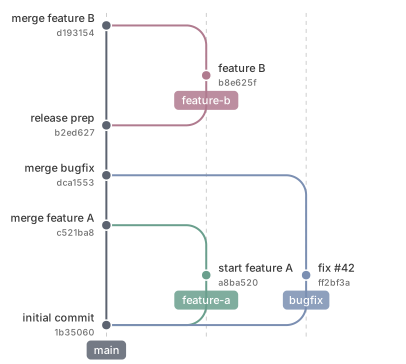
{"op": "branch", "name": "main", "label_side": "left"}
{"op": "commit", "branch": "main", "id": "c1", "msg": "initial commit", "hash": "auto"}
{"op": "branch", "name": "feature-a", "from_branch": "main"}
{"op": "commit", "branch": "feature-a", "id": "a1", "msg": "start feature A", "hash": "auto"}
{"op": "branch", "name": "bugfix", "from_branch": "main"}
{"op": "commit", "branch": "bugfix", "id": "x1", "msg": "fix #42", "hash": "auto"}
{"op": "merge", "from": "feature-a", "into": "main", "as": "m1", "msg": "merge feature A", "hash": "auto"}
{"op": "merge", "from": "bugfix", "into": "main", "as": "m2", "msg": "merge bugfix", "hash": "auto"}
{"op": "commit", "branch": "main", "id": "c2", "msg": "release prep", "hash": "auto"}
{"op": "branch", "name": "feature-b", "from_branch": "main"}
{"op": "commit", "branch": "feature-b", "id": "b1", "msg": "feature B", "hash": "auto"}
{"op": "merge", "from": "feature-b", "into": "main", "as": "m3", "msg": "merge feature B", "hash": "auto"}
Example 4: Highlighting a commit
The highlight op marks an existing commit with an enlarged dot and a bold label — useful for drawing attention to a release or a key milestone.
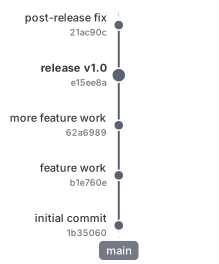
{"op": "branch", "name": "main", "label_side": "left"}
{"op": "commit", "branch": "main", "id": "c1", "msg": "initial commit", "hash": "auto"}
{"op": "commit", "branch": "main", "id": "c2", "msg": "feature work", "hash": "auto"}
{"op": "commit", "branch": "main", "id": "c3", "msg": "more feature work", "hash": "auto"}
{"op": "commit", "branch": "main", "id": "v1", "msg": "release v1.0", "hash": "auto"}
{"op": "commit", "branch": "main", "id": "c4", "msg": "post-release fix", "hash": "auto"}
{"op": "highlight", "commit": "v1"}
Example 5: Remove and rebuild (rebase pattern)
A feature branch is removed and re-declared on top of a more recent main commit, with the same commit IDs as before. This is the rebase-style "move my work onto the new tip" pattern, expressed as primitives.
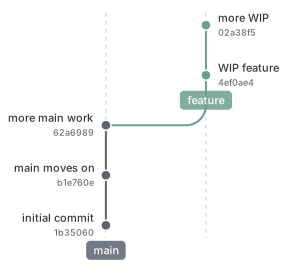
{"op": "branch", "name": "main", "label_side": "left"}
{"op": "commit", "branch": "main", "id": "c1", "msg": "initial commit", "hash": "auto"}
{"op": "branch", "name": "feature", "from_branch": "main"}
{"op": "commit", "branch": "feature", "id": "f1", "msg": "WIP feature", "hash": "auto"}
{"op": "commit", "branch": "feature", "id": "f2", "msg": "more WIP", "hash": "auto"}
{"op": "commit", "branch": "main", "id": "c2", "msg": "main moves on", "hash": "auto"}
{"op": "commit", "branch": "main", "id": "c3", "msg": "more main work", "hash": "auto"}
{"op": "remove", "branches": ["feature"]}
{"op": "branch", "name": "feature", "from_branch": "main"}
{"op": "commit", "branch": "feature", "id": "f1", "msg": "WIP feature", "hash": "auto"}
{"op": "commit", "branch": "feature", "id": "f2", "msg": "more WIP", "hash": "auto"}
Example 6: Import and squash
The import op replays another file as a prelude — here it picks up the rebased state from Example 5. A single new commit then squashes f1 and f2 into one via replaces:.
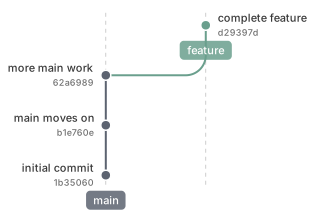
{"op": "import", "path": "05_remove_rebuild.gitsvg.jsonl"}
{"op": "commit", "branch": "feature", "replaces": ["f1", "f2"], "id": "f_squash", "msg": "complete feature", "hash": "auto"}
CLI reference
| Command | Purpose |
|---|---|
gitsvg render <input> -o <output> |
Render a .gitsvg.jsonl file to SVG. Add --small for a more compact SVG (some loss of numeric precision). |
gitsvg validate <input> |
Run the full validation pipeline; report errors with file:line: [code] field: message. Add --json for a structured report. |
gitsvg schema |
Index of all input operations. gitsvg schema <op> prints the JSON Schema for a specific operation; --list-ops prints a bare op list. |
gitsvg errors |
Index of all validation error codes. gitsvg errors <code> prints the long-form catalog entry; --list-codes prints a bare code list. |
gitsvg schema and gitsvg errors are designed for agents and tooling: an LLM-based agent producing input can fetch the schema for a single op and the catalog entry for any error it hits, without reading the rest of the documentation.
License
MIT.
Project details
Verified details
These details have been verified by PyPIProject links
GitHub Statistics
Maintainers
Release history Release notifications | RSS feed


Download files
Download the file for your platform. If you're not sure which to choose, learn more about installing packages.
Source Distribution
Built Distribution
Filter files by name, interpreter, ABI, and platform.
If you're not sure about the file name format, learn more about wheel file names.
Copy a direct link to the current filters
File details
Details for the file gitsvg-0.1.2.tar.gz.
File metadata
- Download URL: gitsvg-0.1.2.tar.gz
- Upload date:
- Size: 51.3 kB
- Tags: Source
- Uploaded using Trusted Publishing? Yes
- Uploaded via: twine/6.1.0 CPython/3.13.12
File hashes
| Algorithm | Hash digest | |
|---|---|---|
| SHA256 |
42266ac65b370b04e3e274a782aa4672dffb7aaef347b860cf1b474838b768b4
|
|
| MD5 |
07d764268c614c5ce3724687a6429440
|
|
| BLAKE2b-256 |
88fed22c6c414dd4e5c7134e2f31e0714d74e259f5a57c23d7f31c4a2d4c72c4
|
Provenance
The following attestation bundles were made for gitsvg-0.1.2.tar.gz:
Publisher:
release_tag.yml on bertpl/gitsvg
-
Statement:
-
Statement type:
https://in-toto.io/Statement/v1 -
Predicate type:
https://docs.pypi.org/attestations/publish/v1 -
Subject name:
gitsvg-0.1.2.tar.gz -
Subject digest:
42266ac65b370b04e3e274a782aa4672dffb7aaef347b860cf1b474838b768b4 - Sigstore transparency entry: 1495405967
- Sigstore integration time:
-
Permalink:
bertpl/gitsvg@acec57abcb6bd34e4999ca9df71d54e482a911a3 -
Branch / Tag:
refs/tags/v0.1.2 - Owner: https://github.com/bertpl
-
Access:
public
-
Token Issuer:
https://token.actions.githubusercontent.com -
Runner Environment:
github-hosted -
Publication workflow:
release_tag.yml@acec57abcb6bd34e4999ca9df71d54e482a911a3 -
Trigger Event:
push
-
Statement type:
File details
Details for the file gitsvg-0.1.2-py3-none-any.whl.
File metadata
- Download URL: gitsvg-0.1.2-py3-none-any.whl
- Upload date:
- Size: 84.9 kB
- Tags: Python 3
- Uploaded using Trusted Publishing? Yes
- Uploaded via: twine/6.1.0 CPython/3.13.12
File hashes
| Algorithm | Hash digest | |
|---|---|---|
| SHA256 |
74a7c70243a58793f0fb5f986061b5eab0c0a729f619b6f2fea1ed66cc098d2f
|
|
| MD5 |
c6789527e4abb7cfaf2e6ee4bd090d7b
|
|
| BLAKE2b-256 |
35be01de73732105d1727da6ca636308c65e76adddc2a45ccec1ec44f52594b0
|
Provenance
The following attestation bundles were made for gitsvg-0.1.2-py3-none-any.whl:
Publisher:
release_tag.yml on bertpl/gitsvg
-
Statement:
-
Statement type:
https://in-toto.io/Statement/v1 -
Predicate type:
https://docs.pypi.org/attestations/publish/v1 -
Subject name:
gitsvg-0.1.2-py3-none-any.whl -
Subject digest:
74a7c70243a58793f0fb5f986061b5eab0c0a729f619b6f2fea1ed66cc098d2f - Sigstore transparency entry: 1495406071
- Sigstore integration time:
-
Permalink:
bertpl/gitsvg@acec57abcb6bd34e4999ca9df71d54e482a911a3 -
Branch / Tag:
refs/tags/v0.1.2 - Owner: https://github.com/bertpl
-
Access:
public
-
Token Issuer:
https://token.actions.githubusercontent.com -
Runner Environment:
github-hosted -
Publication workflow:
release_tag.yml@acec57abcb6bd34e4999ca9df71d54e482a911a3 -
Trigger Event:
push
-
Statement type:






