
 Glasses Detector







About
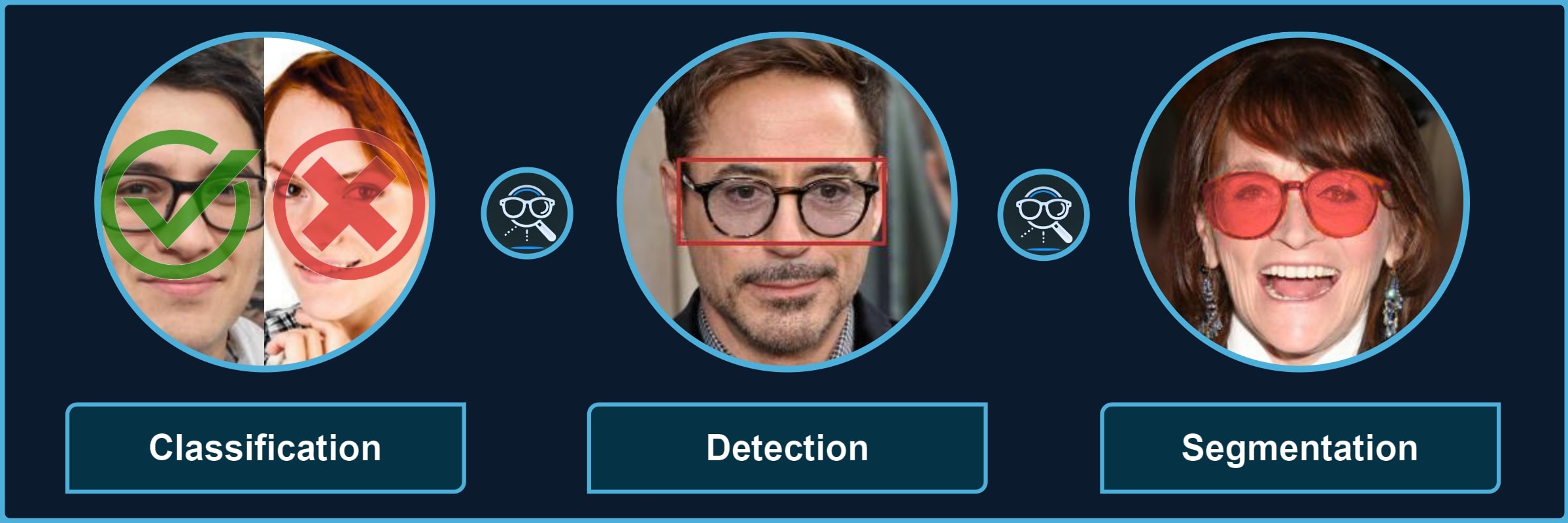
Package for processing images with different types of glasses and their parts. It provides a quick way to use the pre-trained models for 3 kinds of tasks, each divided into multiple categories, for instance, classification of sunglasses or segmentation of glasses frames.
| Classification | 👓 transparent 🕶️ opaque 🥽 any ➿shadows |
| Detection | 🤓 worn 👓 standalone 👀 eye-area |
| Segmentation | 😎 full 🖼️ frames 🦿 legs 🔍 lenses 👥 shadows |
$\color{gray}{\textit{Note: }\text{refer to}}$ Glasses Detector Features $\color{gray}{\text{for visual examples.}}$
Installation
Pip Package
If you only need the library with pre-trained models, just install the pip package and see Quick Start for usage (also check Glasses Detector Installation for more details):
pip install glasses-detector
You can also install it from the source:
git clone https://github.com/mantasu/glasses-detector
cd glasses-detector && pip install .
Local Project
If you want to train your own models on the given datasets (or on some other datasets), just clone the project and install training requirements, then see Running section to see how to run training and testing.
git clone https://github.com/mantasu/glasses-detector
cd glasses-detector && pip install -r requirements.txt
You can create a virtual environment for your packages via venv, however, if you have conda, then you can simply use it to create a new environment, for example:
conda create -n glasses-detector python=3.12
conda activate glasses-detector
To set-up the datasets, refer to Data section.
Quick Start
Command Line
You can run predictions via the command line. For example, classification of a single image and segmentation of images inside a directory can be performed by running:
glasses-detector -i path/to/img.jpg -t classification -d cuda -f int # Prints 1 or 0
glasses-detector -i path/to/img_dir -t segmentation -f mask -e .jpg  # Generates masks
Python Script
You can import the package and its models via the python script for more flexibility. Here is an example of how to classify people wearing sunglasses:
from glasses_detector import GlassesClassifier

# Generates a CSV with each line "<img_name.jpg>,<True|False>"
classifier = GlassesClassifier(size="small", kind="sunglasses")
classifier.process_dir("path/to/dir", "path/to/preds.csv", format="bool")
And here is a more efficient way to process a dir for detection task (only single bbox per image is currently supported):
from glasses_detector import GlassesDetector

# Generates dir_preds with bboxes as .txt for each img
detector = GlassesDetector(kind="eyes", device="cuda")
detector.process_dir("path/to/dir", ext=".txt", batch_size=64)
Demo
Feel free to play around with some demo image files. For example, after installing through pip, you can run:
git clone https://github.com/mantasu/glasses-detector && cd glasses-detector/data
glasses-detector -i demo -o demo_labels.csv --task classification:eyeglasses
You can also check out the demo notebook which can be also accessed via Google Colab.
Credits
For references and citation, please see Glasses Detector Credits.
1 maintainer

Metadata
1 maintainer
Release files for glasses-detector 1.0.4
For a detailed explanation of source distributions (sdists) and built distributions (wheels), please see the package formats documentation.
Source distribution (sdist)
| File | Size | Uploaded | |
|---|---|---|---|
| glasses_detector-1.0.4.tar.gz | 87.8 kB | Details |
Built distribution (wheel)
| File | Interpreter | ABI | Platform | Reset |
|---|---|---|---|---|
| glasses_detector-1.0.4-py3-none-any.whl | Python 3 | none | any | Details |
Total release size: 161.6 kB
Release files / glasses_detector-1.0.4.tar.gz
| Download URL | glasses_detector-1.0.4.tar.gz |
|---|---|
| Size | 87.8 kB |
| Tags | Source |
|
SHA-256 checksum How to use checksums |
dc7a53b1c6b4eb0351b127e0825dbdeb2ca2558ca63b67e8417a251950096ee7
|
|
BLAKE2b-256 checksum How to use checksums |
05abe0c8f59212cd7af26a2cc2a675ed9b3ebbb85d2389204301dfedd5f3c49e
|
| Upload date | |
|
Uploaded using Trusted Publishing? What is trusted publishing? |
No |
| Uploaded via |
twine/6.1.0 CPython/3.13.7
|
Release files / glasses_detector-1.0.4-py3-none-any.whl
| Download URL | glasses_detector-1.0.4-py3-none-any.whl |
|---|---|
| Size | 73.8 kB |
| Tags | Python 3 |
|
SHA-256 checksum How to use checksums |
15c1e1a32a69585a6c75ad4bfeef13191fb7296349609e1ba2831911cfe41aa9
|
|
BLAKE2b-256 checksum How to use checksums |
81c13f0c9a126d0016fd34806b8b78ec991770efcb44a3ea00a9a57e23183381
|
| Upload date | |
|
Uploaded using Trusted Publishing? What is trusted publishing? |
No |
| Uploaded via |
twine/6.1.0 CPython/3.13.7
|














