
globalemu: Robust and Fast Global 21-cm Signal Emulation

Project description
Introduction
- globalemu:
Robust Global 21-cm Signal Emulation
- Author:
Harry Thomas Jones Bevins
- Version:
1.6.0
- Homepage:
- Documentation:








Installation
The software can be pip installed from the PYPI repository via,
pip install globalemuor alternatively it can be installed from the git repository via.
git clone https://github.com/htjb/globalemu.git # or the equivalent using ssh keys
cd globalemu
python setup.py install --user
Emulating the Global 21-cm Signal
globalemu is a fast and robust approach for emulating the Global or sky averaged 21-cm signal and the associated neutral fraction history. In the cited MNRAS paper below we show that it is a factor of approximately 102 times faster and 2 times as accurate as the previous state of the art 21cmGEM. The code is also flexible enough for it to be retrained on detailed simulations containing the most up to date physics. We release two trained networks, one for the Global signal and one for the neutral fraction history, details of which can be found in the MNRAS paper below.
You can download trained networks with the following code after pip installing or installing via the github repository:
from globalemu.downloads import download

download().model() # Redshift-Temperature Network
download(xHI=True).model() # Redshift-Neutral Fraction Network
which will produce two files in your working directory ‘T_release/’ and ‘xHI_release/’. Each file has the respective network model in and related pre and post processing files. You can then go on to evaluate each network for a set of parameters by running:
from globalemu.eval import evaluate

# [fstar, vc, fx, tau, alpha, nu_min, R_mfp]
params = [1e-3, 46.5, 1e-2, 0.0775, 1.25, 1.5, 30]

predictor = evaluate(base_dir='T_release/') # Redshift-Temperature Network
signal, z = predictor(params)

# note the parameter order is different for the neutral fraction emulator
# [fstar, vc, fx, nu_min, tau, alpha, R_mfp]
params = [1e-3, 46.5, 1e-2, 1.5, 0.0775, 1.25, 30]

predictor = evaluate(base_dir='xHI_release/') # Redshift-Neutral Fraction Network
signal, z = predictor(params)
The code can also be used to train a network on your own Global 21-cm signal or neutral fraction simulations using the built in globalemu pre-processing techniques. There is some flexibility on the required astrophysical input parameters and the pre-processing steps which is detailed in the documentation. More details about training your own network can be found in the documentation.
globalemu GUI
globalemu also features a GUI that can be invoked from the command line and used to explore how the structure of the Global 21-cm signal varies with the values of the astrophysical inputs. The GUI needs a configuration file to run and this can be generated using a built in globalemu function. GUI configuration files can be generated for any trained model. For example, if we wanted to generate a configuration file for the released Global signal emulator we would run,
from globalemu.gui_config import config

paramnames = [r'$\log(f_*)$', r'$\log(V_c)$', r'$\log(f_X)$',
              r'$\tau$', r'$\alpha$', r'$\nu_\mathrm{min}$',
              r'$R_\mathrm{mfp}$']

config('T_release/', paramnames, 'data/')
where the directory ‘data/’ contains the training and testing data (in this case that corresponding to 21cmGEM).
The GUI can then be invoked from the terminal via,
globalemu /path/to/base_dir/T_release/etc/An image of the GUI is shown below.
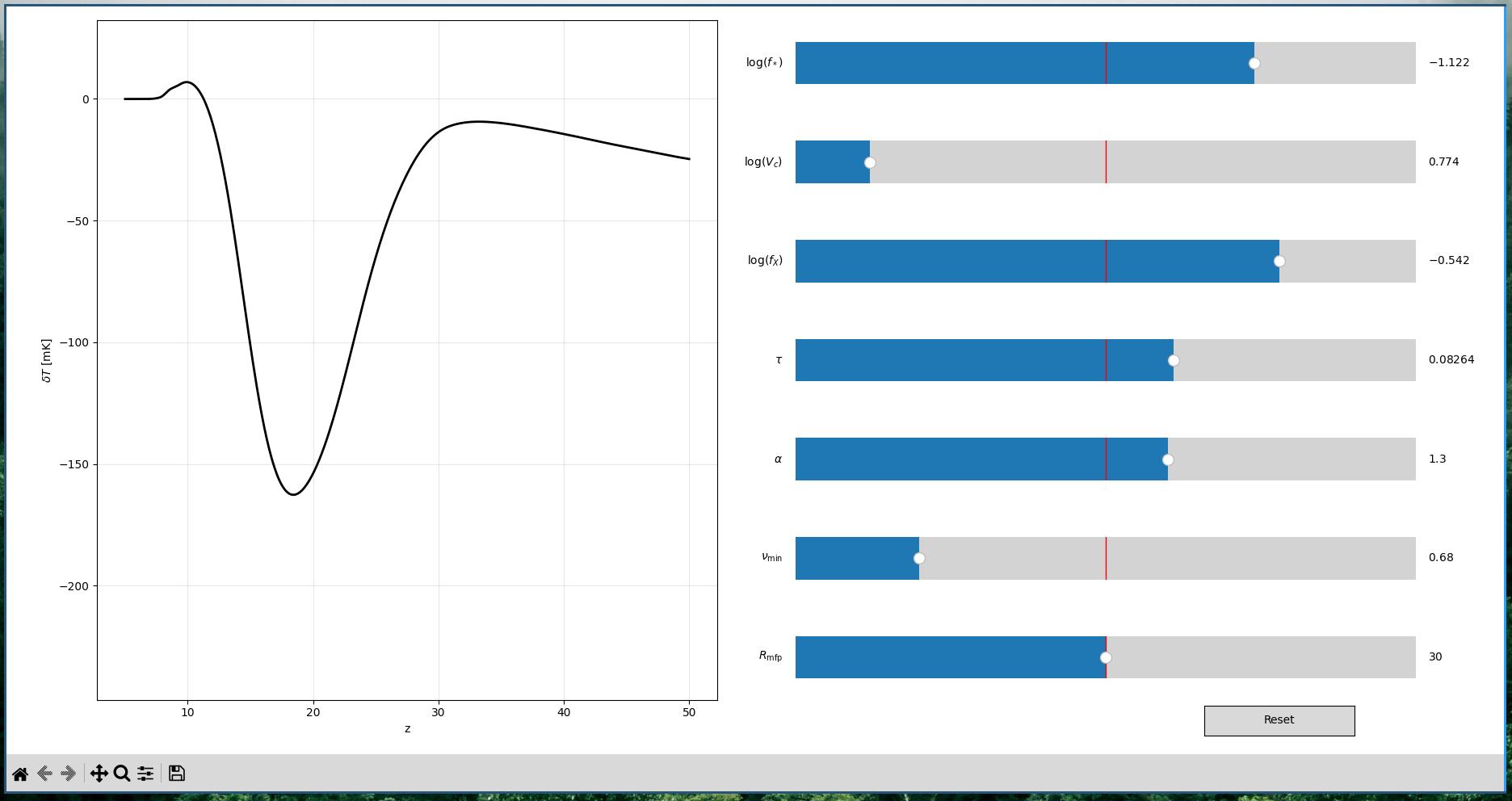
The GUI can also be used to investigate the physics of the neutral fraction history by generating a configuration file for the released trained model. There is no need to specify that the configuration file is for a neutral fraction emulator.
Configuration files for the released models are provided.
Documentation
The documentation is available at: https://globalemu.readthedocs.io/
It can be compiled locally after downloading the repo and installing the relevant packages (see below) via,
cd docs
sphinx-build source html-build
You can find a tutorial notebook here.
T_release/ and xHI_release/
The currently released global signal trained model, T_release/ is trained on the same training data set as 21cmGEM which is available here. The data used to train the neutral fraction history network, xHI_release/ is not publicly available but comes from the same large scale simulations used to model the global signal.
For both models the input parameters and ranges are given below.
Parameter |
Description |
T_release/ |
xHI_release/ |
Min |
Max |
|---|---|---|---|---|---|
Input Order |
Input Order |
||||
f* |
Star Formation Efficiency |
1 |
1 |
0.0001 |
0.5 |
Vc |
Minimal Virial Circular Veloity |
2 |
2 |
4.2 km/s |
100 km/s |
fx |
X-ray Efficiency |
3 |
3 |
0 |
1000 |
tau |
CMB Optical Depth |
4 |
5 |
0.04 |
0.17 |
alpha |
Power of X-ray SED slope |
5 |
6 |
1.0 |
1.5 |
nu min |
Low Energy Cut Off of X-ray SED |
6 |
4 |
0.1 keV |
3 keV |
Rmfp |
Mean Free Path of Ionizing Photons |
7 |
7 |
10.0 Mpc |
50.0 Mpc |
Licence and Citation
The software is free to use on the MIT open source license. If you use the software for academic puposes then we request that you cite the globalemu paper below.
MNRAS pre-print (referred to in the documentation as the globalemu paper),
Bevins, H., W. J. Handley, A. Fialkov, E. D. L. Acedo and K. Javid. “GLOBALEMU: A novel and robust approach for emulating the sky-averaged 21-cm signal from the cosmic dawn and epoch of reionisation.” (2021). arXiv:2104.04336
Below is the bibtex,
@article{Bevins2021,
  title = {{GLOBALEMU}: {A} novel and robust approach for emulating the sky-averaged 21-cm signal from the cosmic dawn and epoch of reionisation},
  url = {http://arxiv.org/abs/2104.04336},
  urldate = {2021-04-12},
  journal = {arXiv:2104.04336 [astro-ph]},
  author = {Bevins, H. T. J. and Handley, W. J. and Fialkov, A. and Acedo, E. de Lera and Javid, K.},
  month = apr,
  year = {2021},
  note = {arXiv: 2104.04336}
}
Requirements
To run the code you will need to following additional packages:
When installing via pip or from source via setup.py the above packages will be installed if absent.
To compile the documentation locally you will need:
To run the test suit you will need:
Contributing
Contributions to globalemu are very much welcome and can be made via,
Opening an issue to report a bug/propose a new feature.
Making a pull request. Please consider opening an issue first to discuss any proposals and ensure the PR will be accepted.
Release history Release notifications | RSS feed


Download files
Download the file for your platform. If you're not sure which to choose, learn more about installing packages.
Source Distribution
File details
Details for the file globalemu-1.6.0.tar.gz.
File metadata
- Download URL: globalemu-1.6.0.tar.gz
- Upload date:
- Size: 28.1 kB
- Tags: Source
- Uploaded using Trusted Publishing? No
- Uploaded via: twine/4.0.1 CPython/3.10.8
File hashes
| Algorithm | Hash digest | |
|---|---|---|
| SHA256 |
342b9251d53ab9e9444099330dbc8f675772dee6ae66ad9c2987e6b87cc38a51
|
|
| MD5 |
3f859c358b5baa5fc43245c835f6e041
|
|
| BLAKE2b-256 |
92049f1416ae6b1f4deed9b9e0c88ad20adc2383e97a16f5776c53978795b7a5
|






