
This release is a pre-release and may not be stable for production use.
GluonTS - Probabilistic Time Series Modeling in Python





GluonTS is a Python package for probabilistic time series modeling, focusing on deep learning based models.
Features
- State-of-the-art models implemented with MXNet and PyTorch (see list)
- Easy AWS integration via Amazon SageMaker (see here)
- Utilities for loading and iterating over time series datasets
- Utilities to evaluate models performance and compare their accuracy
- Building blocks to define custom models and quickly experiment
Installation
GluonTS requires Python 3.6 or newer, and the easiest way to install it is via pip:
pip install gluonts[mxnet,pro]  # support for mxnet models, faster datasets
pip install gluonts[torch,pro]  # support for torch models, faster datasets
You can enable or disable extra dependencies as you prefer, depending on what GluonTS features you are interested in enabling.
Models:
mxnet- MXNet-based modelstorch- PyTorch-based modelsR- R-based modelsProphet- Prophet-based models
Datasets:
arrow- Arrow and Parquet dataset supportpro- bundlesarrowplusorjsonfor faster datasets
Misc:
shellfor integration with SageMaker
Documentation
Available models
| Name | Local/global | Data layout | Architecture/method | Implementation | References |
|---|---|---|---|---|---|
| DeepAR | Global | Univariate | RNN | MXNet, PyTorch | paper |
| DeepState | Global | Univariate | RNN, state-space model | MXNet | paper |
| DeepFactor | Global | Univariate | RNN, state-space model, Gaussian process | MXNet | paper |
| Deep Renewal Processes | Global | Univariate | RNN | MXNet | paper |
| GPForecaster | Global | Univariate | MLP, Gaussian process | MXNet | - |
| MQ-CNN | Global | Univariate | CNN encoder, MLP decoder | MXNet | paper |
| MQ-RNN | Global | Univariate | RNN encoder, MLP encoder | MXNet | paper |
| N-BEATS | Global | Univariate | MLP, residual links | MXNet | paper |
| Rotbaum | Global | Univariate | XGBoost, Quantile Regression Forests, LightGBM, Level Set Forecaster | Numpy | paper |
| Causal Convolutional Transformer | Global | Univariate | Causal convolution, self attention | MXNet | paper |
| Temporal Fusion Transformer | Global | Univariate | LSTM, self attention | MXNet | paper |
| Transformer | Global | Univariate | MLP, multi-head attention | MXNet | paper |
| WaveNet | Global | Univariate | Dilated convolution | MXNet | paper |
| SimpleFeedForward | Global | Univariate | MLP | MXNet, PyTorch | - |
| DeepVAR | Global | Multivariate | RNN | MXNet | paper |
| GPVAR | Global | Multivariate | RNN, Gaussian process | MXNet | paper |
| LSTNet | Global | Multivariate | LSTM | MXNet | paper |
| DeepTPP | Global | Multivariate events | RNN, temporal point process | MXNet | paper |
| RForecast | Local | Univariate | ARIMA, ETS, Croston, TBATS | Wrapped R package | paper |
| Prophet | Local | Univariate | - | Wrapped Python package | paper |
| NaiveSeasonal | Local | Univariate | - | Numpy | book section |
| Naive2 | Local | Univariate | - | Numpy | book section |
| NPTS | Local | Univariate | - | Numpy | - |
Running on Amazon SageMaker
Training and deploying GluonTS models on Amazon SageMaker is easily done by using the gluonts.shell package, see its README for more information.
Dockerfiles compatible with Amazon SageMaker can be found in the examples/dockerfiles folder.
Quick example
This simple example illustrates how to train a model from GluonTS on some data, and then use it to make predictions. For more extensive example, please refer to the tutorial section of the documentation
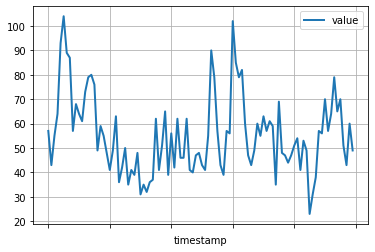
As a first step, we need to collect some data: in this example we will use the volume of tweets mentioning the AMZN ticker symbol.
import pandas as pd
url = "https://raw.githubusercontent.com/numenta/NAB/master/data/realTweets/Twitter_volume_AMZN.csv"
df = pd.read_csv(
    url,
    index_col=0,
    parse_dates=True,
    header=0,
    names=["target"],
)
The first 100 data points look like follows:
import matplotlib.pyplot as plt
df[:100].plot(linewidth=2)
plt.grid(which='both')
plt.show()
We can now prepare a training dataset for our model to train on.
Datasets in GluonTS are essentially iterable collections of
dictionaries: each dictionary represents a time series
with possibly associated features. For this example, we only have one
entry, specified by the "start" field which is the timestamp of the
first datapoint, and the "target" field containing time series data.
For training, we will use data up to midnight on April 5th, 2015.
from gluonts.dataset.pandas import PandasDataset

training_data = PandasDataset(df[:"2015-04-05 00:00:00"])
A forecasting model in GluonTS is a predictor object. One way of obtaining
predictors is by training a correspondent estimator. Instantiating an
estimator requires specifying the frequency of the time series that it will
handle, as well as the number of time steps to predict. In our example
we're using 5 minutes data, so freq="5min",
and we will train a model to predict the next hour, so prediction_length=12.
We also specify some minimal training options.
from gluonts.model.deepar import DeepAREstimator
from gluonts.mx.trainer import Trainer

estimator = DeepAREstimator(freq="5min", prediction_length=12, trainer=Trainer(epochs=10))
predictor = estimator.train(training_data=training_data)
During training, useful information about the progress will be displayed.
To get a full overview of the available options, please refer to the
documentation of DeepAREstimator (or other estimators) and Trainer.
We're now ready to make predictions: we will forecast the hour following the midnight on April 15th, 2015.
test_data = PandasDataset(df[:"2015-04-15 00:00:00"])

from gluonts.dataset.util import to_pandas

for test_entry, forecast in zip(test_data, predictor.predict(test_data)):
    to_pandas(test_entry)[-60:].plot(linewidth=2)
    forecast.plot(color='g', prediction_intervals=[50.0, 90.0])
plt.grid(which='both')
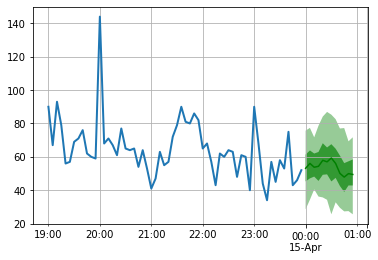
Note that the forecast is displayed in terms of a probability distribution: the shaded areas represent the 50% and 90% prediction intervals, respectively, centered around the median (dark green line).
Contributing
If you wish to contribute to the project, please refer to our contribution guidelines.
Citing
If you use GluonTS in a scientific publication, we encourage you to add the following references to the related papers, in addition to any model-specific references that are relevant for your work:
@article{gluonts_jmlr,
  author  = {Alexander Alexandrov and Konstantinos Benidis and Michael Bohlke-Schneider
    and Valentin Flunkert and Jan Gasthaus and Tim Januschowski and Danielle C. Maddix
    and Syama Rangapuram and David Salinas and Jasper Schulz and Lorenzo Stella and
    Ali Caner Türkmen and Yuyang Wang},
  title   = {{GluonTS: Probabilistic and Neural Time Series Modeling in Python}},
  journal = {Journal of Machine Learning Research},
  year    = {2020},
  volume  = {21},
  number  = {116},
  pages   = {1-6},
  url     = {http://jmlr.org/papers/v21/19-820.html}
}
@article{gluonts_arxiv,
  author  = {Alexandrov, A. and Benidis, K. and Bohlke-Schneider, M. and
    Flunkert, V. and Gasthaus, J. and Januschowski, T. and Maddix, D. C.
    and Rangapuram, S. and Salinas, D. and Schulz, J. and Stella, L. and
    Türkmen, A. C. and Wang, Y.},
  title   = {{GluonTS: Probabilistic Time Series Modeling in Python}},
  journal = {arXiv preprint arXiv:1906.05264},
  year    = {2019}
}
Other resources
- Collected Papers from the group behind GluonTS: a bibliography.
- Tutorial at IJCAI 2021 (with videos) with YouTube link.
- Tutorial at WWW 2020 (with videos)
- Tutorial at SIGMOD 2019
- Tutorial at KDD 2019
- Tutorial at VLDB 2018
- Neural Time Series with GluonTS
- International Symposium of Forecasting: Deep Learning for Forecasting workshop


Release files for gluonts 0.10.0rc1
For a detailed explanation of source distributions (sdists) and built distributions (wheels), please see the package formats documentation.
Source distribution (sdist)
| File | Size | Uploaded | Provenance | Actions |
|---|---|---|---|---|
| gluonts-0.10.0rc1.tar.gz | 2.6 MB | Without provenance | Details for gluonts-0.10.0rc1.tar.gz |
Built distribution (wheel)
| File | Interpreter | ABI | Platform | Actions Reset |
|---|---|---|---|---|
| gluonts-0.10.0rc1-py3-none-any.whl | Python 3 | none | any | Details for gluonts-0.10.0rc1-py3-none-any.whl |
Total release size: 5.1 MB
Release files / gluonts-0.10.0rc1.tar.gz
| Download URL | gluonts-0.10.0rc1.tar.gz |
|---|---|
| Size | 2.6 MB |
| Tags | Source |
|
SHA-256 checksum How to use checksums |
08b00373f950657073c2bb12c0d2530cda75eea23a83f02cf01c79472b0c1f2a
|
|
BLAKE2b-256 checksum How to use checksums |
c164f654b3f95ae2541e3c04cae570449641f66d91e994a1347c9363c032272f
|
| Upload date | |
|
Uploaded using Trusted Publishing? What is trusted publishing? |
No |
| Uploaded via |
twine/4.0.1 CPython/3.9.13
|
Release files / gluonts-0.10.0rc1-py3-none-any.whl
| Download URL | gluonts-0.10.0rc1-py3-none-any.whl |
|---|---|
| Size | 2.5 MB |
| Tags | Python 3 |
|
SHA-256 checksum How to use checksums |
7a38644e1483e4973db536b5bd6c4c97c5063d57cbbcffaea9e855101f75e9fd
|
|
BLAKE2b-256 checksum How to use checksums |
4cba4bad6b4f09a21d15b2df6b5a481c2406090ce8d10767cb3bc315091d87f5
|
| Upload date | |
|
Uploaded using Trusted Publishing? What is trusted publishing? |
No |
| Uploaded via |
twine/4.0.1 CPython/3.9.13
|
Security for gluonts 0.10.0rc1
Provenance
Provenance describes where a file came from. On PyPI, provenance is shared via attestations, which provide a verifiable record of the build or publishing details. View details, limitations and caveats.
No provenance found
None of the files in this release were uploaded with provenance metadata.
A note on package security
PyPI is a repository for distributing packages, not a service for auditing them. While third-party security researchers and our staff do their best to detect and remove malicious packages, PyPI cannot guarantee the quality, security or suitability of any given package.
To learn more about protecting yourself from malicious actors, visit our package security documentation.














