
Gnome appindicator dns switcher


- GitHub: https://github.com/annervisser/gnome-dns-switcher
- PyPi: https://pypi.org/project/gnome-dns-switcher/
Gnome appindicator (toolbar icon) tool to quickly switch between different DNS servers
- Easily available in your toolbox
- Config file to specify DNS servers Supports multiple connections and switching them separately
- Utility button to restart NetworkManager
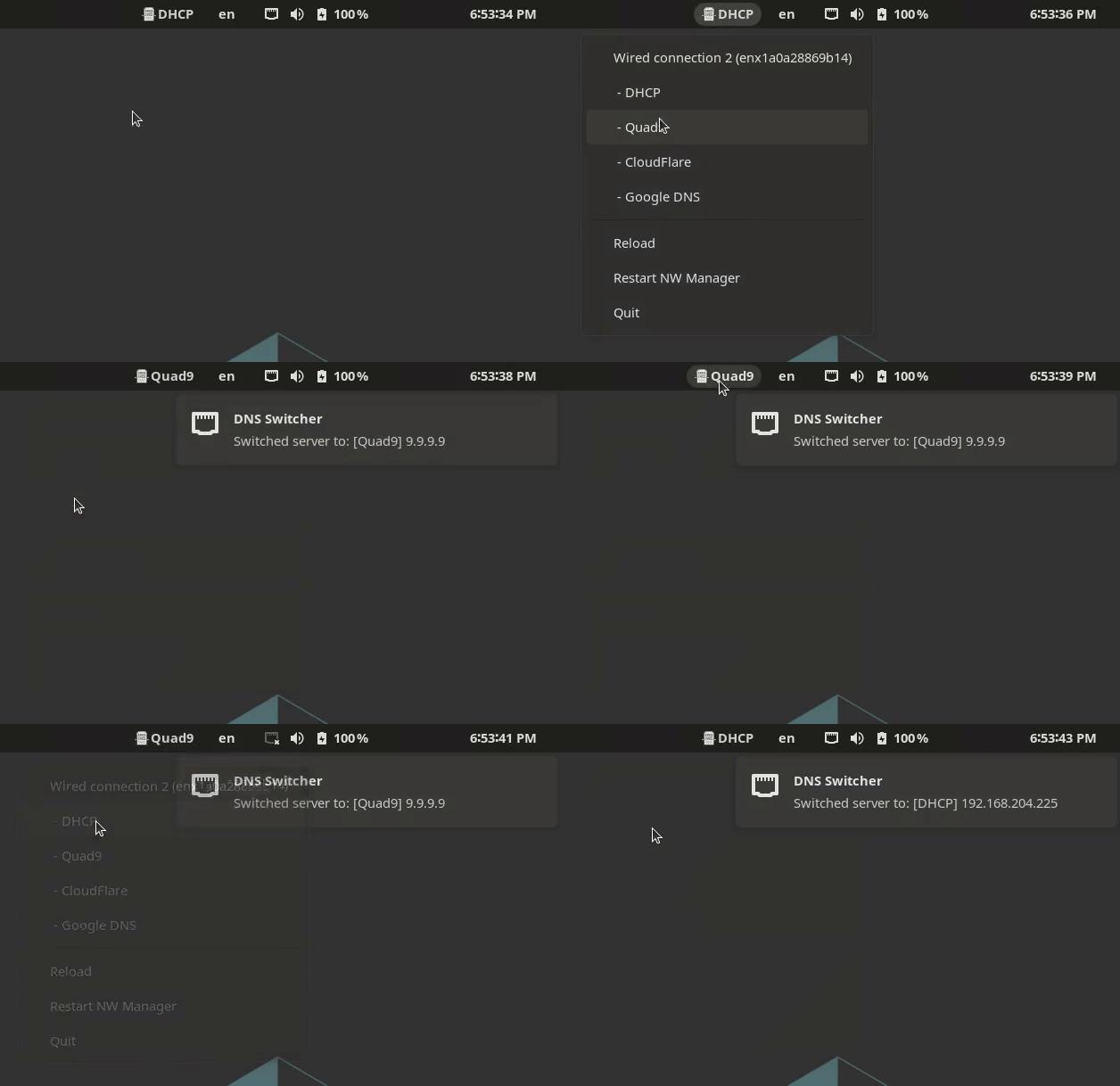
💻 Screenshots

Easily available in your toolbar

Shows you what it's done, no surprises

Supports multiple connections and switching them separately

Setup
Install dependencies
# Install pipx:
sudo apt install pipx

# Add pipx path to your .bashrc
pipx ensurepath

# Install dependencies to run this application
sudo apt install python3-dev libcairo2-dev libgirepository1.0-dev python3-gi python3-gi-cairo gir1.2-gtk-3.0 gir1.2-appindicator3-0.1
Install gnome-dns-switcher
pipx install gnome-dns-switcher

# Generate a default configuration
gnome-dns-switcher generate-config

# Modify the config to your needs. See config documentation below
edit ~/.config/gnome-dns-switcher.yml
Usage
Start the app in the background
Simply add & after your command
gnome-dns-switcher &
Specify a different configuration file (default is ~/.config/gnome-dns-switcher.yml)
gnome-dns-switcher --config /path/to/config.yml
Add to startup applications
# Sleep 10 seconds before starting to prevent starting up
# before network connections have been made
bash -c 'sleep 10 && gnome-dns-switcher --config ~/.config/gnome-dns-switcher.yml'
Config
The config file allows you to specify which DNS servers to show and what devices are visible.
By default, gnome-dns-switcher looks for a config file at ~/.config/gnome-dns-switcher.yml
To generate and example configuration, you can run gnome-dns-switcher generate-config
The generated configuration will look like this:
servers: # DNS Server options to show
  # DHCP is always shown as the first option
  Quad9: 9.9.9.9
  CloudFlare: [1.1.1.1, 1.0.0.1]
  Google DNS:
    - 8.8.8.8
    - 8.8.4.4
devices: [] # Specify device names here if you want to hide certain devices (ip link show)
servers A list of servers that can be switched between
- The name is only used for displaying
- You can define one or more ips, as a yaml array or as a comma-seperated string
devices Which devices to show (optional)
- optional, will display all non-bridge connections if not present or empty
- one or more devices to show in the switcher
- List all your devices by running
ip link showin a terminal
- List all your devices by running
Development
Setup
Set up virtualenv:
virtualenv venv
source venv/bin/activate
Install dependencies:
python setup.py install
pip install vext vext.gi
Running
python -m gnome_dns_switcher
Useful links
1 maintainer

Release files for gnome-dns-switcher 1.4.0
For a detailed explanation of source distributions (sdists) and built distributions (wheels), please see the package formats documentation.
Source distribution (sdist)
| File | Size | Uploaded | |
|---|---|---|---|
| gnome_dns_switcher-1.4.0.tar.gz | 21.1 kB | Details |
Built distribution (wheel)
| File | Interpreter | ABI | Platform | Reset |
|---|---|---|---|---|
| gnome_dns_switcher-1.4.0-py3-none-any.whl | Python 3 | none | any | Details |
Total release size: 42.9 kB
Release files / gnome_dns_switcher-1.4.0.tar.gz
| Download URL | gnome_dns_switcher-1.4.0.tar.gz |
|---|---|
| Size | 21.1 kB |
| Tags | Source |
|
SHA-256 checksum How to use checksums |
afb63deb0f6f099257f96ed5d02f42739f15b6dd35c7bf12ffa317ca77548531
|
|
BLAKE2b-256 checksum How to use checksums |
56135b024b74f07459633da5c5c4fd6e0e2452e5eb45ad0efcf53e11cb8f965c
|
| Upload date | |
|
Uploaded using Trusted Publishing? What is trusted publishing? |
No |
| Uploaded via |
twine/6.1.0 CPython/3.13.3
|
Release files / gnome_dns_switcher-1.4.0-py3-none-any.whl
| Download URL | gnome_dns_switcher-1.4.0-py3-none-any.whl |
|---|---|
| Size | 21.7 kB |
| Tags | Python 3 |
|
SHA-256 checksum How to use checksums |
1c6f822e69a63185c14c7eddba61787b4e8aedcf12f6571d93bced7bd192598e
|
|
BLAKE2b-256 checksum How to use checksums |
b1b1936a9bcb971e3dd9bfb9238b95d2a9f370db158feb13e330ef5da4a5b2e3
|
| Upload date | |
|
Uploaded using Trusted Publishing? What is trusted publishing? |
No |
| Uploaded via |
twine/6.1.0 CPython/3.13.3
|














