
DNS Switcher for Ubuntu Gnome

Project description
Gnome appindicator dns switcher


- GitHub: https://github.com/annervisser/gnome-dns-switcher
- PyPi: https://pypi.org/project/gnome-dns-switcher/
Gnome appindicator (toolbar icon) tool to quickly switch between different DNS servers
- Easily available in your toolbox
- Config file to specify DNS servers Supports multiple connections and switching them separately
- Utility button to restart NetworkManager
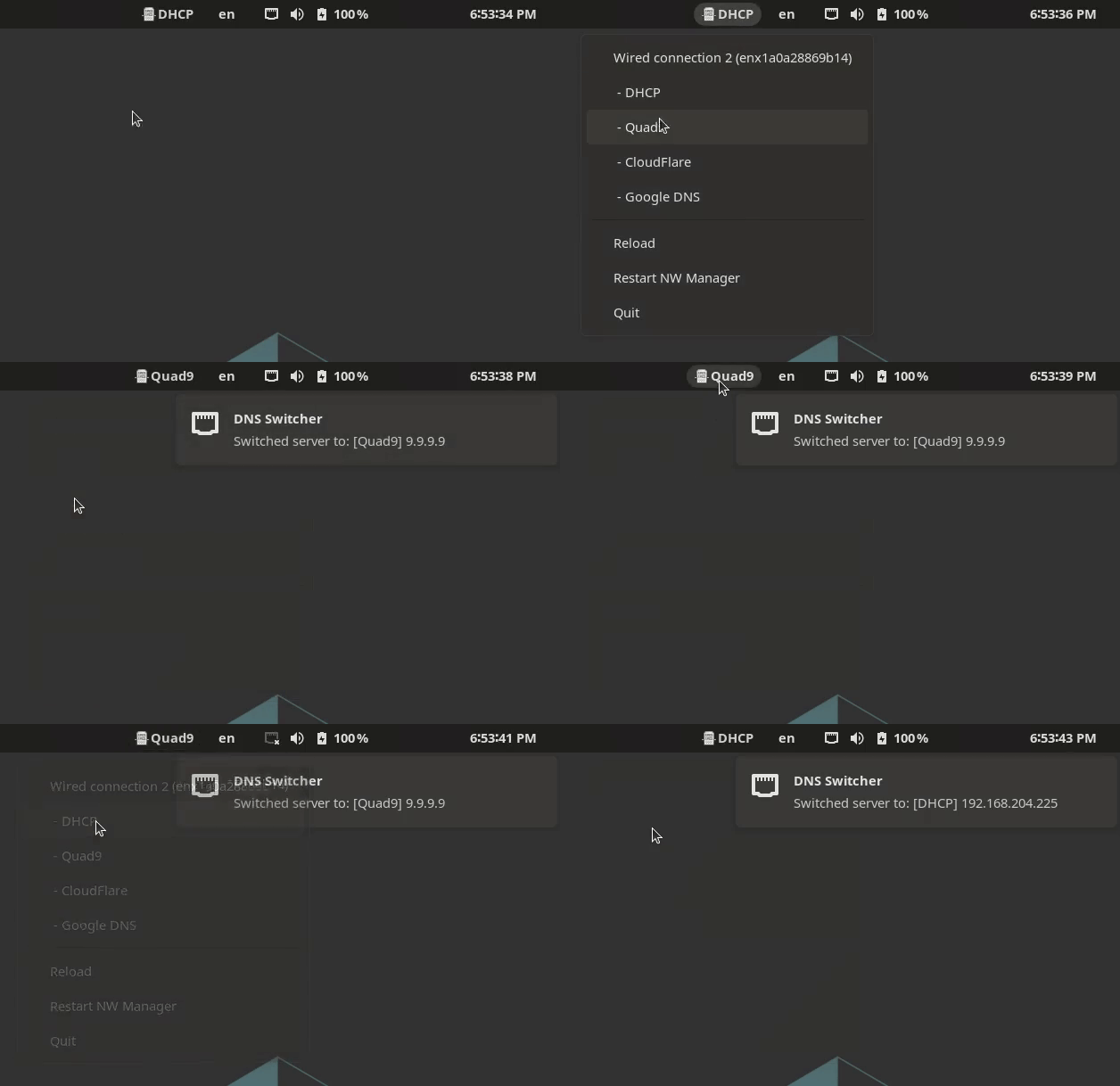
💻 Screenshots

Easily available in your toolbar

Shows you what it's done, no surprises

Supports multiple connections and switching them separately

Setup
Install dependencies
# Install pipx:
sudo apt install pipx

# Add pipx path to your .bashrc
pipx ensurepath

# Install dependencies to run this application
sudo apt install python3-dev libcairo2-dev libgirepository1.0-dev python3-gi python3-gi-cairo gir1.2-gtk-3.0 gir1.2-appindicator3-0.1
Install gnome-dns-switcher
pipx install gnome-dns-switcher

# Generate a default configuration
gnome-dns-switcher generate-config

# Modify the config to your needs. See config documentation below
edit ~/.config/gnome-dns-switcher.yml
Usage
Start the app in the background
Simply add & after your command
gnome-dns-switcher &
Specify a different configuration file (default is ~/.config/gnome-dns-switcher.yml)
gnome-dns-switcher --config /path/to/config.yml
Add to startup applications
# Sleep 10 seconds before starting to prevent starting up
# before network connections have been made
bash -c 'sleep 10 && gnome-dns-switcher --config ~/.config/gnome-dns-switcher.yml'
Config
The config file allows you to specify which DNS servers to show and what devices are visible.
By default, gnome-dns-switcher looks for a config file at ~/.config/gnome-dns-switcher.yml
To generate and example configuration, you can run gnome-dns-switcher generate-config
The generated configuration will look like this:
servers: # DNS Server options to show
  # DHCP is always shown as the first option
  Quad9: 9.9.9.9
  CloudFlare: [1.1.1.1, 1.0.0.1]
  Google DNS:
    - 8.8.8.8
    - 8.8.4.4
devices: [] # Specify device names here if you want to hide certain devices (ip link show)
servers A list of servers that can be switched between
- The name is only used for displaying
- You can define one or more ips, as a yaml array or as a comma-seperated string
devices Which devices to show (optional)
- optional, will display all non-bridge connections if not present or empty
- one or more devices to show in the switcher
- List all your devices by running
ip link showin a terminal
- List all your devices by running
Development
Setup
Set up virtualenv:
virtualenv venv
source venv/bin/activate
Install dependencies:
python setup.py install
pip install vext vext.gi
Running
python -m gnome_dns_switcher
Useful links
Release history Release notifications | RSS feed


Download files
Download the file for your platform. If you're not sure which to choose, learn more about installing packages.
Source Distribution
Built Distribution
Filter files by name, interpreter, ABI, and platform.
If you're not sure about the file name format, learn more about wheel file names.
Copy a direct link to the current filters
File details
Details for the file gnome_dns_switcher-1.4.0.tar.gz.
File metadata
- Download URL: gnome_dns_switcher-1.4.0.tar.gz
- Upload date:
- Size: 21.1 kB
- Tags: Source
- Uploaded using Trusted Publishing? No
- Uploaded via: twine/6.1.0 CPython/3.13.3
File hashes
| Algorithm | Hash digest | |
|---|---|---|
| SHA256 |
afb63deb0f6f099257f96ed5d02f42739f15b6dd35c7bf12ffa317ca77548531
|
|
| MD5 |
efb51aa2ae6b29f1fe4f8080c97c09c1
|
|
| BLAKE2b-256 |
56135b024b74f07459633da5c5c4fd6e0e2452e5eb45ad0efcf53e11cb8f965c
|
File details
Details for the file gnome_dns_switcher-1.4.0-py3-none-any.whl.
File metadata
- Download URL: gnome_dns_switcher-1.4.0-py3-none-any.whl
- Upload date:
- Size: 21.7 kB
- Tags: Python 3
- Uploaded using Trusted Publishing? No
- Uploaded via: twine/6.1.0 CPython/3.13.3
File hashes
| Algorithm | Hash digest | |
|---|---|---|
| SHA256 |
1c6f822e69a63185c14c7eddba61787b4e8aedcf12f6571d93bced7bd192598e
|
|
| MD5 |
1c80bc60120be3c0fa2800a605b4b482
|
|
| BLAKE2b-256 |
b1b1936a9bcb971e3dd9bfb9238b95d2a9f370db158feb13e330ef5da4a5b2e3
|






