

gnvitop
Global nvitop — a web-based GPU & TPU monitoring dashboard that monitors all your remote accelerator servers from a single page.


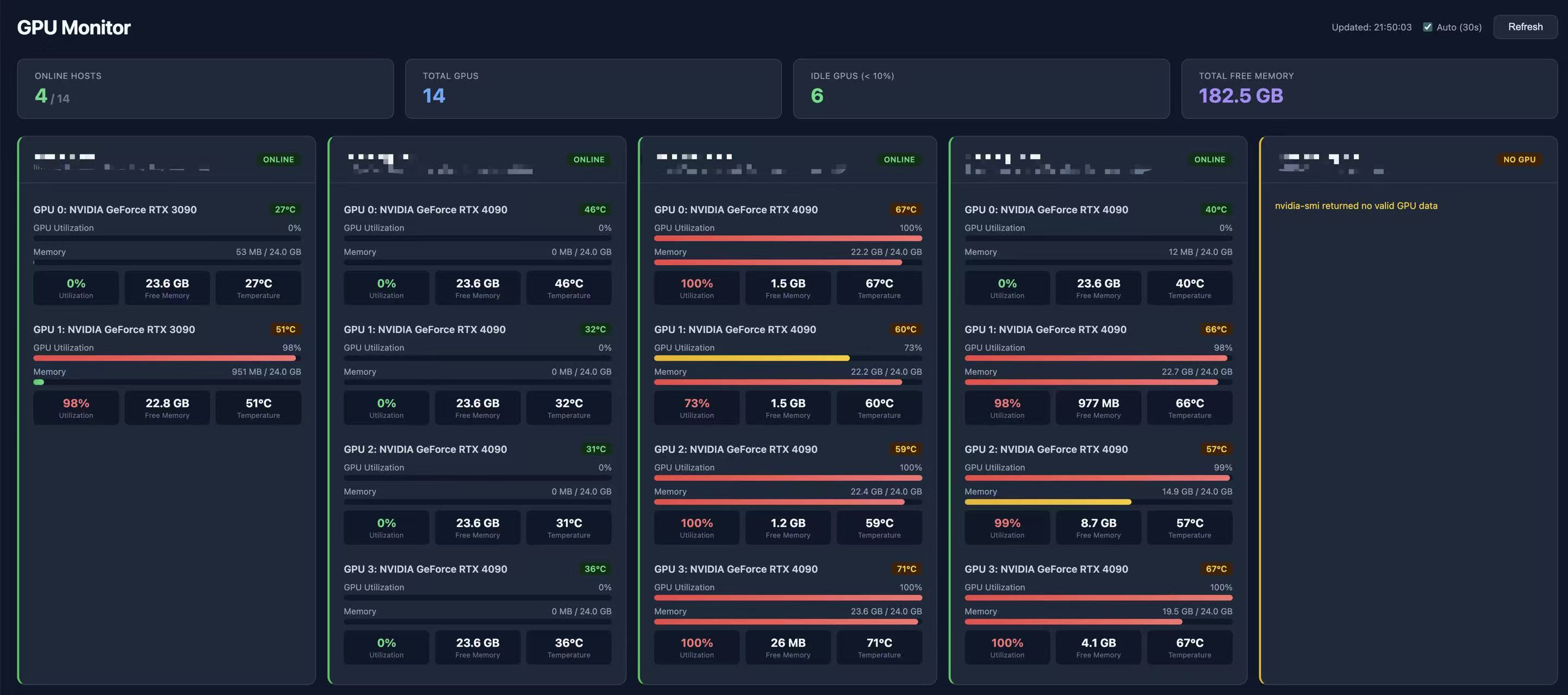
Like nvitop, but for all your servers at once — NVIDIA GPUs, MetaX GPUs, Google Cloud TPUs, and Gadi NCI compute nodes, displayed as a beautiful web dashboard.
pip install gnvitop
gnvitop
How It Works
- Monitors local GPU/TPU automatically (no config needed)
- Reads your
~/.ssh/configand SSH into each remote server - Auto-detects accelerator type: runs
nvidia-smi(NVIDIA),mx-smi(MetaX), or checks/dev/accel*(Google TPU) - Displays everything in a real-time web dashboard with per-user process highlighting
- Auto-refreshes every 30 seconds; SSE streaming shows each server as it responds
graph LR
    A[gnvitop] --> B[Browser]
    B --> C["localhost — Local GPUs"]
    B --> D["lab-server — 4x A100"]
    B --> E["metax-server — MetaX C500"]
    B --> F["tpu-v4-8 — Google TPU v4"]
    B --> G["gadi — NCI HPC (dynamic nodes)"]
    B --> H["offline-server — error"]

    style A fill:#7c3aed,stroke:none,color:#fff,font-weight:bold
    style B fill:#2563eb,stroke:none,color:#fff
    style C fill:#16a34a,stroke:none,color:#fff
    style D fill:#16a34a,stroke:none,color:#fff
    style E fill:#16a34a,stroke:none,color:#fff
    style F fill:#7c3aed,stroke:none,color:#fff
    style G fill:#16a34a,stroke:none,color:#fff
    style H fill:#dc2626,stroke:none,color:#fff
Installation
pip install gnvitop
Usage
gnvitop                              # start and auto-open browser
gnvitop -p 8080                      # custom port
gnvitop --host 0.0.0.0               # expose to LAN
gnvitop --no-browser                 # don't auto-open browser
gnvitop --ssh-config /path/to/config # custom SSH config
gnvitop --tui                        # terminal UI mode (no browser)
gnvitop --tui --tui-refresh 10       # TUI with 10s refresh interval
gnvitop --agent                      # output JSON for scripting/agents
gnvitop --history --csv out.csv      # record GPU history to CSV
gnvitop -v                           # show version
Or run as a module:
python -m gnvitop
Prerequisites
- SSH config — your
~/.ssh/configshould have server entries:
Host gpu-server-01
    HostName 192.168.1.101
    User alice
    IdentityFile ~/.ssh/id_rsa

Host gpu-server-02
    HostName 192.168.1.102
    User bob

# ProxyJump (bastion/jump host) is fully supported
Host compute-node
    HostName compute-node.internal
    User alice
    ProxyJump bastion-host

# Google Cloud TPU VM
Host tpu-v4-8
    HostName <external-ip>
    User <your-user>
    IdentityFile ~/.ssh/google_compute_engine
- SSH key auth — password-less login should be set up
- Accelerator tools —
nvidia-smi(NVIDIA),mx-smi(MetaX), or/dev/accel*(TPU) on the remote servers
Features
- Zero config — reads
~/.ssh/configautomatically, no setup needed - One command —
pip install gnvitop && gnvitop, that's it - Local + Remote — monitors local accelerator alongside all remote servers
- Multi-vendor — supports NVIDIA GPUs (
nvidia-smi), MetaX GPUs (mx-smi), and Google Cloud TPUs - Non-bash shell safe — wraps remote commands in
bash -cso it works even if the remote login shell is fish, zsh, etc. - TPU support — detects Google Cloud TPU chips via
/dev/accel*, shows chip count and HBM spec (v4: 32 GB/chip); utilization shown as N/A untiltorch_xlais installed - MetaX support — parses
mx-smioutput for MetaX C500 and compatible GPUs - Gadi NCI support — SSHes into Gadi login nodes and auto-discovers allocated GPU compute nodes via
qstat - ProxyJump support — monitors compute nodes behind bastion/jump hosts
- Per-GPU users — shows which users occupy each GPU and their memory usage
- User highlight — your own processes are highlighted in blue for quick identification
- Agent mode —
gnvitop --agentoutputs structured JSON for use in scripts and AI agents - History recording —
gnvitop --historyrecords GPU stats to CSV for trend analysis - TUI mode —
gnvitop --tuifor a terminal UI without a browser - Auto browser — opens dashboard in your browser on start
- Adjustable refresh — choose 5s / 10s / 30s / 5min auto-refresh interval
- Concurrent — queries all servers in parallel (20 workers)
- Fast loading — background cache warming so the dashboard loads instantly
- Collapse cards — fold individual server cards to a compact strip
- Drag to reorder — drag server cards to arrange them in any order, persisted across reloads
- Compact / Normal modes — toggle between full detail and compact views
- Dark UI — clean, responsive dark-themed dashboard
- At a glance — summary bar shows online hosts, total GPUs, idle GPUs, free memory
- Color coded — green (online), purple (TPU), yellow (no GPU), red (offline), blue (local)
Agent Mode
gnvitop --agent outputs a JSON array suitable for scripting or AI agent use:
gnvitop --agent
[
  {
    "host": "gpu-server-01",
    "status": "ok",
    "gpus": [
      {
        "index": 0,
        "name": "NVIDIA A100-SXM4-80GB",
        "memory_total_mb": 81920,
        "memory_used_mb": 1200,
        "memory_free_mb": 80720,
        "gpu_utilization_pct": 3.0,
        "available": true
      }
    ]
  },
  {
    "host": "tpu-v4-8",
    "status": "ok",
    "gpus": [
      {
        "index": 0,
        "name": "Google TPU v4",
        "memory_total_mb": 32768,
        "memory_used_mb": -1,
        "memory_free_mb": -1,
        "gpu_utilization_pct": -1,
        "available": true
      }
    ]
  }
]
For TPU chips, memory_used_mb and gpu_utilization_pct are -1 (unknown) until torch_xla is installed on the TPU VM. available is true when no Python processes are detected.
Comparison with nvitop
| Feature | nvitop | gnvitop |
|---|---|---|
| Monitor local GPU | Yes | Yes |
| Monitor remote GPUs | No | Yes |
| Multiple servers | No | Yes |
| NVIDIA GPU support | Yes | Yes |
| MetaX GPU support | No | Yes |
| Google Cloud TPU support | No | Yes |
| Gadi NCI node discovery | No | Yes |
| Show per-GPU users | Yes | Yes |
| Highlight current user | No | Yes |
| Interface | Terminal | Web browser + Terminal (TUI) |
| Agent/JSON output | No | Yes |
| GPU history (CSV) | No | Yes |
| Setup | Run on each server | Run once, reads SSH config |
gnvitop is not a replacement for nvitop — it's a complement. Use nvitop for detailed local process-level GPU monitoring, use gnvitop to get an overview of all your accelerator servers (including local) from one place.
License
MIT
1 maintainer

Release files for gnvitop 0.5.0
For a detailed explanation of source distributions (sdists) and built distributions (wheels), please see the package formats documentation.
Source distribution (sdist)
| File | Size | Uploaded | |
|---|---|---|---|
| gnvitop-0.5.0.tar.gz | 31.0 kB | Details |
Built distribution (wheel)
| File | Interpreter | ABI | Platform | Reset |
|---|---|---|---|---|
| gnvitop-0.5.0-py3-none-any.whl | Python 3 | none | any | Details |
Total release size: 60.8 kB
Release files / gnvitop-0.5.0.tar.gz
| Download URL | gnvitop-0.5.0.tar.gz |
|---|---|
| Size | 31.0 kB |
| Tags | Source |
|
SHA-256 checksum How to use checksums |
e11746309a94679828fb231330070763d1679b72939cc055f6d22e0bdc013d4e
|
|
BLAKE2b-256 checksum How to use checksums |
be7334cd8d13be04eb4797b96457462ff021e639a1fa4dadfc7346a96b8a3846
|
| Upload date | |
|
Uploaded using Trusted Publishing? What is trusted publishing? |
Yes |
| Uploaded via |
twine/6.1.0 CPython/3.13.7
|
Provenance
Provenance describes where a file came from. On PyPI, provenance is shared via attestations, which provide a verifiable record of the build or publishing details. View details, limitations and caveats.


PyPI Publish Attestation
PyPI verified that this artifact, at this checksum, originated from the publisher listed below.
Signed by GitHub Actions, verified by PyPI on Apr 7, 2026.
Transparency logRelease files / gnvitop-0.5.0-py3-none-any.whl
| Download URL | gnvitop-0.5.0-py3-none-any.whl |
|---|---|
| Size | 29.8 kB |
| Tags | Python 3 |
|
SHA-256 checksum How to use checksums |
b70e85f7ee3b9f836c3cbb4dff1f64b825cc9f77f9e08a82ee0d5a3202dfbb33
|
|
BLAKE2b-256 checksum How to use checksums |
f7535f3daaac00125582efc103969c13f0910a26d7620c1737a9b78c7062923a
|
| Upload date | |
|
Uploaded using Trusted Publishing? What is trusted publishing? |
Yes |
| Uploaded via |
twine/6.1.0 CPython/3.13.7
|
Provenance
Provenance describes where a file came from. On PyPI, provenance is shared via attestations, which provide a verifiable record of the build or publishing details. View details, limitations and caveats.
PyPI Publish Attestation
PyPI verified that this artifact, at this checksum, originated from the publisher listed below.
Signed by GitHub Actions, verified by PyPI on Apr 7, 2026.
Transparency log













