
Global nvitop: web-based GPU monitoring dashboard for all your remote servers via SSH
Verified details
These details have been verified by PyPIProject links
GitHub Statistics
Maintainers

Project description

gnvitop
Global nvitop — a web-based GPU monitoring dashboard that monitors all your remote GPU servers from a single page.


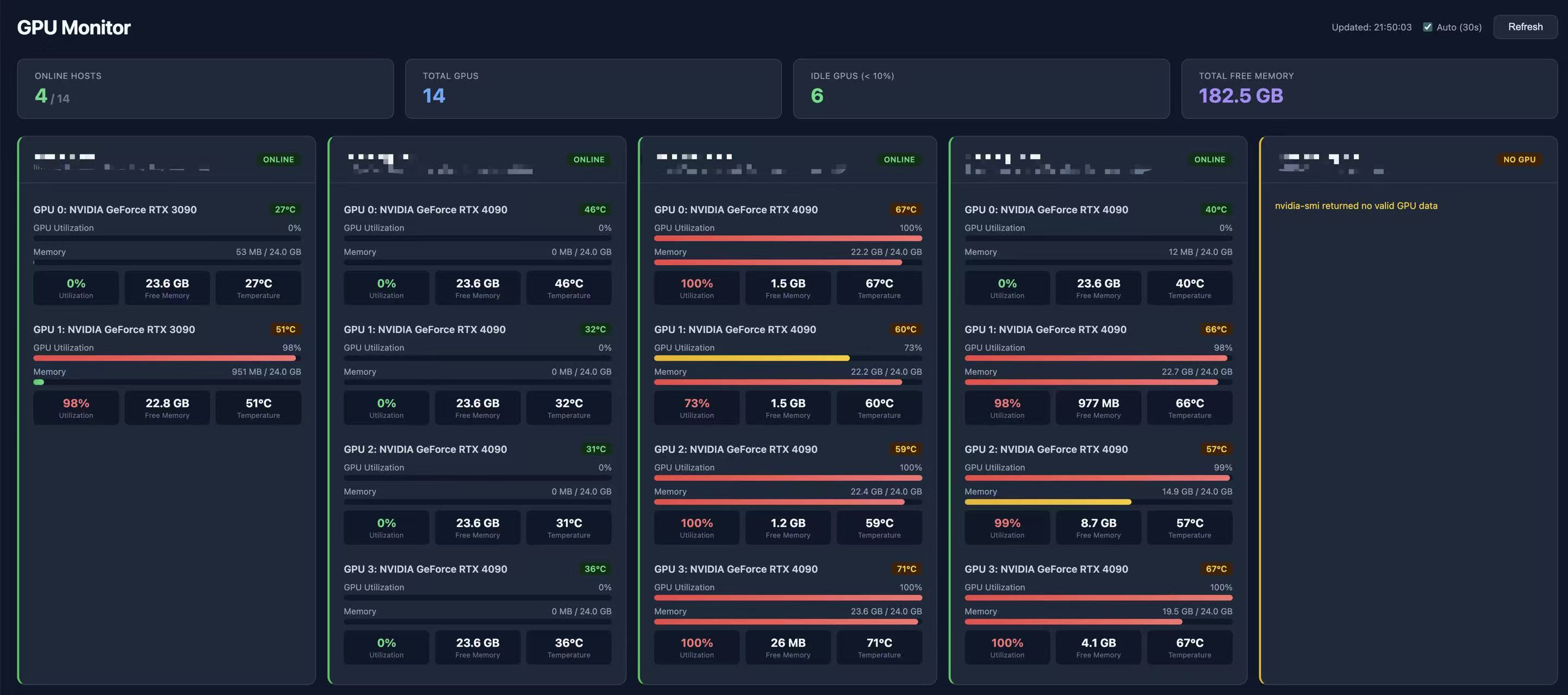
Like nvitop, but for all your servers at once, displayed as a beautiful web dashboard.
pip install gnvitop
gnvitop
How It Works
- Monitors local GPU automatically (no config needed)
- Reads your
~/.ssh/configand SSH into each remote server - Runs
nvidia-smito collect GPU stats and per-GPU process/user info - Displays everything in a real-time web dashboard with current user highlight
- Auto-refreshes every 30 seconds
graph LR
    A[gnvitop] --> B[Browser]
    B --> C["localhost — Local GPUs"]
    B --> D["Server A — 4x A100"]
    B --> E["Server B — 8x V100"]
    B --> F["Server C — 2x RTX 4090"]
    B --> G["Server D — offline"]

    style A fill:#7c3aed,stroke:none,color:#fff,font-weight:bold
    style B fill:#2563eb,stroke:none,color:#fff
    style C fill:#16a34a,stroke:none,color:#fff
    style D fill:#16a34a,stroke:none,color:#fff
    style E fill:#16a34a,stroke:none,color:#fff
    style F fill:#16a34a,stroke:none,color:#fff
    style G fill:#dc2626,stroke:none,color:#fff
Installation
pip install gnvitop
Usage
gnvitop                              # start and auto-open browser
gnvitop -p 8080                      # custom port
gnvitop --host 0.0.0.0              # expose to LAN
gnvitop --no-browser                 # don't auto-open browser
gnvitop --ssh-config /path/to/config # custom SSH config
gnvitop -v                           # show version
Or run as a module:
python -m gnvitop
Prerequisites
- SSH config -- your
~/.ssh/configshould have server entries:
Host gpu-server-01
    HostName 192.168.1.101
    User alice
    IdentityFile ~/.ssh/id_rsa

Host gpu-server-02
    HostName 192.168.1.102
    User bob
- SSH key auth -- password-less login should be set up
- nvidia-smi -- must be installed on the remote servers
Features
- Zero config -- reads
~/.ssh/configautomatically, no setup needed - One command --
pip install gnvitop && gnvitop, that's it - Local + Remote -- monitors local GPU alongside all remote servers
- Per-GPU users -- shows which users occupy each GPU and their memory usage
- User highlight -- your own processes are highlighted in blue for quick identification
- Auto browser -- opens dashboard in your browser on start
- Real-time -- 30s auto-refresh with manual refresh button
- Concurrent -- queries all servers in parallel (20 workers)
- Fast loading -- background cache warming so the dashboard loads instantly; SSE streaming shows each server as it responds
- Cached -- 30s cache to avoid hammering your servers
- Dark UI -- clean, responsive dark-themed dashboard
- At a glance -- summary bar shows online hosts, total GPUs, idle GPUs, free memory
- Color coded -- green (online), yellow (no GPU), red (offline), blue (local)
- GPU details -- utilization bars, memory bars, temperature with color alerts
Comparison with nvitop
| Feature | nvitop | gnvitop |
|---|---|---|
| Monitor local GPU | Yes | Yes |
| Monitor remote GPUs | No | Yes |
| Multiple servers | No | Yes |
| Show per-GPU users | Yes | Yes |
| Highlight current user | No | Yes |
| Interface | Terminal | Web browser |
| Setup | Run on each server | Run once, reads SSH config |
gnvitop is not a replacement for nvitop -- it's a complement. Use nvitop for detailed local process-level GPU monitoring, use gnvitop to get an overview of all your GPU servers (including local) from one place.
License
MIT
Project details
Verified details
These details have been verified by PyPIProject links
GitHub Statistics
Maintainers
Release history Release notifications | RSS feed


Download files
Download the file for your platform. If you're not sure which to choose, learn more about installing packages.
Source Distribution
Built Distribution
Filter files by name, interpreter, ABI, and platform.
If you're not sure about the file name format, learn more about wheel file names.
Copy a direct link to the current filters
File details
Details for the file gnvitop-0.3.1.tar.gz.
File metadata
- Download URL: gnvitop-0.3.1.tar.gz
- Upload date:
- Size: 18.0 kB
- Tags: Source
- Uploaded using Trusted Publishing? Yes
- Uploaded via: twine/6.1.0 CPython/3.13.7
File hashes
| Algorithm | Hash digest | |
|---|---|---|
| SHA256 |
8f4c86188223cebf7f937c43bd5842b71fddf57db72b794db9d6b2fa3ff2e4f3
|
|
| MD5 |
04af2b2cfa9e0d87420b196a32995a54
|
|
| BLAKE2b-256 |
b11e41b5e79d6719a0a970f86f8716bc271a037ab2944729968db419a7b56716
|
Provenance
The following attestation bundles were made for gnvitop-0.3.1.tar.gz:
Publisher:
publish.yml on Linwei94/gnvitop
-
Statement:
-
Statement type:
https://in-toto.io/Statement/v1 -
Predicate type:
https://docs.pypi.org/attestations/publish/v1 -
Subject name:
gnvitop-0.3.1.tar.gz -
Subject digest:
8f4c86188223cebf7f937c43bd5842b71fddf57db72b794db9d6b2fa3ff2e4f3 - Sigstore transparency entry: 1094525901
- Sigstore integration time:
-
Permalink:
Linwei94/gnvitop@c27a38102e572f92341345f8358f64baff1de9b0 -
Branch / Tag:
refs/tags/v0.3.1 - Owner: https://github.com/Linwei94
-
Access:
public
-
Token Issuer:
https://token.actions.githubusercontent.com -
Runner Environment:
github-hosted -
Publication workflow:
publish.yml@c27a38102e572f92341345f8358f64baff1de9b0 -
Trigger Event:
release
-
Statement type:
File details
Details for the file gnvitop-0.3.1-py3-none-any.whl.
File metadata
- Download URL: gnvitop-0.3.1-py3-none-any.whl
- Upload date:
- Size: 17.5 kB
- Tags: Python 3
- Uploaded using Trusted Publishing? Yes
- Uploaded via: twine/6.1.0 CPython/3.13.7
File hashes
| Algorithm | Hash digest | |
|---|---|---|
| SHA256 |
f587aff6003663fb3a3d5a7dbe22ca90df01b729660288f6482e87da2c5fc7fa
|
|
| MD5 |
cc70bb1eb9dab389cef3a35263c3003e
|
|
| BLAKE2b-256 |
2d176cb4c0992698ce28f82b2d57975e7460aea34659aca2b24217f610810ef5
|
Provenance
The following attestation bundles were made for gnvitop-0.3.1-py3-none-any.whl:
Publisher:
publish.yml on Linwei94/gnvitop
-
Statement:
-
Statement type:
https://in-toto.io/Statement/v1 -
Predicate type:
https://docs.pypi.org/attestations/publish/v1 -
Subject name:
gnvitop-0.3.1-py3-none-any.whl -
Subject digest:
f587aff6003663fb3a3d5a7dbe22ca90df01b729660288f6482e87da2c5fc7fa - Sigstore transparency entry: 1094525956
- Sigstore integration time:
-
Permalink:
Linwei94/gnvitop@c27a38102e572f92341345f8358f64baff1de9b0 -
Branch / Tag:
refs/tags/v0.3.1 - Owner: https://github.com/Linwei94
-
Access:
public
-
Token Issuer:
https://token.actions.githubusercontent.com -
Runner Environment:
github-hosted -
Publication workflow:
publish.yml@c27a38102e572f92341345f8358f64baff1de9b0 -
Trigger Event:
release
-
Statement type:






