

Godot AI




Godot AI connects Claude Code, Claude Desktop, Codex, Hermes Agent, and other MCP clients to a live Godot editor. Its ~43 tools and 120+ operations let AI assistants build scenes, edit nodes and scripts, wire signals, and configure UI, materials, animation, particles, cameras, and environments.
📦 Install from the Godot Asset Store or the legacy Asset Library. The Python server requires uv.
💬 Join the Discord — questions, showcases, and contributor chat.
UI demo built in ~2 hours with zero coding, zero image gen, all programmatically drawn by Godot AI — source

Quick Start
Prerequisites
-
Godot
4.5+(4.7+recommended) -
uv (for the Python server)
How to install uv (macOS / Linux / Windows / package managers)
- macOS / Linux:
curl -LsSf https://astral.sh/uv/install.sh | sh - Windows (PowerShell):
powershell -ExecutionPolicy ByPass -c "irm https://astral.sh/uv/install.ps1 | iex" - Package managers:
brew install uv,sudo pacman -S uv,sudo apt install uv, orsudo dnf install uv - More options: uv installation guide
- macOS / Linux:
-
An MCP client (Claude Code | Codex | Antigravity)
1. Install the plugin
From source (latest):
git clone https://github.com/hi-godot/godot-ai.git
cp -r godot-ai/plugin/addons/godot_ai your-project/addons/
Or download the latest release ZIP
and extract addons/godot_ai into your project's addons/ folder.
Or from a Godot marketplace
Use the Godot Asset Store or the deprecated but still-active Asset Library. Marketplace releases may lag behind GitHub.
2. Enable the plugin
In Godot: Project > Project Settings > Plugins — enable Godot AI.
The plugin will automatically start the MCP server, connect over WebSocket, and show status in the Godot AI dock.

3. Connect your MCP client
The dock shows every supported client with Configure / Remove controls; use Configure all to set up every detected client. Supported clients include:
- Claude Code, Claude Desktop, Antigravity, Hermes Agent, DeepSeek Harness
…and 17+ more clients
Codex, Grok Build, Cursor, Devin Desktop, VS Code, VS Code Insiders, Zed, Gemini CLI, Cline, Kilo Code, Roo Code, Zoo Code, Kiro, Trae, Cherry Studio, OpenCode, Qwen Code, Kimi Code, and Pi Agent.
Pi Coding Agent: Install an MCP extension that reads
~/.pi/agent/mcp.json; Pi has no built-in MCP support. See the Pi package gallery.
Most clients use godot-ai attach, a client-owned stdio bridge that starts or
reuses the local backend, making tools available before Godot opens and across
same-version editor restarts. The dock shows the configured transport and, when
needed, a copyable manual command. Cherry Studio remains URL-only because it
manages MCP servers inside the app.
Registering per-project instead of globally
CLI-configured clients use global user scope by default. To limit Godot AI to
one project, set Editor Settings → Plugins → godot_ai/mcp_client_scope to
project (or local, where supported), then press Configure again.
[!IMPORTANT] Configure removes existing
godot-aientries from every scope before writing the selected one. This can modify a checked-in.mcp.json, but never touches other server entries. Remove only affects the currently selected scope.
For project scope:
- The client CLI resolves the project config against its own working
directory. Launch Godot from the project directory so
.mcp.jsonlands where expected. - Claude Code requires one-time approval: run
claudein the project and accept the prompt.
Re-run Configure after changing ports, excluded domains, or plugin versions.
4. Try it
- "Show me the current scene hierarchy."
- "Create a Camera3D named MainCamera under /Main."
- "Search the project for PackedScene files in ui/."
- "Run the scene test suite."
- "Build a voxel block-world game with a player, blocks to place and destroy, and save slots."

Demo gamelet with sophisticated save system built from a handful of Godot AI MCP prompts. Code and Godot project available free here.
Tools and resources: see docs/TOOLS.md for the full tool, op, and resource list (~43 tools exposing 120+ ops, plus read-only godot:// resources), grouped by domain.
Testing: the plugin ships an in-editor GDScript test framework — your AI client (or you) can write McpTestSuite suites for your own game under res://tests/ and run them with test_run. See docs/testing.md.
Manual Client Configuration
Prefer the dock-generated command: it selects a compatible launcher and includes the current version, ports, and excluded tool domains. Re-run Configure after any of those values change.
Claude Code:
claude mcp add --scope user --transport http godot-ai http://127.0.0.1:8000/mcp
Claude Desktop (claude_desktop_config.json):
{
  "mcpServers": {
    "godot-ai": {
      "command": "/absolute/path/to/uvx",
      "args": ["--link-mode", "copy", "--from", "godot-ai==VERSION", "godot-ai", "attach", "--port", "8000", "--ws-port", "9500"]
    }
  }
}
Codex (~/.codex/config.toml):
[mcp_servers."godot-ai"]
command = "godot-ai"
args = [
  "attach",
  "--port", "8000",
  "--ws-port", "9500",
]
enabled = true
startup_timeout_sec = 60
tool_timeout_sec = 360
On Windows, use the dock-generated entry so Store/MSIX paths and consoleless launching are handled correctly. Other clients expose their exact config in the dock's Run this manually panel.
Clients that support URL transport can instead use:
[mcp_servers."godot-ai"]
url = "http://127.0.0.1:8000/mcp"
enabled = true
URL mode relies on the client's reconnect behavior and may require a client restart if Godot AI was not running at startup.
How It Works
MCP Client
   | HTTP (/mcp)
   v
Python Server (FastMCP)      port 8000
   | WebSocket               port 9500
   v
Godot Editor Plugin
   | EditorInterface + SceneTree APIs
   v
Godot Editor
The plugin connects the editor to the Python MCP server over WebSocket; clients
reach its tools and resources over HTTP or the attach stdio bridge.
Remote / LAN access (--allow-host)
The server binds to 127.0.0.1 by default. For LAN access, pass trusted IPs or
CIDRs with --allow-host (repeat or comma-separate the flag):
godot-ai --allow-host 192.168.1.0/24
The editor WebSocket remains loopback-only. Allow only trusted ranges; prefer an SSH tunnel or Tailscale on untrusted networks.
Legacy mcp-proxy import errors
Update Godot AI, press Configure again, and restart the MCP client. This
replaces old mcp-proxy entries with the current godot-ai attach launcher.
Windows: uvx or pywin32 install errors
Close Godot and the MCP client, reopen Godot, press Configure, then restart
the client. Configure uses --link-mode copy, and the plugin cleans stale uv
build directories to avoid Windows file-lock races. If the error persists,
stop stray Godot AI Python processes before retrying.
Contributing
See CONTRIBUTING.md for development setup, testing, and PR guidelines. AI assistants should also read AGENTS.md.
Windows: run .\script\setup-dev.ps1 in PowerShell; it creates the test
project junction without admin rights or Developer Mode.
Telemetry & Privacy
Anonymous telemetry includes an installation UUID, event name, outcome, duration, platform, and version. It excludes code, scene contents, project/file names, and personal data; project-directory slugs are SHA-256 hashed.
Opt out by setting either environment variable to true:
export GODOT_AI_DISABLE_TELEMETRY=true
# or
export DISABLE_TELEMETRY=true
Opt-out creates no UUID, worker, or files. See telemetry and privacy details.
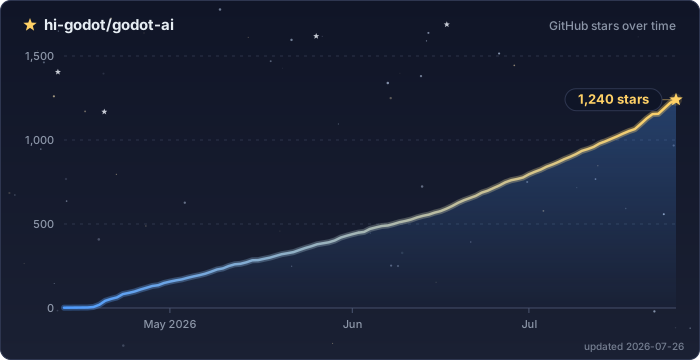
Star History
Download files
Download the file for your platform. If you're not sure which to choose, learn more about installing packages.
Source Distribution
Built Distribution
Filter files by name, interpreter, ABI, and platform.
If you're not sure about the file name format, learn more about wheel file names.
Copy a direct link to the current filters
File details
Details for the file godot_ai-3.2.2.tar.gz.
File metadata
- Download URL: godot_ai-3.2.2.tar.gz
- Upload date:
- Size: 178.6 kB
- Tags: Source
- Uploaded using Trusted Publishing? Yes
- Uploaded via:
twine/7.0.0 CPython/3.13.14
File hashes
| Algorithm | Hash digest | |
|---|---|---|
| SHA256 |
e25a7149f17382de15b1b2874019ffe121aa6087d12141257ff79323d3ebd8a5
|
|
| MD5 |
1a7db1c9515b55d7ee1db530ef8c82ad
|
|
| BLAKE2b-256 |
492324e7b278e6ac63666984200135401732a63181927304f841d628d5d77de5
|
Provenance
The following attestation bundles were made for godot_ai-3.2.2.tar.gz:
Publisher:
release.yml on hi-godot/godot-ai
-
Statement:
-
Statement type:
https://in-toto.io/Statement/v1 -
Predicate type:
https://docs.pypi.org/attestations/publish/v1 -
Subject name:
godot_ai-3.2.2.tar.gz -
Subject digest:
e25a7149f17382de15b1b2874019ffe121aa6087d12141257ff79323d3ebd8a5 - Sigstore transparency entry: 2612902022
- Sigstore integration time:
-
Permalink:
hi-godot/godot-ai@5a41f5a1c344069920353ec4d38034dbb6dab259 -
Branch / Tag:
refs/tags/v3.2.2 - Owner: https://github.com/hi-godot
-
Access:
public
-
Token Issuer:
https://token.actions.githubusercontent.com -
Runner Environment:
github-hosted -
Publication workflow:
release.yml@5a41f5a1c344069920353ec4d38034dbb6dab259 -
Trigger Event:
workflow_dispatch
-
Statement type:
File details
Details for the file godot_ai-3.2.2-py3-none-any.whl.
File metadata
- Download URL: godot_ai-3.2.2-py3-none-any.whl
- Upload date:
- Size: 222.8 kB
- Tags: Python 3
- Uploaded using Trusted Publishing? Yes
- Uploaded via:
twine/7.0.0 CPython/3.13.14
File hashes
| Algorithm | Hash digest | |
|---|---|---|
| SHA256 |
6d2df1f7396680f07891c96d7c0d555015791b8ddce84e452629c4134e672091
|
|
| MD5 |
a1de669aa08cff911e495e8a02428aa3
|
|
| BLAKE2b-256 |
6bc911a3ad3a24fae5163165b01b520fcc68f60a7ea2fbd667d1e8610bc377b9
|
Provenance
The following attestation bundles were made for godot_ai-3.2.2-py3-none-any.whl:
Publisher:
release.yml on hi-godot/godot-ai
-
Statement:
-
Statement type:
https://in-toto.io/Statement/v1 -
Predicate type:
https://docs.pypi.org/attestations/publish/v1 -
Subject name:
godot_ai-3.2.2-py3-none-any.whl -
Subject digest:
6d2df1f7396680f07891c96d7c0d555015791b8ddce84e452629c4134e672091 - Sigstore transparency entry: 2612902078
- Sigstore integration time:
-
Permalink:
hi-godot/godot-ai@5a41f5a1c344069920353ec4d38034dbb6dab259 -
Branch / Tag:
refs/tags/v3.2.2 - Owner: https://github.com/hi-godot
-
Access:
public
-
Token Issuer:
https://token.actions.githubusercontent.com -
Runner Environment:
github-hosted -
Publication workflow:
release.yml@5a41f5a1c344069920353ec4d38034dbb6dab259 -
Trigger Event:
workflow_dispatch
-
Statement type:














