
Production-grade MCP server and AI tools for the Godot engine
Verified details
These details have been verified by PyPIProject links
GitHub Statistics
Maintainers

Project description

Godot AI




Connect MCP clients directly to a live Godot editor via the Model Context Protocol. Over 120 MCP tools (full list) let AI assistants (Claude Code, Codex, Antigravity, etc.) build scenes, edit nodes and scripts, wire signals, and configure UI, materials, animations, particles, cameras, and environments.
🎉 Now on the Godot Asset Library and the new Godot Asset Store — one-click install from Godot's AssetLib tab. You'll still need uv for the Python server (see Quick Start).

💬 Join the Discord — questions, showcases, and contributor chat.
UI demo built in ~2 hours with zero coding, zero image gen, all programmatically drawn by Godot AI — source

Quick Start
Prerequisites
- Godot
4.3+(4.4+recommended) - uv (for the Python server):
- macOS / Linux:
curl -LsSf https://astral.sh/uv/install.sh | sh - Windows (PowerShell):
powershell -ExecutionPolicy ByPass -c "irm https://astral.sh/uv/install.ps1 | iex" - Other options: uv install docs
- macOS / Linux:
- An MCP client (Claude Code | Codex | Antigravity)
1. Install the plugin
Recommended — install from source (always the latest):
git clone https://github.com/hi-godot/godot-ai.git
cp -r godot-ai/plugin/addons/godot_ai your-project/addons/
Or download the latest release ZIP and extract addons/godot_ai into your project's addons/ folder.
Or via the Godot Asset Library
In Godot, open the AssetLib tab, search for Godot AI, click Download, then Install. Note: Asset Library updates lag behind GitHub, so this version may not be the most recent.
🚨 If installing from the Asset Library, most issues can be resolved by disabling and re-enabling the plugin in Project > Project Settings > Plugins.
2. Enable the plugin
In Godot: Project > Project Settings > Plugins — enable Godot AI.
The plugin will automatically start the MCP server, connect over WebSocket, and show status in the Godot AI dock.

3. Connect your MCP client
The dock lists every supported client with a status dot and per-row Configure / Remove buttons, or press Configure all. Auto-configure covers:
- Claude Code, Claude Desktop, Antigravity
…and 15+ more clients
Codex, Cursor, Windsurf, VS Code, VS Code Insiders, Zed, Gemini CLI, Cline, Kilo Code, Roo Code, Kiro, Trae, Cherry Studio, OpenCode, Qwen Code.
Server URL is always http://127.0.0.1:8000/mcp. If auto-configure can't find
a CLI, each dock row exposes a Run this manually panel with a copyable
snippet.
4. Try it
- "Show me the current scene hierarchy."
- "Create a Camera3D named MainCamera under /Main."
- "Search the project for PackedScene files in ui/."
- "Run the scene test suite."
- "Build a voxel block-world game with a player, blocks to place and destroy, and save slots."

Demo gamelet with sophisticated save system built from a handful of Godot AI MCP prompts. Code and Godot project available free here.
Tools and resources: see docs/TOOLS.md for the full list of 120+ MCP tools and resources, grouped by domain.
Manual Client Configuration
Claude Code
claude mcp add --scope user --transport http godot-ai http://127.0.0.1:8000/mcp
Codex (~/.codex/config.toml)
[mcp_servers."godot-ai"]
url = "http://127.0.0.1:8000/mcp"
enabled = true
Antigravity (~/.gemini/antigravity/mcp_config.json)
{
  "mcpServers": {
    "godot-ai": {
      "serverUrl": "http://127.0.0.1:8000/mcp",
      "disabled": false
    }
  }
}
How It Works
MCP Client
   | HTTP (/mcp)
   v
Python Server (FastMCP)      port 8000
   | WebSocket               port 9500
   v
Godot Editor Plugin
   | EditorInterface + SceneTree APIs
   v
Godot Editor
The plugin starts or reuses the Python server, connects over WebSocket, and exposes editor capabilities as MCP tools and resources over HTTP.
Windows: uvx mcp-proxy won't start (pywin32 install fails)
Symptom (in your MCP client's server log):
error: Failed to install: pywin32-311-cp313-cp313-win_amd64.whl (pywin32==311)
  Caused by: failed to remove directory `C:\Users\<you>\AppData\Local\uv\cache\builds-v0\.tmpXXXXXX\Lib\site-packages\pywin32-311.data`: ... os error 32
Cause: uv hard-links shared .pyd files (notably
pydantic_core/_pydantic_core.cp313-win_amd64.pyd) from archive-v0\ into
each new builds-v0\.tmpXXXXXX\ build venv. The running godot-ai Python
process has the same .pyd mapped via LoadLibrary — and because hard
links share the inode, Windows refuses to delete it under any path until
every process unmaps it. uv's post-install cleanup of the build venv then
dies on a stale lock; the misleading pywin32 mention is just the last
package in the resolution order, not the actual lock holder.
Mitigation in this plugin: _stop_server and force_restart_server
both call McpUvCacheCleanup.purge_stale_builds() immediately after
killing the server children, while the .pyd is briefly unmapped. See
plugin/addons/godot_ai/utils/uv_cache_cleanup.gd.
Recommended belt-and-braces: tell uv to copy instead of hard-link by
setting UV_LINK_MODE=copy in the MCP launcher's environment. This also
removes the reverse race where an MCP client spawns uvx mcp-proxy
while a server child is still holding the .pyd. Example for Claude
Desktop's claude_desktop_config.json:
{
  "mcpServers": {
    "godot-ai": {
      "command": "uvx",
      "args": ["mcp-proxy", "--transport", "streamablehttp", "http://127.0.0.1:8000/mcp"],
      "env": { "UV_LINK_MODE": "copy" }
    }
  }
}
If you've already hit the lock, kill stray python.exe children whose
command line contains spawn_main(parent_pid=...) and delete
%LOCALAPPDATA%\uv\cache\builds-v0\.tmp* manually before retrying.
Contributing
See CONTRIBUTING.md for development setup, testing, and PR guidelines.
Windows contributors: run .\script\setup-dev.ps1 in PowerShell. It builds test_project\addons\godot_ai as a directory junction — no admin rights and no Windows Developer Mode required.
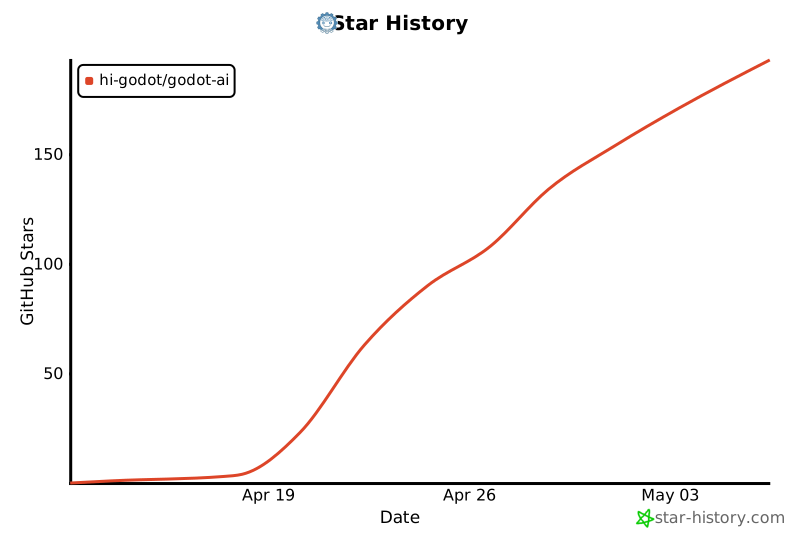
Star History
Project details
Verified details
These details have been verified by PyPIProject links
GitHub Statistics
Maintainers
Release history Release notifications | RSS feed


Download files
Download the file for your platform. If you're not sure which to choose, learn more about installing packages.
Source Distribution
Built Distribution
Filter files by name, interpreter, ABI, and platform.
If you're not sure about the file name format, learn more about wheel file names.
Copy a direct link to the current filters
File details
Details for the file godot_ai-2.3.2.tar.gz.
File metadata
- Download URL: godot_ai-2.3.2.tar.gz
- Upload date:
- Size: 67.4 kB
- Tags: Source
- Uploaded using Trusted Publishing? Yes
- Uploaded via: twine/6.1.0 CPython/3.13.12
File hashes
| Algorithm | Hash digest | |
|---|---|---|
| SHA256 |
35e7b7bc12b32d92b98ff6c5375809e5eab72ef33be99286d6c51037b1e08b69
|
|
| MD5 |
c8ae16f6b3b57629e6a95792aa32efd6
|
|
| BLAKE2b-256 |
29ca8d0c2f9d791ca59f8d271d76c75afa4e16f6c1a72e8fa224f73fdfda7127
|
Provenance
The following attestation bundles were made for godot_ai-2.3.2.tar.gz:
Publisher:
release.yml on hi-godot/godot-ai
-
Statement:
-
Statement type:
https://in-toto.io/Statement/v1 -
Predicate type:
https://docs.pypi.org/attestations/publish/v1 -
Subject name:
godot_ai-2.3.2.tar.gz -
Subject digest:
35e7b7bc12b32d92b98ff6c5375809e5eab72ef33be99286d6c51037b1e08b69 - Sigstore transparency entry: 1429454963
- Sigstore integration time:
-
Permalink:
hi-godot/godot-ai@df5083c1a08d18e6389557869cbc65d300b985bc -
Branch / Tag:
refs/tags/v2.3.2 - Owner: https://github.com/hi-godot
-
Access:
public
-
Token Issuer:
https://token.actions.githubusercontent.com -
Runner Environment:
github-hosted -
Publication workflow:
release.yml@df5083c1a08d18e6389557869cbc65d300b985bc -
Trigger Event:
workflow_dispatch
-
Statement type:
File details
Details for the file godot_ai-2.3.2-py3-none-any.whl.
File metadata
- Download URL: godot_ai-2.3.2-py3-none-any.whl
- Upload date:
- Size: 94.5 kB
- Tags: Python 3
- Uploaded using Trusted Publishing? Yes
- Uploaded via: twine/6.1.0 CPython/3.13.12
File hashes
| Algorithm | Hash digest | |
|---|---|---|
| SHA256 |
cfe7c76ba6f126f8480a2a41ba321ff7ed04021c26047a4fe9ef5719c07edcf0
|
|
| MD5 |
8f561e62bf5f5411a2b31d09d4225135
|
|
| BLAKE2b-256 |
86b422e53b4a2eee0151685da0d507d5e5f30cc766d307acaacd34f8629ce199
|
Provenance
The following attestation bundles were made for godot_ai-2.3.2-py3-none-any.whl:
Publisher:
release.yml on hi-godot/godot-ai
-
Statement:
-
Statement type:
https://in-toto.io/Statement/v1 -
Predicate type:
https://docs.pypi.org/attestations/publish/v1 -
Subject name:
godot_ai-2.3.2-py3-none-any.whl -
Subject digest:
cfe7c76ba6f126f8480a2a41ba321ff7ed04021c26047a4fe9ef5719c07edcf0 - Sigstore transparency entry: 1429454976
- Sigstore integration time:
-
Permalink:
hi-godot/godot-ai@df5083c1a08d18e6389557869cbc65d300b985bc -
Branch / Tag:
refs/tags/v2.3.2 - Owner: https://github.com/hi-godot
-
Access:
public
-
Token Issuer:
https://token.actions.githubusercontent.com -
Runner Environment:
github-hosted -
Publication workflow:
release.yml@df5083c1a08d18e6389557869cbc65d300b985bc -
Trigger Event:
workflow_dispatch
-
Statement type:






