
Perfecting AI workflows with human intelligence

Project description

GoHumanLoop: A Python library empowering AI agents to dynamically request human input (approval/feedback/conversation) at critical stages. Core features:
Human-in-the-loop control: Lets AI agent systems pause and escalate decisions, enhancing safety and trust.Multi-channel integration: Supports Terminal, Email, API, and frameworks like LangGraph/CrewAI (soon).Flexible workflows: Combines automated reasoning with human oversight for reliable AI operations.
Ensures responsible AI deployment by bridging autonomous agents and human judgment.


Table of contents
🎹 Getting Started
To get started, check out the following example or jump straight into one of the Examples:
- 🦜⛓️ LangGraph
Example
GoHumanLoop currently supports Python.
- Installation
pip install gohumanloop
- Example
The following example enhances the official LangGraph example with human-in-the-loop functionality.
💡 By default, it uses
Terminalas thelanggraph_adapterfor human interaction.
import os
from langchain.chat_models import init_chat_model
from typing import Annotated

from langchain_tavily import TavilySearch
from langchain_core.tools import tool
from typing_extensions import TypedDict

from langgraph.checkpoint.memory import MemorySaver
from langgraph.graph import StateGraph, START, END
from langgraph.graph.message import add_messages
from langgraph.prebuilt import ToolNode, tools_condition

# from langgraph.types import Command, interrupt  # Don't use langgraph, use gohumanloop instead

from gohumanloop.adapters.langgraph_adapter import interrupt, create_resume_command

os.environ["DEEPSEEK_API_KEY"] = "sk-xxx"
os.environ["TAVILY_API_KEY"] = "tvly-xxx"

llm = init_chat_model("deepseek:deepseek-chat")

class State(TypedDict):
    messages: Annotated[list, add_messages]

graph_builder = StateGraph(State)

@tool
def human_assistance(query: str) -> str:
    """Request assistance from a human."""
    human_response = interrupt({"query": query})
    return human_response

tool = TavilySearch(max_results=2)
tools = [tool, human_assistance]
llm_with_tools = llm.bind_tools(tools)

def chatbot(state: State):
    message = llm_with_tools.invoke(state["messages"])
    # Because we will be interrupting during tool execution,
    # we disable parallel tool calling to avoid repeating any
    # tool invocations when we resume.
    assert len(message.tool_calls) <= 1
    return {"messages": [message]}

graph_builder.add_node("chatbot", chatbot)

tool_node = ToolNode(tools=tools)
graph_builder.add_node("tools", tool_node)

graph_builder.add_conditional_edges(
    "chatbot",
    tools_condition,
)
graph_builder.add_edge("tools", "chatbot")
graph_builder.add_edge(START, "chatbot")

memory = MemorySaver()

graph = graph_builder.compile(checkpointer=memory)

user_input = "I need some expert guidance for building an AI agent. Could you request assistance for me?"
config = {"configurable": {"thread_id": "1"}}

events = graph.stream(
    {"messages": [{"role": "user", "content": user_input}]},
    config,
    stream_mode="values",
)
for event in events:
    if "messages" in event:
        event["messages"][-1].pretty_print()

# LangGraph code:
# human_response = (
#     "We, the experts are here to help! We'd recommend you check out LangGraph to build your agent."
#     "It's much more reliable and extensible than simple autonomous agents."
# )

# human_command = Command(resume={"data": human_response})

# GoHumanLoop code:
human_command = create_resume_command() # Use this command to resume the execution,instead of using the command above

events = graph.stream(human_command, config, stream_mode="values")
for event in events:
    if "messages" in event:
        event["messages"][-1].pretty_print()
🎵 Why GoHumanloop?
Human-in-the-loop
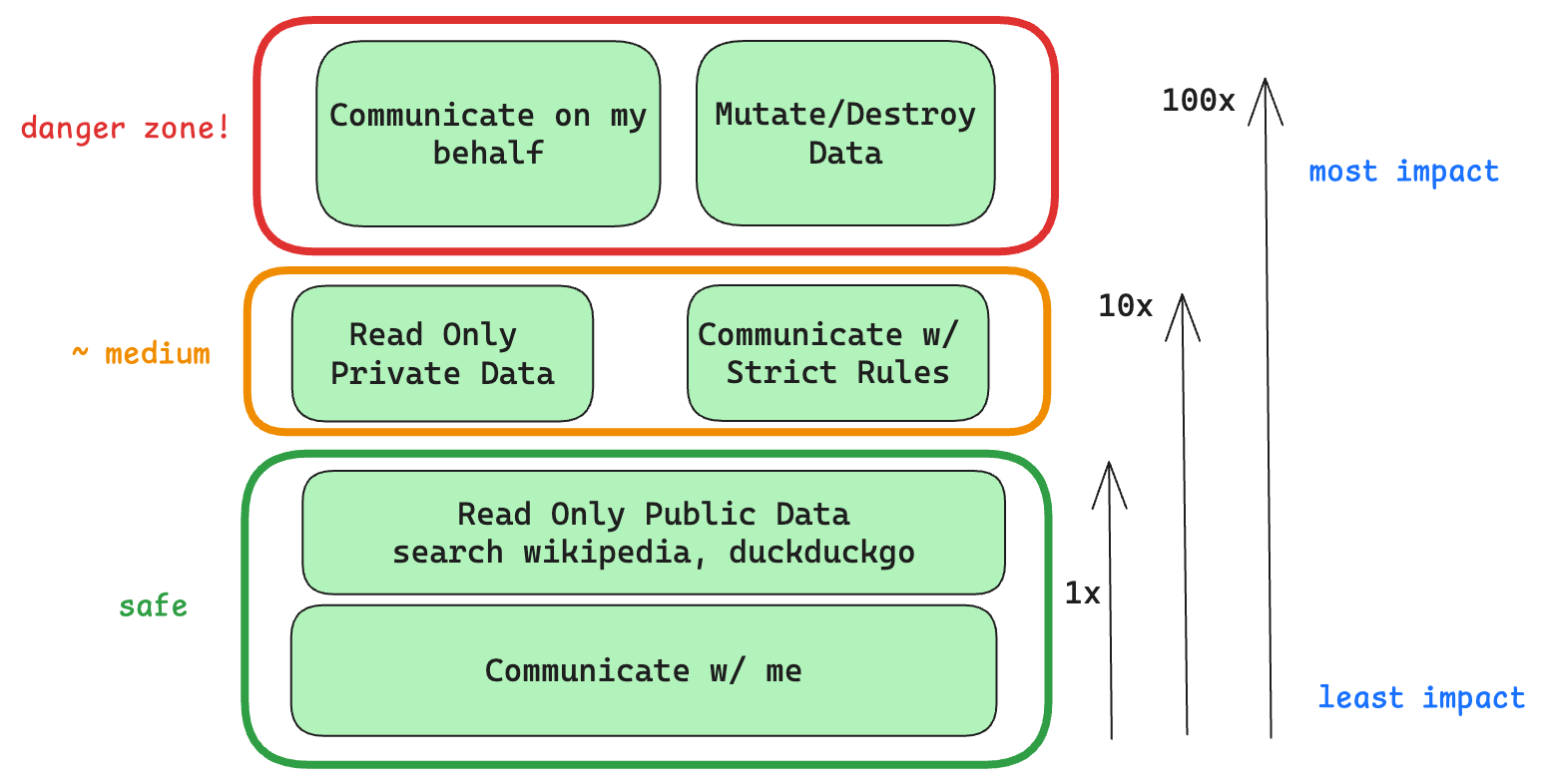
Even with state-of-the-art agentic reasoning and prompt routing, LLMs are not sufficiently reliable to be given access to high-stakes functions without human oversight
Human-in-the-loop is an AI system design philosophy that integrates human judgment and supervision into AI decision-making processes. This concept is particularly important in AI Agent systems:
- Safety Assurance: Allows human intervention and review at critical decision points to prevent potentially harmful AI decisions
- Quality Control: Improves accuracy and reliability of AI outputs through expert feedback
- Continuous Learning: AI systems can learn and improve from human feedback, creating a virtuous cycle
- Clear Accountability: Maintains ultimate human control over important decisions with clear responsibility
In practice, Human-in-the-loop can take various forms - from simple decision confirmation to deep human-AI collaborative dialogues - ensuring optimal balance between autonomy and human oversight to maximize the potential of AI Agent systems.
Typical Use Cases
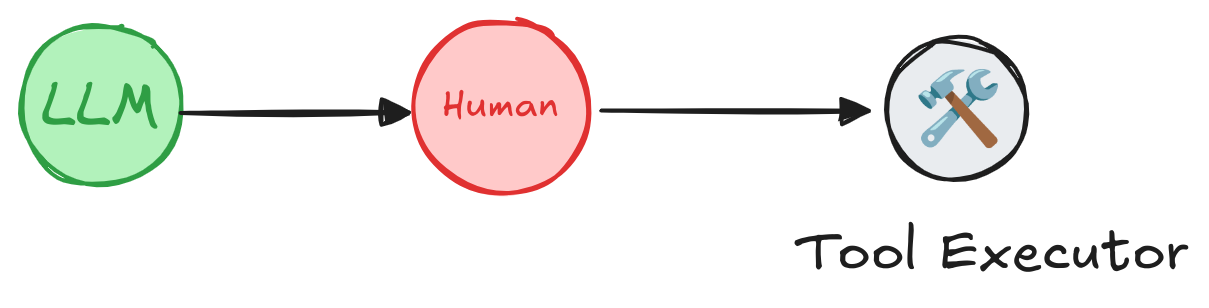
A human can review and edit the output from the agent before proceeding. This is particularly critical in applications where the tool calls requested may be sensitive or require human oversight.
- 🛠️ Tool Call Review: Humans can review, edit or approve tool call requests initiated by LLMs before execution
- ✅ Model Output Verification: Humans can review, edit or approve content generated by LLMs (text, decisions, etc.)
- 💡 Context Provision: Allows LLMs to actively request human input for clarification, additional details or multi-turn conversation context
Secure and Efficient Go➡Humanloop
GoHumanloop provides a set of tools deeply integrated within AI Agents to ensure constant Human-in-the-loop oversight. It deterministically ensures high-risk function calls must undergo human review while also enabling human expert feedback, thereby improving AI system reliability and safety while reducing risks from LLM hallucinations.
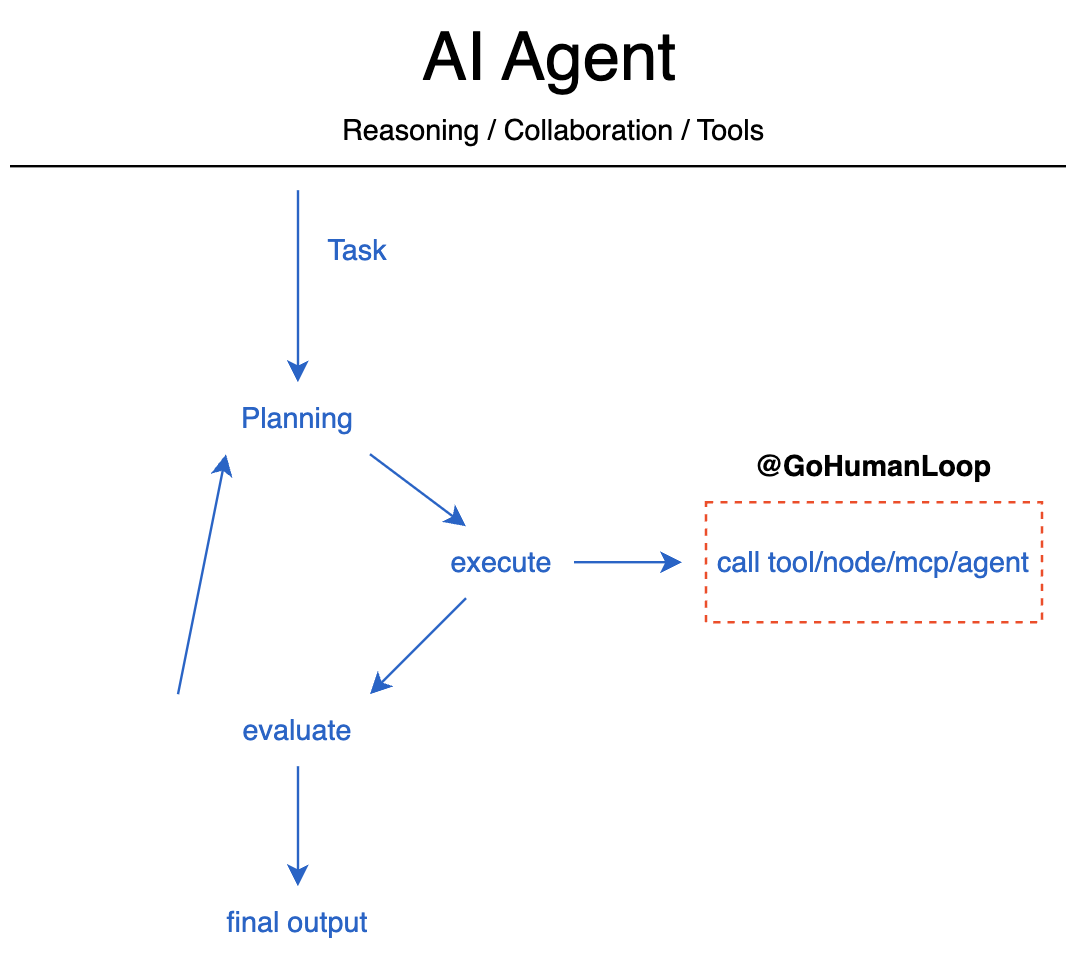
The Outer-Loop and Inversion of Control
Through GoHumanloop's encapsulation, you can implement secure and efficient Human-in-the-loop when requesting tools, Agent nodes, MCP services and other Agents.
📚 Key Features
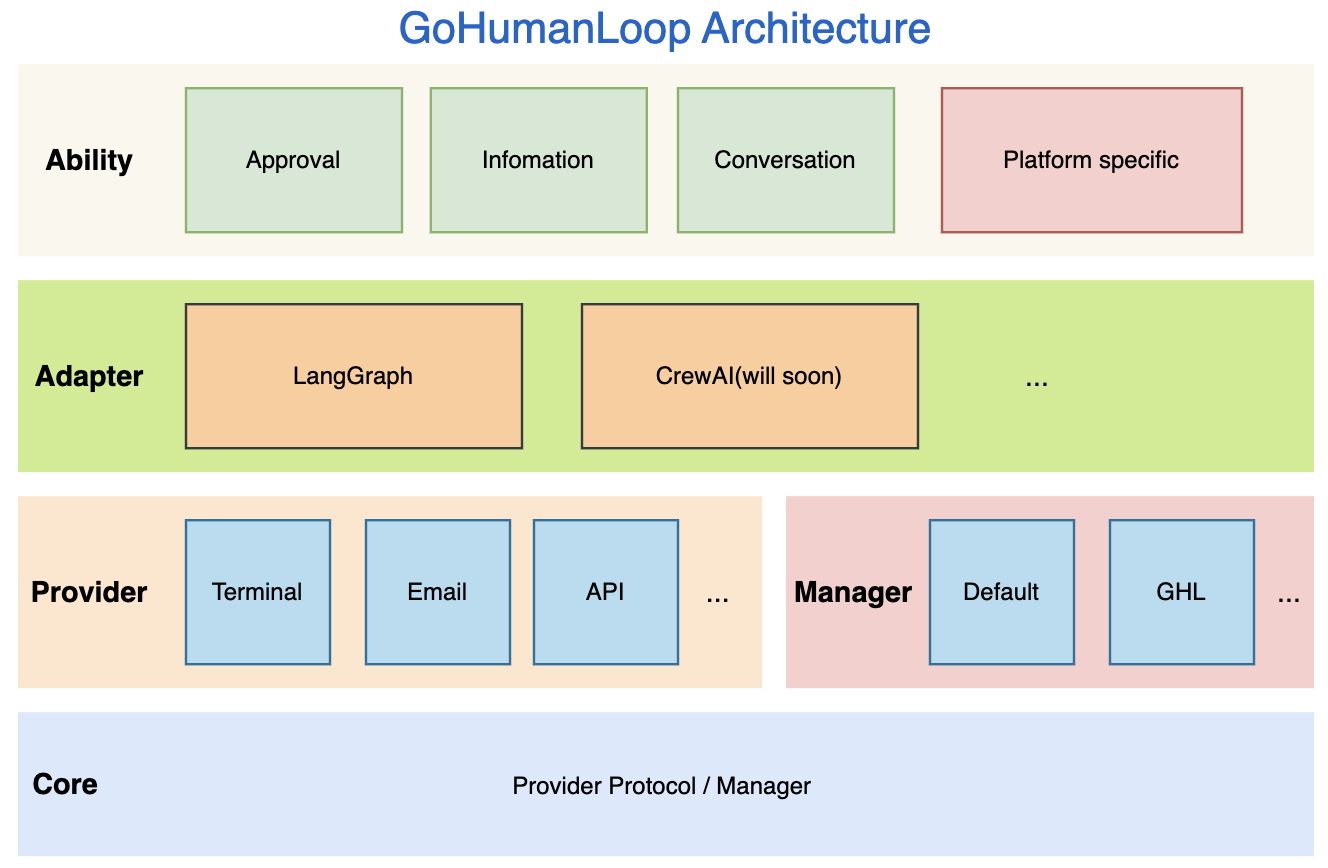
GoHumanLoop Architecture
GoHumanloop offers the following core capabilities:
- Approval: Requests human review or approval when executing specific tool calls or Agent nodes
- Information: Obtains critical human input during task execution to reduce LLM hallucination risks
- Conversation: Enables multi-turn interactions with humans through dialogue to acquire richer contextual information
- Framework-specific Integration: Provides specialized integration methods for specific Agent frameworks, such as
interruptandresumeforLangGraph
📅 Roadmap
| Feature | Status |
|---|---|
| Approval | ⚙️ Beta |
| Information | ⚙️ Beta |
| Conversation | ⚙️ Beta |
| Email Provider | ⚙️ Beta |
| Terminal Provider | ⚙️ Beta |
| API Provider | ⚙️ Beta |
| Default Manager | ⚙️ Beta |
| GLH Manager | 🗓️ Planned |
| Langchain Support | ⚙️ Beta |
| CrewAI Support | 🗓️ Planned |
- 💡 GLH Manager - GoHumanLoop Manager will integrate with the upcoming GoHumanLoop Hub platform to provide users with more flexible management options.
🤝 Contributing
The GoHumanLoop SDK and documentation are open source. We welcome contributions in the form of issues, documentation and PRs. For more details, please see CONTRIBUTING.md
📱 Contact

🎉 If you're interested in this project, feel free to scan the QR code to contact the author.
🌟 Star History
Release history Release notifications | RSS feed


Download files
Download the file for your platform. If you're not sure which to choose, learn more about installing packages.
Source Distribution
Built Distribution
Filter files by name, interpreter, ABI, and platform.
If you're not sure about the file name format, learn more about wheel file names.
Copy a direct link to the current filters
File details
Details for the file gohumanloop-0.0.6.tar.gz.
File metadata
- Download URL: gohumanloop-0.0.6.tar.gz
- Upload date:
- Size: 52.3 kB
- Tags: Source
- Uploaded using Trusted Publishing? No
- Uploaded via: uv/0.6.6
File hashes
| Algorithm | Hash digest | |
|---|---|---|
| SHA256 |
82151ca0c58dfe6dccbdbda6109d7174cae347467c667e4d0aaf46b9f9e43eda
|
|
| MD5 |
a3deb4a305de42dde3dab3b7ae1e0c24
|
|
| BLAKE2b-256 |
66a6fe29c1fd5c7e35bfba49872908434fdb6788750a35c989bf6d3db3dfb0a8
|
File details
Details for the file gohumanloop-0.0.6-py3-none-any.whl.
File metadata
- Download URL: gohumanloop-0.0.6-py3-none-any.whl
- Upload date:
- Size: 57.3 kB
- Tags: Python 3
- Uploaded using Trusted Publishing? No
- Uploaded via: uv/0.6.6
File hashes
| Algorithm | Hash digest | |
|---|---|---|
| SHA256 |
3b4fba69e11993462531c47f42e8b595dd32c0d8a907f4f7d741d5714336753f
|
|
| MD5 |
e88751d8db942550484d610591bd734c
|
|
| BLAKE2b-256 |
a8f9b2293e6f09a10165f31fa2c8fb5d2aaf6490dc6853751014d10d48c204ae
|






