
pygologin
REST API provides programmatic access to GoLogin App. Create a new browser profile, get a list of all browser profiles, add a browser profile and running
class GoLogin - class for working with gologin.com API
Official Package
Getting Started
GoLogin supports Linux, MacOS and Windows platforms.
Installation
pip3 install gologin
or clone this repository
git clone https://github.com/gologinapp/pygologin.git
for running gologin-selenium.py install selenium
pip install selenium
for Selenium need download webdriver
Usage
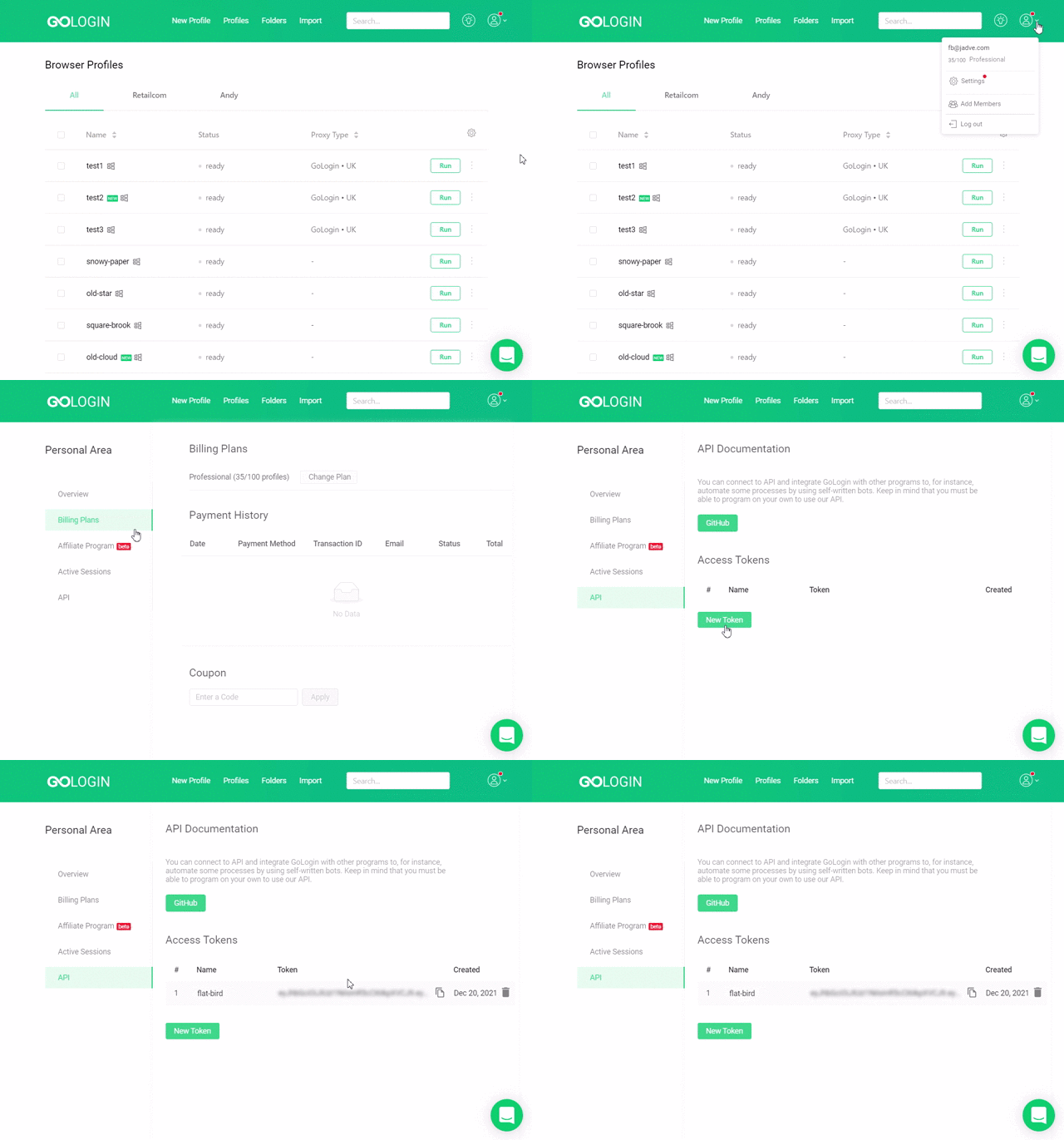
Where is token? API token is here. To have an access to the page below you need register GoLogin account.
!!! Attention !!! If your selenium version is greater than or equal to 4.11, then you should use the "gologin-selenium_4.11.py" script, otherwise use "gologin-selenium.py" script
Example "gologin-selenium.py"
import time
from sys import platform
from selenium import webdriver
from selenium.webdriver.chrome.options import Options
from gologin import GoLogin
from gologin import getRandomPort

# random_port = get_random_port() # uncomment to use random port

gl = GoLogin({
	"token": "yU0token",
	"profile_id": "yU0Pr0f1leiD",
	# "port": random_port
	})

if platform == "linux" or platform == "linux2":
	chrome_driver_path = "./chromedriver"
elif platform == "darwin":
	chrome_driver_path = "./mac/chromedriver"
elif platform == "win32":
	chrome_driver_path = "chromedriver.exe"

debugger_address = gl.start()
chrome_options = Options()
chrome_options.add_experimental_option("debuggerAddress", debugger_address)
driver = webdriver.Chrome(executable_path=chrome_driver_path, options=chrome_options)
driver.get("http://www.python.org")
assert "Python" in driver.title
driver.close()
time.sleep(3)
gl.stop()
Running example:
python gologin-selenium.py
Methods
constructor
options<[Object]> Options for profileautoUpdateBrowser<[boolean]> do not ask whether download new browser version (default false)token<[string]> your API tokenprofile_id<[string]> profile IDexecutablePath<[string]> path to executable Orbita file. Orbita will be downloaded automatically if not specified.remote_debugging_port<[int]> port for remote debuggingvncPort<[integer]> port of VNC server if you using ittmpdir<[string]> path to temporary directore for saving profilesextra_paramsarrayof <[string]> extra params for browser orbita (ex. extentions etc.)uploadCookiesToServer<[boolean]> upload cookies to server after profile stopping (default false)writeCookesFromServer<[boolean]> download cookies from server and write to profile cookies file (default true)port<[integer]> Orbita start port (uncomment out the lines with "random port" and "port" ingologin-selenium.pyto select a random launch port)
gl = GoLogin({
	"token": "yU0token",
	"profile_id": "yU0Pr0f1leiD",
	})
Example create profile
python gologin-create-profile.py
from gologin import GoLogin


gl = GoLogin({
	"token": "yU0token",
	})

profile_id = gl.create({
    "name": 'profile_mac',
    "os": 'mac',
    "navigator": {
        "language": 'en-US',
        "userAgent": 'random', # Your userAgent (if you don't want to change, leave it at 'random')
        "resolution": '1024x768', # Your resolution (if you want a random resolution - set it to 'random')
        "platform": 'mac',
    },
    'proxyEnabled': True, # Specify 'false' if not using proxy
    'proxy': {
        'mode': 'gologin',
        'autoProxyRegion': 'us'
        # 'host': '',
        # 'port': '',
        # 'username': '',
        # 'password': '',
    },
    "webRTC": {
        "mode": "alerted",
        "enabled": True,
    },
});

print('profile id=', profile_id);

# gl.update({
#     "id": 'yU0Pr0f1leiD',
#     "name": 'profile_mac2',
# });

profile = gl.getProfile(profile_id);

print('new profile name=', profile.get("name"));

# gl.delete('yU0Pr0f1leiD')
start()
start browser with profile id
stop()
stop browser with profile id
Full GoLogin API
Swagger: link here
Postman: link here
1 maintainer

Metadata
1 maintainer
Release files for gologin 2024.4.10125438
For a detailed explanation of source distributions (sdists) and built distributions (wheels), please see the package formats documentation.
Source distribution (sdist)
| File | Size | Uploaded | |
|---|---|---|---|
| gologin-2024.4.10125438.tar.gz | 14.1 kB | Details |
Built distribution (wheel)
| File | Interpreter | ABI | Platform | Reset |
|---|---|---|---|---|
| gologin-2024.4.10125438-py3-none-any.whl | Python 3 | none | any | Details |
Total release size: 29.8 kB
Release files / gologin-2024.4.10125438.tar.gz
| Download URL | gologin-2024.4.10125438.tar.gz |
|---|---|
| Size | 14.1 kB |
| Tags | Source |
|
SHA-256 checksum How to use checksums |
57e9a42a906ef125c768d393050452fef8d698ad1f70bae6ab8bf762a88d6f3a
|
|
BLAKE2b-256 checksum How to use checksums |
f0a7d2988eaff62eba0573f740e3eb3452e516bdb4bba9803c7cf5d53e933a54
|
| Upload date | |
|
Uploaded using Trusted Publishing? What is trusted publishing? |
No |
| Uploaded via |
twine/5.0.0 CPython/3.12.2
|
Release files / gologin-2024.4.10125438-py3-none-any.whl
| Download URL | gologin-2024.4.10125438-py3-none-any.whl |
|---|---|
| Size | 15.7 kB |
| Tags | Python 3 |
|
SHA-256 checksum How to use checksums |
e2babfa459b81295a1e94722ebdac6c4ffa1517f782e38a05c2fffc43652d60e
|
|
BLAKE2b-256 checksum How to use checksums |
cc3ea882d303f0a573084fe2747d0bf87393857a404fd73cc4d5fccc0afd5daf
|
| Upload date | |
|
Uploaded using Trusted Publishing? What is trusted publishing? |
No |
| Uploaded via |
twine/5.0.0 CPython/3.12.2
|














