
Official GoLogin python package

Project description
pygologin - GoLogin Python SDK
This package provides functionality to run and stop GoLogin profiles with python and then connect the profiles to automation tools like Selenium, Puppetteer, Playwright etc.
Check full gologin documentations here.
How does it work?
- You give SDK your dev token and profile id that you want to run
- SDK takes care of downloading, preparing your profile and starts the browser
- SDK gives you websocket url for automation tools
- You take this websocker url and connect it to the automation tool on your choice: Puppetteer, Selenium, Playwright etc
- Automation tool connects to browser and you can manage it through code
Getting Started
Where is token? API token is here.
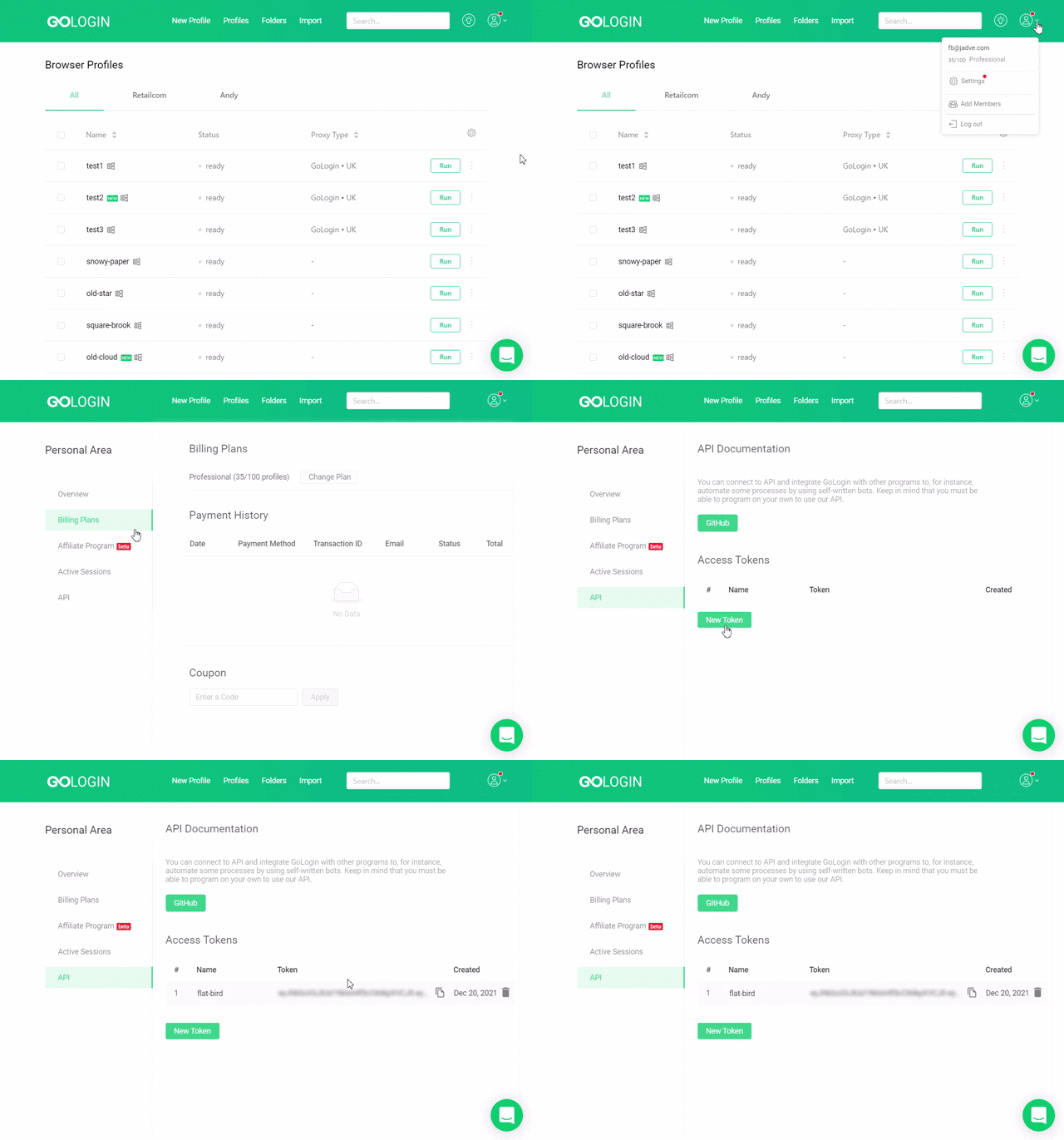
Installation
pip3 install gologin
for base case - we use selenium as it is the most popular tool
pip3 install -r requirements.txt
Example "gologin-selenium.py"
import time
from gologin import GoLogin
from selenium import webdriver
from selenium.webdriver.chrome.service import Service
from webdriver_manager.chrome import ChromeDriverManager
profile_id = "Your profile id"

# Initialize GoLogin
gl = GoLogin({
	"token": "Your token",
	"profile_id": profile_id
	})

# Start Browser and get websocket url
debugger_address = gl.start()

# Get Chromium version for webdriver
chromium_version = gl.get_chromium_version()

# Add proxy to profile
gl.addGologinProxyToProfile(profile_id, "us")

# Install webdriver
service = Service(ChromeDriverManager(driver_version=chromium_version).install())

chrome_options = webdriver.ChromeOptions()
chrome_options.add_experimental_option("debuggerAddress", debugger_address)

driver = webdriver.Chrome(service=service, options=chrome_options)

# Give command to Selenium to open the page
driver.get("http://www.python.org")

time.sleep(30)
driver.quit()
time.sleep(10)
gl.stop()
Running example:
python3 examples/selenium/one-time-use-profile.py
Methods
constructor - initiate your token, profile that you want to run and browser params
Required options:
token<[string]> Required - your API tokenprofile_id<[string]> Required - profile ID (NOT PROFILE NAME)
Optional options:
executablePath<[string]> path to executable Orbita file. Orbita will be downloaded automatically if not specifiedextra_paramsarrayof <[string]> additional flags for browser start. For example: '--headles', '--load-extentions=path/to/extension'uploadCookiesToServer<[boolean]> upload cookies to server after profile stopping (default false). It allows you to export cookies from api later.writeCookesFromServer<[boolean]> if you have predefined cookies and you want browser to import it (default true).
gl = GoLogin({
	"token": "your token",
	"profile_id": "your profile id",
    "extra_params": ["--headless", "--load-extentions=path/to/extension"]
	})
createProfileRandomFingerprint - you pass os ('lin', 'win', 'mac') and profile name and we give you brand new shiny profile
gl = GoLogin({
	"token": "your token",
	})
profile = gl.createProfileRandomFingerprint({"os": "lin", "name": "some name"})
gl.setProfileId(profile['id'])
createProfileWithCustomParams - This method creates a profile and you can pass any particular params to it. Full list of params you can find here - https://api.gologin.com/docs
gl = GoLogin({
	"token": "your token",
	})
profile = gl.createProfileWithCustomParams({
    "os": "lin",
    "name": "some name",
    "navigator": {
        "userAgent": "Mozilla/5.0 (X11; Linux x86_64) AppleWebKit/537.36 (KHTML, like Gecko) Chrome/119.0.0.0 Safari/537.36",
        "resolution": "1920x1080",
        "language": "en-US",
        "platform": "Linux x86_64",
        "hardwareConcurrency": 8,
        "deviceMemory": 8,
        "maxTouchPoints": 0
    }
})
gl.setProfileId(profile['id'])
updateUserAgentToLatestBrowser - user agent is one of the most important thing in your fingerprint. It decides which browser version to run. This method help you to keep useragent up to date.
gl = GoLogin({
	"token": "your token",
	})
gl.updateUserAgentToLatestBrowser(["profineId1", "profileId2"], "workspceId(optional)")
addGologinProxyToProfile - Gologin provides high quality proxies with free traffic for paid users. Here you can add gologin proxy to profile, just pass country code
gl = GoLogin({
	"token": "your token",
	})
gl.addGologinProxyToProfile("profileId", "us")
addCookiesToProfile - You can pass cookies to the profile and browser will import it before starting
gl = GoLogin({
	"token": "your token",
	})

gl.addCookiesToProfile("profileId", [
    {
        "name": "session_id",
        "value": "abc123",
        "domain": "example.com",
        "path": "/",
        "expirationDate": 1719161018.307793,
        "httpOnly": True,
        "secure": True
    },
    {
        "name": "user_preferences",
        "value": "dark_mode",
        "domain": "example.com",
        "path": "/settings",
        "sameSite": "lax"
    }
])
refreshProfilesFingerprint - Replaces your profile fingerprint with a new one
gl = GoLogin({
	"token": "your token",
	})

gl.refreshProfilesFingerprint(["profileId1", "profileId2"])
changeProfileProxy - allows you to set a proxy to a profile
gl = GoLogin({
	"token": "your token",
	})
gl.changeProfileProxy("profileId", { "mode": "http", "host": "somehost.com", "port": 109, "username": "someusername", "password": "somepassword"})
start() - prepares profile, starts browser and returns websocket url
gl = GoLogin({
	"token": "your token",
    "profile_id": "some_profile_id"
	})

wsUrl = gl.start()
start browser with profile id
stop() - stops browser, saves profile and upload it to the storage
gl = GoLogin({
	"token": "your token",
    "profile_id": "some_profile_id"
	})

wsUrl = gl.start()
gl.stop()
Telemetry
This package collects anonymous error data to help improve reliability.
How to disable:
- Set environment variable:
DISABLE_TELEMETRY=true
Data handling:
- No personal information collected
- Data stored securely
- Used only for bug fixes and improvements
Privacy
Our full privacy policy you can finde here
Release history Release notifications | RSS feed


Download files
Download the file for your platform. If you're not sure which to choose, learn more about installing packages.
Source Distribution
Built Distribution
Filter files by name, interpreter, ABI, and platform.
If you're not sure about the file name format, learn more about wheel file names.
Copy a direct link to the current filters
File details
Details for the file gologin-2026.5.5.tar.gz.
File metadata
- Download URL: gologin-2026.5.5.tar.gz
- Upload date:
- Size: 29.4 kB
- Tags: Source
- Uploaded using Trusted Publishing? No
- Uploaded via: twine/6.2.0 CPython/3.14.4
File hashes
| Algorithm | Hash digest | |
|---|---|---|
| SHA256 |
935312f0ec08803ec048b0cc72c56493aae4449d07e7a2d9ac32a32fff10d70a
|
|
| MD5 |
3169da7b7b1b442df50539492e4c410a
|
|
| BLAKE2b-256 |
d9d1c4bc9d361efc8b865f4282d6d83ab198a3b12fda37b6f45e07a8edd85590
|
File details
Details for the file gologin-2026.5.5-py3-none-any.whl.
File metadata
- Download URL: gologin-2026.5.5-py3-none-any.whl
- Upload date:
- Size: 32.3 kB
- Tags: Python 3
- Uploaded using Trusted Publishing? No
- Uploaded via: twine/6.2.0 CPython/3.14.4
File hashes
| Algorithm | Hash digest | |
|---|---|---|
| SHA256 |
3161446832f343a107e096ff492f26d20953993d8007d6016be7c2ffa19038c1
|
|
| MD5 |
0b227096ccf8bd1122d50eb0194e9edd
|
|
| BLAKE2b-256 |
1b13a96ab80e62bb3dab9e70f41aeb3ec626bacbdb5c13766584a4f23ca677fa
|






