
google-browser-scraper
Self-hosted SERP API alternative: Google search results from a real Chrome browser and your own residential proxy.





Quickstart · Output · Poisoned results · HTTP API · MCP · Docker · How it works · Options
| ✅ 100% | 📉 0.4 MB | ⚡ 1.4 s |
|---|---|---|
| success rate | per search | per search on a warm proxy IP |
Latest version benchmarks (v0.1)
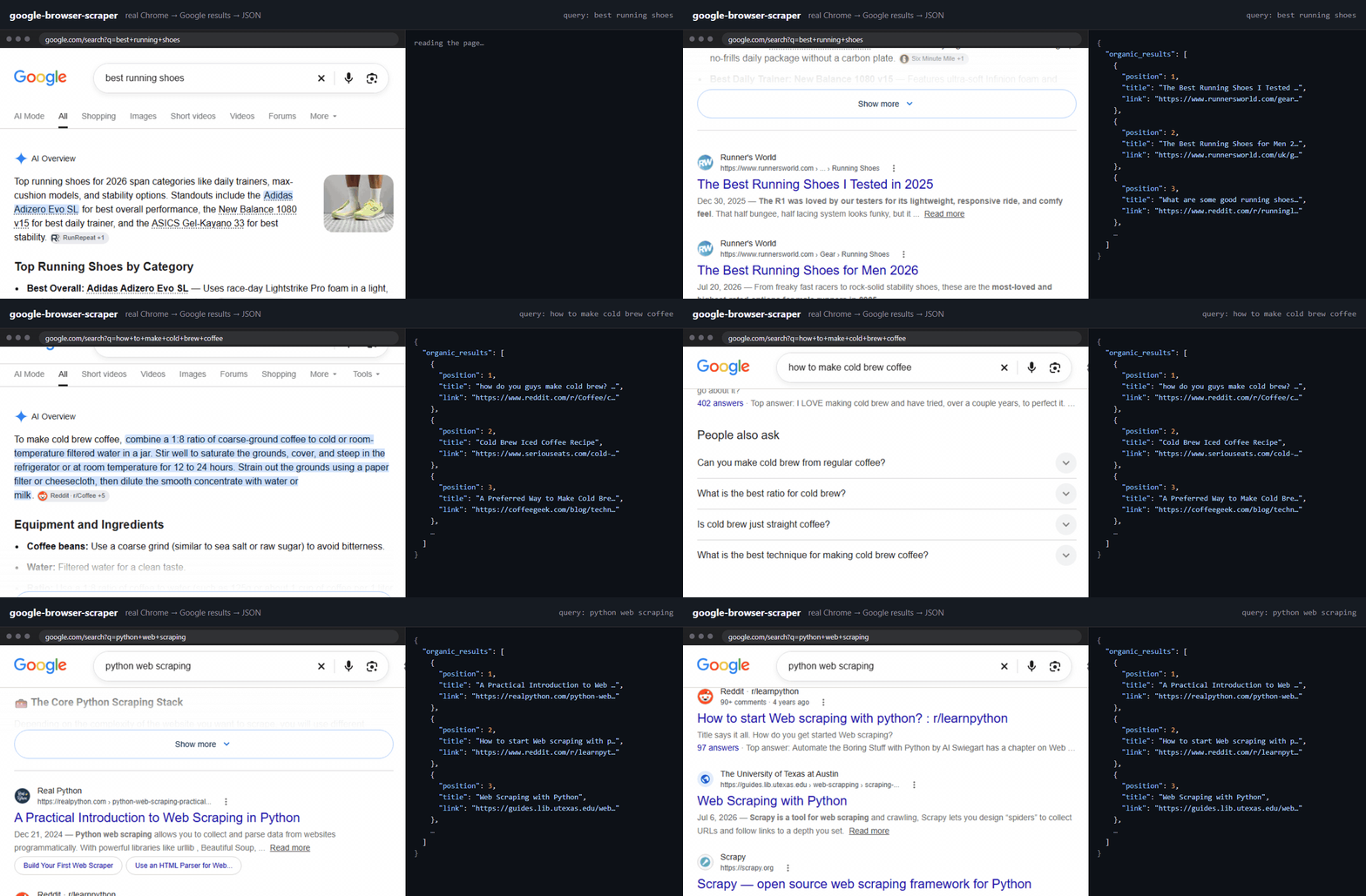
Scrape Google search results (SERP) with a real Chrome browser and your own residential proxy, and get clean JSON back. Use it as a CLI, a Python library, a local HTTP API, or an MCP server that gives AI agents live Google search.
Plain HTTP is no longer a reliable way to scrape Google, and a fresh browser on a fresh proxy IP is refused quickly. So the scraper warms a sticky proxy session with ordinary browsing, lets the browser pass Google's checks, and then fetches results pages directly over HTTPS with the browser's own cookies. Captchas and blocks are reported as such, never as "no results".
Features
|
⚡ Hybrid mode |
🛡️ Poisoned results protection |
|
🌐 Real browser |
🧩 SERP API-style JSON |
|
🔌 Bring your own proxy |
🚦 Honest failures |
|
🤖 For AI agents |
🐳 Run it your way |
Use cases
- SEO rank tracking and SERP monitoring for your own keywords
- Keyword and competitor research from live Google results
- Web search for AI agents and LLM apps through MCP
- A self-hosted alternative to paid Google search APIs when you already pay for proxies
Install
pip install google-browser-scraper
patchright install chromium
Quickstart
google-browser-scraper search "best running shoes" \
  --proxy "http://USER-session-{session}:PASS@gate.example.com:7000" \
  -o results.jsonl
The first query takes a few minutes while a new proxy IP warms up; later queries on the same proxy IP take seconds. Every run ends with a summary of pages served and traffic used.
With NodeMaven
The session id is handled for you and the credentials come from the environment:
pip install "google-browser-scraper[nodemaven]"
export NODEMAVEN_LOGIN=... NODEMAVEN_PASSWORD=...
google-browser-scraper search -f queries.txt --nodemaven --country us -o results.jsonl
Cap a run's traffic with a demo sub-user
--nodemaven-demo creates a sub-user with a traffic limit from your dashboard API
key, shares it across workers, and deletes it when the run ends (--keep-subuser
keeps it). The account needs sub-users enabled. A fresh warm-up alone uses about
60 MB, so keep the cap well above that:
export NODEMAVEN_API_KEY=...
google-browser-scraper search -f queries.txt --nodemaven-demo --traffic-limit-mb 300 -o results.jsonl
Try it without a proxy
google-browser-scraper search "best running shoes" --no-proxy
Google then sees one address for every query, so it starts answering with
captchas sooner than it would across a pool of proxy IPs. Those pages come back as
captcha in page_verdict, not as empty results.
From Python
from google_browser_scraper import ProxyTemplate, Scraper, Settings

proxy = ProxyTemplate("http://USER-session-{session}:PASS@gate.example.com:7000")
for page in Scraper(proxy, Settings(pages=2)).run(["best running shoes"]):
    for result in page.get("organic_results", []):
        print(result["position"], result["title"], result["link"])
What you get
One JSON object per results page:
{
  "search_metadata": {"status": "Success", "page_verdict": "ok", "fetched_with": "http"},
  "search_parameters": {"engine": "google", "q": "best running shoes", "page": 1},
  "organic_results": [
    {"position": 1, "title": "...", "link": "https://...", "snippet": "..."}
  ],
  "related_questions": [{"question": "..."}],
  "ai_overview": {"text": "..."},
  "exit": {"session": "...", "queries_on_exit": 1, "bytes": "..."}
}
The field names are the ones common to SERP APIs, so simple consumers can often switch with minimal mapping.
All fields
organic_results,ads,related_questions,related_searches,pagination,search_metadataai_overview: the text of Google's AI Overview when the page shows one (pages in English,--hl en, the default)local_results: the places of the map pack on local queries (name, rating, reviews, type, address, phone, opening hours)exit: which proxy IP (sticky session) answered and how many bytes the page costsearch_metadata.fetched_with:httporbrowsersearch_metadata.timings: seconds per step (httpfor a page fetched over HTTP;type,load,readyandreadfor one the browser rendered;parse;links, which overlaps the next query)- A query that failed is a record too, with an
error
Knowledge panels, shopping, images and other special blocks are not parsed.
--format csv writes the organic results as a table, and --price-per-gb adds
the cost per 1000 pages to the summary.
Poisoned results protection
Google does not always block a scraper. Sometimes it answers with a normal-looking results page for a different query: no captcha, no error, just wrong data that slips into your pipeline unnoticed.
The scraper checks results pages against the queries it asked. When a proxy IP starts returning unrelated results, it is dropped within a few pages and the query is asked again on a fresh one.
- No extra requests, no extra traffic: the check runs on the page already downloaded
- On by default
Run it as an API
google-browser-scraper serve --nodemaven --country us --prewarm
curl "http://127.0.0.1:8000/search.json?q=best+running+shoes"
- Same record format as above
hl(language) andgl(country) per request:/search.json?q=...&hl=de&gl=at--prewarmfinds a proxy IP Google serves at startup, so the first request does not wait for a warm-up;/healthanswers 503warminguntil then- Requests run one at a time on one held proxy IP
- Set
GBS_API_KEYto require a key; without one the server only listens on localhost
Use it from an AI agent (MCP)
{
  "mcpServers": {
    "google-search": {
      "command": "google-browser-scraper",
      "args": ["mcp", "--nodemaven", "--country", "us", "--prewarm"],
      "env": {"NODEMAVEN_LOGIN": "...", "NODEMAVEN_PASSWORD": "..."}
    }
  }
}
One tool, google_search(query, pages, hl, gl). It returns the organic results,
"People also ask", related searches, and the AI Overview and map places when
Google shows them.
Docker
A ready image is published to GitHub Container Registry with every release:
docker run --rm ghcr.io/nodemaven/google-browser-scraper doctor
docker run --rm -p 8000:8000 -e GBS_API_KEY=change-me \
  -e GBS_PROXY='http://USER-session-{session}:PASS@gate.example.com:7000' \
  ghcr.io/nodemaven/google-browser-scraper serve --host 0.0.0.0
To build it yourself: docker build -t google-browser-scraper .
How it works
- New identity: a sticky proxy session and a fresh browser profile.
- Warm-up: a few ordinary pages, staying on each for 20-45 seconds.
- Search: the first query on a proxy IP goes through the browser. Once Google serves it, the next pages come over HTTPS with the browser's cookies, until Google asks for its check again.
- Check before parsing: a captcha or a block is reported as one, never parsed as an empty result.
- Keep or drop: a proxy IP Google answers is reused; one it refuses is dropped and the query retried on a new one. If one proxy IP after another is refused, the run stops instead of spending more traffic.
More detail: HTTP between checks, holding proxy IPs, copied cookies, result links, traffic
HTTP between checks. After the browser passes Google's check, results pages
are fetched over HTTPS with the browser's own headers and cookies. If that stops
working, the scraper goes back to the browser on its own. --no-hybrid uses the
browser for every page.
Unrelated results. A proxy IP that starts returning results unrelated to the queries is dropped, and the query is asked again on a new one.
Holding proxy IPs. A served proxy IP is kept for up to 300 queries. Every new one pays for a warm-up, so a short cap mostly buys more warm-up traffic. Every 50 results pages it renders, the browser is restarted on the same profile and proxy IP, which keeps its memory from growing over a long hold. A browser error on a search is retried once on the same proxy IP before it is dropped; a network error, running out of memory or a crashed browser drops it at once.
Copying cookies. The command line copies the cookies of the first proxy IP Google serves and starts new proxy IPs from that copy, on new sticky sessions, instead of warming each one; all workers share the copy. Google's acceptance follows the cookies more than the address, so a copy usually starts out served and costs a few MB instead of a full warm-up. A copy waits 40-60 seconds after its browser starts before the first search.
Copying the cache. Pages get cheaper as a proxy IP is held, because the
browser cache fills with Google's shared scripts and images. Copies carry that
cache too, so a new proxy IP starts with cheap pages, and the copy is refreshed
from the held one at each browser restart, when its cache is warm. If two
copies carrying the cache are refused on their first search, the rest of the
run copies cookies only (--no-clone-cache does that from the start).
Result links. Google wraps result links in encrypted /goto redirects.
Each one is resolved with a small request on the proxy IP the page came from,
with that page's cookies, in the background while the next query runs; a link
left over is tried through a separate short-lived proxy session. Records still
come out in the order each browser searched them.
Traffic. Everything goes through a small local relay that counts bytes per host and blocks a large model download Chrome otherwise makes on every fresh profile.
The defaults come from measurements in proxy-benchmark.
Options
All search options
| Option | Default | What it does |
|---|---|---|
--workers N |
1 | Search on N proxy IPs at once, one browser each, from one list of queries |
--max-per-exit N |
300 | Queries before a served proxy IP is retired |
--restart-every N |
50 | Results pages the browser rendered before it restarts on the same profile and proxy IP; 0 never |
--no-hybrid |
Fetch every results page in the browser instead of over HTTP between Google's checks | |
--hl, --gl |
en, unset |
Language and country of the results |
--clone N |
10 | New proxy IPs started from copied cookies; 0 turns copying off |
--clone-max-age |
180 | Minutes copied cookies stay in use |
--clone-refusals N |
1 | Copies refused in a row on their first query that end the copying |
--no-clone-cache |
Copies carry cookies only, not the browser cache | |
--warmup |
L3 |
Pages a fresh proxy IP opens before its first query: L3, light (without Google Trends: much less traffic, served on the first query less often), L2, L1, off |
--spare N |
0 | Proxy IPs warmed in the background so a retired one is replaced at once; each costs a warm-up |
--direct |
all |
Open results pages directly: all, follow-ups (all but the first query on each proxy IP), none |
--input |
type |
How a query goes into the search box: type, insert, words |
--gap LOW,HIGH |
2,5 | Seconds between queries on one proxy IP |
--pages N |
1 | Result pages per query |
--format |
jsonl |
jsonl or csv |
--price-per-gb |
Your proxy price, to print the cost per 1000 pages | |
--no-resolve-links |
Keep result links as Google /goto redirects |
|
--save-html DIR |
Keep every page's HTML, gzipped |
google-browser-scraper search --help lists the rest.
Proxies
Any provider with sticky sessions works through --proxy and a {session}
placeholder. A proxy without one is accepted with a warning: if the proxy IP changes
on every request, warming it does nothing. SOCKS5 needs an IP-whitelisted
endpoint, because Chrome cannot send a SOCKS5 username and password.
Check your machine
google-browser-scraper doctor
Starts the browser on a blank page, sends nothing, and reports what a website would see: whether the browser looks headless, whether WebGL works, the screen size. Google answers some machines much less than others, so run this first.
What this is not
Not a free Google Search API, and not a guarantee that every proxy IP will work. It is a browser-based collector that makes failures explicit, drops proxy IPs Google refuses, and tells you what each page cost.
Status
Early. The cloak engine (--engine cloak) is experimental; patchright is
the default.
Google changes its pages often. If results come back empty or wrong, run with
--save-html DIR and open an issue with what you see.
You are responsible for using this within Google's terms and the law where you run it.
Adding an engine
An engine joins this tool only after it has been measured on proxy-benchmark. Add it there and run the warm-up ladder against Google:
python scripts/run_ladder.py --engines your-engine
Then open a pull request here with the run file. The ladder runs identities with and without the warm-up in the same hours, so the result shows whether the engine actually gets served, not whether it got lucky once.
License
1 maintainer

Metadata
1 maintainer
Release files for google-browser-scraper 0.1.2
For a detailed explanation of source distributions (sdists) and built distributions (wheels), please see the package formats documentation.
Source distribution (sdist)
| File | Size | Uploaded | Provenance | Actions |
|---|---|---|---|---|
| google_browser_scraper-0.1.2.tar.gz | 119.2 kB | With provenance | Details for google_browser_scraper-0.1.2.tar.gz |
Built distribution (wheel)
| File | Interpreter | ABI | Platform | Actions Reset |
|---|---|---|---|---|
| google_browser_scraper-0.1.2-py3-none-any.whl | Python 3 | none | any | Details for google_browser_scraper-0.1.2-py3-none-any.whl |
Total release size: 200.1 kB
Release files / google_browser_scraper-0.1.2.tar.gz
| Download URL | google_browser_scraper-0.1.2.tar.gz |
|---|---|
| Size | 119.2 kB |
| Tags | Source |
|
SHA-256 checksum How to use checksums |
73975cb0c4dcf6a4cb82022ef1a1e08f372a88c40aaafa0abdf910342215c230
|
|
BLAKE2b-256 checksum How to use checksums |
fe8699b1938469c71a4bbfddf005c097e7f0af6c81dd7c9aaf1b2bbfacad757d
|
| Upload date | |
|
Uploaded using Trusted Publishing? What is trusted publishing? |
Yes |
| Uploaded via |
twine/7.0.0 CPython/3.13.16
|
Provenance
Provenance describes where a file came from. On PyPI, provenance is shared via attestations, which provide a verifiable record of the build or publishing details. View details, limitations and caveats.


PyPI Publish Attestation
PyPI verified that this artifact, at this checksum, originated from the publisher listed below.
Signed by GitHub Actions, verified by PyPI on Oct 30, 2026.
Transparency logRelease files / google_browser_scraper-0.1.2-py3-none-any.whl
| Download URL | google_browser_scraper-0.1.2-py3-none-any.whl |
|---|---|
| Size | 80.9 kB |
| Tags | Python 3 |
|
SHA-256 checksum How to use checksums |
94676beed6bc176312a6d550a2dce3fb3cbc548851c8f1d30a2d9862658d9438
|
|
BLAKE2b-256 checksum How to use checksums |
34bbb0ef44c942b2c28cd785b9bbb71d0bb04df2a10d290795b86a5529c6479b
|
| Upload date | |
|
Uploaded using Trusted Publishing? What is trusted publishing? |
Yes |
| Uploaded via |
twine/7.0.0 CPython/3.13.16
|
Provenance
Provenance describes where a file came from. On PyPI, provenance is shared via attestations, which provide a verifiable record of the build or publishing details. View details, limitations and caveats.
PyPI Publish Attestation
PyPI verified that this artifact, at this checksum, originated from the publisher listed below.
Signed by GitHub Actions, verified by PyPI on Oct 30, 2026.
Transparency logSecurity for google-browser-scraper 0.1.2
Provenance
Provenance describes where a file came from. On PyPI, provenance is shared via attestations, which provide a verifiable record of the build or publishing details. View details, limitations and caveats.
Full provenance
Both files in this release have been uploaded with provenance metadata.
Attestation for google_browser_scraper-0.1.2.tar.gz
PyPI Publish Attestation
PyPI verified that this artifact, at this checksum, originated from the publisher listed below.
Signed by GitHub Actions, verified by PyPI on Oct 30, 2026.
Transparency logA note on package security
PyPI is a repository for distributing packages, not a service for auditing them. While third-party security researchers and our staff do their best to detect and remove malicious packages, PyPI cannot guarantee the quality, security or suitability of any given package.
To learn more about protecting yourself from malicious actors, visit our package security documentation.














