
GPR-MAX UI

GprMax is open-source software that simulates electromagnetic wave propagation. It solves Maxwell’s equations in 3D using the Finite-Difference Time-Domain (FDTD) method. Although it was designed initially for modeling Ground Penetrating Radar (GPR), it can also be used to model electromagnetic wave propagation for many other applications. GprMax-UI enhances this functionality by providing a high-level API for executing GprMax models, along with tools for visualization, analysis, and result interpretation.
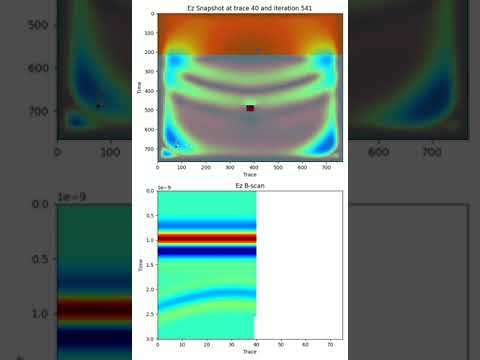
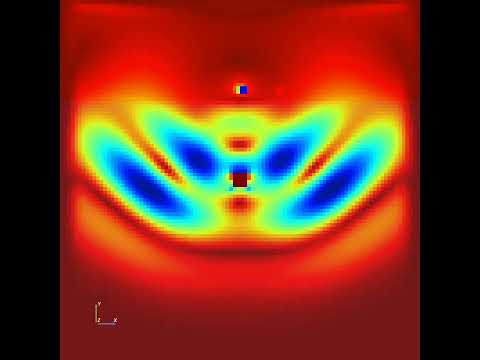
The following video have been created using gprmaxui:
Prerequisites
Install Pycuda
sudo apt install build-essential clang
sudo apt install libstdc++-12-dev
export CUDA_HOME=/usr/local/cuda
export PATH=$CUDA_HOME/bin:$PATH
export LD_LIBRARY_PATH=$CUDA_HOME/lib64:$LD_LIBRARY_PATH
uv add pycuda --optional gpu
Install gprMax
git clone https://github.com/gprMax/gprMax.git
sudo apt install libgomp1
sudo apt install libomp-dev
python setup.py build
python setup.py develop --no-deps
Installation gprMaxUI
pip install gprmaxui
Build the documentation
mkdocs build
mkdocs serve -a localhost:8000
Usage
from gprmaxui.commands import *
from gprmaxui import GprMaxModel

# Create a GPRMax model
model = GprMaxModel(
    title="B scan from a single target buried in a dielectric sand-space",
    output_folder=Path("output"),
    domain_size=DomainSize(x=0.2, y=0.2, z=0.002),
    domain_resolution=DomainResolution(dx=0.002, dy=0.002, dz=0.002),
    time_window=TimeWindow(twt=3e-9),
)

# Register model materials
model.register_materials(
    Material(
        id="half_space", permittivity=6, conductivity=0, permeability=1, color="red"
    )
)

# Register model sources
tx_rx_sep = 2e-2
model.set_source(
    TxRxPair(
        tx=Tx(
            waveform=Waveform(wave_family="ricker", amplitude=1.0, frequency=1.5e9),
            source=HertzianDipole(polarization="z", x=0.03, y=0.15, z=0.0),
        ),
        rx=Rx(x=0.03 + tx_rx_sep, y=0.15, z=0.0),
        src_steps=SrcSteps(dx=0.002, dy=0.0, dz=0.0),
        rx_steps=RxSteps(dx=0.002, dy=0.0, dz=0.0),
    )
)

# add model geometries
box = DomainBox(
    x_min=0.0,
    y_min=0.0,
    z_min=0.0,
    x_max=0.2,
    y_max=0.145,
    z_max=0.002,
    material="half_space",
)
model.add_geometry(box)

cx = model.domain_size.x / 2
sphere = DomainSphere(cx=cx, cy=0.1, cz=0.0, radius=0.005, material="pec")
model.add_geometry(sphere)

print(model)
model.run(n="auto", geometry=True, snapshots=True)
1 maintainer

Metadata
1 maintainer
Release files for gprmaxui 1.0.3
For a detailed explanation of source distributions (sdists) and built distributions (wheels), please see the package formats documentation.
Source distribution (sdist)
| File | Size | Uploaded | |
|---|---|---|---|
| gprmaxui-1.0.3.tar.gz | 231.9 kB | Details |
Built distribution (wheel)
| File | Interpreter | ABI | Platform | Reset |
|---|---|---|---|---|
| gprmaxui-1.0.3-py3-none-any.whl | Python 3 | none | any | Details |
Total release size: 253.5 kB
Release files / gprmaxui-1.0.3.tar.gz
| Download URL | gprmaxui-1.0.3.tar.gz |
|---|---|
| Size | 231.9 kB |
| Tags | Source |
|
SHA-256 checksum How to use checksums |
130fa3814d7505a2441bc87865b05dfb062c79880878170fed7b1bbfd6fffb91
|
|
BLAKE2b-256 checksum How to use checksums |
a241be0ba062036fe3e7d6676ec890a291bcd6ed5ea49c15e84b5db7d03a9400
|
| Upload date | |
|
Uploaded using Trusted Publishing? What is trusted publishing? |
No |
| Uploaded via |
uv/0.6.2
|
Release files / gprmaxui-1.0.3-py3-none-any.whl
| Download URL | gprmaxui-1.0.3-py3-none-any.whl |
|---|---|
| Size | 21.6 kB |
| Tags | Python 3 |
|
SHA-256 checksum How to use checksums |
6657e97aa6e7071c82b17f716251053a2d9530f301baf00303566618a657ea2d
|
|
BLAKE2b-256 checksum How to use checksums |
92390034f10cfc93ab046a3b07dc94965955855658f81c2892fa6a765a84b837
|
| Upload date | |
|
Uploaded using Trusted Publishing? What is trusted publishing? |
No |
| Uploaded via |
uv/0.6.2
|














