
Add your description here

Project description
GPR-MAX UI

GprMax is open-source software that simulates electromagnetic wave propagation. It solves Maxwell’s equations in 3D using the Finite-Difference Time-Domain (FDTD) method. Although it was designed initially for modeling Ground Penetrating Radar (GPR), it can also be used to model electromagnetic wave propagation for many other applications. GprMax-UI enhances this functionality by providing a high-level API for executing GprMax models, along with tools for visualization, analysis, and result interpretation.
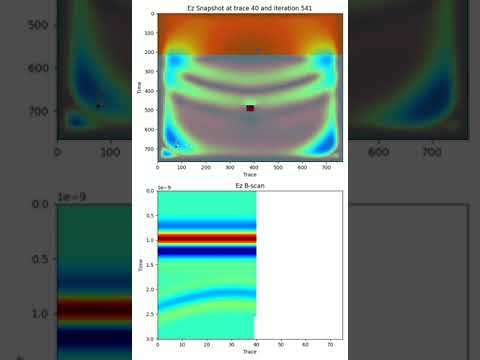
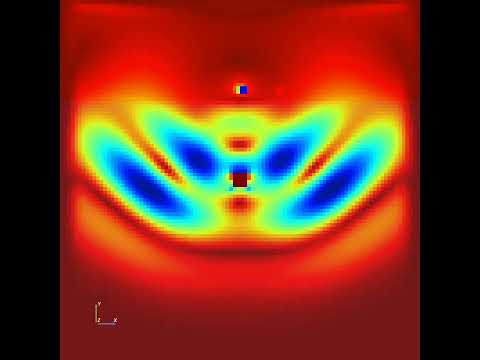
The following video have been created using gprmaxui:
Prerequisites
Install Pycuda
sudo apt install build-essential clang
sudo apt install libstdc++-12-dev
export CUDA_HOME=/usr/local/cuda
export PATH=$CUDA_HOME/bin:$PATH
export LD_LIBRARY_PATH=$CUDA_HOME/lib64:$LD_LIBRARY_PATH
uv add pycuda --optional gpu
Install gprMax
git clone https://github.com/gprMax/gprMax.git
sudo apt install libgomp1
sudo apt install libomp-dev
python setup.py build
python setup.py develop --no-deps
Installation gprMaxUI
pip install gprmaxui
Build the documentation
mkdocs build
mkdocs serve -a localhost:8000
Usage
from gprmaxui.commands import *
from gprmaxui import GprMaxModel

# Create a GPRMax model
model = GprMaxModel(
    title="B scan from a single target buried in a dielectric sand-space",
    output_folder=Path("output"),
    domain_size=DomainSize(x=0.2, y=0.2, z=0.002),
    domain_resolution=DomainResolution(dx=0.002, dy=0.002, dz=0.002),
    time_window=TimeWindow(twt=3e-9),
)

# Register model materials
model.register_materials(
    Material(
        id="half_space", permittivity=6, conductivity=0, permeability=1, color="red"
    )
)

# Register model sources
tx_rx_sep = 2e-2
model.set_source(
    TxRxPair(
        tx=Tx(
            waveform=Waveform(wave_family="ricker", amplitude=1.0, frequency=1.5e9),
            source=HertzianDipole(polarization="z", x=0.03, y=0.15, z=0.0),
        ),
        rx=Rx(x=0.03 + tx_rx_sep, y=0.15, z=0.0),
        src_steps=SrcSteps(dx=0.002, dy=0.0, dz=0.0),
        rx_steps=RxSteps(dx=0.002, dy=0.0, dz=0.0),
    )
)

# add model geometries
box = DomainBox(
    x_min=0.0,
    y_min=0.0,
    z_min=0.0,
    x_max=0.2,
    y_max=0.145,
    z_max=0.002,
    material="half_space",
)
model.add_geometry(box)

cx = model.domain_size.x / 2
sphere = DomainSphere(cx=cx, cy=0.1, cz=0.0, radius=0.005, material="pec")
model.add_geometry(sphere)

print(model)
model.run(n="auto", geometry=True, snapshots=True)
Release history Release notifications | RSS feed


Download files
Download the file for your platform. If you're not sure which to choose, learn more about installing packages.
Source Distribution
Built Distribution
Filter files by name, interpreter, ABI, and platform.
If you're not sure about the file name format, learn more about wheel file names.
Copy a direct link to the current filters
File details
Details for the file gprmaxui-1.0.1.tar.gz.
File metadata
- Download URL: gprmaxui-1.0.1.tar.gz
- Upload date:
- Size: 231.6 kB
- Tags: Source
- Uploaded using Trusted Publishing? No
- Uploaded via: uv/0.6.2
File hashes
| Algorithm | Hash digest | |
|---|---|---|
| SHA256 |
a96e2c391d21e4acc4c4276458c3badeaa4ac1a1b2f2b53da5a7a5d886c30fa4
|
|
| MD5 |
265b828be35f79377b6a44425f000471
|
|
| BLAKE2b-256 |
630ad68f4c991ad77c0d6230da77c49fd7158d59d469f2155081452f2ab5ece9
|
File details
Details for the file gprmaxui-1.0.1-py3-none-any.whl.
File metadata
- Download URL: gprmaxui-1.0.1-py3-none-any.whl
- Upload date:
- Size: 21.4 kB
- Tags: Python 3
- Uploaded using Trusted Publishing? No
- Uploaded via: uv/0.6.2
File hashes
| Algorithm | Hash digest | |
|---|---|---|
| SHA256 |
68681e1877fd5eac1a49a94bfc6820dd782632cf1a0906f506cbb224fe2d2e3e
|
|
| MD5 |
b683d953274fdf7f337cf7b35d4ebabd
|
|
| BLAKE2b-256 |
f85a58e15c7535ed9971ee196865ad1921aac7cfda1421a14c871f655d33604a
|






