
GPU cluster monitoring service
Verified details
These details have been verified by PyPIProject links
GitHub Statistics
Maintainers

Project description
GPU Monitor
GPU Monitor is a small browser-based dashboard for checking GPU usage across SSH-accessible servers. It shows GPU memory usage, utilization, and active compute users without requiring an agent on the target machines.
Preview
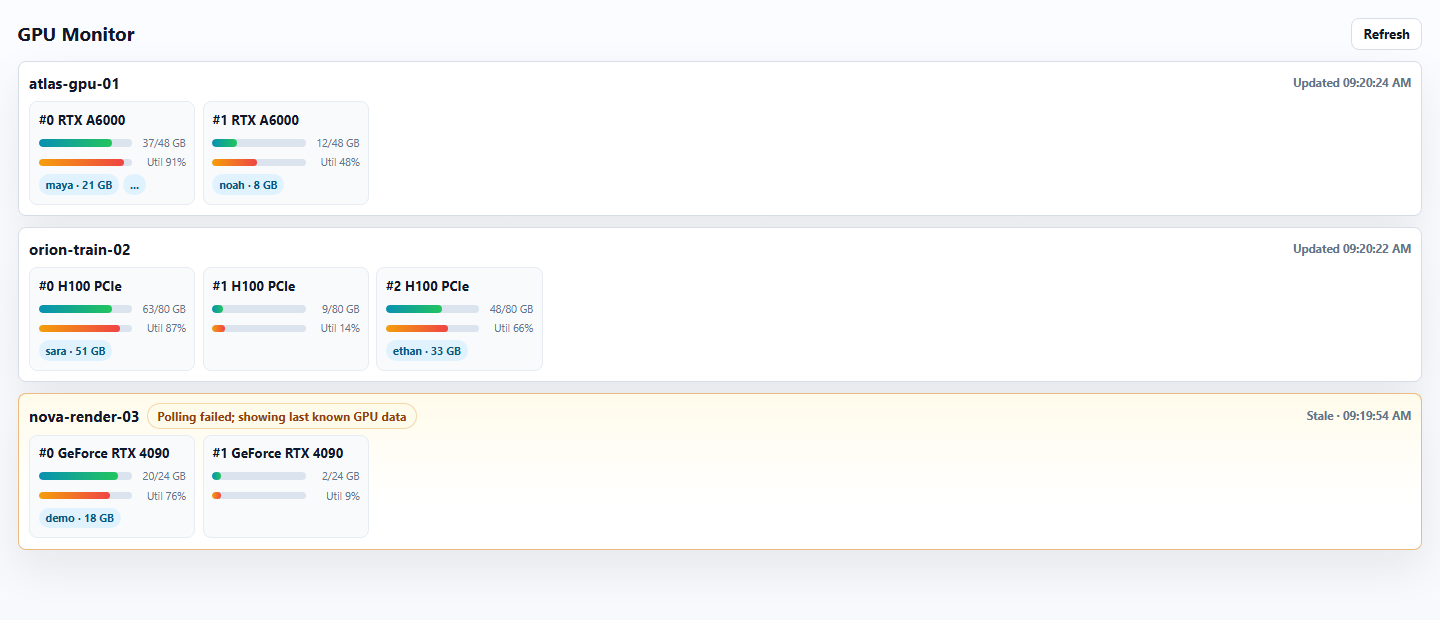
Features
- Monitor multiple GPU servers from one page.
- Show GPU memory usage, utilization, and active process owners.
- Refresh automatically and provide a manual Refresh button.
- Keep the last known GPU data visible when a server is temporarily unreachable.
- Update server cards independently, so a slow host does not block the rest of the dashboard.
Requirements
- Python 3.11 or newer.
- SSH access from the machine running GPU Monitor to each target server.
- NVIDIA drivers and
nvidia-smion each target server.
Before configuring GPU Monitor, verify that SSH can run nvidia-smi:
ssh server-a nvidia-smi
Installation
Install from PyPI:
python -m pip install gpu-server-monitor
Quick Start
Create a sample configuration file:
gpu-monitor init -c ./config.toml
Edit config.toml, then start the web service:
gpu-monitor run -c ./config.toml -H 127.0.0.1 -p 8000
Open:
http://127.0.0.1:8000/
Configuration
GPU Monitor uses a TOML configuration file.
The recommended setup is to keep SSH connection details in your normal SSH config file:
Host server-a
    HostName 10.0.0.11
    User your_username
    Port 22
    IdentityFile ~/.ssh/id_rsa
Then reference the SSH host name from GPU Monitor:
poll_interval_seconds = 20

[[servers]]
Host = "server-a"
You can also put SSH options directly in the GPU Monitor config:
poll_interval_seconds = 20

[[servers]]
Host = "server-b"
HostName = "10.0.0.12"
User = "your_username"
Port = 22
IdentityFile = "~/.ssh/id_rsa"
ConnectTimeout = 5
Add more [[servers]] blocks to monitor more machines.
poll_interval_seconds controls the automatic refresh interval. Restart GPU Monitor after changing the configuration file.
Troubleshooting
No servers appear
Check that the config file passed to -c contains at least one [[servers]] block.
A server shows stale data or cannot be reached
Test the same host from your terminal:
ssh server-a nvidia-smi
If that command fails, fix the SSH login, key, port, or network issue first.
Configuration changes do not appear
Restart GPU Monitor after editing the configuration file.
Project details
Verified details
These details have been verified by PyPIProject links
GitHub Statistics
Maintainers


Download files
Download the file for your platform. If you're not sure which to choose, learn more about installing packages.
Source Distribution
Built Distribution
Filter files by name, interpreter, ABI, and platform.
If you're not sure about the file name format, learn more about wheel file names.
Copy a direct link to the current filters
File details
Details for the file gpu_server_monitor-0.3.0.tar.gz.
File metadata
- Download URL: gpu_server_monitor-0.3.0.tar.gz
- Upload date:
- Size: 19.5 kB
- Tags: Source
- Uploaded using Trusted Publishing? Yes
- Uploaded via: twine/6.1.0 CPython/3.13.12
File hashes
| Algorithm | Hash digest | |
|---|---|---|
| SHA256 |
3b78caf73ae0d3755fc01287667408c82e61714cbb934f400c3cc591d0c04d22
|
|
| MD5 |
12cc0a1cb2e24a7a263d6bec26a5ed6b
|
|
| BLAKE2b-256 |
f2693c5584af8f1cf44c73e04d4c0aeb015c5e2cf5e7aa871a2b249e3d85a97b
|
Provenance
The following attestation bundles were made for gpu_server_monitor-0.3.0.tar.gz:
Publisher:
publish.yml on NingChenTHU/gpu-monitor
-
Statement:
-
Statement type:
https://in-toto.io/Statement/v1 -
Predicate type:
https://docs.pypi.org/attestations/publish/v1 -
Subject name:
gpu_server_monitor-0.3.0.tar.gz -
Subject digest:
3b78caf73ae0d3755fc01287667408c82e61714cbb934f400c3cc591d0c04d22 - Sigstore transparency entry: 2044718439
- Sigstore integration time:
-
Permalink:
NingChenTHU/gpu-monitor@1ae206d6c47e22b852d123519804a3927b39fe69 -
Branch / Tag:
refs/tags/v0.3.0 - Owner: https://github.com/NingChenTHU
-
Access:
public
-
Token Issuer:
https://token.actions.githubusercontent.com -
Runner Environment:
github-hosted -
Publication workflow:
publish.yml@1ae206d6c47e22b852d123519804a3927b39fe69 -
Trigger Event:
release
-
Statement type:
File details
Details for the file gpu_server_monitor-0.3.0-py3-none-any.whl.
File metadata
- Download URL: gpu_server_monitor-0.3.0-py3-none-any.whl
- Upload date:
- Size: 15.7 kB
- Tags: Python 3
- Uploaded using Trusted Publishing? Yes
- Uploaded via: twine/6.1.0 CPython/3.13.12
File hashes
| Algorithm | Hash digest | |
|---|---|---|
| SHA256 |
03555ee6e5001d77df666a8bd46ac77d04f68631f2074c14ae99b5bcbb09598e
|
|
| MD5 |
3cf21c26ffc1eb6a43d545d1be410f93
|
|
| BLAKE2b-256 |
cf160f1b1848488b92b3aba5d54fd24367d715251953a4f721c8ec85250525be
|
Provenance
The following attestation bundles were made for gpu_server_monitor-0.3.0-py3-none-any.whl:
Publisher:
publish.yml on NingChenTHU/gpu-monitor
-
Statement:
-
Statement type:
https://in-toto.io/Statement/v1 -
Predicate type:
https://docs.pypi.org/attestations/publish/v1 -
Subject name:
gpu_server_monitor-0.3.0-py3-none-any.whl -
Subject digest:
03555ee6e5001d77df666a8bd46ac77d04f68631f2074c14ae99b5bcbb09598e - Sigstore transparency entry: 2044718499
- Sigstore integration time:
-
Permalink:
NingChenTHU/gpu-monitor@1ae206d6c47e22b852d123519804a3927b39fe69 -
Branch / Tag:
refs/tags/v0.3.0 - Owner: https://github.com/NingChenTHU
-
Access:
public
-
Token Issuer:
https://token.actions.githubusercontent.com -
Runner Environment:
github-hosted -
Publication workflow:
publish.yml@1ae206d6c47e22b852d123519804a3927b39fe69 -
Trigger Event:
release
-
Statement type:






