

Train PyTorch on every GPU you can reach.
One Trainer, from your laptop to many machines.
Install ·
Quickstart ·
Performance ·
AI agents ·
Architecture ·
Docs ·
Examples ·
Changelog
The GPUlayer Trainer runs the same PyTorch script in your process, on every GPU of a
machine, or across many machines: laptops, workstations, servers and cloud VMs. It picks
machines and GPUs that can train the model, starts every process, and brings back logs,
checkpoints and metrics. Its Module, DataModule, hooks, manual optimization, callbacks,
loggers, profilers and tuner follow PyTorch Lightning's API, so most Lightning code moves with
an import change and a class rename, and CI runs the same code on both and compares what
happens. A run can survive losing a machine: with max_attempts, it restarts from its newest
checkpoint, which is kept while it trains.
NVIDIA CUDA, Apple Metal (MPS) and CPU are validated on hardware. AMD ROCm is implemented and not yet validated. Docs: gpulayer.dev/docs.
v0.11.0. Validated on a Tesla T4, 4× RTX 3070, 2× A100 (NVLink), an Apple M2 Pro, and distributed CPU training on up to 16 Google Cloud machines. NCCL across machines is validated on 8 AWS machines with one Tesla T4 each (DDP,
sync_batchnorm, manual optimization, FSDP), and on T4s: DeepSpeed ZeRO 1 to 3, FSDP options, tensor parallelism, DDP communication hooks, 4/8-bit quantized training and TensorRT export. Not run on hardware yet: FP8, TPUs, AMD. See Status.
Install
pip install gpulayer
Check what this machine can train on:
gpulayer resources detect
To train with PyTorch, install it too: pip install "gpulayer[torch]".
Other ways to install
| Method | Command |
|---|---|
| As a standalone CLI with uv | uv tool install gpulayer |
| Install script (own virtual environment, no sudo) | curl -fsSL https://gpulayer.dev/install.sh | sh |
| Docker | docker pull ghcr.io/antonellof/gpulayer:0.11.0 (also :0.11.0-torch; see deploy/docker) |
| Kubernetes (Helm) | helm install gpulayer deploy/kubernetes/helm/gpulayer -n gpulayer --create-namespace (see Kubernetes) |
| From source, to run the examples | git clone https://github.com/antonellof/gpulayer && cd gpulayer && pip install -e ".[dev,examples]" |
More in Installation.
Quickstart
import gpulayer.pytorch as glt

trainer = glt.Trainer(max_epochs=5, accelerator="cuda", devices=4, num_nodes=2)
trainer.fit(model, train_loader)          # 2 machines x 4 GPUs, DDP over NCCL
# The same file in this process, as 2-process DDP, or on 2 nodes: only the flags change
python examples/trainer_regression/train.py
python examples/trainer_regression/train.py --accelerator cpu --devices 2
python examples/trainer_regression/train.py --accelerator cpu --nodes 2 --devices 2
More machines: start a server on one, join the others, and point your laptop at it. Each
line is printed by gpulayer up; on a single machine, use three terminals.
gpulayer up                                                    # machine 1: the server, runs jobs too
gpulayer join https://192.168.1.56:8470 --token glj_... --fingerprint sha256:...   # each GPU machine
export GPULAYER_URL=https://192.168.1.56:8470 GPULAYER_TOKEN=glc_... GPULAYER_FINGERPRINT=sha256:...
python examples/trainer_regression/train.py --accelerator cpu --nodes 2   # one node per worker
The full quickstart shows the output of each step.
Performance
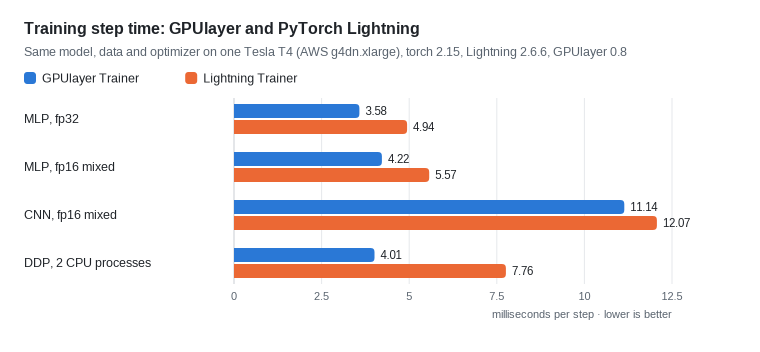
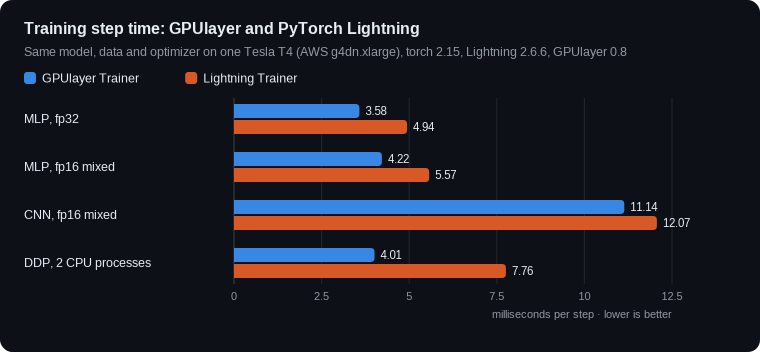
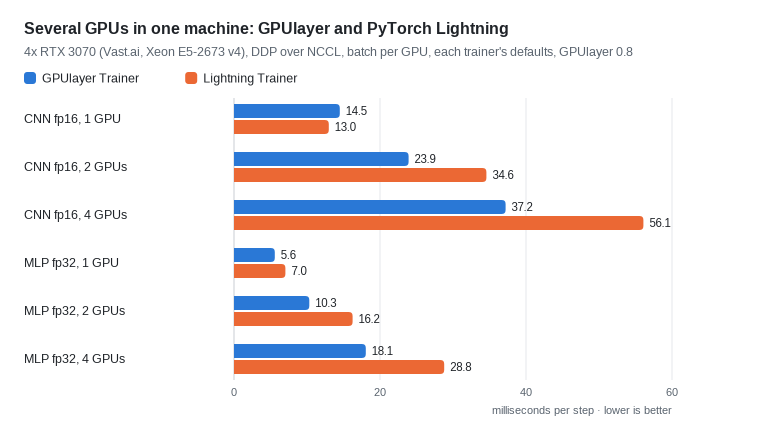
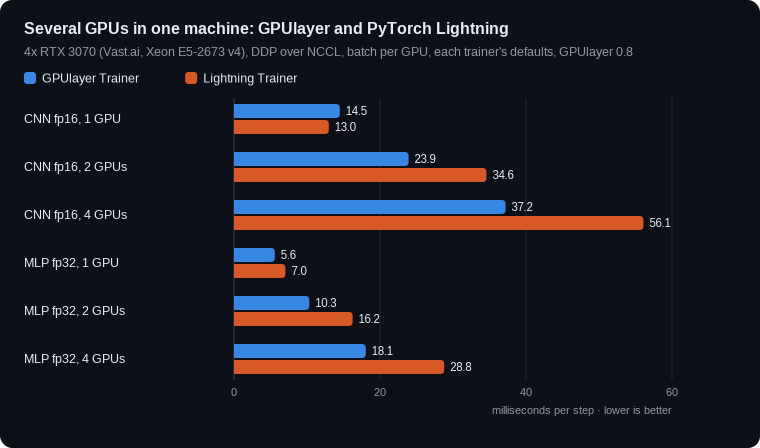
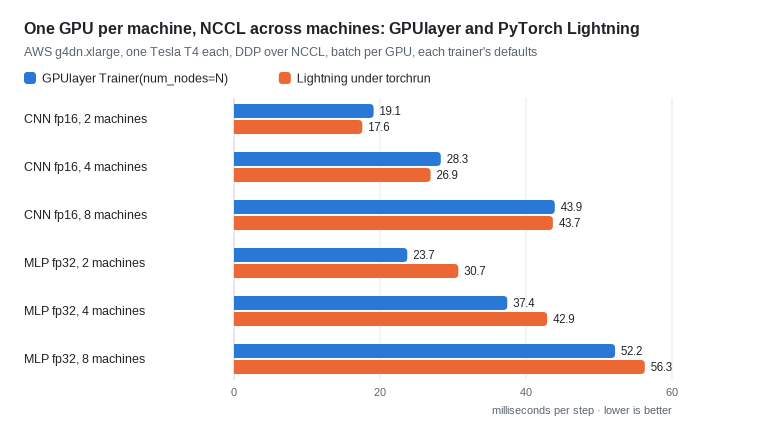
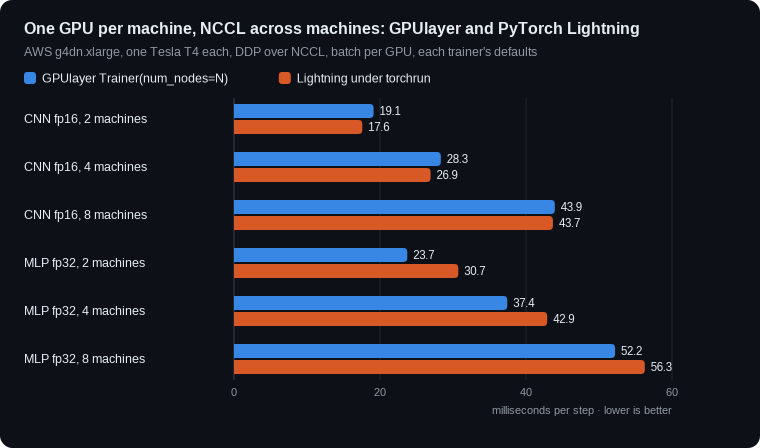
Against PyTorch Lightning, with the same model, data and optimizer and each trainer's defaults, the GPUlayer Trainer was faster in 13 of 17 GPU cases and in every CPU case (GPUlayer 0.8, 2026-11-01). Lightning was faster on one GPU with a CNN on one host, and by 1 to 9% on a CNN across 2 to 8 machines over NCCL.
| Hardware | GPUlayer Trainer against Lightning |
|---|---|
| Tesla T4 | 1.08 to 1.38x per step |
| 1, 2 and 4 RTX 3070s (DDP over NCCL) | 1.26 to 1.60x in 5 cases; 1.12x slower on one GPU with a CNN |
| 2, 4 and 8 machines with one T4 each (NCCL) | MLP 1.08 to 1.29x faster; CNN 1.01 to 1.09x slower |
| Apple M2 Pro, GPU and CPU | 1.02 to 1.80x |
| 8 CPU machines on AWS (gloo, 4 processes each) | 17.8% faster (Lightning under torchrun) |
Keeping a 4-machine run in one zone instead of two regions made it 1.38x faster (42.5 s vs
58.8 s). Method and logs:
Performance;
scripts in benchmarks/.
How it works
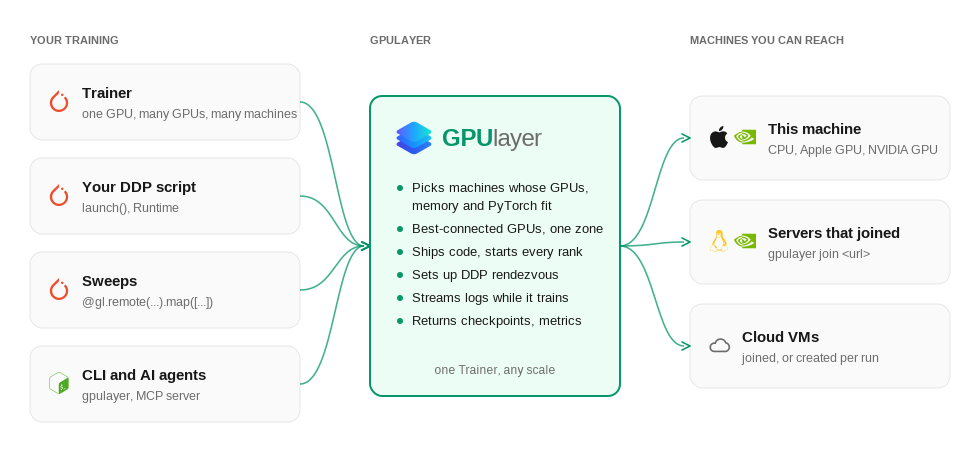
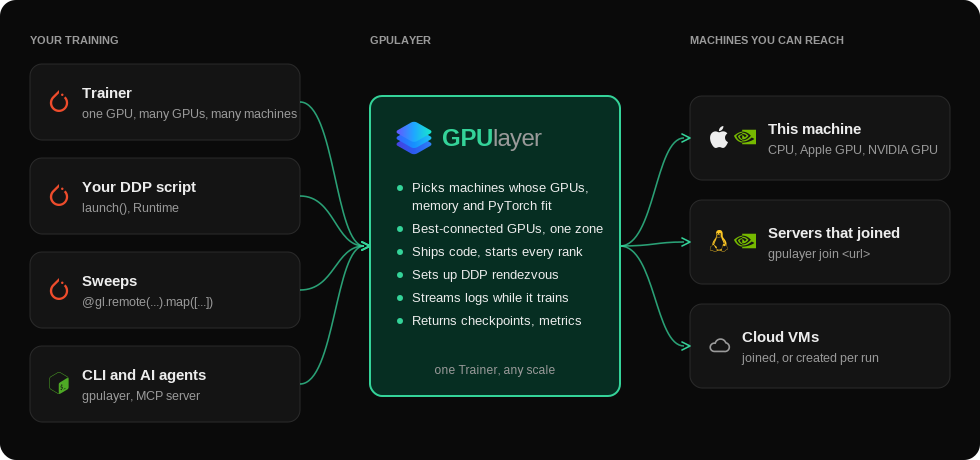
The Trainer submits a run that says what it needs (accelerator, number of GPUs and machines,
GPU memory). A control plane, inside your process or run as a server with gpulayer up,
picks machines that can train it: the best-connected GPUs of a machine, and machines in one
zone when it can. A worker on each machine starts the ranks, streams logs and uploads
checkpoints. Workers open every connection themselves, so machines can sit behind NAT. More
in the Architecture overview.
The same engine runs plain commands and Python functions as jobs, and gpulayer mcp lets
coding agents start runs and read their results
(AI agents).
With one GPU on the machine you are using, a plain training loop is simpler. Jobs are not sandboxed, so use GPUlayer among people who trust each other.
Development
uv pip install -e '.[dev,examples]'
.venv/bin/pytest && .venv/bin/ruff check src tests && .venv/bin/mypy src
See Contributing.
License
Apache License 2.0, see LICENSE.
1 maintainer

Metadata
1 maintainer
Release files for gpulayer 0.11.0
For a detailed explanation of source distributions (sdists) and built distributions (wheels), please see the package formats documentation.
Source distribution (sdist)
| File | Size | Uploaded | Provenance | Actions |
|---|---|---|---|---|
| gpulayer-0.11.0.tar.gz | 2.6 MB | With provenance | Details for gpulayer-0.11.0.tar.gz |
Built distribution (wheel)
| File | Interpreter | ABI | Platform | Actions Reset |
|---|---|---|---|---|
| gpulayer-0.11.0-py3-none-any.whl | Python 3 | none | any | Details for gpulayer-0.11.0-py3-none-any.whl |
Total release size: 2.9 MB
Release files / gpulayer-0.11.0.tar.gz
| Download URL | gpulayer-0.11.0.tar.gz |
|---|---|
| Size | 2.6 MB |
| Tags | Source |
|
SHA-256 checksum How to use checksums |
e94a1f6dbb0f284cbce8d71f4e2638aea58e26715304091ca6904288f944157c
|
|
BLAKE2b-256 checksum How to use checksums |
d1482aa5bbab028728b0b8aaabc398d0c7562d72c2508fdca7e2542670325f78
|
| Upload date | |
|
Uploaded using Trusted Publishing? What is trusted publishing? |
Yes |
| Uploaded via |
twine/7.0.0 CPython/3.13.16
|
Provenance
Provenance describes where a file came from. On PyPI, provenance is shared via attestations, which provide a verifiable record of the build or publishing details. View details, limitations and caveats.


PyPI Publish Attestation
PyPI verified that this artifact, at this checksum, originated from the publisher listed below.
Signed by GitHub Actions, verified by PyPI on Nov 7, 2026.
Transparency logRelease files / gpulayer-0.11.0-py3-none-any.whl
| Download URL | gpulayer-0.11.0-py3-none-any.whl |
|---|---|
| Size | 308.3 kB |
| Tags | Python 3 |
|
SHA-256 checksum How to use checksums |
9cd5e91d254c5d71d781cbf685ec9cc2c55e350dbad0e03d05e632778565571c
|
|
BLAKE2b-256 checksum How to use checksums |
9b7d743de803efbbe78779af530f11b84143ac804bddad3ebdc72751bab3126a
|
| Upload date | |
|
Uploaded using Trusted Publishing? What is trusted publishing? |
Yes |
| Uploaded via |
twine/7.0.0 CPython/3.13.16
|
Provenance
Provenance describes where a file came from. On PyPI, provenance is shared via attestations, which provide a verifiable record of the build or publishing details. View details, limitations and caveats.
PyPI Publish Attestation
PyPI verified that this artifact, at this checksum, originated from the publisher listed below.
Signed by GitHub Actions, verified by PyPI on Nov 7, 2026.
Transparency logSecurity for gpulayer 0.11.0
Provenance
Provenance describes where a file came from. On PyPI, provenance is shared via attestations, which provide a verifiable record of the build or publishing details. View details, limitations and caveats.
Full provenance
Both files in this release have been uploaded with provenance metadata.
Attestation for gpulayer-0.11.0.tar.gz
PyPI Publish Attestation
PyPI verified that this artifact, at this checksum, originated from the publisher listed below.
Signed by GitHub Actions, verified by PyPI on Nov 7, 2026.
Transparency logA note on package security
PyPI is a repository for distributing packages, not a service for auditing them. While third-party security researchers and our staff do their best to detect and remove malicious packages, PyPI cannot guarantee the quality, security or suitability of any given package.
To learn more about protecting yourself from malicious actors, visit our package security documentation.














