
gpushift




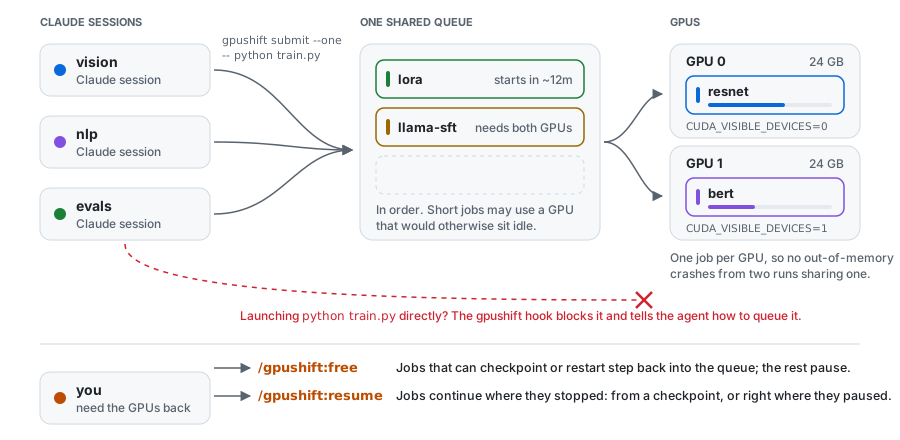
Share one GPU machine between your Claude Code agents and yourself. Agents queue their GPU work instead of launching it, so they never crash each other's runs, and the queue steps aside whenever you need the GPUs yourself.
- One queue for every session. A Claude Code hook stops agents that launch training directly and tells them how to queue it.
- The machine is still yours. Free the GPUs with one command: running jobs save a checkpoint and step aside, and carry on when you resume.
- No idle GPUs. Jobs run in the order they were queued, but short jobs may fill a GPU that would otherwise sit idle, and small jobs share a GPU.
- You stay informed. Agents hear when their jobs end, you get a desktop notification when one fails, and a local dashboard shows everything.
- Windows, Linux and macOS, any number of NVIDIA GPUs. No configuration needed.
Quickstart
uv tool install gpushift   # or: pipx install gpushift
gpushift init              # detects your GPUs and starts gpushift (also at login)
Then, in Claude Code:
/plugin marketplace add EdwardGlockner/gpushift
/plugin install gpushift@gpushift
That's it: agents now queue their GPU work. You can queue jobs too:
$ gpushift submit --one --eta 40m -- python train.py
job 14 queued (one: 1 GPU, 2 slots) tag=resnet
position 2 of 3, estimated start: ~40m (14:52)
Dashboard
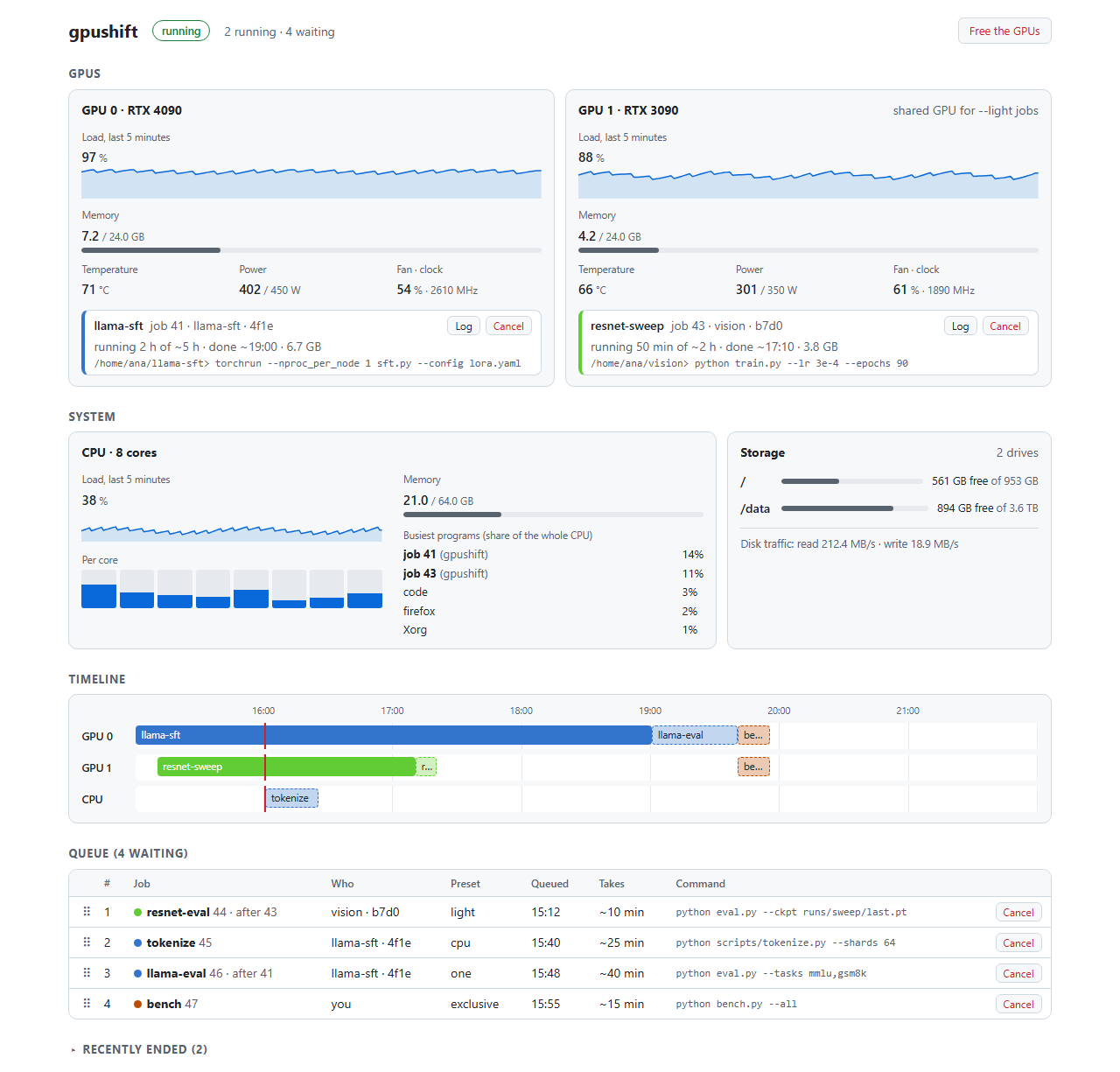
gpushift ui opens a live dashboard in your browser: what runs on each GPU, CPU and
disk usage, a timeline of what runs when, the queue (drag jobs to reorder them) and
each job's output. gpushift status shows the same in the terminal.
Submitting jobs
Pick how much of the machine a job needs:
| Preset | For | Gets |
|---|---|---|
--light |
Small evals and inference | Shares one GPU with other light jobs |
--one (default) |
Most jobs | One GPU |
--two |
Multi-GPU training | All GPUs |
--exclusive |
Benchmarks | The whole machine |
--cpu |
Preprocessing | No GPU |
Useful options:
--eta 40m: how long the job takes, for better start times. Without it, gpushift learns from earlier runs of the same command.--after 12: start only once job 12 has succeeded, e.g. an eval after its training run. Use this whenever order matters; otherwise jobs may run side by side.--restartable: the job is safe to stop and run again from the start.
Jobs run in the folder and environment you submitted them from (including your
virtualenv), on the GPUs gpushift picked for them. See gpushift submit --help for
everything else.
When you need the GPUs
gpushift free      # pause the queue and clear the GPUs
gpushift resume    # carry on
Jobs that can save a checkpoint do so and resume later, restartable jobs start over later, and other jobs are paused in place (they keep their GPU memory). Only you can free or resume; agents can't.
Claude Code plugin
- A skill that teaches agents to queue GPU work and pick sensible options.
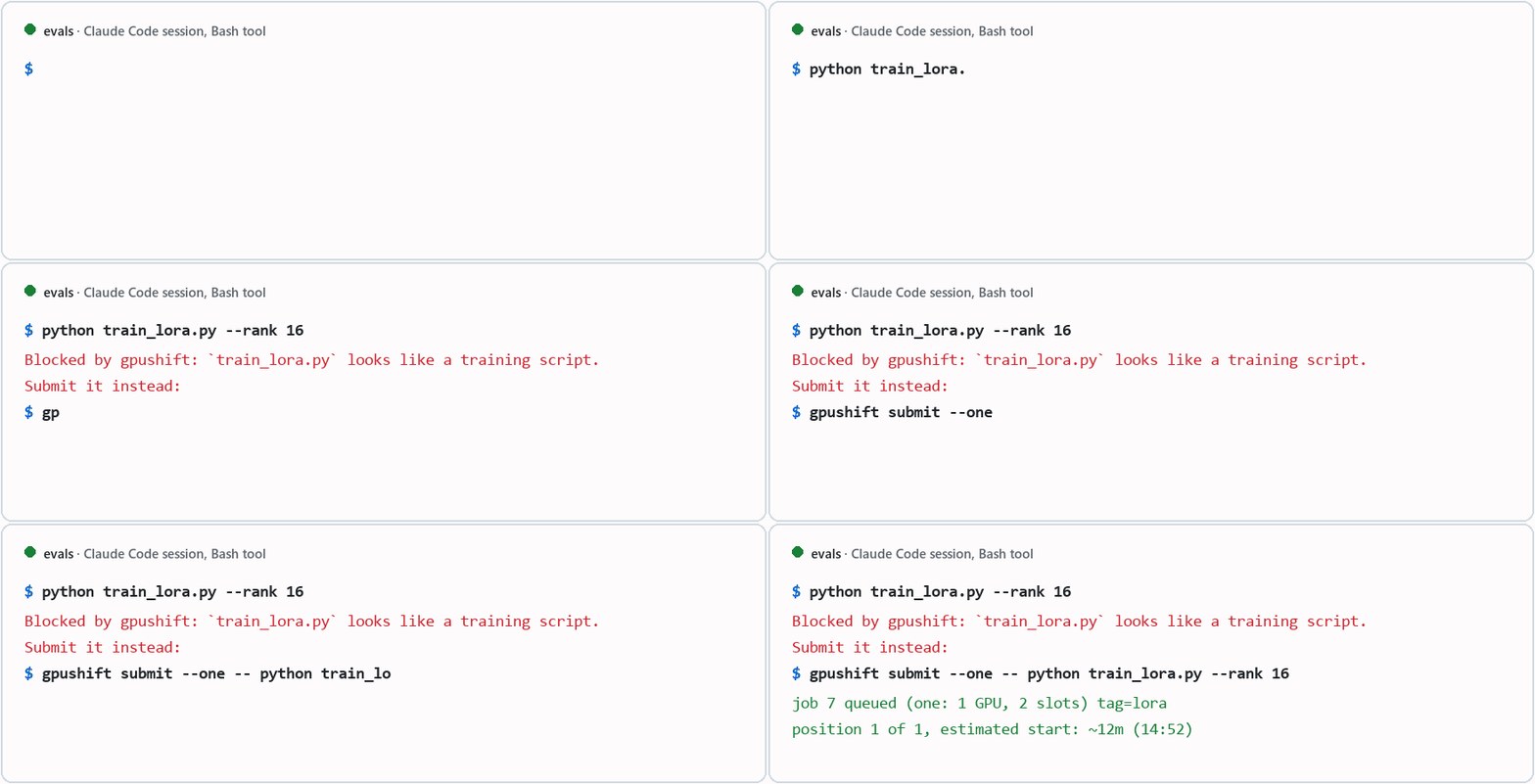
- A hook that blocks direct GPU launches (
python train.py,torchrun,accelerate launch, ...) and shows the agent how to queue them instead. Add# no-queueto a command to let it through. - Wake-ups: agents run
gpushift waitin the background, so a session hears when its jobs end, even if it was idle. - Commands:
/gpushift:queue,/gpushift:priority,/gpushift:cancel,/gpushift:freeand/gpushift:resume.
Not using the plugin? Add this to your CLAUDE.md:
Never launch GPU jobs directly; submit them with
gpushift submit(gpushift submit --help,gpushift status).
Making jobs resumable
So that freeing the GPUs doesn't cost progress, let your training loop check whether gpushift wants it to stop, and save a checkpoint when it does:
from gpushift import checkpoint as ckpt

last = ckpt.latest_checkpoint("checkpoints", "step*.pt")  # None on a fresh start
step = load(last) if last else 0
while step < total:
    train_step()
    step += 1
    if ckpt.should_stop():
        with ckpt.atomic_path(f"checkpoints/step{step:08d}.pt") as tmp:
            torch.save(state, tmp)
        break  # gpushift requeues the job and resumes it later
It has no dependencies and works in any environment. Examples for PyTorch, HF Trainer and Lightning.
Commands
| Command | |
|---|---|
gpushift submit [preset] -- <cmd> |
Queue a job |
gpushift status / gpushift ui |
See what's running and waiting |
gpushift logs <id> -f |
Follow a job's output |
gpushift wait [<id>] |
Wait for a job (or the next of your jobs) to end |
gpushift cancel <id> / gpushift retry <id> |
Cancel a job / run it again |
gpushift priority <id> |
Move a job to the front |
gpushift free / gpushift resume |
Free the GPUs / carry on |
gpushift config --edit |
Change settings |
gpushift --help lists the rest.
Configuration
Nothing needs configuring. To change something, run gpushift config --edit: the
file explains every setting, such as which GPUs to use, the dashboard port, and whether Claude sessions take turns instead of first come,
first served.
How it works
A small background service per user keeps the queue in a local SQLite database and
starts each job when its GPUs are free. It recovers after crashes and reboots, and
the queue keeps its place even while the service is stopped. Its state lives in
%LOCALAPPDATA%\gpushift (Windows), ~/.local/state/gpushift (Linux) or
~/Library/Application Support/gpushift (macOS).
Development
pip install -e ".[dev]"
pytest
ruff check . && ruff format --check .
The tests run a real queue on fake GPUs, so they don't need a GPU.
1 maintainer

Metadata
1 maintainer
Release files for gpushift 0.1.2
For a detailed explanation of source distributions (sdists) and built distributions (wheels), please see the package formats documentation.
Source distribution (sdist)
| File | Size | Uploaded | Provenance | Actions |
|---|---|---|---|---|
| gpushift-0.1.2.tar.gz | 87.6 kB | With provenance | Details for gpushift-0.1.2.tar.gz |
Built distribution (wheel)
| File | Interpreter | ABI | Platform | Actions Reset |
|---|---|---|---|---|
| gpushift-0.1.2-py3-none-any.whl | Python 3 | none | any | Details for gpushift-0.1.2-py3-none-any.whl |
Total release size: 165.5 kB
Release files / gpushift-0.1.2.tar.gz
| Download URL | gpushift-0.1.2.tar.gz |
|---|---|
| Size | 87.6 kB |
| Tags | Source |
|
SHA-256 checksum How to use checksums |
5a8e3f9c3c54593c166689b00773e9493fe8f9099f96411832481f57a3bbf022
|
|
BLAKE2b-256 checksum How to use checksums |
5c0aeffeb6b4744af2024d155b0a6c388a576af6e49eb16245bb8e77e1ef096d
|
| Upload date | |
|
Uploaded using Trusted Publishing? What is trusted publishing? |
Yes |
| Uploaded via |
twine/7.0.0 CPython/3.13.16
|
Provenance
Provenance describes where a file came from. On PyPI, provenance is shared via attestations, which provide a verifiable record of the build or publishing details. View details, limitations and caveats.


PyPI Publish Attestation
PyPI verified that this artifact, at this checksum, originated from the publisher listed below.
Signed by GitHub Actions, verified by PyPI on Nov 12, 2026.
Transparency logRelease files / gpushift-0.1.2-py3-none-any.whl
| Download URL | gpushift-0.1.2-py3-none-any.whl |
|---|---|
| Size | 78.0 kB |
| Tags | Python 3 |
|
SHA-256 checksum How to use checksums |
fdb1e33dcbc5bfad236cae7ecafaf51383aa64491381abba021346412aa0fb18
|
|
BLAKE2b-256 checksum How to use checksums |
30009251c0a523b9c96cca124e69e0561abb26ec1b7b749422a0677f0e4588e1
|
| Upload date | |
|
Uploaded using Trusted Publishing? What is trusted publishing? |
Yes |
| Uploaded via |
twine/7.0.0 CPython/3.13.16
|
Provenance
Provenance describes where a file came from. On PyPI, provenance is shared via attestations, which provide a verifiable record of the build or publishing details. View details, limitations and caveats.
PyPI Publish Attestation
PyPI verified that this artifact, at this checksum, originated from the publisher listed below.
Signed by GitHub Actions, verified by PyPI on Nov 12, 2026.
Transparency logSecurity for gpushift 0.1.2
Provenance
Provenance describes where a file came from. On PyPI, provenance is shared via attestations, which provide a verifiable record of the build or publishing details. View details, limitations and caveats.
Full provenance
Both files in this release have been uploaded with provenance metadata.
Attestation for gpushift-0.1.2.tar.gz
PyPI Publish Attestation
PyPI verified that this artifact, at this checksum, originated from the publisher listed below.
Signed by GitHub Actions, verified by PyPI on Nov 12, 2026.
Transparency logA note on package security
PyPI is a repository for distributing packages, not a service for auditing them. While third-party security researchers and our staff do their best to detect and remove malicious packages, PyPI cannot guarantee the quality, security or suitability of any given package.
To learn more about protecting yourself from malicious actors, visit our package security documentation.














