
gradio_client: Use a Gradio app as an API -- in 3 lines of Python
This directory contains the source code for gradio_client, a lightweight Python library that makes it very easy to use any Gradio app as an API.
As an example, consider this Hugging Face Space that transcribes audio files that are recorded from the microphone.
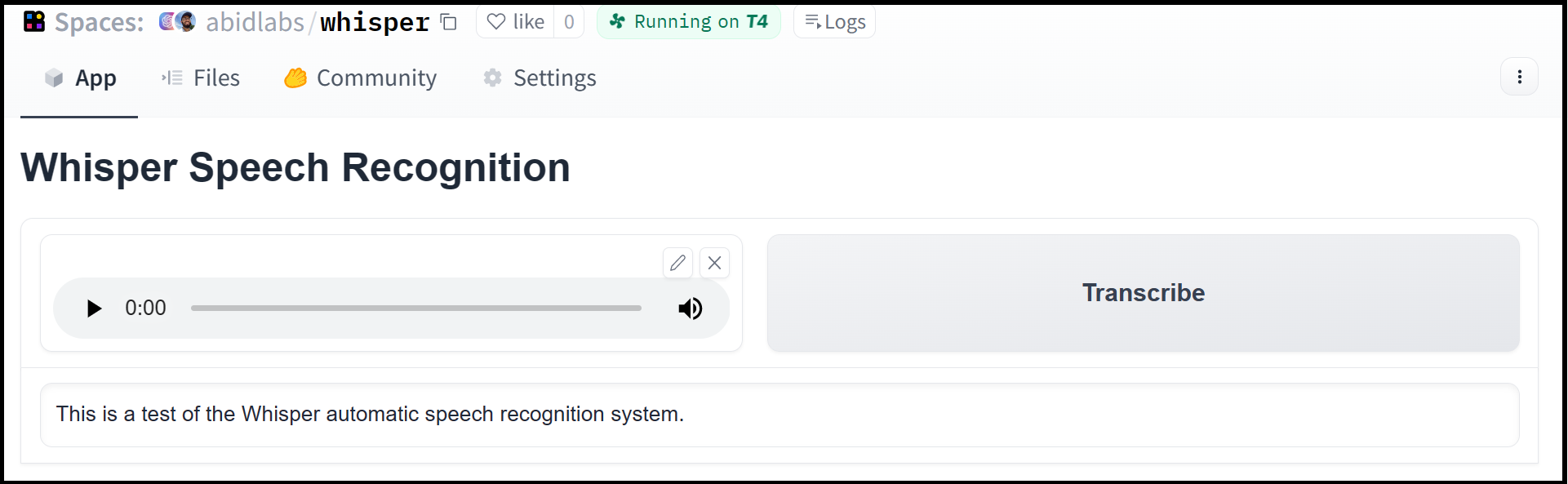
Using the gradio_client library, we can easily use the Gradio as an API to transcribe audio files programmatically.
Here's the entire code to do it:
from gradio_client import Client

client = Client("abidlabs/whisper")
client.predict("audio_sample.wav")

>> "This is a test of the whisper speech recognition model."
The Gradio client works with any Gradio Space, whether it be an image generator, a stateful chatbot, or a tax calculator.
Installation
If you already have a recent version of gradio, then the gradio_client is included as a dependency.
Otherwise, the lightweight gradio_client package can be installed from pip (or pip3) and works with Python versions 3.10 or higher:
$ pip install gradio_client
Basic Usage
Connecting to a Space or a Gradio app
Start by connecting instantiating a Client object and connecting it to a Gradio app that is running on Spaces (or anywhere else)!
Connecting to a Space
from gradio_client import Client

client = Client("abidlabs/en2fr")  # a Space that translates from English to French
You can also connect to private Spaces by passing in your HF token with the hf_token parameter. You can get your HF token here: https://huggingface.co/settings/tokens
from gradio_client import Client

client = Client("abidlabs/my-private-space", hf_token="...")
Duplicating a Space for private use
While you can use any public Space as an API, you may get rate limited by Hugging Face if you make too many requests. For unlimited usage of a Space, simply duplicate the Space to create a private Space, and then use it to make as many requests as you'd like!
The gradio_client includes a class method: Client.duplicate() to make this process simple:
from gradio_client import Client

client = Client.duplicate("abidlabs/whisper")
client.predict("audio_sample.wav")

>> "This is a test of the whisper speech recognition model."
If you have previously duplicated a Space, re-running duplicate() will not create a new Space. Instead, the Client will attach to the previously-created Space. So it is safe to re-run the Client.duplicate() method multiple times.
Note: if the original Space uses GPUs, your private Space will as well, and your Hugging Face account will get billed based on the price of the GPU. To minimize charges, your Space will automatically go to sleep after 1 hour of inactivity. You can also set the hardware using the hardware parameter of duplicate().
Connecting a general Gradio app
If your app is running somewhere else, just provide the full URL instead, including the "http://" or "https://". Here's an example of making predictions to a Gradio app that is running on a share URL:
from gradio_client import Client

client = Client("https://bec81a83-5b5c-471e.gradio.live")
Inspecting the API endpoints
Once you have connected to a Gradio app, you can view the APIs that are available to you by calling the .view_api() method. For the Whisper Space, we see the following:
Client.predict() Usage Info
---------------------------
Named API endpoints: 1

 - predict(input_audio, api_name="/predict") -> value_0
    Parameters:
     - [Audio] input_audio: str (filepath or URL)
    Returns:
     - [Textbox] value_0: str (value)
This shows us that we have 1 API endpoint in this space, and shows us how to use the API endpoint to make a prediction: we should call the .predict() method, providing a parameter input_audio of type str, which is a filepath or URL.
We should also provide the api_name='/predict' argument. Although this isn't necessary if a Gradio app has a single named endpoint, it does allow us to call different endpoints in a single app if they are available. If an app has unnamed API endpoints, these can also be displayed by running .view_api(all_endpoints=True).
Making a prediction
The simplest way to make a prediction is simply to call the .predict() function with the appropriate arguments:
from gradio_client import Client

client = Client("abidlabs/en2fr")
client.predict("Hello")

>> Bonjour
If there are multiple parameters, then you should pass them as separate arguments to .predict(), like this:
from gradio_client import Client

client = Client("gradio/calculator")
client.predict(4, "add", 5)

>> 9.0
For certain inputs, such as images, you should pass in the filepath or URL to the file. Likewise, for the corresponding output types, you will get a filepath or URL returned.
from gradio_client import Client

client = Client("abidlabs/whisper")
client.predict("https://audio-samples.github.io/samples/mp3/blizzard_unconditional/sample-0.mp3")

>> "My thought I have nobody by a beauty and will as you poured. Mr. Rochester is serve in that so don't find simpus, and devoted abode, to at might in a r—"
Advanced Usage
For more ways to use the Gradio Python Client, check out our dedicated Guide on the Python client, available here: https://www.gradio.app/guides/getting-started-with-the-python-client
5 maintainers


Release files for gradio-client 2.7.1
For a detailed explanation of source distributions (sdists) and built distributions (wheels), please see the package formats documentation.
Source distribution (sdist)
| File | Size | Uploaded | |
|---|---|---|---|
| gradio_client-2.7.1.tar.gz | 62.7 kB | Details |
Built distribution (wheel)
| File | Interpreter | ABI | Platform | Reset |
|---|---|---|---|---|
| gradio_client-2.7.1-py3-none-any.whl | Python 3 | none | any | Details |
Total release size: 126.3 kB
Release files / gradio_client-2.7.1.tar.gz
| Download URL | gradio_client-2.7.1.tar.gz |
|---|---|
| Size | 62.7 kB |
| Tags | Source |
|
SHA-256 checksum How to use checksums |
2c629110496dbca67a848cd70add8cf5c3a24776404a2c5ef4fd759c7c2c33c4
|
|
BLAKE2b-256 checksum How to use checksums |
14ddbfc46f5c671f4be56949fd26a062972d63b03aa6fc799c7aacb004a48807
|
| Upload date | |
|
Uploaded using Trusted Publishing? What is trusted publishing? |
Yes |
| Uploaded via |
twine/6.2.0 CPython/3.12.14
|
Provenance
Provenance describes where a file came from. On PyPI, provenance is shared via attestations, which provide a verifiable record of the build or publishing details. View details, limitations and caveats.


PyPI Publish Attestation
PyPI verified that this artifact, at this checksum, originated from the publisher listed below.
Signed by GitHub Actions, verified by PyPI on Sep 18, 2026.
Transparency logRelease files / gradio_client-2.7.1-py3-none-any.whl
| Download URL | gradio_client-2.7.1-py3-none-any.whl |
|---|---|
| Size | 63.6 kB |
| Tags | Python 3 |
|
SHA-256 checksum How to use checksums |
b4f953212a66eeb7fa12d93fcf98fa90a0567c2c9c6a5fc2795610f7c71e21b5
|
|
BLAKE2b-256 checksum How to use checksums |
038adea48fd8863da2a920e6f83c3ce9b0a00dbb5517cd77b834746812d4687e
|
| Upload date | |
|
Uploaded using Trusted Publishing? What is trusted publishing? |
Yes |
| Uploaded via |
twine/6.2.0 CPython/3.12.14
|
Provenance
Provenance describes where a file came from. On PyPI, provenance is shared via attestations, which provide a verifiable record of the build or publishing details. View details, limitations and caveats.
PyPI Publish Attestation
PyPI verified that this artifact, at this checksum, originated from the publisher listed below.
Signed by GitHub Actions, verified by PyPI on Sep 18, 2026.
Transparency log













