
Python library for easily interacting with trained machine learning models
Verified details
These details have been verified by PyPIProject links
GitHub Statistics
Maintainers


Project description
gradio_client: Use a Gradio app as an API -- in 3 lines of Python
This directory contains the source code for gradio_client, a lightweight Python library that makes it very easy to use any Gradio app as an API.
As an example, consider this Hugging Face Space that transcribes audio files that are recorded from the microphone.
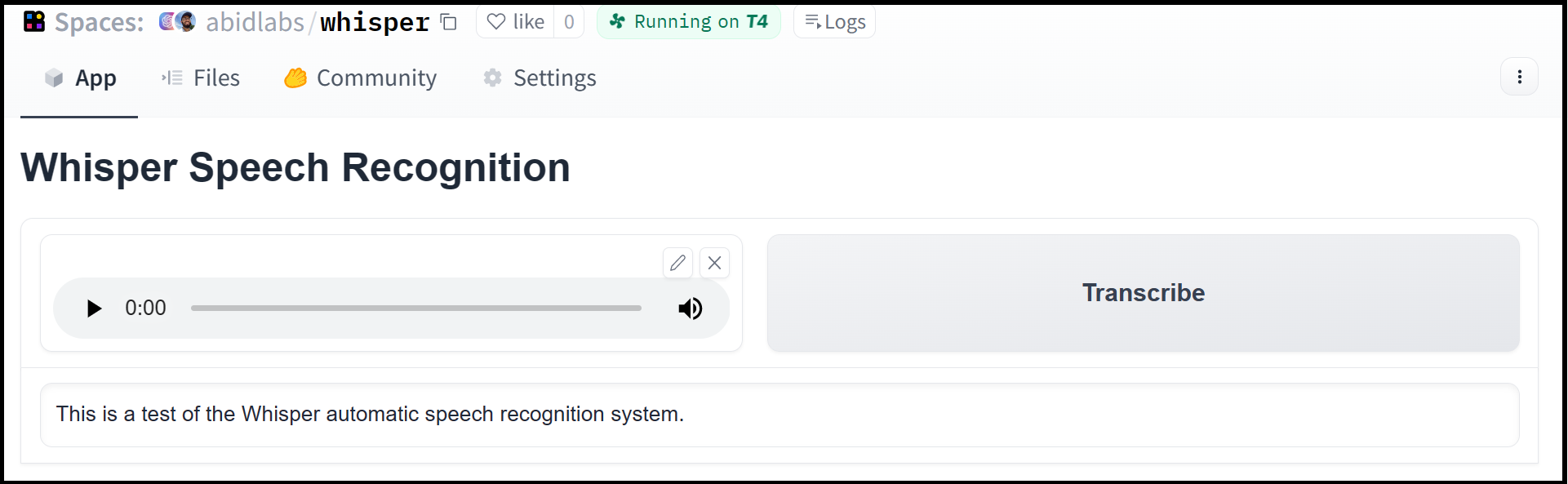
Using the gradio_client library, we can easily use the Gradio as an API to transcribe audio files programmatically.
Here's the entire code to do it:
from gradio_client import Client

client = Client("abidlabs/whisper")
client.predict("audio_sample.wav")

>> "This is a test of the whisper speech recognition model."
The Gradio client works with any Gradio Space, whether it be an image generator, a stateful chatbot, or a tax calculator.
Installation
If you already have a recent version of gradio, then the gradio_client is included as a dependency.
Otherwise, the lightweight gradio_client package can be installed from pip (or pip3) and works with Python versions 3.10 or higher:
$ pip install gradio_client
Basic Usage
Connecting to a Space or a Gradio app
Start by connecting instantiating a Client object and connecting it to a Gradio app that is running on Spaces (or anywhere else)!
Connecting to a Space
from gradio_client import Client

client = Client("abidlabs/en2fr")  # a Space that translates from English to French
You can also connect to private Spaces by passing in your HF token with the hf_token parameter. You can get your HF token here: https://huggingface.co/settings/tokens
from gradio_client import Client

client = Client("abidlabs/my-private-space", hf_token="...")
Duplicating a Space for private use
While you can use any public Space as an API, you may get rate limited by Hugging Face if you make too many requests. For unlimited usage of a Space, simply duplicate the Space to create a private Space, and then use it to make as many requests as you'd like!
The gradio_client includes a class method: Client.duplicate() to make this process simple:
from gradio_client import Client

client = Client.duplicate("abidlabs/whisper")
client.predict("audio_sample.wav")

>> "This is a test of the whisper speech recognition model."
If you have previously duplicated a Space, re-running duplicate() will not create a new Space. Instead, the Client will attach to the previously-created Space. So it is safe to re-run the Client.duplicate() method multiple times.
Note: if the original Space uses GPUs, your private Space will as well, and your Hugging Face account will get billed based on the price of the GPU. To minimize charges, your Space will automatically go to sleep after 1 hour of inactivity. You can also set the hardware using the hardware parameter of duplicate().
Connecting a general Gradio app
If your app is running somewhere else, just provide the full URL instead, including the "http://" or "https://". Here's an example of making predictions to a Gradio app that is running on a share URL:
from gradio_client import Client

client = Client("https://bec81a83-5b5c-471e.gradio.live")
Inspecting the API endpoints
Once you have connected to a Gradio app, you can view the APIs that are available to you by calling the .view_api() method. For the Whisper Space, we see the following:
Client.predict() Usage Info
---------------------------
Named API endpoints: 1

 - predict(input_audio, api_name="/predict") -> value_0
    Parameters:
     - [Audio] input_audio: str (filepath or URL)
    Returns:
     - [Textbox] value_0: str (value)
This shows us that we have 1 API endpoint in this space, and shows us how to use the API endpoint to make a prediction: we should call the .predict() method, providing a parameter input_audio of type str, which is a filepath or URL.
We should also provide the api_name='/predict' argument. Although this isn't necessary if a Gradio app has a single named endpoint, it does allow us to call different endpoints in a single app if they are available. If an app has unnamed API endpoints, these can also be displayed by running .view_api(all_endpoints=True).
Making a prediction
The simplest way to make a prediction is simply to call the .predict() function with the appropriate arguments:
from gradio_client import Client

client = Client("abidlabs/en2fr")
client.predict("Hello")

>> Bonjour
If there are multiple parameters, then you should pass them as separate arguments to .predict(), like this:
from gradio_client import Client

client = Client("gradio/calculator")
client.predict(4, "add", 5)

>> 9.0
For certain inputs, such as images, you should pass in the filepath or URL to the file. Likewise, for the corresponding output types, you will get a filepath or URL returned.
from gradio_client import Client

client = Client("abidlabs/whisper")
client.predict("https://audio-samples.github.io/samples/mp3/blizzard_unconditional/sample-0.mp3")

>> "My thought I have nobody by a beauty and will as you poured. Mr. Rochester is serve in that so don't find simpus, and devoted abode, to at might in a r—"
Advanced Usage
For more ways to use the Gradio Python Client, check out our dedicated Guide on the Python client, available here: https://www.gradio.app/guides/getting-started-with-the-python-client
Project details
Verified details
These details have been verified by PyPIProject links
GitHub Statistics
Maintainers
Release history Release notifications | RSS feed


Download files
Download the file for your platform. If you're not sure which to choose, learn more about installing packages.
Source Distribution
Built Distribution
Filter files by name, interpreter, ABI, and platform.
If you're not sure about the file name format, learn more about wheel file names.
Copy a direct link to the current filters
File details
Details for the file gradio_client-2.5.0.tar.gz.
File metadata
- Download URL: gradio_client-2.5.0.tar.gz
- Upload date:
- Size: 59.0 kB
- Tags: Source
- Uploaded using Trusted Publishing? Yes
- Uploaded via: twine/6.2.0 CPython/3.12.13
File hashes
| Algorithm | Hash digest | |
|---|---|---|
| SHA256 |
4cde99bad62149595c30c90876ca2e405e3a13687ecf895474f3412cb476673d
|
|
| MD5 |
f4a29bea0ebbb96bcf6e7b1bed24f380
|
|
| BLAKE2b-256 |
e8e66b6029f5fe2ad7f1211105d530e34d991014c2cae463f9223033031cfc4f
|
Provenance
The following attestation bundles were made for gradio_client-2.5.0.tar.gz:
Publisher:
publish.yml on gradio-app/gradio
-
Statement:
-
Statement type:
https://in-toto.io/Statement/v1 -
Predicate type:
https://docs.pypi.org/attestations/publish/v1 -
Subject name:
gradio_client-2.5.0.tar.gz -
Subject digest:
4cde99bad62149595c30c90876ca2e405e3a13687ecf895474f3412cb476673d - Sigstore transparency entry: 1343702326
- Sigstore integration time:
-
Permalink:
gradio-app/gradio@43f5de68579919b0632ceb6107a99c629483ea2f -
Branch / Tag:
refs/heads/main - Owner: https://github.com/gradio-app
-
Access:
public
-
Token Issuer:
https://token.actions.githubusercontent.com -
Runner Environment:
github-hosted -
Publication workflow:
publish.yml@43f5de68579919b0632ceb6107a99c629483ea2f -
Trigger Event:
push
-
Statement type:
File details
Details for the file gradio_client-2.5.0-py3-none-any.whl.
File metadata
- Download URL: gradio_client-2.5.0-py3-none-any.whl
- Upload date:
- Size: 60.0 kB
- Tags: Python 3
- Uploaded using Trusted Publishing? Yes
- Uploaded via: twine/6.2.0 CPython/3.12.13
File hashes
| Algorithm | Hash digest | |
|---|---|---|
| SHA256 |
d43e2179c29076292a76485ad7ed2e6eaa19d14ac58283bd7f5beabfe4ca958c
|
|
| MD5 |
17832b60fc8afb6b4cfee97d110b55dc
|
|
| BLAKE2b-256 |
78810a861b8e1ff42960139c6cd4c7dd591292fa09ea1ae2d87677441cba4c00
|
Provenance
The following attestation bundles were made for gradio_client-2.5.0-py3-none-any.whl:
Publisher:
publish.yml on gradio-app/gradio
-
Statement:
-
Statement type:
https://in-toto.io/Statement/v1 -
Predicate type:
https://docs.pypi.org/attestations/publish/v1 -
Subject name:
gradio_client-2.5.0-py3-none-any.whl -
Subject digest:
d43e2179c29076292a76485ad7ed2e6eaa19d14ac58283bd7f5beabfe4ca958c - Sigstore transparency entry: 1343702371
- Sigstore integration time:
-
Permalink:
gradio-app/gradio@43f5de68579919b0632ceb6107a99c629483ea2f -
Branch / Tag:
refs/heads/main - Owner: https://github.com/gradio-app
-
Access:
public
-
Token Issuer:
https://token.actions.githubusercontent.com -
Runner Environment:
github-hosted -
Publication workflow:
publish.yml@43f5de68579919b0632ceb6107a99c629483ea2f -
Trigger Event:
push
-
Statement type:






