
GraphUniverse: Enabling Systematic Evaluation of Inductive Generalization




Generate families of graphs with finely controllable properties for systematic evaluation of inductive graph learning models.
Quick Start | Interactive UI | Validation | Paper Experiments
Key Features
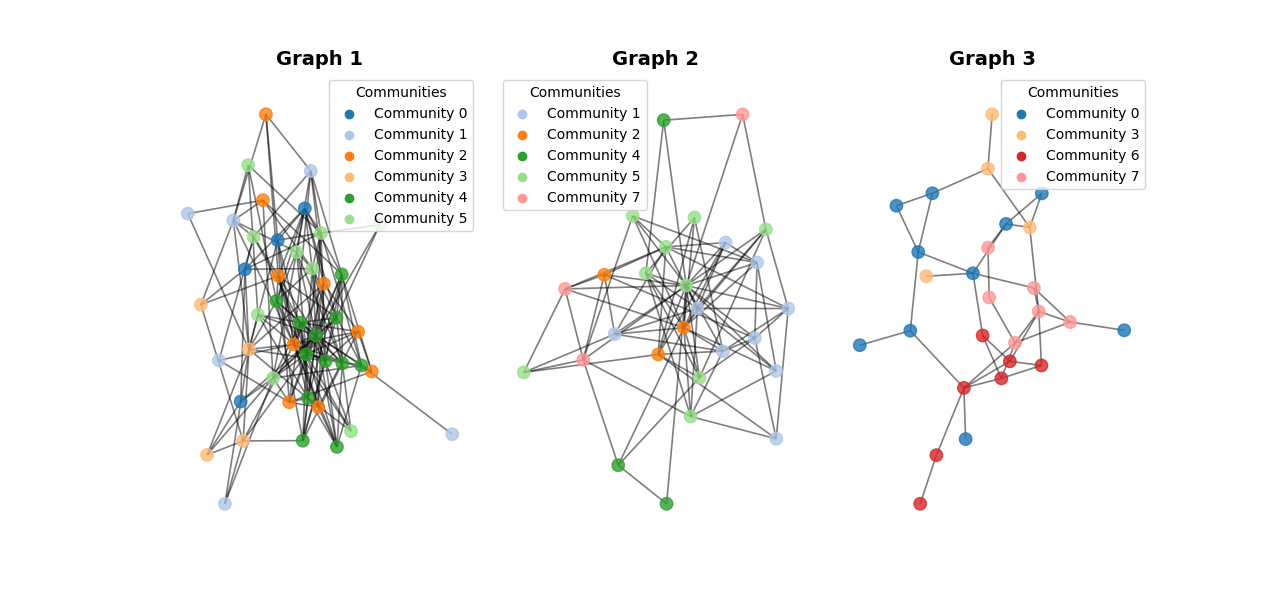
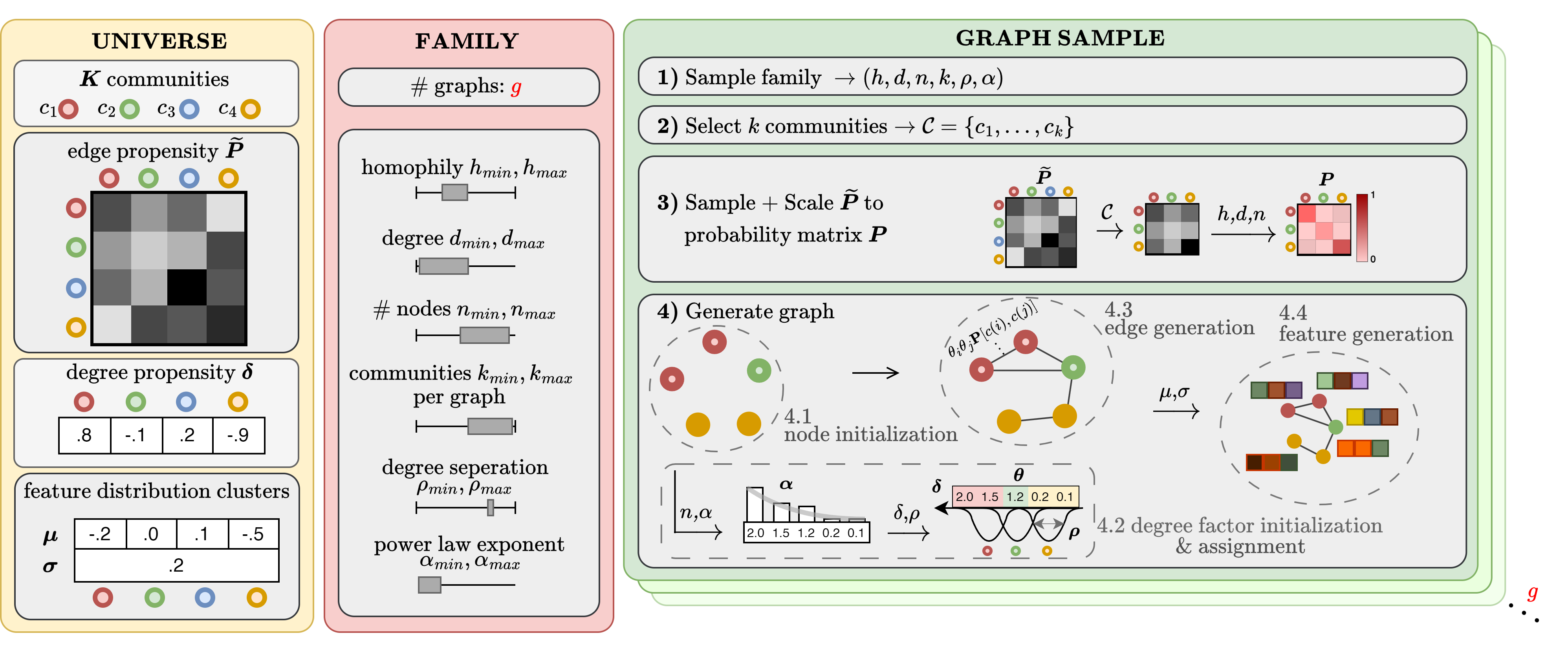
Synthetic graph learning benchmarks are limited to single-graph, transductive settings. GraphUniverse enables the first systematic evaluation of inductive generalization by generating entire families of graphs with:
- Consistent Semantics: Communities maintain stable identities across graphs
- Fine-grained Control: Tune homophily, degree distributions, community structure
- Scalable Generation: Linear scaling, thousands of graphs per minute
- Validated Framework: Comprehensive parameter sensitivity analysis
- Interactive Tool: Web-based exploration and visualization and Downloadable Pyg-dataset object ready to train!
Installation
Install from PyPI:
pip install graph-universe
For the interactive UI (streamlit) and visualization tools:
pip install graph-universe[viz]
Optional extras:
[viz]- Streamlit UI + seaborn visualization tools[dev]- Development dependencies (testing, linting)[all]- Everything (includes documentation tools)
Install from source:
git clone https://github.com/LouisVanLangendonck/GraphUniverse.git
cd GraphUniverse
pip install -e ".[dev]"
Interactive UI
After installing with [viz], launch the interactive dashboard:
graph-universe-ui
Hosted demo: Try it online at graphuniverse.streamlit.app
Launch from Python:
from graph_universe import launch_ui
launch_ui()  # Opens browser, press Ctrl+C to stop
Quick Start
Option 1: Python API with Individual Classes
from graph_universe import GraphUniverse, GraphFamilyGenerator

# Create universe with 8 communities and 10-dimensional features
universe = GraphUniverse(K=8, edge_propensity_variance=0.3, feature_dim=10)

# Generate family with full parameter control
family = GraphFamilyGenerator(
    universe=universe,
    n_nodes_range=(35, 50),
    n_communities_range=(2, 6),
    homophily_range=(0.2, 0.8),
    avg_degree_range=(2.0, 10.0),
    power_law_exponent_range=(2.0, 5.0),
    degree_separation_range=(0.1, 0.7),
    seed=42
)

# Generate 30 graphs
family.generate_family(n_graphs=30, show_progress=True)

print(f"Generated {len(family.graphs)} graphs!")

# Convert to PyTorch Geometric format for training
pyg_graphs = family.to_pyg_graphs(task="community_detection")
Option 2: Config-Driven Workflow
Create config.yaml:
universe_parameters:
  K: 10
  edge_propensity_variance: 0.5
  feature_dim: 16
  center_variance: 1.0
  cluster_variance: 0.3
  seed: 42

family_parameters:
  n_graphs: 100
  n_nodes_range: [25, 200]
  n_communities_range: [3, 7]
  homophily_range: [0.1, 0.9]
  avg_degree_range: [2.0, 8.0]
  power_law_exponent_range: [2.0, 3.0]
  degree_separation_range: [0.4, 0.8]
  seed: 42

task: "community_detection"
Then load and generate:
import yaml
from graph_universe import GraphUniverseDataset

with open("config.yaml") as f:
    config = yaml.safe_load(f)

dataset = GraphUniverseDataset(root="./data", parameters=config)
print(f"Generated dataset with {len(dataset)} graphs!")
Validation & Analysis
GraphUniverse includes built-in validation to ensure generated graphs match target properties:
# Validate standard graph properties
family_properties = family.analyze_graph_family_properties()
for property_name in ['node_counts', 'avg_degrees', 'homophily_levels']:
    values = family_properties[property_name]
    print(f"{property_name}: mean={np.mean(values):.3f}")

# Analyze within-graph community signals (fits Random Forest per graph)
family_signals = family.analyze_graph_family_signals()
for signal in ['structure_signal', 'feature_signal', 'degree_signal']:
    values = family_signals[signal]
    print(f"{signal}: mean={np.mean(values):.3f}")

# Measure between-graph consistency
family_consistency = family.analyze_graph_family_consistency()
for metric in ['structure_consistency', 'feature_consistency', 'degree_consistency']:
    value = family_consistency[metric]
    print(f"{metric}: {value:.3f}")
Documentation & Support
- GitHub Repository: https://github.com/LouisVanLangendonck/GraphUniverse
- PyPI Package: https://pypi.org/project/graph-universe/
- Issue Tracker: https://github.com/LouisVanLangendonck/GraphUniverse/issues
- Changelog: https://github.com/LouisVanLangendonck/GraphUniverse/blob/main/CHANGELOG.md
Citation
If you use GraphUniverse in your research, please cite:
@article{van2025graphuniverse,
  title={GraphUniverse: Enabling Systematic Evaluation of Inductive Generalization},
  author={Van Langendonck, Louis and Bern{\'a}rdez, Guillermo and Miolane, Nina and Barlet-Ros, Pere},
  journal={arXiv preprint arXiv:2509.21097},
  year={2025}
}
For Researchers & Contributors
The sections below contain resources for reproducing paper experiments and contributing to development.
Reproducing Paper Experiments
Clone the repository to access validation and experiment scripts:
git clone https://github.com/LouisVanLangendonck/GraphUniverse.git
cd GraphUniverse
pip install -e ".[dev]"
Run parameter sensitivity validation (reproduces paper results):
python experiments/validate_parameter_sensitivity.py --n-random-samples 100 --n-graphs 30
Run scalability experiments:
python experiments/scalability_experiment.py
License
MIT License - see LICENSE for details.
Copyright (c) 2025 Louis Van Langendonck and Guillermo Bernardez
1 maintainer

Metadata
1 maintainer
Release files for graph-universe 0.1.2
For a detailed explanation of source distributions (sdists) and built distributions (wheels), please see the package formats documentation.
Source distribution (sdist)
| File | Size | Uploaded | Provenance | Actions |
|---|---|---|---|---|
| graph_universe-0.1.2.tar.gz | 51.3 kB | Without provenance | Details for graph_universe-0.1.2.tar.gz |
Built distribution (wheel)
| File | Interpreter | ABI | Platform | Actions Reset |
|---|---|---|---|---|
| graph_universe-0.1.2-py3-none-any.whl | Python 3 | none | any | Details for graph_universe-0.1.2-py3-none-any.whl |
Total release size: 100.5 kB
Release files / graph_universe-0.1.2.tar.gz
| Download URL | graph_universe-0.1.2.tar.gz |
|---|---|
| Size | 51.3 kB |
| Tags | Source |
|
SHA-256 checksum How to use checksums |
70e14d1c163fb6411e985413597bdd1400cd37c604e38f0216d35f45d36f4f40
|
|
BLAKE2b-256 checksum How to use checksums |
525b381f556e92450086f55df8e211c518541be05662e5a10886bb409cc93939
|
| Upload date | |
|
Uploaded using Trusted Publishing? What is trusted publishing? |
No |
| Uploaded via |
twine/6.2.0 CPython/3.11.3
|
Release files / graph_universe-0.1.2-py3-none-any.whl
| Download URL | graph_universe-0.1.2-py3-none-any.whl |
|---|---|
| Size | 49.1 kB |
| Tags | Python 3 |
|
SHA-256 checksum How to use checksums |
5a87d437b5e1658a6e115d9fd5f48151bf00c1bd73e269540c21598698e650f9
|
|
BLAKE2b-256 checksum How to use checksums |
58b383a5b822c7c6314d0a4df369c97d93136d2d810f843015e84a1d20ac0547
|
| Upload date | |
|
Uploaded using Trusted Publishing? What is trusted publishing? |
No |
| Uploaded via |
twine/6.2.0 CPython/3.11.3
|
Security for graph-universe 0.1.2
Provenance
Provenance describes where a file came from. On PyPI, provenance is shared via attestations, which provide a verifiable record of the build or publishing details. View details, limitations and caveats.
No provenance found
None of the files in this release were uploaded with provenance metadata.
A note on package security
PyPI is a repository for distributing packages, not a service for auditing them. While third-party security researchers and our staff do their best to detect and remove malicious packages, PyPI cannot guarantee the quality, security or suitability of any given package.
To learn more about protecting yourself from malicious actors, visit our package security documentation.














