



GraphGen: Enhancing Supervised Fine-Tuning for LLMs with Knowledge-Driven Synthetic Data Generation
📚 Table of Contents
📝 What is GraphGen?
GraphGen is a framework for synthetic data generation guided by knowledge graphs. Here is our paper.
It begins by constructing a fine-grained knowledge graph from the source text,then identifies knowledge gaps in LLMs using the expected calibration error metric, prioritizing the generation of QA pairs that target high-value, long-tail knowledge. Furthermore, GraphGen incorporates multi-hop neighborhood sampling to capture complex relational information and employs style-controlled generation to diversify the resulting QA data.
🚀 Quick Start
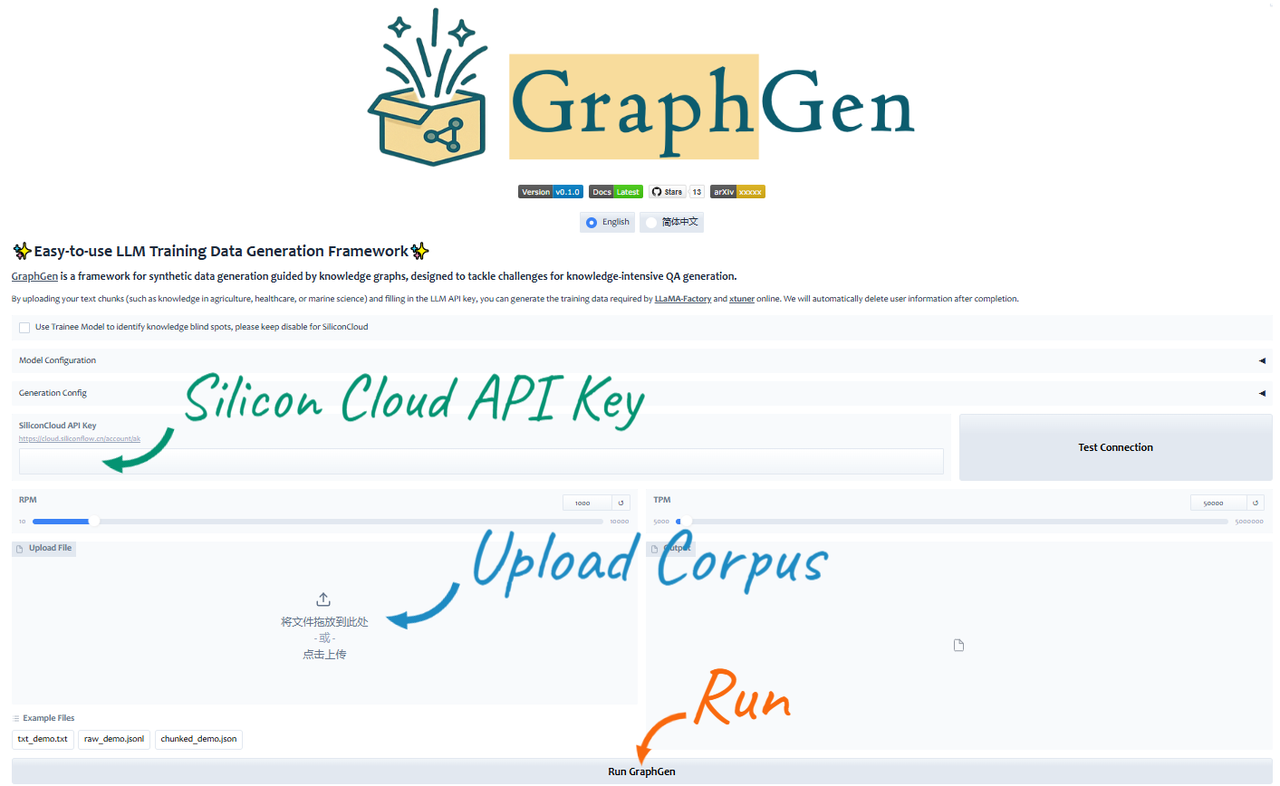
Experience it on the OpenXLab Application Center
Gradio Demo
python webui/app.py
Run from PyPI
-
Install GraphGen
pip install graphg
-
Run in CLI
SYNTHESIZER_MODEL=your_synthesizer_model_name \
SYNTHESIZER_BASE_URL=your_base_url_for_synthesizer_model \
SYNTHESIZER_API_KEY=your_api_key_for_synthesizer_model \
TRAINEE_MODEL=your_trainee_model_name \
TRAINEE_BASE_URL=your_base_url_for_trainee_model \
TRAINEE_API_KEY=your_api_key_for_trainee_model \
graphg --output_dir cache
Run from Source
- Install dependencies
pip install -r requirements.txt
- Configure the environment
- Create an
.envfile in the root directorycp .env.example .env
- Set the following environment variables:
# Synthesizer is the model used to construct KG and generate data
SYNTHESIZER_MODEL=your_synthesizer_model_name
SYNTHESIZER_BASE_URL=your_base_url_for_synthesizer_model
SYNTHESIZER_API_KEY=your_api_key_for_synthesizer_model
# Trainee is the model used to train with the generated data
TRAINEE_MODEL=your_trainee_model_name
TRAINEE_BASE_URL=your_base_url_for_trainee_model
TRAINEE_API_KEY=your_api_key_for_trainee_model
- Create an
- (Optional) If you want to modify the default generated configuration, you can edit the content of the configs/graphgen_config.yaml file.
# configs/graphgen_config.yaml
# Example configuration
data_type: "raw"
input_file: "resources/examples/raw_demo.jsonl"
# more configurations...
- Run the generation script
bash scripts/generate.sh - Get the generated data
ls cache/data/graphgen
🏗️ System Architecture
Directory Structure
├── baselines/           # baseline methods
├── cache/               # cache files
│   ├── data/            # generated data
│   ├── logs/            # log files
├── configs/             # configuration files
├── graphgen/            # GraphGen implementation
│   ├── operators/       # operators
│   ├── graphgen.py      # main file
├── models/              # base classes
├── resources/           # static files and examples
├── scripts/             # scripts for running experiments
├── templates/           # prompt templates
├── utils/               # utility functions
├── webui/               # web interface
└── README.md
Workflow

🍀 Acknowledgements
- SiliconCloud Abundant LLM API, some models are free
- LightRAG Simple and efficient graph retrieval solution
- ROGRAG ROGRAG: A Robustly Optimized GraphRAG Framework
1 maintainer

Release files for graphg 20250416
For a detailed explanation of source distributions (sdists) and built distributions (wheels), please see the package formats documentation.
Source distribution (sdist)
| File | Size | Uploaded | |
|---|---|---|---|
| graphg-20250416.tar.gz | 64.6 kB | Details |
Built distribution (wheel)
| File | Interpreter | ABI | Platform | Reset |
|---|---|---|---|---|
| graphg-20250416-py3-none-any.whl | Python 3 | none | any | Details |
Total release size: 152.0 kB
Release files / graphg-20250416.tar.gz
| Download URL | graphg-20250416.tar.gz |
|---|---|
| Size | 64.6 kB |
| Tags | Source |
|
SHA-256 checksum How to use checksums |
db041c714db1f7e2858d169ed3bab64ac26c163257449597471f6e3a7507aa7b
|
|
BLAKE2b-256 checksum How to use checksums |
79b1deb221c7a13de343ce605b48290cbf3fe85d7cf45c5c0f9af7190b5f0d3d
|
| Upload date | |
|
Uploaded using Trusted Publishing? What is trusted publishing? |
No |
| Uploaded via |
twine/6.1.0 CPython/3.12.9
|
Release files / graphg-20250416-py3-none-any.whl
| Download URL | graphg-20250416-py3-none-any.whl |
|---|---|
| Size | 87.3 kB |
| Tags | Python 3 |
|
SHA-256 checksum How to use checksums |
7fff58b5888da10e01d4dbfa2b8e6ba0ea8e0d0f75c73fd264e4462b52a4374b
|
|
BLAKE2b-256 checksum How to use checksums |
3c862e6207be3334d2ef068205fb69ee97faf70e1a33b65c26e17b052a3ef729
|
| Upload date | |
|
Uploaded using Trusted Publishing? What is trusted publishing? |
No |
| Uploaded via |
twine/6.1.0 CPython/3.12.9
|














