










GraphGen: Enhancing Supervised Fine-Tuning for LLMs with Knowledge-Driven Synthetic Data Generation
📚 Table of Contents
📝 What is GraphGen?
GraphGen is a framework for synthetic data generation guided by knowledge graphs. Please check the paper and best practice.
Here is post-training result which over 50% SFT data comes from GraphGen and our data clean pipeline.
| Domain | Dataset | Ours | Qwen2.5-7B-Instruct (baseline) |
|---|---|---|---|
| Plant | SeedBench | 65.9 | 51.5 |
| Common | CMMLU | 73.6 | 75.8 |
| Knowledge | GPQA-Diamond | 40.0 | 33.3 |
| Math | AIME24 | 20.6 | 16.7 |
| AIME25 | 22.7 | 7.2 |
It begins by constructing a fine-grained knowledge graph from the source text,then identifies knowledge gaps in LLMs using the expected calibration error metric, prioritizing the generation of QA pairs that target high-value, long-tail knowledge. Furthermore, GraphGen incorporates multi-hop neighborhood sampling to capture complex relational information and employs style-controlled generation to diversify the resulting QA data.
After data generation, you can use LLaMA-Factory and xtuner to finetune your LLMs.
📌 Latest Updates
- 2025.09.29: We auto-update gradio demo on Hugging Face and ModelScope.
- 2025.08.14: We have added support for community detection in knowledge graphs using the Leiden algorithm, enabling the synthesis of Chain-of-Thought (CoT) data.
- 2025.07.31: We have added Google, Bing, Wikipedia, and UniProt as search back-ends.
- 2025.04.21: We have released the initial version of GraphGen.
🚀 Quick Start
Experience GraphGen through Web or Backup Web Entrance
For any questions, please check FAQ, open new issue or join our wechat group and ask.
Preparation
-
Install uv
# You could try pipx or pip to install uv when meet network issues, refer the uv doc for more details
curl -LsSf https://astral.sh/uv/install.sh | sh
-
Clone the repository
git clone --depth=1 https://github.com/open-sciencelab/GraphGen
cd GraphGen
-
Create a new uv environment
uv venv --python 3.10
-
Configure the dependencies
uv pip install -r requirements.txt
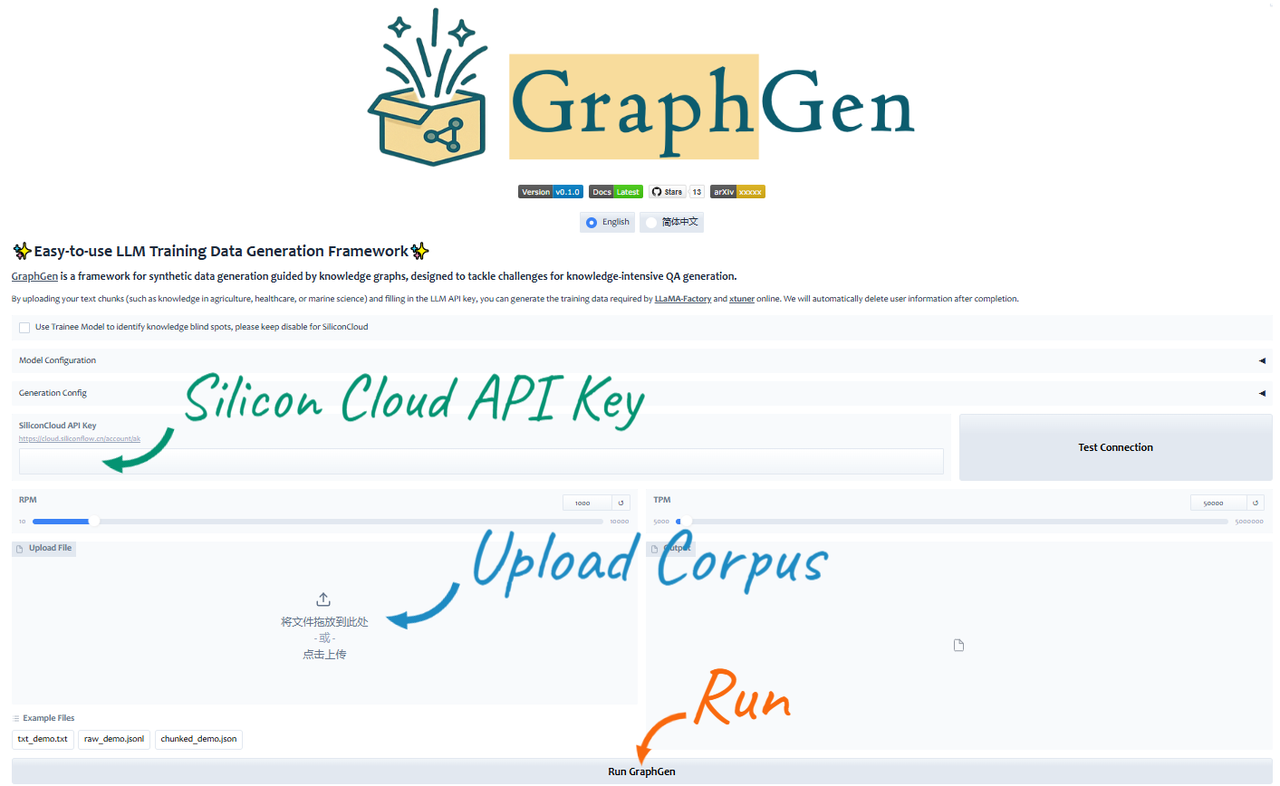
Run Gradio Demo
python -m webui.app
Run from PyPI
-
Install GraphGen
uv pip install graphg
-
Run in CLI
SYNTHESIZER_MODEL=your_synthesizer_model_name \
SYNTHESIZER_BASE_URL=your_base_url_for_synthesizer_model \
SYNTHESIZER_API_KEY=your_api_key_for_synthesizer_model \
TRAINEE_MODEL=your_trainee_model_name \
TRAINEE_BASE_URL=your_base_url_for_trainee_model \
TRAINEE_API_KEY=your_api_key_for_trainee_model \
graphg --output_dir cache
Run from Source
-
Configure the environment
- Create an
.envfile in the root directorycp .env.example .env
- Set the following environment variables:
# Synthesizer is the model used to construct KG and generate data
SYNTHESIZER_MODEL=your_synthesizer_model_name
SYNTHESIZER_BASE_URL=your_base_url_for_synthesizer_model
SYNTHESIZER_API_KEY=your_api_key_for_synthesizer_model
# Trainee is the model used to train with the generated data
TRAINEE_MODEL=your_trainee_model_name
TRAINEE_BASE_URL=your_base_url_for_trainee_model
TRAINEE_API_KEY=your_api_key_for_trainee_model
- Create an
-
(Optional) Customize generation parameters in
graphgen/configs/folder.Edit the corresponding YAML file, e.g.:
  # configs/cot_config.yaml
  input_file: resources/input_examples/jsonl_demo.jsonl
  output_data_type: cot
  tokenizer: cl100k_base
  # additional settings...
-
Generate data
Pick the desired format and run the matching script:
Format Script to run Notes cotbash scripts/generate/generate_cot.shChain-of-Thought Q&A pairs atomicbash scripts/generate/generate_atomic.shAtomic Q&A pairs covering basic knowledge aggregatedbash scripts/generate/generate_aggregated.shAggregated Q&A pairs incorporating complex, integrated knowledge multi-hopbash scripts/generate/generate_multihop.shMulti-hop reasoning Q&A pairs -
Get the generated data
ls cache/data/graphgen
Run with Docker
- Build the Docker image
docker build -t graphgen .
- Run the Docker container
docker run -p 7860:7860 graphgen
🏗️ System Architecture
See analysis by deepwiki for a technical overview of the GraphGen system, its architecture, and core functionalities.
Workflow

🍀 Acknowledgements
- SiliconFlow Abundant LLM API, some models are free
- LightRAG Simple and efficient graph retrieval solution
- ROGRAG A robustly optimized GraphRAG framework
- DB-GPT An AI native data app development framework
📚 Citation
If you find this repository useful, please consider citing our work:
@misc{chen2025graphgenenhancingsupervisedfinetuning,
      title={GraphGen: Enhancing Supervised Fine-Tuning for LLMs with Knowledge-Driven Synthetic Data Generation},
      author={Zihong Chen and Wanli Jiang and Jinzhe Li and Zhonghang Yuan and Huanjun Kong and Wanli Ouyang and Nanqing Dong},
      year={2025},
      eprint={2505.20416},
      archivePrefix={arXiv},
      primaryClass={cs.CL},
      url={https://arxiv.org/abs/2505.20416},
}
📜 License
This project is licensed under the Apache License 2.0.
📅 Star History
1 maintainer

Release files for graphg 0.1.0.post20250930
For a detailed explanation of source distributions (sdists) and built distributions (wheels), please see the package formats documentation.
Source distribution (sdist)
| File | Size | Uploaded | |
|---|---|---|---|
| graphg-0.1.0.post20250930.tar.gz | 89.7 kB | Details |
Built distribution (wheel)
| File | Interpreter | ABI | Platform | Reset |
|---|---|---|---|---|
| graphg-0.1.0.post20250930-py3-none-any.whl | Python 3 | none | any | Details |
Total release size: 217.1 kB
Release files / graphg-0.1.0.post20250930.tar.gz
| Download URL | graphg-0.1.0.post20250930.tar.gz |
|---|---|
| Size | 89.7 kB |
| Tags | Source |
|
SHA-256 checksum How to use checksums |
75278308edbfe1c984204a9505c990f68afe3a49536f744f0120c3370ea14111
|
|
BLAKE2b-256 checksum How to use checksums |
d2b833a1c9ec259006a438e656d1061a645211822899ed39574096e9301a5f4e
|
| Upload date | |
|
Uploaded using Trusted Publishing? What is trusted publishing? |
No |
| Uploaded via |
twine/6.1.0 CPython/3.13.7
|
Release files / graphg-0.1.0.post20250930-py3-none-any.whl
| Download URL | graphg-0.1.0.post20250930-py3-none-any.whl |
|---|---|
| Size | 127.3 kB |
| Tags | Python 3 |
|
SHA-256 checksum How to use checksums |
ef4a40b16fa0d1057c540c9b9d7a497717d92d9faa1dcde2343906ff4aea33fc
|
|
BLAKE2b-256 checksum How to use checksums |
b408f1c76e4101fc48ec8cacb54c4acc29e399af7d7c871cc2ddabe5dfd537ef
|
| Upload date | |
|
Uploaded using Trusted Publishing? What is trusted publishing? |
No |
| Uploaded via |
twine/6.1.0 CPython/3.13.7
|














