
GraphQLNomad
  ________                    .__     ________   .____     _______                             .___
 /  _____/___________  ______ |  |__  \_____  \  |    |    \      \   ____   _____ _____     __| _/
/   \  __\_  __ \__  \ \____ \|  |  \  /   / \  \|    |    /  |    \ /  _ \ /     \\__  \   / __ |
\    \_\  \  | \// __ \|  |_> >   Y  \/    \_/.  \    |___/   |     (  <_> )  Y Y  \/ __ \_/ /_/ |
 \______  /__|  (____  /   __/|___|  /\_____\ \_/_______  \____|__  /\____/|__|_|  (____  /\____ |
        \/           \/|__|        \/        \__>       \/       \/             \/     \/      \/
v1.0.0 - A comprehensive tool to discover, fingerprint, and explore GraphQL endpoints.





GraphQLNomad is a powerful all-in-one command-line tool designed for security researchers, penetration testers, bug bounty hunters, and developers.
It automates the entire GraphQL reconnaissance workflow - from discovering hidden endpoints to fingerprinting the underlying engine and exploring schemas through an intuitive interactive shell.
✨ Key Features
🔍 Discovery & Reconnaissance
- Automatic Endpoint Detection: Intelligently discovers GraphQL endpoints using a comprehensive built-in wordlist covering common paths like
/graphql,/api/graphql,/graphiql,/v1/graphql, and more - Custom Wordlist Support: Bring your own wordlist for targeted endpoint discovery
- Smart Verification: Validates discovered endpoints to ensure they're legitimate GraphQL interfaces
🔬 Engine Fingerprinting
- Technology Identification: Automatically identifies the underlying GraphQL engine and its technology stack
- Supported Engines:
- Apollo Server (Node.js, JavaScript)
- Graphene (Python, Django, Flask)
- Hot Chocolate (.NET, C#)
- Hasura (Go, Haskell)
- Behavioral Analysis: Uses multiple fingerprinting techniques including error signatures, headers, and response patterns
📊 Schema Introspection
- Multi-Method Introspection: Attempts multiple introspection query strategies to maximize success rate
- Complete Schema Extraction: Fetches queries, mutations, types, fields, and their descriptions
- Type System Analysis: Deep inspection of object types, interfaces, enums, and their relationships
💻 Interactive Shell
- Intuitive Commands: User-friendly command interface for schema exploration
- Query Builder: Interactive step-by-step query construction with field selection
- Live Execution: Execute queries and view responses directly in the terminal
- Type Navigation: Browse and explore type definitions and relationships
🚀 Automation & Integration
- Non-Interactive Mode: Perfect for CI/CD pipelines and automated security scanning
- CSV Export: Export reconnaissance results for reporting and analysis
- Flexible Authentication: Custom header support for authenticated endpoints
- Proxy Support: Route requests through HTTP/HTTPS proxies for testing
🛠️ Advanced Options
- Custom Headers: Add authentication tokens, API keys, or any custom headers
- Timeout Configuration: Control request timeouts for slow or rate-limited endpoints
- Redirect Control: Choose whether to follow HTTP redirects
- Colorized Output: Beautiful terminal output with syntax highlighting (powered by Colorama)
Demo
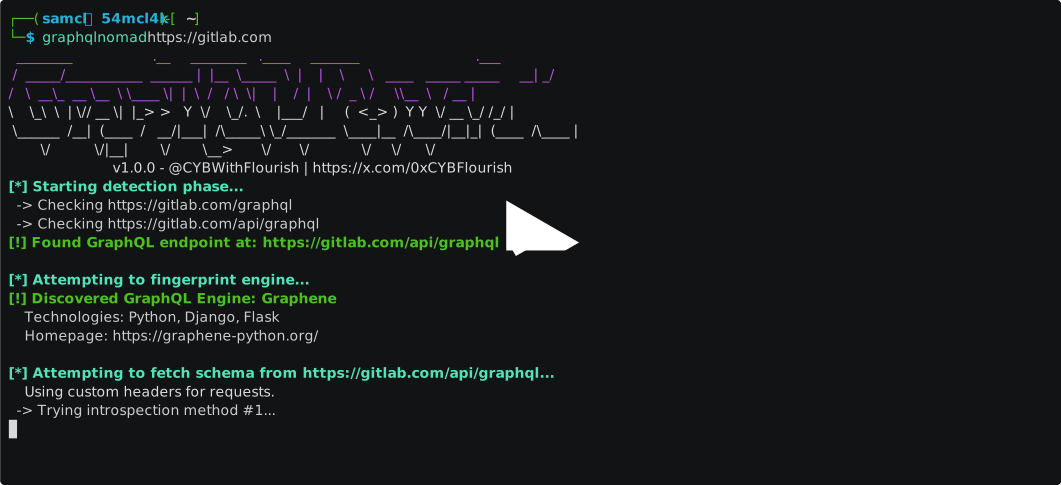
📦 Installation
GraphQLNomad can be installed in multiple ways to fit your workflow.
Prerequisites
- Python 3.6+ (Python 3.10+ recommended)
- pip (Python package manager)
Option 1: From PyPI with pipx (Recommended)
pipx installs Python applications in isolated environments, preventing dependency conflicts.
# Install pipx if you don't have it
python3 -m pip install --user pipx
python3 -m pipx ensurepath

# Install GraphQLNomad
pipx install graphqlnomad
Option 2: From PyPI with pip
For a traditional pip installation:
pip install graphqlnomad
Option 3: From NPM
For users in the JavaScript/Node.js ecosystem, an npm wrapper is available.
Note: This still requires Python and pipx to be installed, as it's a wrapper around the Python package.
npm install -g graphqlnomad
The npm package will automatically run pipx install graphqlnomad during the post-install phase.
Option 4: From Source
To get the latest development version or contribute to the project:
git clone https://github.com/CYBWithFlourish/GraphQLNomad.git
cd GraphQLNomad
pip install -e .
Verify Installation
After installation, verify that GraphQLNomad is working correctly:
graphqlnomad --version
# Output: GraphQLNomad v1.0.0

graphqlnomad --help
🎯 Quick Start
GraphQLNomad is designed to be simple yet powerful. At its most basic, just provide a URL to scan:
graphqlnomad https://example.com
This single command will:
- 🔍 Scan the target for GraphQL endpoints
- 🔬 Fingerprint the detected engine
- 📊 Introspect the schema
- 💻 Launch an interactive shell for exploration
📖 Usage
Basic Syntax
graphqlnomad <url> [options]
Command-line Options
Positional Arguments
| Argument | Description |
|---|---|
url |
The target base URL (e.g., https://api.example.com) or direct GraphQL endpoint URL (e.g., https://api.example.com/graphql) |
General Options
| Option | Description |
|---|---|
-h, --help |
Show help message and exit |
-v, --version |
Display version number and exit |
Reconnaissance Options
| Option | Description |
|---|---|
--no-detect |
Skip automatic endpoint detection. Use when you already know the exact endpoint URL |
--no-fingerprint |
Skip engine fingerprinting phase |
-w, --wordlist <file> |
Use a custom wordlist file for endpoint detection (one path per line) |
-l, --list-engines |
List all fingerprintable GraphQL engines and exit |
Connection Options
| Option | Description |
|---|---|
-H, --header <header> |
Add custom HTTP header. Format: 'Header-Name: Header-Value'. Can be used multiple times |
-p, --proxy <url> |
Route requests through HTTP/HTTPS proxy. Format: http://user:pass@host:port |
-T, --timeout <seconds> |
Request timeout in seconds (default: 15) |
--no-redirect |
Do not follow HTTP 3xx redirections |
Execution Options
| Option | Description |
|---|---|
--non-interactive |
Exit after reconnaissance completes. Useful for scripting and CI/CD |
-o, --output-file <file> |
Save reconnaissance results to CSV file |
💡 Usage Examples
Example 1: Basic Reconnaissance
Scan a domain to discover GraphQL endpoints automatically:
graphqlnomad https://api.example.com
What happens:
- Scans common paths like
/graphql,/api/graphql,/graphiql, etc. - Identifies the GraphQL engine (Apollo, Hasura, etc.)
- Fetches the schema
- Drops you into an interactive shell
Example 2: Direct Endpoint Access
If you already know the GraphQL endpoint:
graphqlnomad https://api.example.com/graphql --no-detect
Example 3: Authenticated Endpoints
Test endpoints that require authentication:
graphqlnomad https://api.example.com/graphql \
  -H "Authorization: Bearer YOUR_TOKEN_HERE" \
  -H "X-API-Key: your-api-key"
Example 4: Using a Proxy
Route requests through Burp Suite or other proxy for analysis:
graphqlnomad https://api.example.com/graphql \
  --proxy http://127.0.0.1:8080
Example 5: Non-Interactive Scanning
Perfect for automation, CI/CD pipelines, or bulk scanning:
graphqlnomad https://api.example.com/graphql \
  --non-interactive \
  -o results.csv
The CSV output includes:
- Target URL
- Detected endpoint
- Identified engine
- Timestamp
Example 6: Custom Wordlist
Use your own wordlist for endpoint discovery:
graphqlnomad https://api.example.com \
  --wordlist ./my-graphql-paths.txt
Example wordlist format:
/graphql
/api/v1/graphql
/api/v2/graphql
/query
/gql
Example 7: List Supported Engines
View all GraphQL engines that can be fingerprinted:
# Note: A URL is required but can be any placeholder when using --list-engines
graphqlnomad --list-engines https://example.com
Example 8: Complete Pentesting Workflow
# Step 1: Discover and export results
graphqlnomad https://target.com \
  -o recon.csv \
  --non-interactive

# Step 2: Interactive exploration with authentication
graphqlnomad https://target.com/graphql \
  --no-detect \
  -H "Authorization: Bearer TOKEN" \
  --proxy http://127.0.0.1:8080
🖥️ Interactive Shell
Once GraphQLNomad successfully introspects a schema, you'll be dropped into an interactive shell where you can explore and query the API.
Available Commands
| Command | Description | Example |
|---|---|---|
help |
Show available commands | help |
help <command> |
Show detailed help for a specific command | help run |
queries |
List all available top-level queries | queries |
mutations |
List all available mutations | mutations |
info <name> |
Display detailed information about a query, mutation, or type | info user |
run query <name> |
Interactively build and execute a query | run query users |
run mutation <name> |
Interactively build and execute a mutation | run mutation createUser |
exit or quit |
Exit the interactive shell | exit |
Interactive Shell Workflow
Here's a typical session:
GraphQLNomad> queries
--- Available Queries ---
Name          Description
----------------------------------
user          Get user by ID
users         List all users
posts         Get all posts
comments      Get comments

GraphQLNomad> info user
--- Details for 'user' ---
{
  "name": "user",
  "description": "Get user by ID",
  "args": [
    {
      "name": "id",
      "type": { "name": "ID", "kind": "SCALAR" }
    }
  ],
  "type": { "name": "User", "kind": "OBJECT" }
}

GraphQLNomad> run query user

Enter arguments for 'user':
(Press Enter to skip optional args)
  id (ID)*: 123

Select fields for type 'User':
  1: id (ID)
  2: name (String)
  3: email (String)
  4: posts (PostConnection)

Enter field numbers (e.g., 1 3 4), or '*' for all: 1 2 3

--- Executing Query ---
query {
  user(id: 123) {
    id
    name
    email
  }
}

--- Response ---
{
  "data": {
    "user": {
      "id": "123",
      "name": "John Doe",
      "email": "john@example.com"
    }
  }
}

GraphQLNomad> exit
Building Complex Queries
The interactive query builder supports:
- Field Selection: Choose specific fields to include
- Nested Objects: Automatically prompts for sub-fields of object types
- Arguments: Input arguments with type validation
- Enums: Shows available enum values for selection
- Wildcards: Use
*to select all fields at once
Example of nested query building:
GraphQLNomad> run query user
  id (ID)*: 123

Select fields for type 'User':
  1: id (ID)
  2: name (String)
  3: posts (PostConnection)

Enter field numbers: 1 2 3

Select fields for type 'PostConnection':
  1: edges (PostEdge)
  2: pageInfo (PageInfo)

Enter field numbers: 1

Select fields for type 'PostEdge':
  1: node (Post)

Enter field numbers: 1

Select fields for type 'Post':
  1: id (ID)
  2: title (String)
  3: content (String)

Enter field numbers: 1 2
🐛 Troubleshooting
Common Issues
Issue: "Could not find GraphQL endpoint automatically"
Cause: The target doesn't use common GraphQL paths, or the endpoint is protected.
Solutions:
- Use
--wordlistwith a custom wordlist - Directly specify the endpoint:
graphqlnomad https://api.example.com/custom-path --no-detect - Check if the endpoint requires authentication headers
Issue: "All introspection methods failed"
Cause: Introspection is disabled on the endpoint (security hardening).
Solutions:
- This is a security feature on the target
- GraphQLNomad cannot bypass disabled introspection
- Consider manual testing or contacting the API provider
Issue: "Module not found" or "Command not found"
Cause: Installation issue or PATH not configured.
Solutions:
# Verify installation
pip show graphqlnomad

# Reinstall
pip uninstall graphqlnomad
pipx install graphqlnomad

# Ensure pipx bin directory is in PATH
pipx ensurepath
Issue: "Connection timeout" or "No response"
Cause: Network issues, slow endpoint, or rate limiting.
Solutions:
# Increase timeout
graphqlnomad https://api.example.com --timeout 30

# Check proxy settings if using one
graphqlnomad https://api.example.com --proxy http://127.0.0.1:8080
Issue: npm installation fails
Cause: Python/pipx not installed or not in PATH.
Solutions:
# Install Python first
python3 --version

# Install pipx
python3 -m pip install --user pipx
python3 -m pipx ensurepath

# Then install via npm
npm install -g graphqlnomad
🔒 Security Considerations
Responsible Usage
- Authorization: Always ensure you have permission to test the target GraphQL endpoint
- Rate Limiting: Be mindful of rate limits and use
--timeoutappropriately - Legal Compliance: Only use GraphQLNomad on systems you own or have explicit permission to test
Best Practices
- Use
--proxyto route through Burp Suite or similar tools for request logging - Save results with
-ofor documentation and reporting - Combine with other tools in your security testing toolkit
- Review the target's bug bounty program rules before testing
🤝 Contributing
Contributions, issues, and feature requests are welcome! Feel free to check the issues page.
How to Contribute
- Fork the repository
- Create your Feature Branch:
git checkout -b feature/AmazingFeature - Commit your changes:
git commit -m 'feat: Add some AmazingFeature' - Run tests: Ensure
flake8passes critical checks - Push to the branch:
git push origin feature/AmazingFeature - Open a Pull Request
Development Setup
See SETUP.md for detailed development instructions.
Code Quality
# Install development dependencies
pip install flake8

# Run critical error checks (must pass)
flake8 . --count --select=E9,F63,F7,F82 --show-source --statistics

# Run full linting
flake8 . --count --exit-zero --max-complexity=10 --max-line-length=127 --statistics
📊 Use Cases
For Security Researchers & Penetration Testers
- Reconnaissance: Quickly map GraphQL attack surface during engagements
- Vulnerability Assessment: Identify exposed queries and mutations
- Engine Fingerprinting: Determine technology stack for targeted testing
- Schema Analysis: Find sensitive fields and data exposure points
For Bug Bounty Hunters
- Fast Discovery: Automate GraphQL endpoint discovery across targets
- Detailed Reports: Export findings to CSV for documentation
- Proxy Integration: Route through Burp Suite for detailed analysis
- Interactive Testing: Build and test queries on-the-fly
For Developers
- API Exploration: Understand GraphQL APIs without reading documentation
- Testing: Verify introspection queries and schema structure
- Debugging: Test endpoints with custom headers and authentication
- Documentation: Generate lists of available queries and mutations
For DevOps & CI/CD
- Automated Scanning: Integrate into security pipelines with
--non-interactive - Endpoint Validation: Verify GraphQL deployments are accessible
- CSV Reports: Generate machine-readable output for further processing
🌟 Features in Detail
Endpoint Detection
GraphQLNomad tries common GraphQL paths in this order:
/graphql/api/graphql/graphiql/graphql/console/v1/graphql/v2/graphql/graphql/api/api
Each path is validated by sending a simple {__typename} query to confirm it's a valid GraphQL endpoint.
Engine Fingerprinting
Fingerprinting uses multiple detection techniques:
- HTTP Headers: Checking for engine-specific headers (e.g.,
x-apollo-tracing) - Error Signatures: Analyzing error messages and formats
- Error Codes: Examining structured error codes in responses
Supported engines:
- Apollo Server: Node.js/JavaScript GraphQL server
- Graphene: Python GraphQL framework (Django/Flask)
- Hot Chocolate: .NET/C# GraphQL server
- Hasura: Go/Haskell GraphQL engine
Schema Introspection
GraphQLNomad attempts multiple introspection strategies:
- Full introspection query (complete schema with all metadata)
- Simplified introspection (types and fields only)
- Minimal introspection (type names only)
- Basic schema query
This multi-tiered approach maximizes success even with partially restricted endpoints.
📝 License
This project is licensed under the Apache 2.0 License. See the LICENSE file for more details.
🙏 Acknowledgments
- Requests - HTTP library for Python
- Colorama - Cross-platform colored terminal output
- The open-source security community for inspiration and feedback
- All contributors who have helped improve GraphQLNomad
📚 Additional Resources
- Documentation: See SETUP.md for development setup
- Issues: Report bugs or request features on GitHub Issues
- PyPI: https://pypi.org/project/graphqlnomad/
- npm: https://www.npmjs.com/package/graphqlnomad
💬 Support
If you find GraphQLNomad useful, please consider:
- ⭐ Starring the repository
- 🐛 Reporting bugs and issues
- 💡 Suggesting new features
- 🤝 Contributing code improvements
- 📢 Sharing with the security community
Built with ❤️ by @CYBWithFlourish
Happy GraphQL Hunting! 🚀
1 maintainer

Metadata
1 maintainer
Release files for graphqlnomad 1.0.1
For a detailed explanation of source distributions (sdists) and built distributions (wheels), please see the package formats documentation.
Source distribution (sdist)
| File | Size | Uploaded | |
|---|---|---|---|
| graphqlnomad-1.0.1.tar.gz | 26.9 kB | Details |
Built distribution (wheel)
| File | Interpreter | ABI | Platform | Reset |
|---|---|---|---|---|
| graphqlnomad-1.0.1-py3-none-any.whl | Python 3 | none | any | Details |
Total release size: 48.1 kB
Release files / graphqlnomad-1.0.1.tar.gz
| Download URL | graphqlnomad-1.0.1.tar.gz |
|---|---|
| Size | 26.9 kB |
| Tags | Source |
|
SHA-256 checksum How to use checksums |
829067f989d2f58fac8afb776983244d3f0824c43bb3bb6dcdbd54e152626433
|
|
BLAKE2b-256 checksum How to use checksums |
b069124d5b3c21c01b937738922da78dddb77700968f517545e3a3f397636ced
|
| Upload date | |
|
Uploaded using Trusted Publishing? What is trusted publishing? |
No |
| Uploaded via |
twine/6.2.0 CPython/3.13.7
|
Release files / graphqlnomad-1.0.1-py3-none-any.whl
| Download URL | graphqlnomad-1.0.1-py3-none-any.whl |
|---|---|
| Size | 21.2 kB |
| Tags | Python 3 |
|
SHA-256 checksum How to use checksums |
d6071b05bc28676e36fb68565b93e2850c9fbd71a61a848fa89287272b1d812d
|
|
BLAKE2b-256 checksum How to use checksums |
70037db959c55943b3757ac3c68156548b81c03fa551a40e54796147ba466370
|
| Upload date | |
|
Uploaded using Trusted Publishing? What is trusted publishing? |
No |
| Uploaded via |
twine/6.2.0 CPython/3.13.7
|














