
An integrated tool to detect, fingerprint, and explore GraphQL endpoints.

Project description
GraphQLNomad
  ________                    .__     ________   .____     _______                             .___
 /  _____/___________  ______ |  |__  \_____  \  |    |    \      \   ____   _____ _____     __| _/
/   \  __\_  __ \__  \ \____ \|  |  \  /   / \  \|    |    /  |    \ /  _ \ /     \\__  \   / __ |
\    \_\  \  | \// __ \|  |_> >   Y  \/    \_/.  \    |___/   |     (  <_> )  Y Y  \/ __ \_/ /_/ |
 \______  /__|  (____  /   __/|___|  /\_____\ \_/_______  \____|__  /\____/|__|_|  (____  /\____ |
        \/           \/|__|        \/        \__>       \/       \/             \/     \/      \/
v1.0.0 - A comprehensive tool to discover, fingerprint, and explore GraphQL endpoints.





GraphQLNomad is a powerful all-in-one command-line tool designed for security researchers, penetration testers, bug bounty hunters, and developers.
It automates the entire GraphQL reconnaissance workflow - from discovering hidden endpoints to fingerprinting the underlying engine and exploring schemas through an intuitive interactive shell.
✨ Key Features
🔍 Discovery & Reconnaissance
- Automatic Endpoint Detection: Intelligently discovers GraphQL endpoints using a comprehensive built-in wordlist covering common paths like
/graphql,/api/graphql,/graphiql,/v1/graphql, and more - Custom Wordlist Support: Bring your own wordlist for targeted endpoint discovery
- Smart Verification: Validates discovered endpoints to ensure they're legitimate GraphQL interfaces
🔬 Engine Fingerprinting
- Technology Identification: Automatically identifies the underlying GraphQL engine and its technology stack
- Supported Engines:
- Apollo Server (Node.js, JavaScript)
- Graphene (Python, Django, Flask)
- Hot Chocolate (.NET, C#)
- Hasura (Go, Haskell)
- Behavioral Analysis: Uses multiple fingerprinting techniques including error signatures, headers, and response patterns
📊 Schema Introspection
- Multi-Method Introspection: Attempts multiple introspection query strategies to maximize success rate
- Complete Schema Extraction: Fetches queries, mutations, types, fields, and their descriptions
- Type System Analysis: Deep inspection of object types, interfaces, enums, and their relationships
💻 Interactive Shell
- Intuitive Commands: User-friendly command interface for schema exploration
- Query Builder: Interactive step-by-step query construction with field selection
- Live Execution: Execute queries and view responses directly in the terminal
- Type Navigation: Browse and explore type definitions and relationships
🚀 Automation & Integration
- Non-Interactive Mode: Perfect for CI/CD pipelines and automated security scanning
- CSV Export: Export reconnaissance results for reporting and analysis
- Flexible Authentication: Custom header support for authenticated endpoints
- Proxy Support: Route requests through HTTP/HTTPS proxies for testing
🛠️ Advanced Options
- Custom Headers: Add authentication tokens, API keys, or any custom headers
- Timeout Configuration: Control request timeouts for slow or rate-limited endpoints
- Redirect Control: Choose whether to follow HTTP redirects
- Colorized Output: Beautiful terminal output with syntax highlighting (powered by Colorama)
Demo
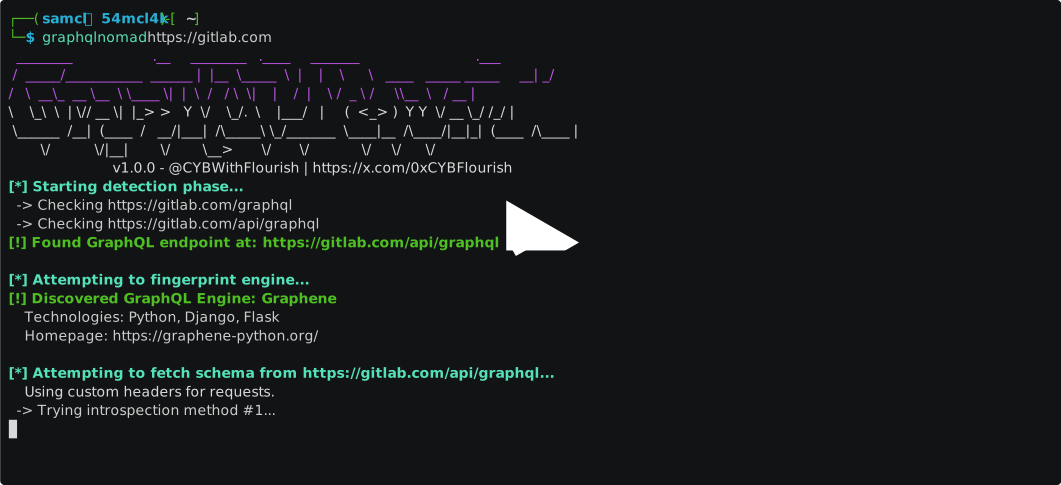
📦 Installation
GraphQLNomad can be installed in multiple ways to fit your workflow.
Prerequisites
- Python 3.6+ (Python 3.10+ recommended)
- pip (Python package manager)
Option 1: From PyPI with pipx (Recommended)
pipx installs Python applications in isolated environments, preventing dependency conflicts.
# Install pipx if you don't have it
python3 -m pip install --user pipx
python3 -m pipx ensurepath

# Install GraphQLNomad
pipx install graphqlnomad
Option 2: From PyPI with pip
For a traditional pip installation:
pip install graphqlnomad
Option 3: From NPM
For users in the JavaScript/Node.js ecosystem, an npm wrapper is available.
Note: This still requires Python and pipx to be installed, as it's a wrapper around the Python package.
npm install -g graphqlnomad
The npm package will automatically run pipx install graphqlnomad during the post-install phase.
Option 4: From Source
To get the latest development version or contribute to the project:
git clone https://github.com/CYBWithFlourish/GraphQLNomad.git
cd GraphQLNomad
pip install -e .
Verify Installation
After installation, verify that GraphQLNomad is working correctly:
graphqlnomad --version
# Output: GraphQLNomad v1.0.0

graphqlnomad --help
🎯 Quick Start
GraphQLNomad is designed to be simple yet powerful. At its most basic, just provide a URL to scan:
graphqlnomad https://example.com
This single command will:
- 🔍 Scan the target for GraphQL endpoints
- 🔬 Fingerprint the detected engine
- 📊 Introspect the schema
- 💻 Launch an interactive shell for exploration
📖 Usage
Basic Syntax
graphqlnomad <url> [options]
Command-line Options
Positional Arguments
| Argument | Description |
|---|---|
url |
The target base URL (e.g., https://api.example.com) or direct GraphQL endpoint URL (e.g., https://api.example.com/graphql) |
General Options
| Option | Description |
|---|---|
-h, --help |
Show help message and exit |
-v, --version |
Display version number and exit |
Reconnaissance Options
| Option | Description |
|---|---|
--no-detect |
Skip automatic endpoint detection. Use when you already know the exact endpoint URL |
--no-fingerprint |
Skip engine fingerprinting phase |
-w, --wordlist <file> |
Use a custom wordlist file for endpoint detection (one path per line) |
-l, --list-engines |
List all fingerprintable GraphQL engines and exit |
Connection Options
| Option | Description |
|---|---|
-H, --header <header> |
Add custom HTTP header. Format: 'Header-Name: Header-Value'. Can be used multiple times |
-p, --proxy <url> |
Route requests through HTTP/HTTPS proxy. Format: http://user:pass@host:port |
-T, --timeout <seconds> |
Request timeout in seconds (default: 15) |
--no-redirect |
Do not follow HTTP 3xx redirections |
Execution Options
| Option | Description |
|---|---|
--non-interactive |
Exit after reconnaissance completes. Useful for scripting and CI/CD |
-o, --output-file <file> |
Save reconnaissance results to CSV file |
💡 Usage Examples
Example 1: Basic Reconnaissance
Scan a domain to discover GraphQL endpoints automatically:
graphqlnomad https://api.example.com
What happens:
- Scans common paths like
/graphql,/api/graphql,/graphiql, etc. - Identifies the GraphQL engine (Apollo, Hasura, etc.)
- Fetches the schema
- Drops you into an interactive shell
Example 2: Direct Endpoint Access
If you already know the GraphQL endpoint:
graphqlnomad https://api.example.com/graphql --no-detect
Example 3: Authenticated Endpoints
Test endpoints that require authentication:
graphqlnomad https://api.example.com/graphql \
  -H "Authorization: Bearer YOUR_TOKEN_HERE" \
  -H "X-API-Key: your-api-key"
Example 4: Using a Proxy
Route requests through Burp Suite or other proxy for analysis:
graphqlnomad https://api.example.com/graphql \
  --proxy http://127.0.0.1:8080
Example 5: Non-Interactive Scanning
Perfect for automation, CI/CD pipelines, or bulk scanning:
graphqlnomad https://api.example.com/graphql \
  --non-interactive \
  -o results.csv
The CSV output includes:
- Target URL
- Detected endpoint
- Identified engine
- Timestamp
Example 6: Custom Wordlist
Use your own wordlist for endpoint discovery:
graphqlnomad https://api.example.com \
  --wordlist ./my-graphql-paths.txt
Example wordlist format:
/graphql
/api/v1/graphql
/api/v2/graphql
/query
/gql
Example 7: List Supported Engines
View all GraphQL engines that can be fingerprinted:
# Note: A URL is required but can be any placeholder when using --list-engines
graphqlnomad --list-engines https://example.com
Example 8: Complete Pentesting Workflow
# Step 1: Discover and export results
graphqlnomad https://target.com \
  -o recon.csv \
  --non-interactive

# Step 2: Interactive exploration with authentication
graphqlnomad https://target.com/graphql \
  --no-detect \
  -H "Authorization: Bearer TOKEN" \
  --proxy http://127.0.0.1:8080
🖥️ Interactive Shell
Once GraphQLNomad successfully introspects a schema, you'll be dropped into an interactive shell where you can explore and query the API.
Available Commands
| Command | Description | Example |
|---|---|---|
help |
Show available commands | help |
help <command> |
Show detailed help for a specific command | help run |
queries |
List all available top-level queries | queries |
mutations |
List all available mutations | mutations |
info <name> |
Display detailed information about a query, mutation, or type | info user |
run query <name> |
Interactively build and execute a query | run query users |
run mutation <name> |
Interactively build and execute a mutation | run mutation createUser |
exit or quit |
Exit the interactive shell | exit |
Interactive Shell Workflow
Here's a typical session:
GraphQLNomad> queries
--- Available Queries ---
Name          Description
----------------------------------
user          Get user by ID
users         List all users
posts         Get all posts
comments      Get comments

GraphQLNomad> info user
--- Details for 'user' ---
{
  "name": "user",
  "description": "Get user by ID",
  "args": [
    {
      "name": "id",
      "type": { "name": "ID", "kind": "SCALAR" }
    }
  ],
  "type": { "name": "User", "kind": "OBJECT" }
}

GraphQLNomad> run query user

Enter arguments for 'user':
(Press Enter to skip optional args)
  id (ID)*: 123

Select fields for type 'User':
  1: id (ID)
  2: name (String)
  3: email (String)
  4: posts (PostConnection)

Enter field numbers (e.g., 1 3 4), or '*' for all: 1 2 3

--- Executing Query ---
query {
  user(id: 123) {
    id
    name
    email
  }
}

--- Response ---
{
  "data": {
    "user": {
      "id": "123",
      "name": "John Doe",
      "email": "john@example.com"
    }
  }
}

GraphQLNomad> exit
Building Complex Queries
The interactive query builder supports:
- Field Selection: Choose specific fields to include
- Nested Objects: Automatically prompts for sub-fields of object types
- Arguments: Input arguments with type validation
- Enums: Shows available enum values for selection
- Wildcards: Use
*to select all fields at once
Example of nested query building:
GraphQLNomad> run query user
  id (ID)*: 123

Select fields for type 'User':
  1: id (ID)
  2: name (String)
  3: posts (PostConnection)

Enter field numbers: 1 2 3

Select fields for type 'PostConnection':
  1: edges (PostEdge)
  2: pageInfo (PageInfo)

Enter field numbers: 1

Select fields for type 'PostEdge':
  1: node (Post)

Enter field numbers: 1

Select fields for type 'Post':
  1: id (ID)
  2: title (String)
  3: content (String)

Enter field numbers: 1 2
🐛 Troubleshooting
Common Issues
Issue: "Could not find GraphQL endpoint automatically"
Cause: The target doesn't use common GraphQL paths, or the endpoint is protected.
Solutions:
- Use
--wordlistwith a custom wordlist - Directly specify the endpoint:
graphqlnomad https://api.example.com/custom-path --no-detect - Check if the endpoint requires authentication headers
Issue: "All introspection methods failed"
Cause: Introspection is disabled on the endpoint (security hardening).
Solutions:
- This is a security feature on the target
- GraphQLNomad cannot bypass disabled introspection
- Consider manual testing or contacting the API provider
Issue: "Module not found" or "Command not found"
Cause: Installation issue or PATH not configured.
Solutions:
# Verify installation
pip show graphqlnomad

# Reinstall
pip uninstall graphqlnomad
pipx install graphqlnomad

# Ensure pipx bin directory is in PATH
pipx ensurepath
Issue: "Connection timeout" or "No response"
Cause: Network issues, slow endpoint, or rate limiting.
Solutions:
# Increase timeout
graphqlnomad https://api.example.com --timeout 30

# Check proxy settings if using one
graphqlnomad https://api.example.com --proxy http://127.0.0.1:8080
Issue: npm installation fails
Cause: Python/pipx not installed or not in PATH.
Solutions:
# Install Python first
python3 --version

# Install pipx
python3 -m pip install --user pipx
python3 -m pipx ensurepath

# Then install via npm
npm install -g graphqlnomad
🔒 Security Considerations
Responsible Usage
- Authorization: Always ensure you have permission to test the target GraphQL endpoint
- Rate Limiting: Be mindful of rate limits and use
--timeoutappropriately - Legal Compliance: Only use GraphQLNomad on systems you own or have explicit permission to test
Best Practices
- Use
--proxyto route through Burp Suite or similar tools for request logging - Save results with
-ofor documentation and reporting - Combine with other tools in your security testing toolkit
- Review the target's bug bounty program rules before testing
🤝 Contributing
Contributions, issues, and feature requests are welcome! Feel free to check the issues page.
How to Contribute
- Fork the repository
- Create your Feature Branch:
git checkout -b feature/AmazingFeature - Commit your changes:
git commit -m 'feat: Add some AmazingFeature' - Run tests: Ensure
flake8passes critical checks - Push to the branch:
git push origin feature/AmazingFeature - Open a Pull Request
Development Setup
See SETUP.md for detailed development instructions.
Code Quality
# Install development dependencies
pip install flake8

# Run critical error checks (must pass)
flake8 . --count --select=E9,F63,F7,F82 --show-source --statistics

# Run full linting
flake8 . --count --exit-zero --max-complexity=10 --max-line-length=127 --statistics
📊 Use Cases
For Security Researchers & Penetration Testers
- Reconnaissance: Quickly map GraphQL attack surface during engagements
- Vulnerability Assessment: Identify exposed queries and mutations
- Engine Fingerprinting: Determine technology stack for targeted testing
- Schema Analysis: Find sensitive fields and data exposure points
For Bug Bounty Hunters
- Fast Discovery: Automate GraphQL endpoint discovery across targets
- Detailed Reports: Export findings to CSV for documentation
- Proxy Integration: Route through Burp Suite for detailed analysis
- Interactive Testing: Build and test queries on-the-fly
For Developers
- API Exploration: Understand GraphQL APIs without reading documentation
- Testing: Verify introspection queries and schema structure
- Debugging: Test endpoints with custom headers and authentication
- Documentation: Generate lists of available queries and mutations
For DevOps & CI/CD
- Automated Scanning: Integrate into security pipelines with
--non-interactive - Endpoint Validation: Verify GraphQL deployments are accessible
- CSV Reports: Generate machine-readable output for further processing
🌟 Features in Detail
Endpoint Detection
GraphQLNomad tries common GraphQL paths in this order:
/graphql/api/graphql/graphiql/graphql/console/v1/graphql/v2/graphql/graphql/api/api
Each path is validated by sending a simple {__typename} query to confirm it's a valid GraphQL endpoint.
Engine Fingerprinting
Fingerprinting uses multiple detection techniques:
- HTTP Headers: Checking for engine-specific headers (e.g.,
x-apollo-tracing) - Error Signatures: Analyzing error messages and formats
- Error Codes: Examining structured error codes in responses
Supported engines:
- Apollo Server: Node.js/JavaScript GraphQL server
- Graphene: Python GraphQL framework (Django/Flask)
- Hot Chocolate: .NET/C# GraphQL server
- Hasura: Go/Haskell GraphQL engine
Schema Introspection
GraphQLNomad attempts multiple introspection strategies:
- Full introspection query (complete schema with all metadata)
- Simplified introspection (types and fields only)
- Minimal introspection (type names only)
- Basic schema query
This multi-tiered approach maximizes success even with partially restricted endpoints.
📝 License
This project is licensed under the Apache 2.0 License. See the LICENSE file for more details.
🙏 Acknowledgments
- Requests - HTTP library for Python
- Colorama - Cross-platform colored terminal output
- The open-source security community for inspiration and feedback
- All contributors who have helped improve GraphQLNomad
📚 Additional Resources
- Documentation: See SETUP.md for development setup
- Issues: Report bugs or request features on GitHub Issues
- PyPI: https://pypi.org/project/graphqlnomad/
- npm: https://www.npmjs.com/package/graphqlnomad
💬 Support
If you find GraphQLNomad useful, please consider:
- ⭐ Starring the repository
- 🐛 Reporting bugs and issues
- 💡 Suggesting new features
- 🤝 Contributing code improvements
- 📢 Sharing with the security community
Built with ❤️ by @CYBWithFlourish
Happy GraphQL Hunting! 🚀
Release history Release notifications | RSS feed


Download files
Download the file for your platform. If you're not sure which to choose, learn more about installing packages.
Source Distribution
Built Distribution
Filter files by name, interpreter, ABI, and platform.
If you're not sure about the file name format, learn more about wheel file names.
Copy a direct link to the current filters
File details
Details for the file graphqlnomad-1.0.1.tar.gz.
File metadata
- Download URL: graphqlnomad-1.0.1.tar.gz
- Upload date:
- Size: 26.9 kB
- Tags: Source
- Uploaded using Trusted Publishing? No
- Uploaded via: twine/6.2.0 CPython/3.13.7
File hashes
| Algorithm | Hash digest | |
|---|---|---|
| SHA256 |
829067f989d2f58fac8afb776983244d3f0824c43bb3bb6dcdbd54e152626433
|
|
| MD5 |
ee9334eb6feeeb317f4f20e8460e01f6
|
|
| BLAKE2b-256 |
b069124d5b3c21c01b937738922da78dddb77700968f517545e3a3f397636ced
|
File details
Details for the file graphqlnomad-1.0.1-py3-none-any.whl.
File metadata
- Download URL: graphqlnomad-1.0.1-py3-none-any.whl
- Upload date:
- Size: 21.2 kB
- Tags: Python 3
- Uploaded using Trusted Publishing? No
- Uploaded via: twine/6.2.0 CPython/3.13.7
File hashes
| Algorithm | Hash digest | |
|---|---|---|
| SHA256 |
d6071b05bc28676e36fb68565b93e2850c9fbd71a61a848fa89287272b1d812d
|
|
| MD5 |
d55573c0c5f764b3a3db5b04ea80fbca
|
|
| BLAKE2b-256 |
70037db959c55943b3757ac3c68156548b81c03fa551a40e54796147ba466370
|






