
graphsight-langgraph


See which retrieved documents your agent actually used — and which it ignored.
Retrieval in an agent is a black box: twelve documents go in, an answer comes out, and when the answer is wrong you're left guessing which context misled it. The nine documents the model ignored still cost you tokens, latency, and a wider surface to go wrong on — and nothing tells you which nine.
This package opens the box. One callback handler records a LangGraph run — every node, every retriever call, per-document scores, and (for graph-aware retrievers) the relational paths between retrieved entities — and one command renders it as an interactive graph in your browser.
your LangGraph agent ──▶ LangGraphTracer ──▶ AgentTrace (v0.2) ──▶ graphsight viewer
                          (callbacks)         neutral JSON          interactive graph
Only dependency: langchain-core. No engine, no backend, no account —
nothing leaves your machine.
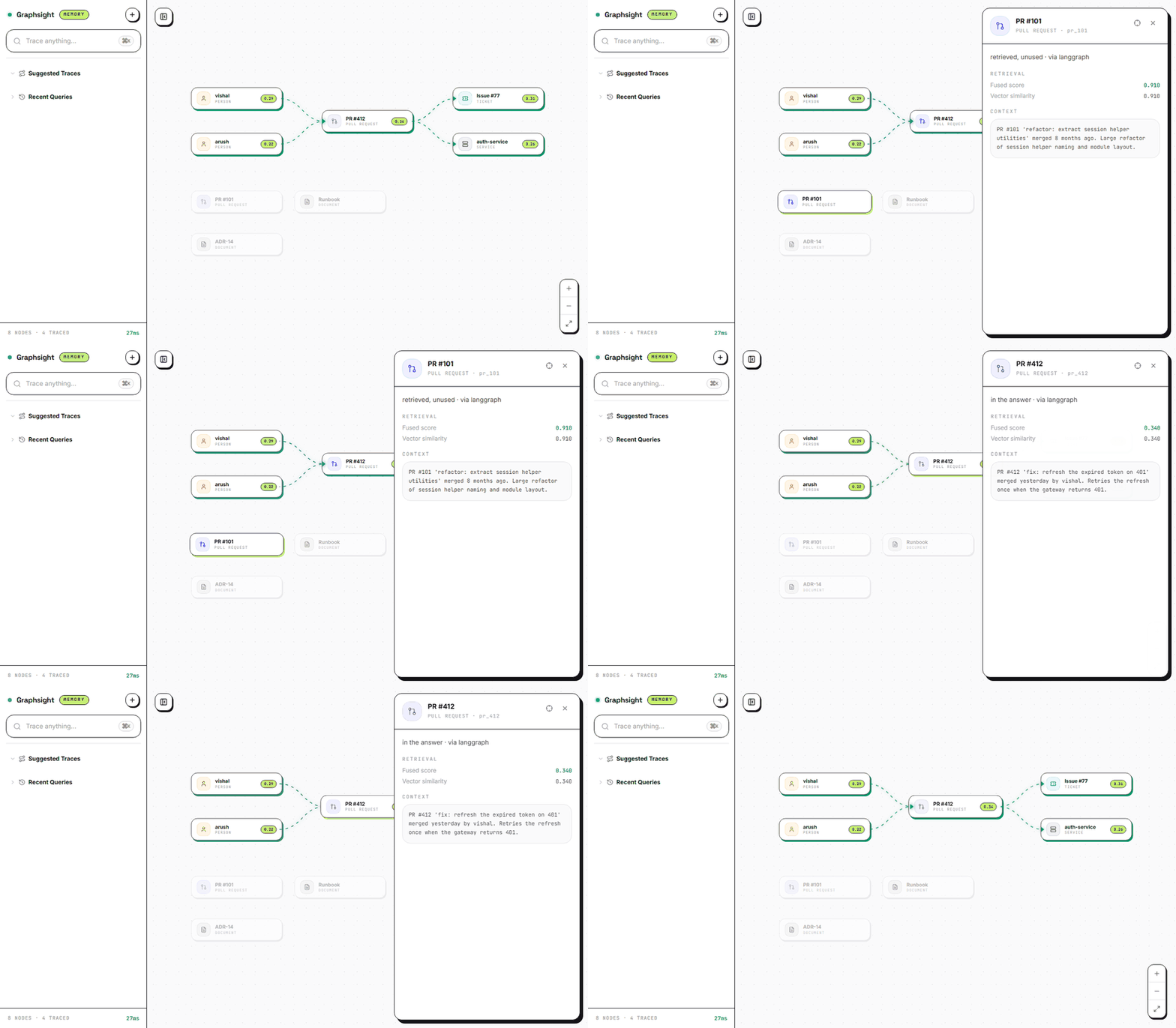
A real run. PR #101 scored 0.910 — the highest of anything retrieved — and the answer
never used it. PR #412 scored 0.340 and is the one that answered.
Installation
pip install graphsight-langgraph            # the tracer
pip install "graphsight-langgraph[example]" # + langgraph, for the GitHub CLI
pip install graphsight                      # the local viewer (recommended)
Compatibility
| Python | ≥ 3.10 |
langchain-core |
≥ 0.3 (verified against 1.5.0) |
langgraph |
any recent version; only needed for the [example] extra |
Sync (invoke / stream) |
verified, covered by the test suite |
Async (ainvoke / astream) |
verified, covered by the test suite |
Quickstart: trace a GitHub repo in 60 seconds
No setup, no API keys — public repositories don't need a token:
graphsight-github-trace langchain-ai/langgraph "who fixed the recent streaming bugs?"
graphsight graphsight_out/trace_state.json
Your browser opens on a live graph of that repository's recent activity: the PRs that matched the question, the people who authored them, the issues they resolve — every node clickable, scores shown, execution timeline included.
graphsight-github-trace reference
graphsight-github-trace REPO [QUESTION] [options]
| Argument | Default | Description |
|---|---|---|
REPO |
— | owner/name, e.g. langchain-ai/langgraph. |
QUESTION |
"What changed recently in <repo>, and who drove it?" | The question the traced retrieval answers. |
--token |
$GITHUB_TOKEN |
GitHub token. Required for private repositories; raises the rate limit on public ones. |
--prs |
25 |
Recent pull requests to fetch. |
--issues |
25 |
Recent issues to fetch. |
--commits |
25 |
Recent commits to fetch — solo repos with no PRs/issues still produce a full graph. |
--top |
10 |
Items the retrieval keeps. |
--out |
graphsight_out/ |
Output directory for agent_trace.json and trace_state.json. |
Method note: the CLI builds a corpus with relational edges
(person AUTHORED pr/commit, pr RESOLVES issue, pr TOUCHES repo) and
ranks by lexical overlap with 1-hop graph expansion — deliberately
simple, and reported as such. The scores you see are exactly the scores
computed; nothing is presented as semantic similarity.
Ask it who / what / when questions ("who touched auth recently?", "which issue needed two attempts?") — that's what commit and PR history can answer. How-does-it-work questions need semantic retrieval over code and docs, which this deliberately simple demo does not pretend to do.
Tracing your own agent
The complete integration:
from graphsight_langgraph import LangGraphTracer, capture

tracer = LangGraphTracer()
result = graph.invoke(inputs, config={"callbacks": [tracer]})

capture(tracer, query="why is checkout failing?", answer=result["answer"])
# -> .graphsight/20260725T071558_why-is-checkout-failing.json
capture() finishes the trace and appends it to a local history directory
(./.graphsight/ by default, $GRAPHSIGHT_DIR to override) — browse every
run with graphsight .graphsight/. For manual control use
tracer.finish() + to_tracestate() / save_trace(); trace.to_dict()
gives the framework-neutral AgentTrace for your own tooling.
Retrieved vs. used
When you pass answer=, each retrieved item gets an answer_overlap
score — the lexical overlap between the item's content and the final
answer. In the viewer, items that surfaced in the answer render
highlighted; items retrieved but unused render dimmed with the label
"retrieved, unused." That splits the two classic retrieval failures at a
glance:
- right doc retrieved, ignored by the model → dimmed node with a high retrieval score
- wrong doc trusted → highlighted node that shouldn't be
The overlap is a lexical heuristic (labeled as such, threshold 0.2) — it is
never presented as a model-computed relevance judgment. No answer= → no
usage claims; everything renders plain.
Configuration propagation (read this once)
LangChain only propagates callbacks into runnables that receive the run's config. Inside a LangGraph node, pass the node's config through to sub-runnables, or the tracer will record the node but not what happened inside it:
def retrieve(state, config):                               # 1. accept config
    docs = retriever.invoke(state["q"], config=config)     # 2. pass it through
    return {"docs": docs}
Symptom if you skip this: the trace shows node spans but zero retrievals.
API reference
| Name | Description |
|---|---|
LangGraphTracer() |
BaseCallbackHandler subclass. Pass via config={"callbacks": [tracer]} to invoke / stream. Reusable within a single run; create a fresh instance per run. |
tracer.finish(query=None, answer=None) -> AgentTrace |
Assembles the trace after the run: closes dangling spans, computes total latency and per-item answer_overlap. query falls back to the first retriever query seen. |
capture(tracer, query=None, answer=None, dir=None) -> Path |
finish() + save to the history directory in one call. |
save_trace(trace, dir=None) -> Path |
Writes a finished trace to the history directory (./.graphsight/ or $GRAPHSIGHT_DIR). |
to_tracestate(trace) -> dict |
Maps an AgentTrace to the viewer's JSON contract. Serialize with json.dump. |
trace.to_dict() -> dict |
The framework-neutral AgentTrace (schema v0.2) for your own tooling. |
AgentTrace, Span, Retrieval, RetrievedItem, TraceEdge |
Plain dataclasses defining the schema; importable for custom emitters. |
What gets captured
| Source in the run | Captured as |
|---|---|
| Each LangGraph node execution | Span(kind="node") with monotonic-clock timing |
Framework internals (RunnableSequence, ChannelWrite, __start__, …) |
filtered out — one span per user node |
on_retriever_end documents |
one RetrievedItem per doc: id, label, kind, score, content, source |
Document.metadata score keys (score, relevance_score, similarity, _score, vector_score) |
item scores |
Document.metadata["edges"] |
relational edges, deduplicated per retrieval |
| LLM / tool calls | plain spans in the execution timeline |
| Edges present in a retrieval | arm = "graph", else "vector" — detected automatically |
The final answer (when passed to finish/capture) |
per-item answer_overlap — the retrieved-vs-used signal |
Making your retriever graph-aware
The tracer reads two optional metadata conventions from the Document
objects your retriever returns:
Document(
    page_content="PR #4821 'fix: idempotent refund path' merged by Priya N. ...",
    metadata={
        "id": "pr_4821",             # stable node id (falls back to a content hash)
        "label": "PR #4821",         # display name
        "kind": "pull_request",      # normalized to a viewer entity type, see below
        "score": 0.94,               # any recognized score key
        "source": "https://github.com/acme/platform/pull/4821",
        "edges": [                   # optional — enables the relational view
            {"source": "pr_4821", "target": "svc_checkout",
             "relation": "TOUCHES", "weight": 0.9},
        ],
    },
)
kind values are normalized (pull_request → PR, service → Service,
person/author → Person, ticket/issue/jira → Ticket,
repo → Repo, library → Library, team → Team, tool → Tool; anything
else renders as Document).
Both endpoints must be retrieved items. The viewer can only draw an edge between two nodes it has, so an edge pointing at something you didn't return —
{"source": "person_vishal", "target": "pr_412"}when no document hasid: "person_vishal"— is dropped from the rendered graph. (It is preserved inAgentTrace, so your own tooling still sees it.) If you want people, services or tickets on the canvas, return them as documents too, each with its ownid,labelandkind. A retriever that emits only PRs and then links them to authors will render a flat graph with no edges at all.
Degradation behavior
- No edges in metadata → a flat scored-retrieval view instead of relational path highlighting. Still useful; not graph-aware.
- No recognized score keys → scores stay
None; no score chips render. Nothing is ever fabricated. - The emitted
confidence.rationalestates that scores came from your retriever and were not recomputed — an imported trace never masquerades as an engine-computed one.
Schema (v0.2)
AgentTrace is the stable contract. Future adapters (LlamaIndex, raw
OpenTelemetry) emit the same shape and render in the same viewer. v0.2 adds
RetrievedItem.answer_overlap (additive — v0.1 traces stay valid).
{
  "schema_version": "0.2",
  "framework": "langgraph",
  "query": "…",
  "spans": [
    { "id": "…", "name": "retrieve", "kind": "node",       // node | retriever | llm | tool
      "parent_id": null, "start_ms": 0.0, "end_ms": 0.3, "status": "ok" }
  ],
  "retrievals": [
    {
      "span_id": "…", "query": "…",
      "arm": "graph",                                       // "vector" | "graph", auto-detected
      "items": [
        { "id": "pr_4821", "label": "PR #4821", "kind": "pull_request",
          "score": 0.94, "vector_score": null, "graph_score": null,
          "answer_overlap": 0.41,                             // null when no answer given
          "content": "…", "source_uri": "https://…", "metadata": {} }
      ],
      "edges": [                                            // optional — the relational view
        { "source": "pr_4821", "target": "svc_checkout", "relation": "TOUCHES", "weight": 0.9 }
      ]
    }
  ],
  "answer": "…",
  "latency_ms": 3.9
}
Troubleshooting
| Symptom | Cause / fix |
|---|---|
| Node spans but no retrievals | Config not propagated into the node's sub-runnables — see Configuration propagation. |
| Items without scores | Your retriever doesn't write a recognized score key to Document.metadata — add one (score is simplest). |
| Flat graph, no edges | Either your retriever doesn't emit metadata["edges"], or the edges point at ids you never returned as documents — both endpoints must be retrieved items. See Making your retriever graph-aware. |
GitHub API 403 from the CLI |
Rate limit (60 requests/hour unauthenticated) — pass --token or set GITHUB_TOKEN. |
| Garbled output on Windows consoles | Fixed in ≥ 0.1.1; upgrade. |
Roadmap
In order: a LlamaIndex adapter emitting the same AgentTrace, then a
raw OpenTelemetry span ingestor. The schema is the contract; adapters
stay thin.
Links
- Source & issue tracker: github.com/Kcodess2807/graphsight
- The viewer: graphsight on PyPI
- Beta test script: BETA.md
License
MIT © Arush Karnatak
1 maintainer

Release files for graphsight-langgraph 0.3.1
For a detailed explanation of source distributions (sdists) and built distributions (wheels), please see the package formats documentation.
Source distribution (sdist)
| File | Size | Uploaded | |
|---|---|---|---|
| graphsight_langgraph-0.3.1.tar.gz | 26.4 kB | Details |
Built distribution (wheel)
| File | Interpreter | ABI | Platform | Reset |
|---|---|---|---|---|
| graphsight_langgraph-0.3.1-py3-none-any.whl | Python 3 | none | any | Details |
Total release size: 47.8 kB
Release files / graphsight_langgraph-0.3.1.tar.gz
| Download URL | graphsight_langgraph-0.3.1.tar.gz |
|---|---|
| Size | 26.4 kB |
| Tags | Source |
|
SHA-256 checksum How to use checksums |
4bf352d95610fbf755031dd8d1aa87b7e16342bc342d4efcadcd1175c0f2dad4
|
|
BLAKE2b-256 checksum How to use checksums |
16d75a7d22065b7e354e5118293b8259f93c999cc1bea9cb959e3a648256ac12
|
| Upload date | |
|
Uploaded using Trusted Publishing? What is trusted publishing? |
No |
| Uploaded via |
twine/6.2.0 CPython/3.13.7
|
Release files / graphsight_langgraph-0.3.1-py3-none-any.whl
| Download URL | graphsight_langgraph-0.3.1-py3-none-any.whl |
|---|---|
| Size | 21.4 kB |
| Tags | Python 3 |
|
SHA-256 checksum How to use checksums |
b9acb42117baecbeb14bd52662f7ba86ac118f43334af9d09ccefd90e896c053
|
|
BLAKE2b-256 checksum How to use checksums |
a18d74cd2d36a708b4605cde6e56ba3744224a19636e97d6d8ac1dbd26c92f7c
|
| Upload date | |
|
Uploaded using Trusted Publishing? What is trusted publishing? |
No |
| Uploaded via |
twine/6.2.0 CPython/3.13.7
|














