
GraphTerm is a browser-based graphical terminal interface, that aims to seamlessly blend the command line and graphical user interfaces. You can use it just like a regular terminal, backwards-compatible with xterm, and access the additional graphical features as needed. These features can help impove your terminal workflow by integrating graphical operations with the command line and letting you view images and HTML output inline.
GraphTerm has several funky features, but two of the most useful practical applications are:
an inline data visualization tool for plotting with Python or R that can work seamlessly across SSH login boundaries, with an optional notebook interface. (For remote access, it also serves as a detachable terminal, like tmux or screen.)
a virtual computer lab for teaching and demonstrations. The GraphTerm server can be set up in the cloud and accessed by multiple users using their laptop/mobile browsers, with Google Authentication. The lab instructor can monitor all the users’ terminals via a “dashboard”, and users can collaborate with each other by sharing terminals and notebooks.
GraphTerm builds upon two earlier projects, XMLTerm which implemented a terminal using the Mozilla framework and AjaxTerm which is an AJAX/Python terminal implementation. (Other recent projects along these lines include TermKit and Terminology.)
A GraphTerm terminal window is just a web page served from the GraphTerm web server program. Multiple users can connect simultaneously to the web server to share terminal sessions. Multiple hosts can also connect to the server (on a different port), allowing a single user to access all of them via the browser. The GraphTerm server acts as a router, sending input from browser windows for different users to the appropriate terminal (“pseudo-tty”) sessions running on different hosts, and transmitting the terminal output back to the browser windows.
The interface is designed to be touch-friendly for use with tablets, relying upon command re-use to minimize the need for a keyboard. It preserves history for all commands, whether entered by typing, clicking, or tapping. It is also themable using CSS.
You can find more information on using GraphTerm in its project page and browse the source code on github. Images of GraphTerm in action can be found in screenshots and in this YouTube Video.
You can use the GraphTerm API to build “mashups” of web applications that work seamlessly within the terminal. Sample mashups include:
greveal: Inline version of reveal.js to display Markdown files as slideshows
gtutor: Inline version of pythontutor.com for visual tracing of python programs
yweather: Using Yahoo weather API to display weather
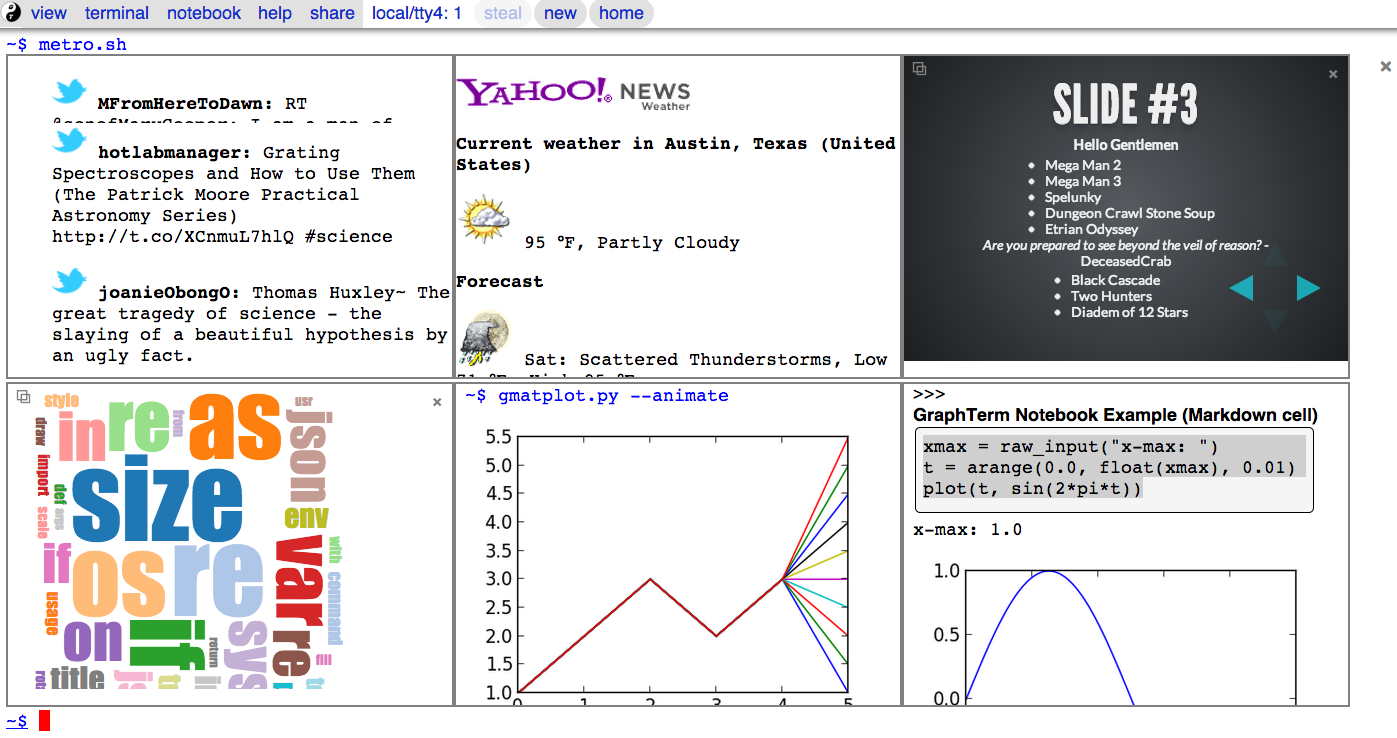
Here is a sample screenshot showing the output of the metro.sh command, which embeds six smaller terminals within the main terminal, running six different commands from the GraphTerm toolchain: (i) live twitter stream output using gtweet, (ii) weather info using yweather, (ii) slideshow from markdown file using greveal and reveal.js, (iv) word cloud using d3cloud and d3.js, (v) inline graphics using gmatplot.py, and (vi) notebook mode using the standard python interpreter.
INSTALLATION
Requirements: You will need a browser that supports Websockets, such as a recent version of Chrome, Firefox, or Safari. The GraphTerm server is written in pure Python (version 2.6+), and should run on any Unix-like system (e.g., Linux, OS X) that supports the pseudo-tty terminal device. (The browser client works on Windows, iPad, and Android as well.)
If you have setuptools, you can install GraphTerm using the following two commands:
sudo easy_install graphterm
sudo gterm_setup
Alternatively, you can download the tarball, untar, and execute sudo python setup.py install in the graphterm-<version> directory. You will also need to install the tornado web server, which can be downloaded from https://github.com/downloads/facebook/tornado/tornado-2.3.tar.gz
To start the GraphTerm server and open a terminal, use the command:
gtermserver --terminal --auth_type=none
Disclaimer: GraphTerm is currently of alpha-quality. It is known to work on Linux, Mac OS X, and the Raspberry Pi, but you may encounter various glitches.
1 maintainer

Metadata
1 maintainer
Release files for graphterm 0.57.0
For a detailed explanation of source distributions (sdists) and built distributions (wheels), please see the package formats documentation.
Source distribution (sdist)
| File | Size | Uploaded | |
|---|---|---|---|
| graphterm-0.57.0.tar.gz | 2.0 MB | Details |
Built distribution (wheel)
| File | Interpreter | ABI | Platform | Reset |
|---|---|---|---|---|
| graphterm-0.57.0-py2.7.egg | Legacy Egg format | - | - | Details |
Total release size: 4.9 MB
Release files / graphterm-0.57.0.tar.gz
| Download URL | graphterm-0.57.0.tar.gz |
|---|---|
| Size | 2.0 MB |
| Tags | Source |
|
SHA-256 checksum How to use checksums |
da8afe460922498004528d68716c49ce3315392995cbf61f3e5f181ae0a900a9
|
|
BLAKE2b-256 checksum How to use checksums |
9918e8fb547adb0ed693ca332df62bf91d30216ba2d02c39c0e6d89df3fec792
|
| Upload date | |
|
Uploaded using Trusted Publishing? What is trusted publishing? |
No |
Release files / graphterm-0.57.0-py2.7.egg
| Download URL | graphterm-0.57.0-py2.7.egg |
|---|---|
| Size | 2.9 MB |
| Tags | Egg |
|
SHA-256 checksum How to use checksums |
9312c795fcf4b6ed9e37f5945c967b84cc1e42460e1e8c9f6b3233e613ff8e47
|
|
BLAKE2b-256 checksum How to use checksums |
4ffec978832a4388e36f4114eccda88071fd12bb6b50ed4c27783a8096489216
|
| Upload date | |
|
Uploaded using Trusted Publishing? What is trusted publishing? |
No |














